
Setting a budget against your accountsوضع موازنة على حساباتك
A budget in Libra is not a separate document you write and file away. It is a figure attached to each account for a period, which is what lets a report put "planned" and "actual" side by side without anyone reconciling two systems.
This screen is where those figures are entered and corrected.
1. The screen, read from the top down
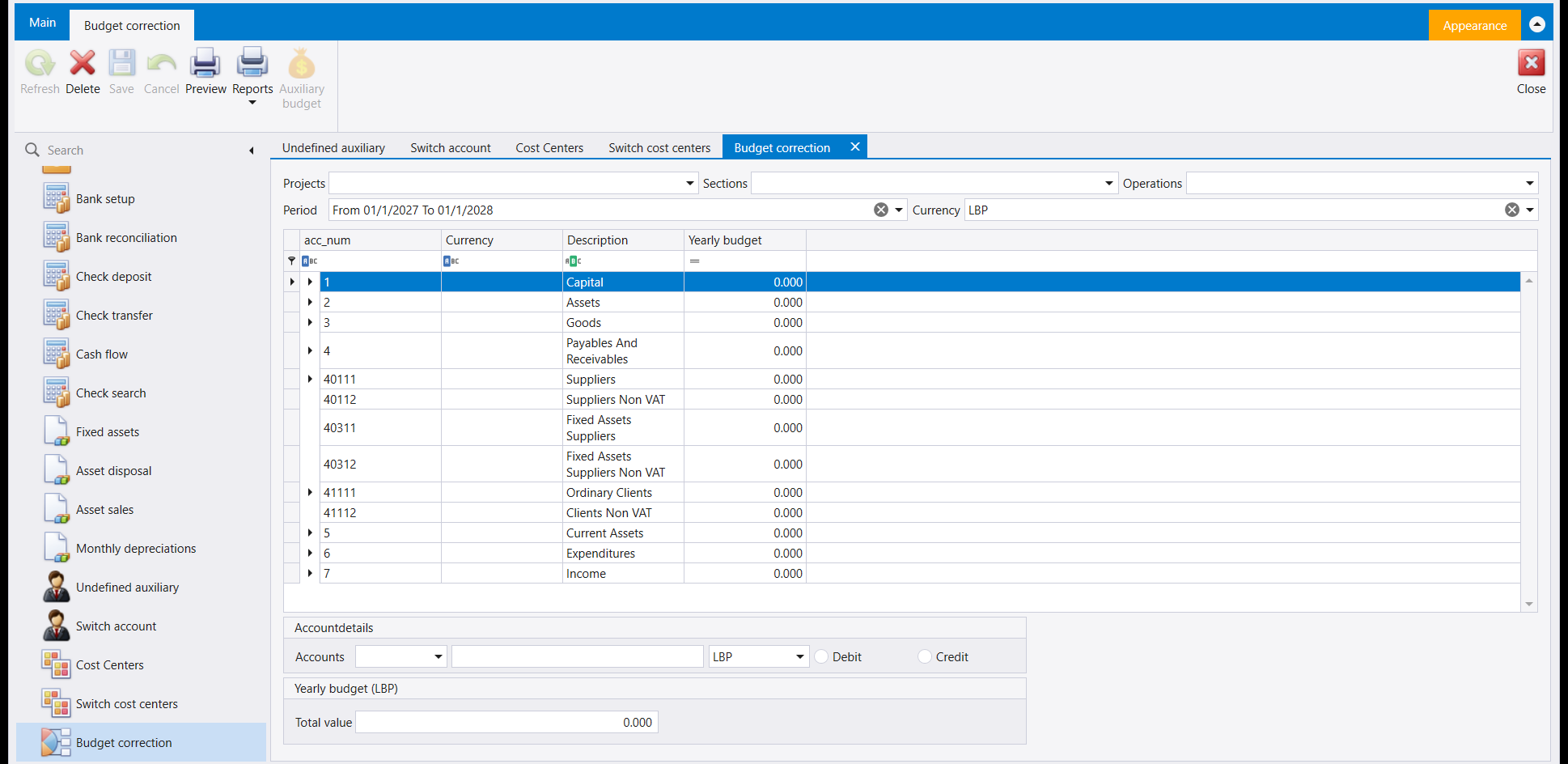
The three things at the top decide which budget you are editing, and they matter more than they look:
- Period - From 01/1/2027 To 01/1/2028 in the picture. A budget always belongs to a span of time. Change this and you are editing a different budget entirely, not the same one differently.
- Currency - LBP here. The figures below are in it.
- Projects, Sections and Operations - leave them empty for a company-wide budget, or choose one to budget a single cost centre.
The grid is your chart of accounts with one extra column, Yearly budget. You are looking at the same tree you see everywhere else - Capital, Assets, Goods, Payables and Receivables, down to Expenditures and Income - and typing a figure beside the accounts you want to plan.
You do not budget every account. Most companies budget expenditure and income and leave the balance-sheet accounts alone. The zeroes in the picture are not an incomplete setup; they are what a company that has not started budgeting looks like.
2. The panels underneath
Accountdetails is where you enter against one account rather than hunting the grid for it - pick the account, its currency, and whether the figure is a Debit or a Credit. That last choice is the one to get right: budgeting a revenue account on the wrong side produces a variance report that reads backwards.
Yearly budget shows the Total value of what you have entered. Use it as a sanity check before you leave the screen - a total that is an order of magnitude out is much easier to see here than anywhere downstream.
Save is greyed until you change something, which is Libra telling you the screen is currently just a view. If you have typed a figure and Save is still grey, the cell has not committed yet - click out of it first.
3. Where the number shows up
Once entered, the budget is what the Budget balance report compares your actual figures against. That is the whole payoff, and it is worth saying plainly because the connection is not obvious from either screen: nothing here produces a report by itself. You enter figures here, and you read the comparison there.
Enter the budget before the period starts, not during it. A budget typed in halfway through the year against numbers you already know is not a plan, and a variance report built on one tells you nothing you did not already know.
الموازنة في ليبرا ليست مستندًا منفصلًا تكتبه وتحفظه. بل هي رقم مرتبط بكل حساب لفترة، وهو ما يتيح للتقرير أن يضع «المخطّط» و«الفعلي» جنبًا إلى جنب دون أن يوفّق أحد بين نظامين.
وهذه الشاشة هي حيث تُدخَل تلك الأرقام وتُصحَّح.
١. الشاشة، مقروءةً من أعلى إلى أسفل
الأشياء الثلاثة في الأعلى تقرّر أيّ موازنة تحرّر، وهي أهمّ ممّا تبدو:
- Period - From 01/1/2027 To 01/1/2028 في الصورة. فالموازنة تخصّ دائمًا مدًى زمنيًا. وتغييره يعني أنك تحرّر موازنة أخرى بالكامل، لا الموازنة نفسها بشكل مختلف.
- Currency - الليرة اللبنانية هنا. والأرقام أدناه بها.
- Projects وSections وOperations - اتركها فارغة لموازنة على مستوى الشركة، أو اختر واحدًا لتوازن مركز كلفة بعينه.
والشبكة هي دليل حساباتك مع عمود إضافي واحد، Yearly budget. فأنت تنظر إلى الشجرة نفسها التي تراها في كل موضع - Capital و Assets و Goods و Payables and Receivables، نزولًا إلى Expenditures و Income - وتكتب رقمًا بجانب الحسابات التي تريد التخطيط لها.
ولا توازن كل حساب. فمعظم الشركات توازن المصروفات والإيرادات وتترك حسابات الميزانية. والأصفار في الصورة ليست إعدادًا ناقصًا؛ بل هي شكل شركة لم تبدأ الموازنة بعد.
٢. اللوحتان أسفل الشاشة
Accountdetails هي حيث تُدخِل على حساب واحد بدل أن تبحث عنه في الشبكة - اختر الحساب وعملته، وهل الرقم Debit أم Credit. وذلك الاختيار الأخير هو ما يجب ضبطه: فموازنة حساب إيراد على الجانب الخاطئ تُنتج تقرير انحراف يُقرأ بالمقلوب.
وYearly budget تُظهر Total value لما أدخلته. استعمله تحقّقًا سريعًا قبل أن تغادر الشاشة - فالمجموع الذي يزيد بمرتبة عشرية أسهل رؤيةً هنا منه في أي موضع لاحق.
Save مطفأ حتى تغيّر شيئًا، وهو ليبرا يخبرك أن الشاشة الآن مجرّد عرض. فإن كنت قد كتبت رقمًا ولا يزال Save مطفأً، فالخانة لم تُثبَّت بعد - اخرج منها بنقرة أولًا.
٣. أين يظهر الرقم
بعد إدخالها، تكون الموازنة هي ما يقارن به تقرير Budget balance أرقامك الفعلية. وذلك هو المردود كله، ويستحقّ القول صراحةً لأن الصلة ليست بديهية من أيّ من الشاشتين: فلا شيء هنا يُنتج تقريرًا وحده. أنت تُدخِل الأرقام هنا، وتقرأ المقارنة هناك.
أدخِل الموازنة قبل أن تبدأ الفترة لا أثناءها. فالموازنة المكتوبة في منتصف السنة على أرقام تعرفها أصلًا ليست خطّة، وتقرير الانحراف المبني عليها لا يخبرك بشيء لم تكن تعرفه.