
Locking a period and closing the yearقفل الفترة وإقفال السنة
Two different things get confused constantly, so start here: locking stops people changing the past, and closing rolls the year up and starts a new one. Locking is reversible and you will do it every month. Closing is the big one and you will do it once a year.
Do them in that order. A locked period is what makes a closing trustworthy.
1. The two lock dates, and why there are two
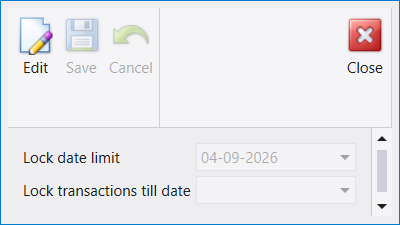
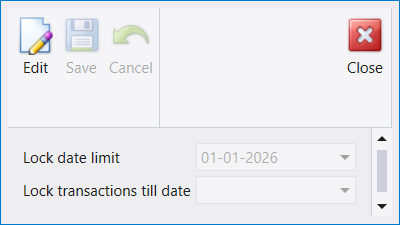
The two screens look identical and they are not the same setting. One governs accounting entries, the other governs stock movements. In the pictures they hold different dates, which is the whole reason both exist: a company can close its books for a month while stock is still being counted, or the other way round.
Each has two fields and they do different jobs:
- Lock date limit is the boundary the company has set - how far back anyone is allowed to lock.
- Lock transactions till date is what you are setting now. Everything on or before it becomes read-only.
The lock date is the first thing to check when Libra refuses to save something. A document that will not save with a date in a closed month is not a fault - it is this screen doing its job. The message rarely says so.
Both are read-only until you press Edit, which is why Save and Cancel are greyed above.
2. End of Year Closing - and the order it enforces
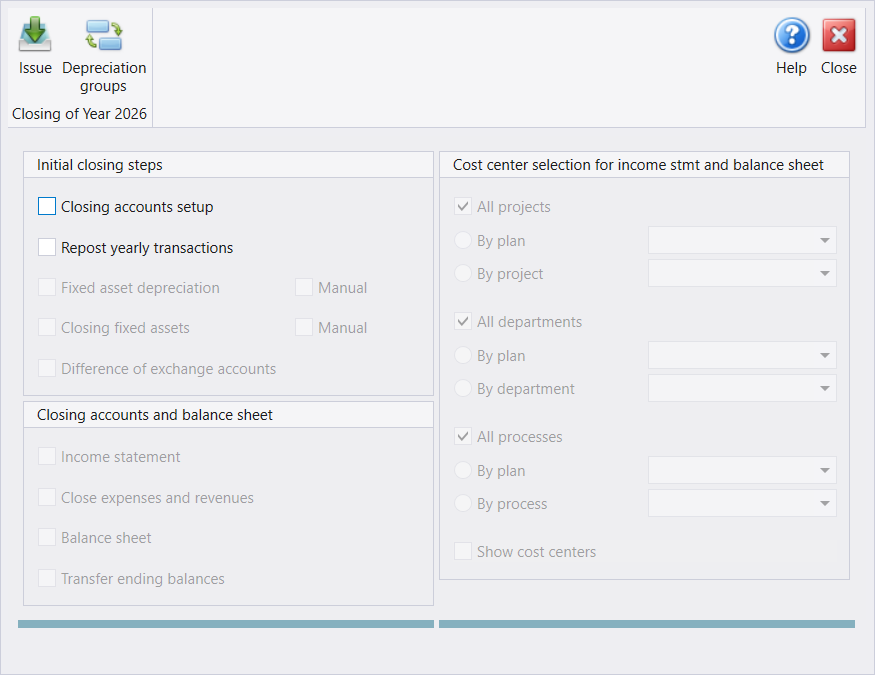
This is the screen that ends your financial year, and the most useful thing about it is not in any of the labels: most of it is greyed out, and that is the instruction.
Look at the picture. In Initial closing steps only the first two are available - Closing accounts setup and Repost yearly transactions. Everything under them, and the whole Closing accounts and balance sheet panel below, is switched off. They light up as the steps before them are completed. The screen will not let you produce a balance sheet before the accounts that feed it have been set up and reposted.
So read it top to bottom as a checklist, not as a menu:
- Closing accounts setup - say which accounts close into which.
- Repost yearly transactions - bring the year's entries up to date.
- Fixed asset depreciation and Closing fixed assets - each with a Manual option beside it, for when you would rather post the figures yourself than let Libra calculate them.
- Difference of exchange accounts - settle the currency differences.
- Then the second panel: Income statement, Close expenses and revenues, Balance sheet, Transfer ending balances - the last of which is what carries your balances into next year.
The right-hand panel, Cost center selection, decides how the income statement and balance sheet are broken down - all projects, departments and processes, or a chosen plan. Leave it on all unless your accountant wants a cost-centre view.
Take a backup before you press Issue, and press it once. The closing writes vouchers across the whole year. There is a reverse (section 3), but a backup taken five minutes earlier is a much shorter conversation than a reversal.
3. Reverse Closing - the way back, and what it asks
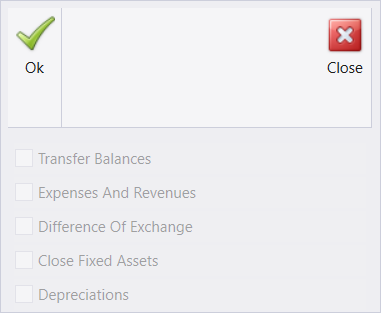
There are two reverse entries in the menu: Reverse closing of current year for the accounting closing, and Reverse inventory closing for the stock closing. The accounting one opens its own screen first - Ok, Close, and five options: Transfer Balances, Expenses And Revenues, Difference Of Exchange, Close Fixed Assets and Depreciations. In a company with nothing to reverse, all five are greyed, and this prompt follows:
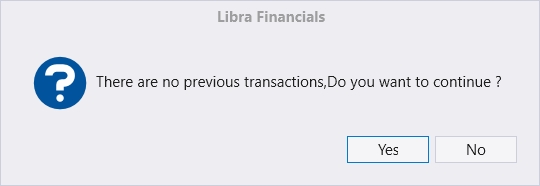
Read that message carefully, because it is easy to misread as harmless. It is not telling you the reverse is unnecessary; it is telling you it found nothing from a previous closing and is asking whether to proceed anyway. No is the right answer unless you know exactly why you are here.
Three things the screen does not say:
- A company's first closing raises this same prompt, even though the closing is real: the screen looks for the opening voucher of the year before the one closed, and a first year has none. Reversing it then goes through a support password - ask your support provider.
- When the options are available, a ticked box means undo.
- Only the latest closing can be reversed; an older year means reversing the newer ones first.
Closing the year, reopening it, and closing it again walks through a full cycle on a live company.
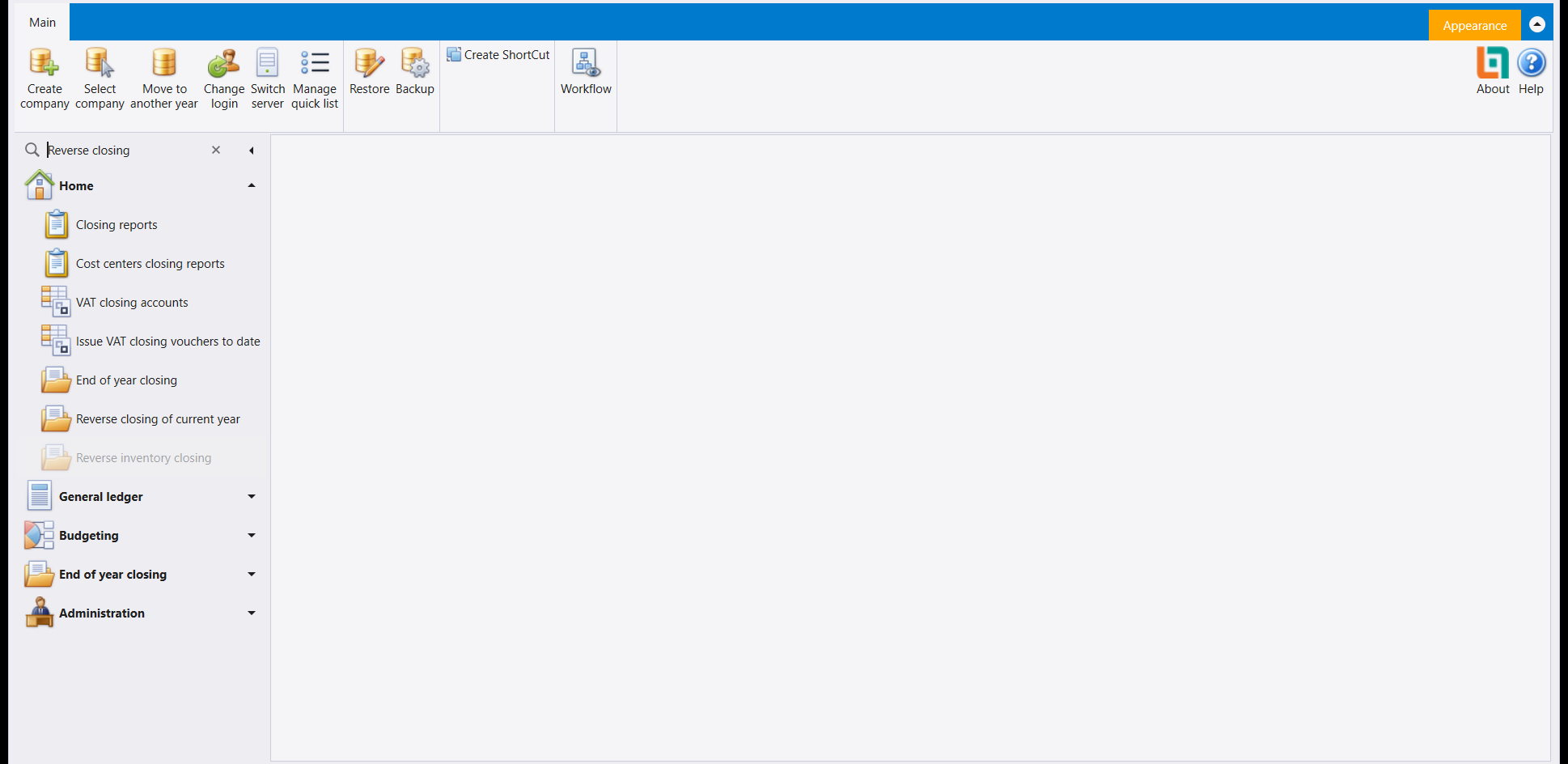
Reverse inventory closing can appear greyed out in the menu, as Inventory closing can in the End of year closing group. A greyed entry does not open.
That the reverse exists at all is the reassuring part: a closing is not a one-way door. But use it deliberately - reverse, fix what was wrong, close again - rather than as a way of exploring what the buttons do.
4. Inventory closing - one choice, then Issue
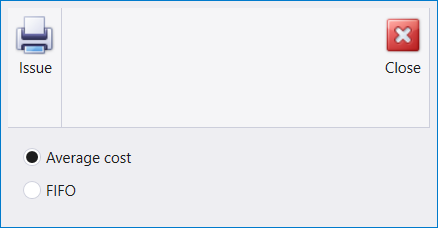
Where Inventory closing is available in the End of year closing group, it opens a small window of its own:
- Issue and Close in its ribbon;
- one choice below them, Average cost or FIFO.
Average cost is selected when the window opens. Close leaves without doing anything, and Issue is the button that carries the closing out, so settle the method before you press it.
يختلط أمران باستمرار، فلنبدأ من هنا: القفل يمنع الناس من تغيير الماضي، والإقفال يطوي السنة ويبدأ غيرها. والقفل قابل للعكس وستفعله كل شهر. أمّا الإقفال فهو الكبير وستفعله مرّة في السنة.
وافعلهما بهذا الترتيب. فالفترة المقفولة هي ما يجعل الإقفال جديرًا بالثقة.
١. تاريخا القفل، ولماذا هما اثنان
تبدو الشاشتان متطابقتين وليستا الإعداد نفسه. فإحداهما تحكم القيود المحاسبية والأخرى تحكم حركة المخزون. وهما في الصورتين تحملان تاريخين مختلفين، وهذا هو سبب وجودهما معًا: فقد تقفل الشركة دفاترها لشهر بينما لا يزال الجرد جاريًا، أو العكس.
ولكلٍّ حقلان يؤدّيان عملين مختلفين:
- Lock date limit هو الحدّ الذي وضعته الشركة - إلى أي مدى يُسمح لأحد أن يقفل.
- Lock transactions till date هو ما تضبطه الآن. فكل ما هو في هذا التاريخ أو قبله يصير للقراءة فقط.
تاريخ القفل هو أول ما تتحقّق منه حين يرفض ليبرا أن يحفظ شيئًا. فالمستند الذي لا يُحفظ بتاريخ في شهر مقفل ليس عطلًا - بل هذه الشاشة تؤدّي عملها. والرسالة قلّما تقول ذلك.
وكلتاهما للقراءة فقط حتى تضغط Edit، ولذلك يظهر Save و Cancel مطفأين أعلاه.
٢. End of Year Closing - والترتيب الذي يفرضه
هذه هي الشاشة التي تنهي سنتك المالية، وأنفع ما فيها ليس في أيّ من عناوينها: فمعظمها مطفأ، وذلك هو التعليمات.
انظر إلى الصورة. ففي Initial closing steps لا يتاح إلّا الأوّلان - Closing accounts setup وRepost yearly transactions. وكل ما تحتهما، ولوحة Closing accounts and balance sheet كاملةً، مطفأ. وهي تضيء كلّما اكتملت الخطوات التي قبلها. فالشاشة لن تدعك تُخرج ميزانية قبل أن تُضبط الحسابات التي تغذّيها ويُعاد ترحيلها.
فاقرأها من أعلى إلى أسفل بوصفها قائمة تحقّق لا قائمة اختيارات:
- Closing accounts setup - قل أي الحسابات تُقفل في أيّها.
- Repost yearly transactions - حدّث قيود السنة.
- Fixed asset depreciation وClosing fixed assets - ولكلٍّ خيار Manual بجانبه، لمن يفضّل أن يقيّد الأرقام بنفسه بدل أن يحسبها ليبرا.
- Difference of exchange accounts - سوِّ فروق العملة.
- ثم اللوحة الثانية: Income statement وClose expenses and revenues وBalance sheet وTransfer ending balances - وآخرها هو ما ينقل أرصدتك إلى السنة التالية.
أمّا اللوحة اليمنى، Cost center selection، فتقرّر كيف يُفصَّل بيان الدخل والميزانية - كل المشاريع والأقسام والعمليات، أو خطّة مختارة. اتركها على الكل ما لم يُرد محاسبك عرضًا بحسب مركز الكلفة.
خذ نسخة احتياطية قبل أن تضغط Issue، واضغطه مرّة واحدة. فالإقفال يكتب سندات على مدار السنة كلها. وهناك عكس (القسم الثالث)، لكن نسخة أُخذت قبل خمس دقائق حديثٌ أقصر بكثير من عملية عكس.
٣. Reverse Closing - طريق العودة، وما يسأله
في القائمة مدخلا عكس: Reverse closing of current year للإقفال المحاسبي، وReverse inventory closing لإقفال المخزون. ويفتح الأول شاشته الخاصة أولًا - Ok وClose وخمسة خيارات: Transfer Balances وExpenses And Revenues وDifference Of Exchange وClose Fixed Assets وDepreciations. وفي شركة لا شيء فيها ليُعكس، تكون الخمسة كلها مطفأة، وتليها هذه الرسالة:
اقرأ تلك الرسالة بتمعّن، فمن السهل أن تُقرأ على أنها غير ذات بال. فهي لا تخبرك أن العكس غير لازم؛ بل تخبرك أنها لم تجد شيئًا من إقفال سابق وتسألك هل تتابع رغم ذلك. وNo هو الجواب الصحيح ما لم تكن تعرف تحديدًا لماذا أنت هنا.
وثلاثة أمور لا تقولها الشاشة:
- أول إقفال للشركة يُظهر هذه الرسالة نفسها، مع أن الإقفال حقيقي: فالشاشة تبحث عن سند افتتاح السنة السابقة للسنة المقفلة، والسنة الأولى لا سند لها. ويمرّ عكسه حينئذٍ بكلمة مرور الدعم - اطلبها من مزوّد الدعم.
- حين تكون الخيارات متاحة، فالمربع المعلَّم يعني التراجع.
- لا يُعكس إلّا آخر إقفال؛ فالسنة الأقدم تعني عكس السنوات الأحدث أولًا.
ويتتبّع إقفال السنة وإعادة فتحها ثم إقفالها من جديد دورة كاملة على شركة حيّة.
قد يظهر Reverse inventory closing مطفأً في القائمة، كما قد يظهر Inventory closing في مجموعة End of year closing. والمدخل المطفأ لا يُفتح.
ووجود العكس أصلًا هو الجانب المطمئن: فالإقفال ليس بابًا ذا اتجاه واحد. لكن استعمله عن قصد - اعكس، وصحّح ما كان خطأً، ثم أقفل ثانيةً - لا بوصفه طريقة لاستكشاف ما تفعله الأزرار.
٤. Inventory closing - اختيار واحد ثم Issue
حيث يكون Inventory closing متاحًا في مجموعة End of year closing، يفتح نافذة صغيرة خاصة به:
- Issue وClose في شريطها؛
- اختيار واحد تحتهما: Average cost أو FIFO.
يكون Average cost مختارًا عند فتح النافذة. يخرج Close دون أن يفعل شيئًا، وIssue هو الزر الذي ينفّذ الإقفال، فحدّد الطريقة قبل الضغط عليه.