
Two tools for tidying up a period: currency differences and small balancesأداتان لترتيب الفترة: فروقات الصرف والأرصدة الصغيرة
Two screens sit next to the year-end tools, and each ends in an Issue button that creates accounting entries: one for exchange differences up to a date, one for closing account balances. Both open with their own defaults filled in, so read every field before pressing Issue.
1. Differential exchange to date
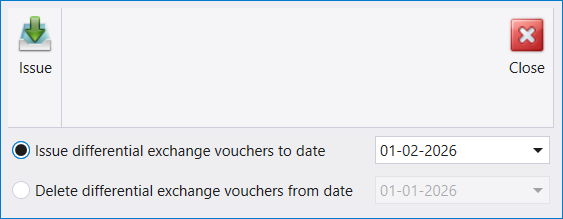
The screen offers two options, each with its own date:
- Issue differential exchange vouchers to date - selected when the screen opens, with a date already filled in.
- Delete differential exchange vouchers from date - the reverse, from the date you give. Its date box becomes available when you select this option.
Pressing Issue carries out the selected option for the date shown, so check the date first.
2. Closing balances of accounts
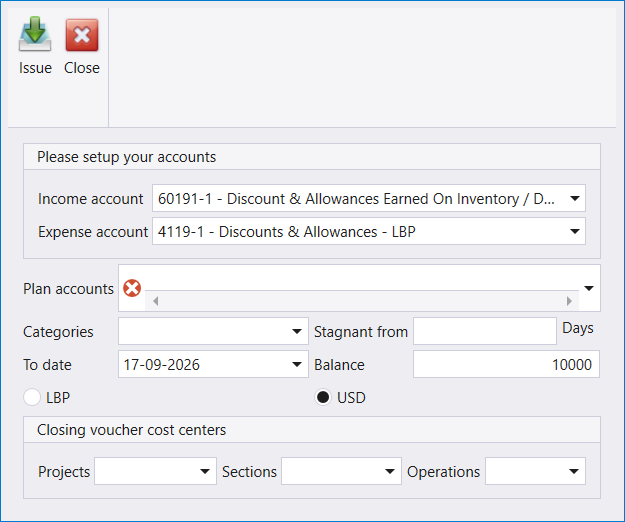
This screen issues a closing voucher for account balances, using the accounts and limits you set:
- Please setup your accounts - an Income account and an Expense account. The screen opens with discount and allowance accounts proposed; change them to suit your chart.
- Plan accounts (required) and Categories - which accounts the closing covers.
- Stagnant from a number of Days, a To date, and a Balance amount (10000 when the screen opens).
- LBP or USD - the currency.
- Closing voucher cost centers - Projects, Sections and Operations for the voucher the screen creates.
Pressing Issue creates that voucher. Review every field first, and try it on a narrow selection of accounts before a wide one.
تقف شاشتان إلى جانب أدوات إقفال السنة، وتنتهي كلٌّ منهما بزرّ Issue يُنشئ قيودًا محاسبية: الأولى لفروقات الصرف حتى تاريخ، والثانية لإقفال أرصدة الحسابات. وكلتاهما تُفتح بقيم افتراضية معبّأة، فاقرأ كل حقل قبل ضغط Issue.
١. Differential exchange to date
تعرض الشاشة خيارين، لكلٍّ منهما تاريخه:
- Issue differential exchange vouchers to date - محدَّد عند فتح الشاشة، وتاريخه مملوء سلفًا.
- Delete differential exchange vouchers from date - العكس، ابتداءً من التاريخ الذي تعطيه. ويصبح صندوق تاريخه متاحًا حين تختار هذا الخيار.
ضغط Issue ينفّذ الخيار المحدَّد للتاريخ المعروض، فتحقّق من التاريخ أولًا.
٢. Closing balances of accounts
تُصدر هذه الشاشة سند إقفال لأرصدة الحسابات، بحسب الحسابات والحدود التي تضبطها:
- Please setup your accounts - Income account وExpense account. وتُفتح الشاشة مقترحةً حسابات الخصومات والتنزيلات؛ غيّرها بما يناسب دليل حساباتك.
- Plan accounts (مطلوب) وCategories - أيّ الحسابات يشملها الإقفال.
- Stagnant from بعدد من Days، وTo date، ومبلغ Balance (10000 عند فتح الشاشة).
- LBP أو USD - العملة.
- Closing voucher cost centers - Projects وSections وOperations للسند الذي تُنشئه الشاشة.
ضغط Issue يُنشئ ذلك السند. راجع كل حقل أولًا، وجرّبه على نطاق ضيّق من الحسابات قبل نطاق واسع.