
Changing things in bulk: switching accounts and cost centresالتغيير بالجملة: تبديل الحسابات ومراكز الكلفة
Sooner or later a company discovers that a year of entries went to the wrong account, or that the cost centres were reorganised and the history did not follow. Libra has screens for exactly that, and they are the most powerful screens in the accounting side - which is another way of saying they are the ones to be careful with.
There is also a small list in this group that people rarely notice and often need: the register of one-off parties.
1. Switch account - moving a year of entries
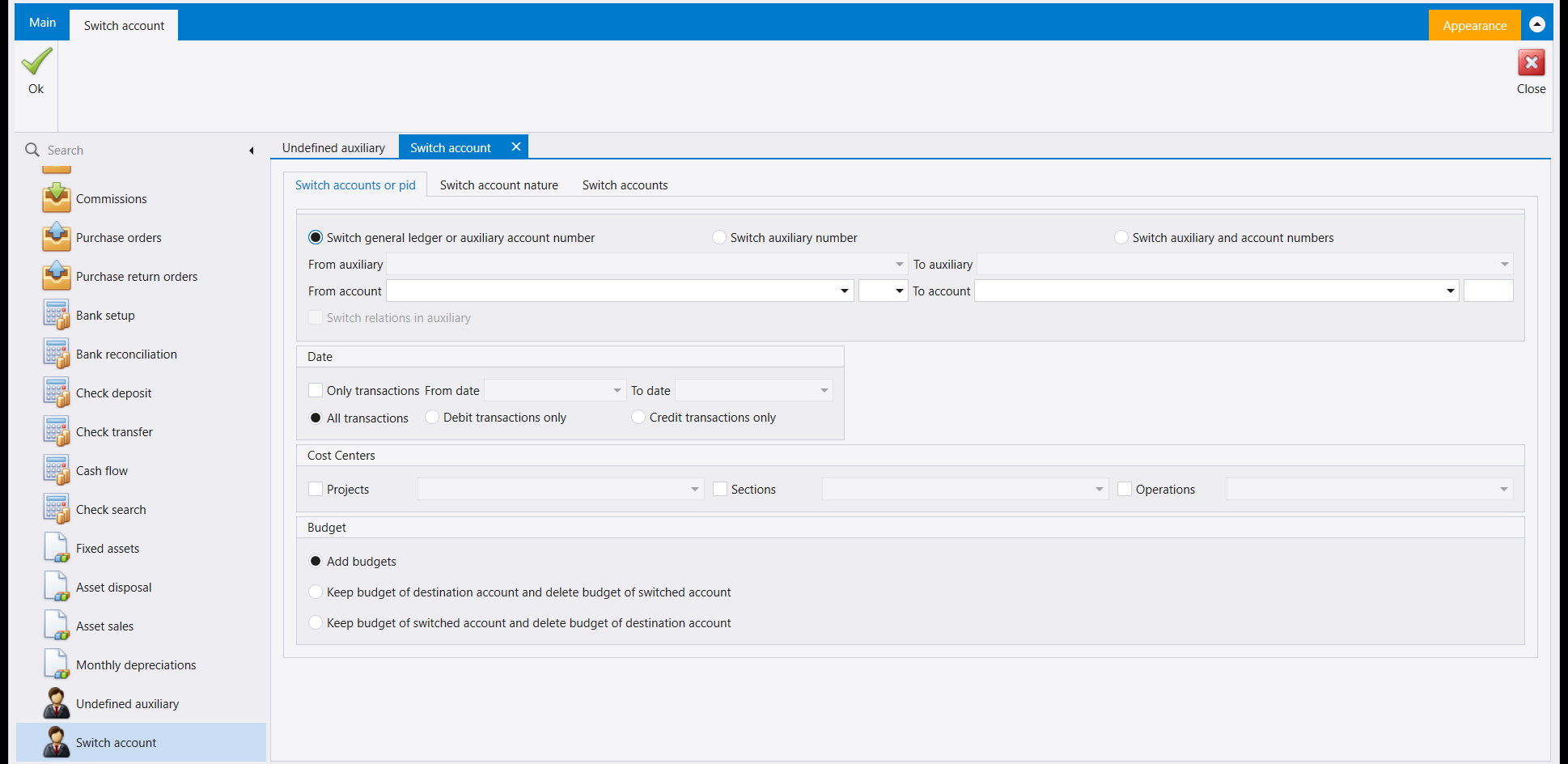
Read this screen as a sentence: **move what is on this account onto that one**, with everything below narrowing which entries move.
The three options across the top decide what kind of move it is - a ledger or auxiliary account number, an auxiliary number on its own, or both together. Pick the wrong one and the move either does nothing or does far more than you meant, so this is the field to read twice.
Then three filters, and each is a chance to make the change smaller and safer:
- Date - tick Only transactions and give a range, and only that period moves. There is also a choice of All, Debit transactions only or Credit transactions only, which is how you move one side of an account without the other.
- Cost Centers - restrict the move to one project, section or operation.
- Budget - what happens to any budget attached. Add budgets merges them; the other two keep one side's budget and delete the other's. If the accounts carry budgets, this is not a detail.
This rewrites history, and there is no undo button on this screen. Take a backup first, and use the Date filter to move one month as a test before you move a year. Then check the result on a statement before doing the rest.
2. Switch cost centers - the same idea, one dimension at a time
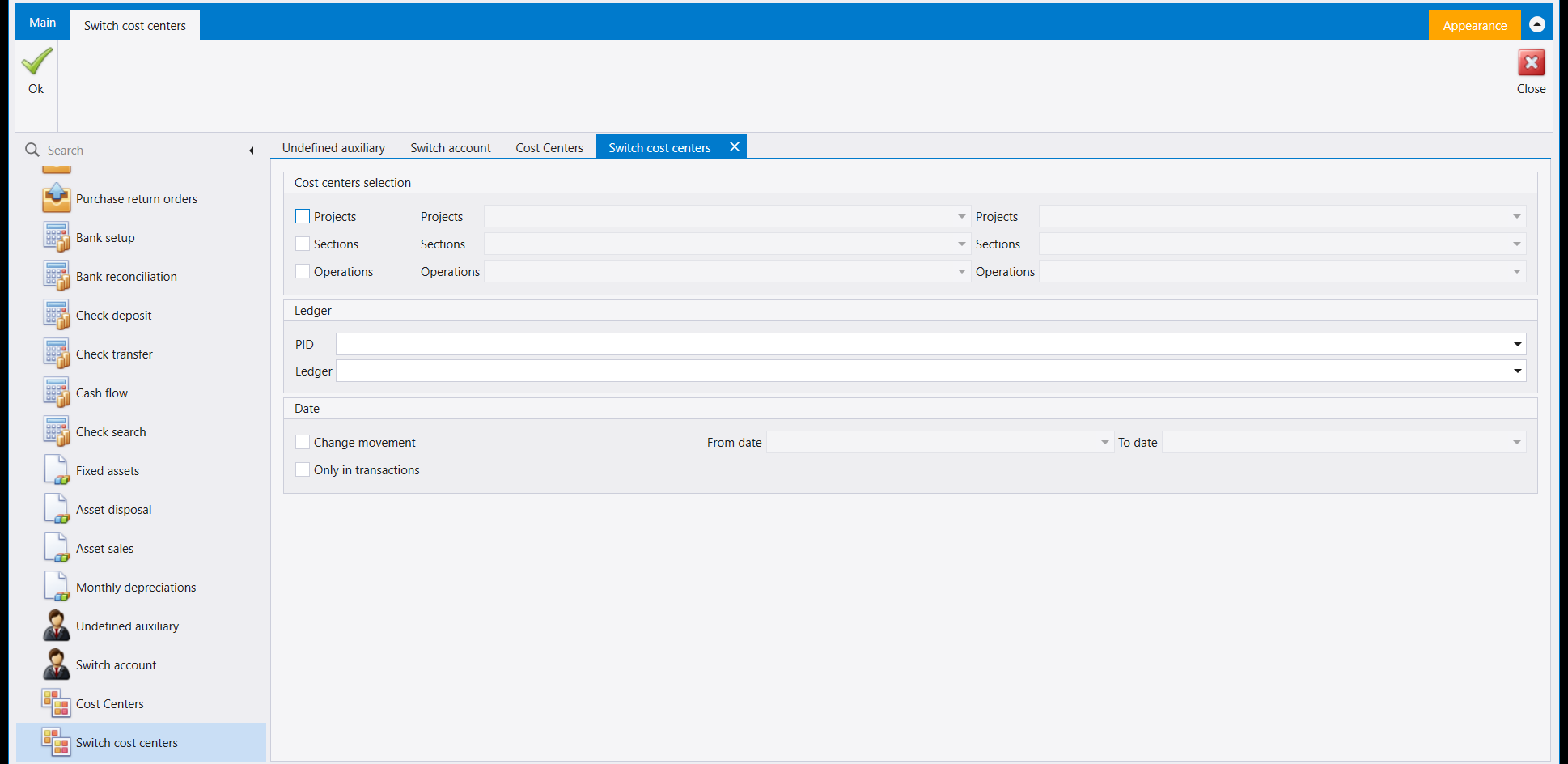
The cost-centre equivalent, and the layout tells you how it thinks. Each of Projects, Sections and Operations has its own tick box and its own from and to selectors, so you can move a project without touching the section, or all three at once.
The Ledger panel narrows the move to one account or one party rather than the whole company - so "move project A to project B, but only on this customer" is a single run.
Change movement with a date range decides whether existing entries are rewritten or only future ones are affected. That tick is the difference between correcting the past and changing the setup, and it is easy to skim past.
3. Cost Centers - the list the switch works on
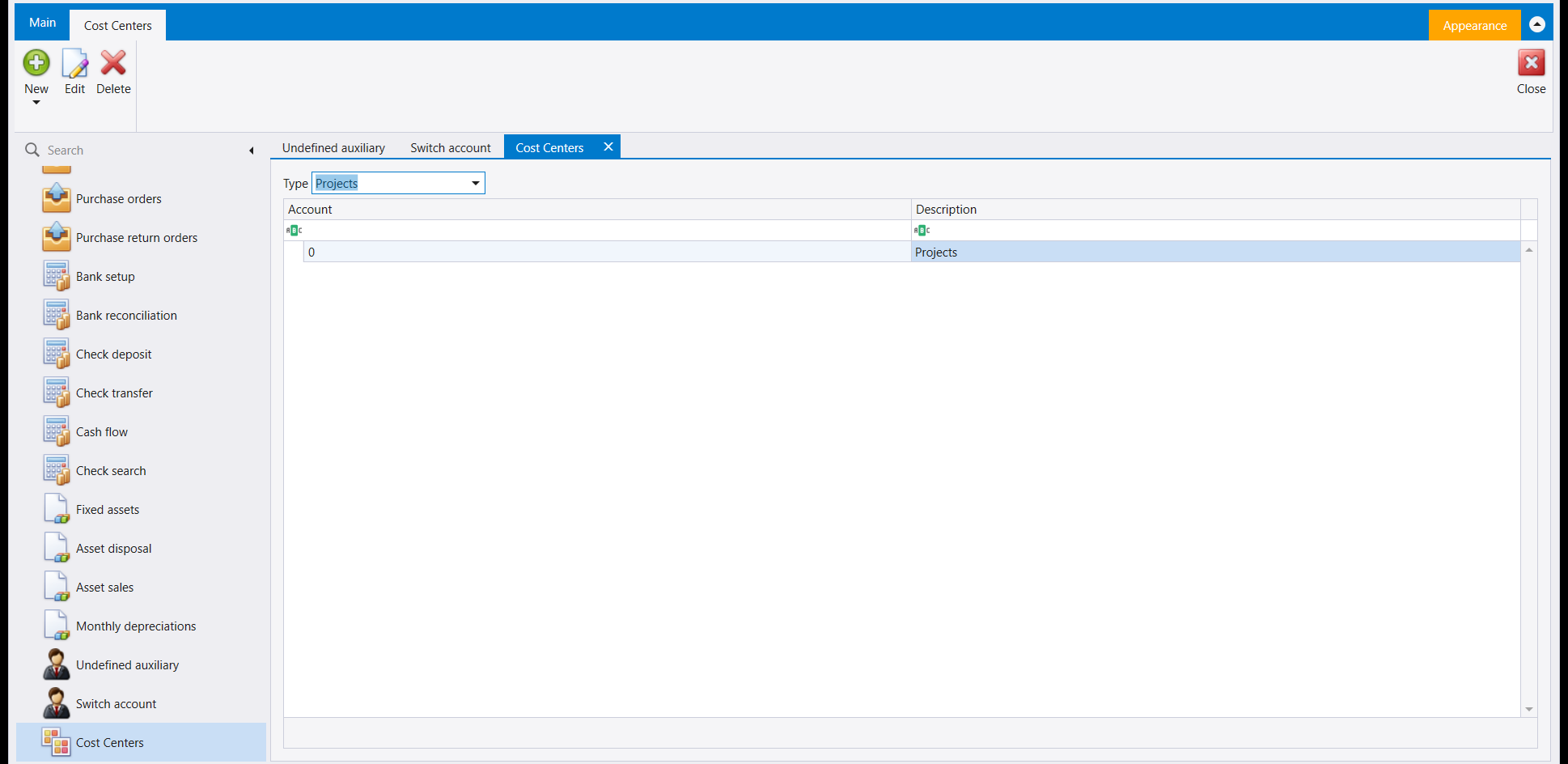
Before you can switch cost centres you need cost centres, and this is where they live. The Type dropdown at the top selects which of the three dimensions you are editing - Projects, Sections or Operations - and the grid below then shows that dimension's entries, each with an Account number and a Description.
It is one screen serving three lists, which is why it can look empty when you expected content: check the Type box before concluding a dimension has nothing in it.
4. Undefined auxiliary - the register of one-off parties
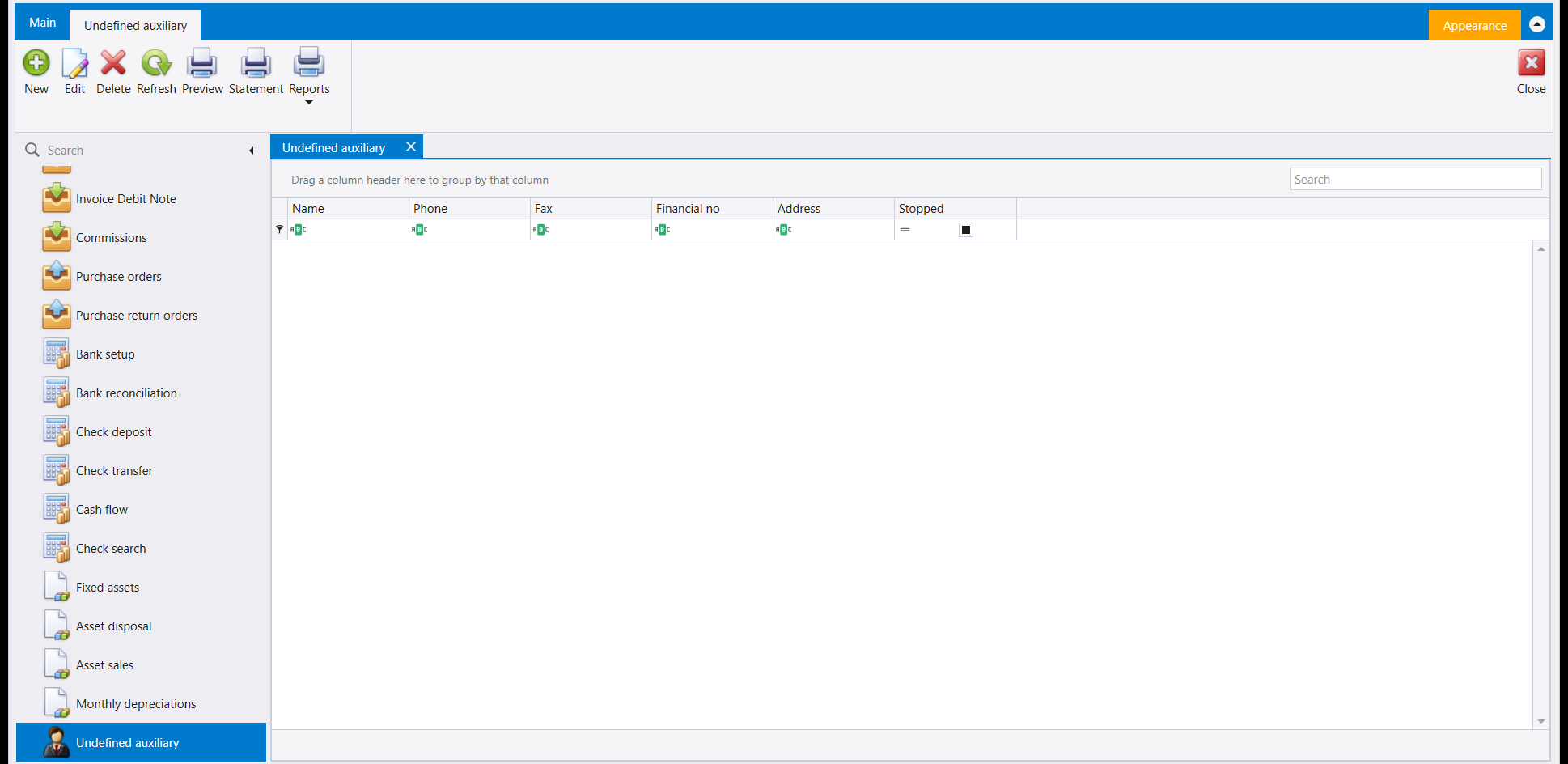
This one is not a correction tool and it sits here quietly being useful. It is a register of parties you deal with once - a walk-in customer, a supplier you buy from a single time - who do not deserve a permanent record in your main customer or supplier list.
The columns are the ordinary ones: Name, Phone, Fax, Financial no, Address and Stopped. What makes it more than a scratchpad is the Statement button in the ribbon: a one-off party still gets a statement, so if a walk-in comes back you can see what they did.
Use it to keep your real customer list clean. The instinct when a stranger walks in is to create a customer record, and a year of that leaves a list nobody can search. This screen is the alternative, and a party recorded here can still be attached to a document and reported on.
تكتشف الشركة عاجلًا أو آجلًا أن سنةً من القيود ذهبت إلى حساب خاطئ، أو أن مراكز الكلفة أُعيد تنظيمها ولم يتبعها التاريخ. ولليبرا شاشات لذلك بالضبط، وهي أقوى شاشات الجانب المحاسبي - وهذه طريقة أخرى في القول إنها التي يجب الحذر معها.
وفي هذه المجموعة أيضًا قائمة صغيرة قلّما ينتبه إليها الناس وكثيرًا ما يحتاجونها: سجلّ الأطراف العابرين.
١. Switch account - نقل سنة من القيود
اقرأ هذه الشاشة كجملة: **انقل ما على هذا الحساب إلى *ذاك***، وكل ما تحت ذلك يضيّق أي القيود تُنقل.
والخيارات الثلاثة في الأعلى تقرّر نوع النقل - رقم حساب أستاذ أو مساعد، أو رقم مساعد وحده، أو كلاهما معًا. واختيار الخطأ منها يجعل النقل إمّا لا يفعل شيئًا وإمّا يفعل أكثر ممّا قصدت بكثير، فهذا هو الحقل الذي يُقرأ مرّتين.
ثم ثلاثة مرشّحات، وكلٌّ منها فرصة لجعل التغيير أصغر وأأمن:
- Date - علّم Only transactions وأعطِ مدًى، فلا تُنقل إلّا تلك الفترة. وهناك أيضًا اختيار بين All وDebit transactions only وCredit transactions only، وهو كيف تنقل جانبًا واحدًا من الحساب دون الآخر.
- Cost Centers - احصر النقل في مشروع أو قسم أو عملية.
- Budget - ماذا يحلّ بأي موازنة مرتبطة. فـAdd budgets يدمجها، والخياران الآخران يبقيان موازنة جانب ويحذفان موازنة الآخر. وإن كانت الحسابات تحمل موازنات فليس هذا تفصيلًا.
هذا يعيد كتابة التاريخ، وليس على هذه الشاشة زر تراجُع. خذ نسخة احتياطية أولًا، واستعمل مرشّح التاريخ لتنقل شهرًا واحدًا تجربةً قبل أن تنقل سنة. ثم تحقّق من النتيجة على كشف قبل أن تفعل الباقي.
٢. Switch cost centers - الفكرة نفسها، بُعدًا بُعدًا
نظير مراكز الكلفة، وتخطيطه يخبرك كيف يفكّر. فلكلٍّ من Projects وSections وOperations مربّعه الخاص ومحدّدا من وإلى الخاصّان به، فتستطيع أن تنقل مشروعًا دون أن تمسّ القسم، أو تنقل الثلاثة معًا.
ولوحة Ledger تحصر النقل في حساب واحد أو طرف واحد بدل الشركة كلها - فـ«انقل المشروع أ إلى المشروع ب، ولكن على هذا الزبون فقط» تشغيلة واحدة.
وChange movement مع مدى تواريخ يقرّر هل تُعاد كتابة القيود القائمة أم لا يتأثّر إلّا ما هو آتٍ. وتلك العلامة هي الفرق بين تصحيح الماضي وتغيير الإعداد، ومن السهل تجاوزها بالنظر.
٣. Cost Centers - القائمة التي يعمل عليها التبديل
قبل أن تبدّل مراكز الكلفة تحتاج إلى مراكز كلفة، وهنا تسكن. فقائمة Type في الأعلى تختار أيّ الأبعاد الثلاثة تحرّر - Projects أو Sections أو Operations - ثم تُظهر الشبكة مداخل ذلك البُعد، لكلٍّ رقم Account وDescription.
وهي شاشة واحدة تخدم ثلاث قوائم، ولهذا قد تبدو فارغة حين تتوقّع محتوًى: تحقّق من صندوق Type قبل أن تستنتج أن بُعدًا لا شيء فيه.
٤. Undefined auxiliary - سجلّ الأطراف العابرين
هذه ليست أداة تصحيح، وهي تجلس هنا بهدوء وهي نافعة. فهي سجلّ للأطراف الذين تتعامل معهم مرّةً واحدة - زبون عابر، أو مورّد تشتري منه مرّةً - ممّن لا يستحقّون سجلًّا دائمًا في قائمة زبائنك أو موردّيك الرئيسية.
والأعمدة هي المعتادة: Name وPhone وFax وFinancial no وAddress وStopped. والذي يجعلها أكثر من مسوّدة هو زر Statement في الشريط: فالطرف العابر يظلّ له كشف، فإن عاد العابر استطعت أن ترى ما فعل.
استعملها لتُبقي قائمة زبائنك الحقيقية نظيفة. فالغريزة حين يدخل غريب أن تُنشئ سجلّ زبون، وسنةٌ من ذلك تترك قائمةً لا يستطيع أحد أن يبحث فيها. وهذه الشاشة هي البديل، والطرف المسجَّل هنا يمكن مع ذلك أن يُربط بمستند ويُقرَّر عنه.