
Cost centersمراكز التكلفة
Cost centers answer a question the chart of accounts cannot: not what you earned, but what earned it. They are the tool for a business whose money comes from several activities that all post to the same account.
This differs from business to business. Before modelling anything, you have to know how the business actually works - the structure below is one worked example, not a template to copy.
1. The problem
A beauty centre sells products over the counter and services in a spa: nails, massage, lashes, facials. All of the service revenue lands on the same service-sales account, and all of the product cost lands in the same purchases. At the end of the month the owner can see services earned this much and nothing more.
What they actually want to know is which service earned it. Is the massage room paying for itself? Are the nails worth the shelf space? Splitting the sales account further does not scale: ten services would mean ten accounts, and then the same again for their costs.
2. Why the answer is not more items
The instinctive fix is to create a separate item per service per variant, and it collapses quickly. Ten services with a few variations each become an item file nobody can maintain, and you still cannot compare them without adding them up by hand.
Cost centers keep the item and vary the center instead. One Massage item, posted against whichever center performed it, gives you revenue and cost per center without touching the item file.
3. Build the structure
Cost centers live in their own navbar group, Cost centers management, with a Cost Centers screen also reachable under the Audit group:
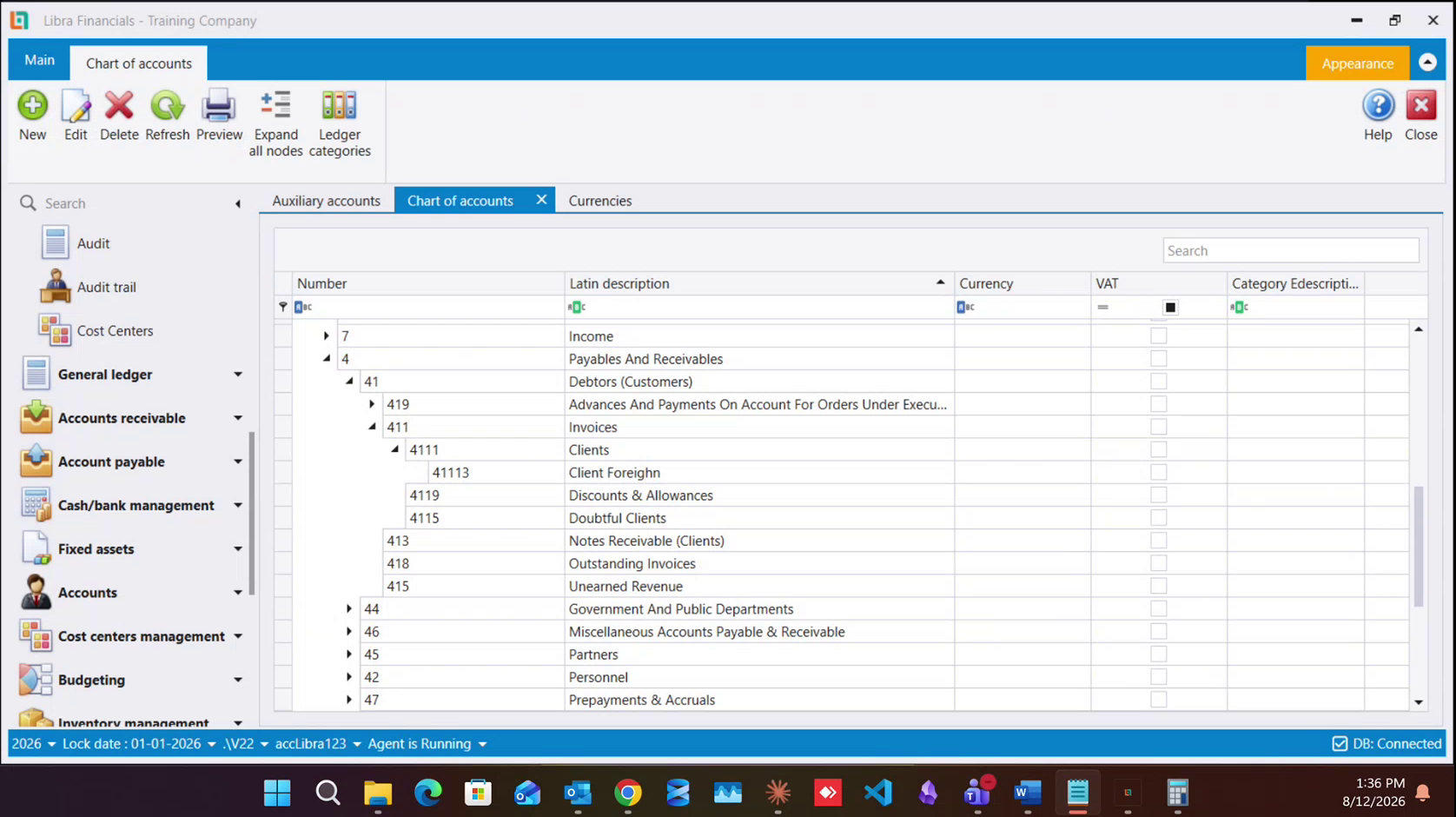
The screen opens with a Type selector at the top and a tree below it with two columns, Account and Description. Type offers three values, which here read:
| Type | What it separates |
|---|---|
Projects | work that runs as a project |
Sections | parts of the business - departments, and subcontractors |
Operations | steps or activities within the work |
Those three names are set per company. A company that manages buildings can have the same three dimensions reading Property, Building and Apartment instead, in the selector and everywhere else they appear. Read your own company's selector; the three below are the names Libra starts with.
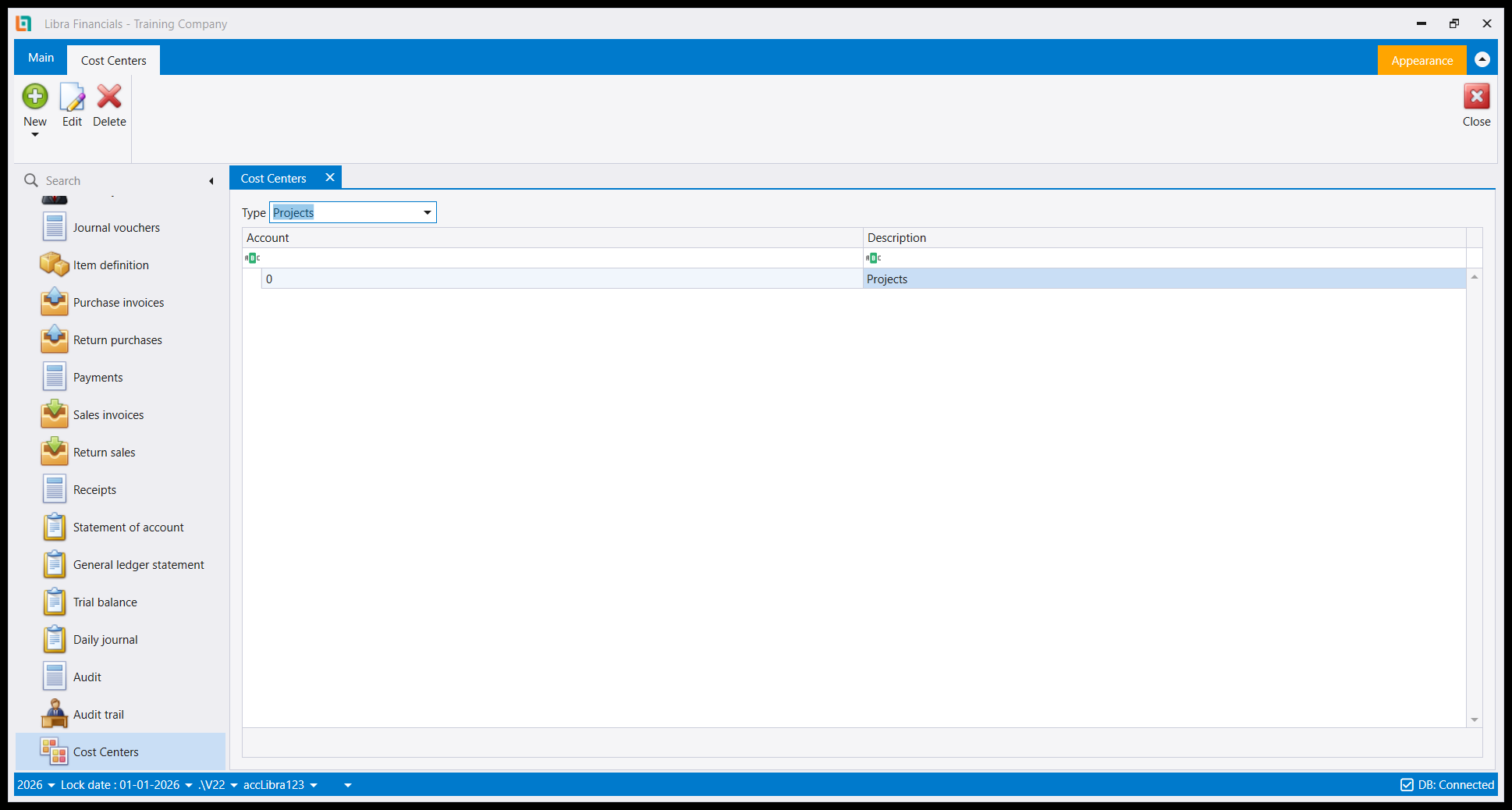
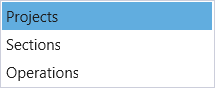
These are three parallel dimensions, not three names for one thing, and they are the same three that appear as checkboxes in the Force cost center usage panel below. Pick the Type first; the tree beneath it is that dimension's own structure.
Give each department its own center (nails, massage, lashes, facials). Then post every sale against the center that performed it. The item stays the same; the center changes.
4. Sections: Separating a subcontractor from your own staff
Here is the case that makes cost centers worth the effort. The spa has employed lash technicians, and a freelance one who comes in on Fridays and takes a percentage of what the client is billed. The service is identical. The item is identical. But the money behaves completely differently - one is a salary, the other is a share of the revenue, and at month end the freelancer has to be paid out of exactly what she brought in.
You do not create a second lashes item for her. You add a section to the cost-center structure (a subcontractors section) and post her work under it. Same item, different section.
If you have several subcontractors and want to know what each one earned, name the sections after them rather than lumping them into one subcontractors node.
The chart of accounts is where this becomes enforceable. Every account's details form carries a Force cost center usage panel with three boxes ( Projects, Sections and Operations) which make the corresponding dimension mandatory on any entry touching that account. Turn Sections on for the service-sales account and a posting can no longer be saved without saying which section it belongs to.
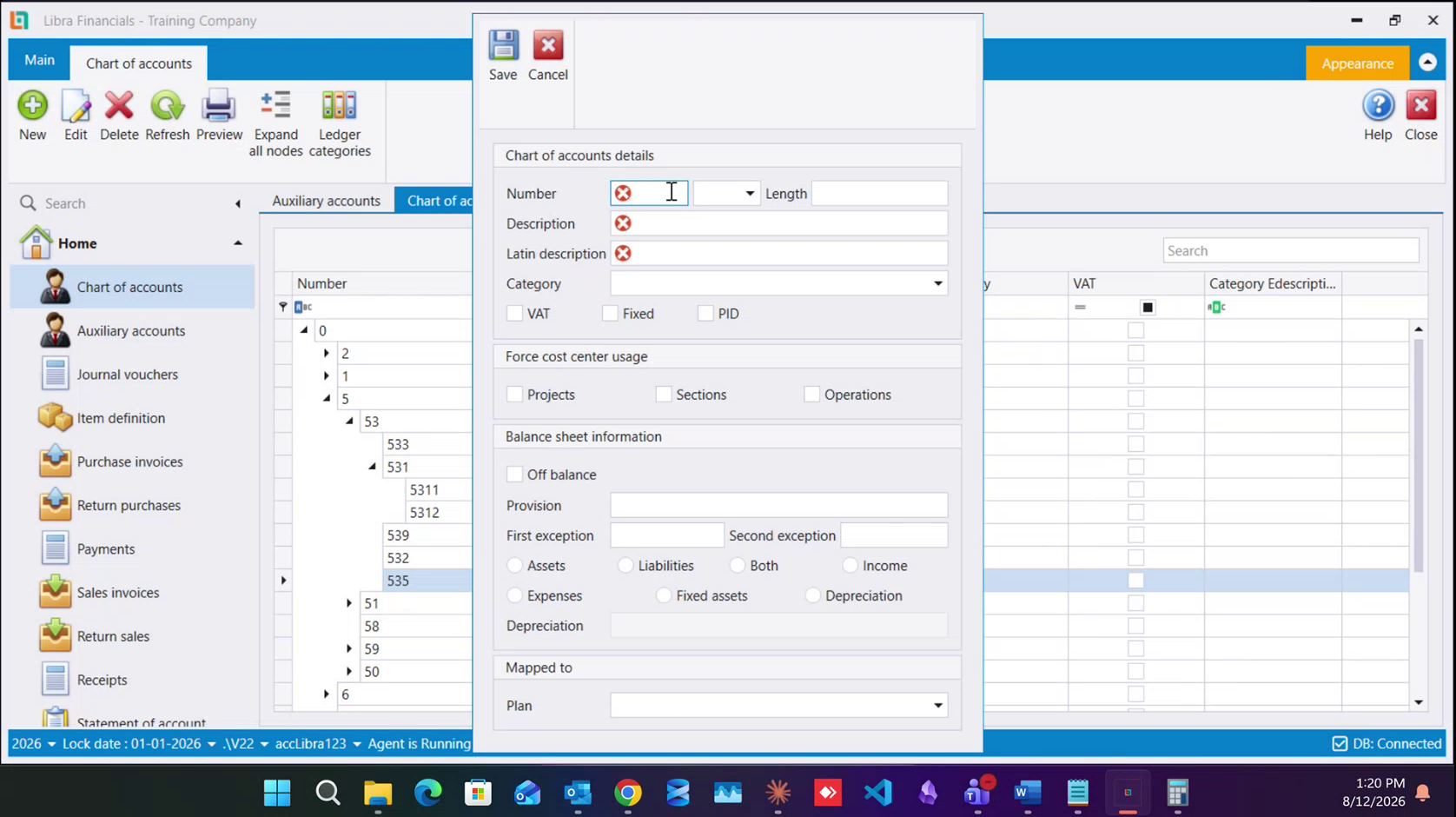
That is the difference between a structure people are supposed to use and one they cannot avoid.
5. Where the cost comes from
Revenue per center is the easy half. The cost side comes from purchases: the products consumed delivering each service (the polish, the wax, the oils) are bought, and those purchases are what have to be split per center. A center is only telling you something once both its revenue and its consumption arrive on it.
Note also that a salesman can be tied to cost centers directly, the auxiliary record toolbar carries a Salesman by cost centers button for exactly that.
6. The same three fields turn up everywhere
Projects, Sections and Operations are not confined to the accounting documents. The same trio sits in the header of a production invoice and a production formula, and again on an item family, where it sets the default for every item created under it. So manufacturing and dismantling can be attributed to a project or a department exactly like any other cost, and the attribution can be made the family's default rather than typed each time.
See Production formulas, invoices & orders and Item families.
Next: The chart of accounts for the account side · Key rules.
تجيب مراكز التكلفة عن سؤال لا تستطيع شجرة الحسابات الإجابة عنه: لا كم ربحت، بل ما الذي أربحك. وهي الأداة لمنشأة يأتي مالها من أنشطة عدة تُرحَّل كلها إلى الحساب نفسه.
وهذا يختلف من منشأة إلى أخرى. وقبل نمذجة أي شيء عليك أن تعرف كيف تعمل المنشأة فعلًا - والهيكل أدناه مثال مطبَّق واحد، لا قالبًا يُنسخ.
1. المشكلة
مركز تجميل يبيع منتجات على الكاونتر وخدمات في السبا: أظافر ومساج ورموش وعناية بالبشرة. فتقع إيرادات الخدمات كلها على حساب مبيعات الخدمات نفسه، وتقع كلفة المنتجات كلها في المشتريات نفسها. وفي آخر الشهر يرى المالك أن الخدمات أربحت هذا المبلغ ولا شيء أكثر.
وما يريد معرفته فعلًا هو أيّ خدمة أربحته. هل غرفة المساج تغطي كلفتها؟ وهل الأظافر تستحق مساحتها؟ وتقسيم حساب المبيعات أكثر لا يتوسّع: فعشر خدمات تعني عشرة حسابات، ثم مثلها لكلفها.
2. لماذا الجواب ليس مزيدًا من الأصناف
الحل الغريزي هو إنشاء صنف منفصل لكل خدمة ولكل تنويعة، وهو ينهار سريعًا. فعشر خدمات لكل منها بضع تنويعات تصير ملف أصناف لا يستطيع أحد صيانته، وتبقى عاجزًا عن المقارنة بينها دون جمعها يدويًا.
ومراكز التكلفة تُبقي الصنف وتغيّر المركز بدلًا من ذلك. فصنف مساج واحد، يُرحَّل على المركز الذي أدّى الخدمة، يعطيك الإيراد والكلفة لكل مركز دون أن تمسّ ملف الأصناف.
3. ابنِ الهيكل
لمراكز التكلفة مجموعتها الخاصة في القائمة، إدارة مراكز التكلفة (Cost centers management)، مع شاشة مراكز التكلفة (Cost Centers) يمكن الوصول إليها أيضًا تحت مجموعة التدقيق (Audit):
تفتح الشاشة ومعها منتقي النوع (Type) في أعلاها وشجرة تحته بعمودين، Account وDescription. ويعرض Type ثلاث قيم، تقرأ هنا:
| النوع | ما الذي يفصله |
|---|---|
Projects | العمل الذي يجري كمشروع |
Sections | أقسام المنشأة - الدوائر، ومقاولو الباطن |
Operations | الخطوات أو الأنشطة داخل العمل |
وهذه الأسماء الثلاثة تُضبط لكل شركة على حدة. فشركة تدير مبانيَ قد تحمل الأبعاد الثلاثة نفسها بأسماء Property وBuilding وApartment، في المنتقي وفي كل موضع آخر تظهر فيه. اقرأ منتقي شركتك أنت؛ والثلاثة أدناه هي الأسماء التي يبدأ بها ليبرا.
وهذه ثلاثة أبعاد متوازية، لا ثلاثة أسماء لشيء واحد، وهي الثلاثة نفسها التي تظهر مربعاتِ اختيار في لوحة Force cost center usage أدناه. اختر Type أولًا؛ فالشجرة تحته هي هيكل ذلك البُعد وحده.
أعطِ كل قسم مركزه - أظافر ومساج ورموش وعناية بالبشرة. ثم رحّل كل بيع على المركز الذي أدّاه. الصنف يبقى نفسه، والمركز يتغيّر.
4. الأقسام - فصل مقاول الباطن عن موظفيك
وهنا الحالة التي تجعل مراكز التكلفة تستحق العناء. فللسبا فنيات رموش موظفات، وفنية حرة تأتي أيام الجمعة وتأخذ نسبة مما يُفوتَر على الزبونة. الخدمة واحدة. والصنف واحد. لكن المال يسلك سلوكًا مختلفًا تمامًا - هذه راتب وتلك حصة من الإيراد وفي آخر الشهر يجب أن تُدفع للحرّة من نفس ما جلبته بالضبط.
ولا تُنشئ لها صنف رموش ثانيًا. بل تضيف قسمًا (section) إلى هيكل مراكز التكلفة - قسم مقاولي الباطن وترحّل عملها تحته. الصنف نفسه، والقسم مختلف.
وإن كان لديك عدة مقاولي باطن وأردت معرفة ما أربحه كل منهم، فسمِّ الأقسام بأسمائهم بدل جمعهم في عقدة مقاولو الباطن واحدة.
وشجرة الحسابات هي حيث يصير هذا مُلزِمًا. فنموذج تفاصيل كل حساب يحمل لوحة فرض استخدام مركز التكلفة (Force cost center usage) بثلاثة مربعات - Projects وSections وOperations - تجعل البُعد المقابل إلزاميًا على أي قيد يمسّ ذلك الحساب. فعّل Sections على حساب مبيعات الخدمات فلا يعود القيد قابلًا للحفظ دون تحديد القسم الذي يخصّه.
وهذا هو الفرق بين هيكل يُفترض بالناس استخدامه وهيكل لا يستطيعون تجاوزه.
5. من أين تأتي الكلفة
الإيراد لكل مركز هو النصف السهل. أما جانب الكلفة فيأتي من المشتريات: فالمنتجات المستهلكة في تأدية كل خدمة , الطلاء والشمع والزيوت تُشترى، وهذه المشتريات هي ما يجب تقسيمه على المراكز. ولا يخبرك المركز بشيء إلا متى وصله إيراده واستهلاكه معًا.
ولاحظ أيضًا أن المندوب يمكن ربطه بمراكز التكلفة مباشرة - فشريط السجل المساعد يحمل زر المندوب حسب مراكز التكلفة (Salesman by cost centers) لهذا الغرض بالذات.
6. الحقول الثلاثة نفسها تظهر في كل مكان
Projects وSections وOperations ليست محصورة في المستندات المحاسبية. فالثلاثي نفسه يجلس في ترويسة قسيمة الإنتاج وتركيبة الإنتاج، ومرة أخرى في عائلة الصنف حيث يضبط الافتراضي لكل صنف يُنشأ تحتها. فيمكن نسبة التصنيع والتفكيك إلى مشروع أو قسم تمامًا كأي كلفة أخرى، ويمكن جعل النسبة افتراضَ العائلة بدل كتابتها كل مرة.
راجع تركيبات وقسائم وأوامر الإنتاج و عائلات الأصناف.
التالي: شجرة الحسابات لجانب الحسابات · القواعد الأساسية.