
Inventory reports: sales, prices and profitتقارير المخزون: المبيعات والأسعار والأرباح
The ribbon every one of these screens shares - Preview, Direct printing, the report-selection box, and the saved-filter box - is covered in Inventory reports: how the report screens work. This page covers what each of the following ten screens actually asks for and answers.
1. Accounts / inventory statistics
Totals a date range of vouchers by account, grouped either by Receivables or by Items, and ordered Ascending or Descending. Vouchers selection narrows to Purchases or Sales first; Report information then picks which document kinds count toward the total - Sales, Sales Returns, Stock out, POS sales, POS returns. Summary by chooses whether the result reads in Amounts or Quantities.
2. Sales statistics
A Report type choice of Sales or Monthly. Narrow by Region, Warehouse, Cost center, Salesman or Account, and pick LBP, USD or Account currency for the result. Group by re-sorts the same totals by Salesmen, Region, Projects, or leaves them as one combined figure (No grouping).
3. Periodic Statistics
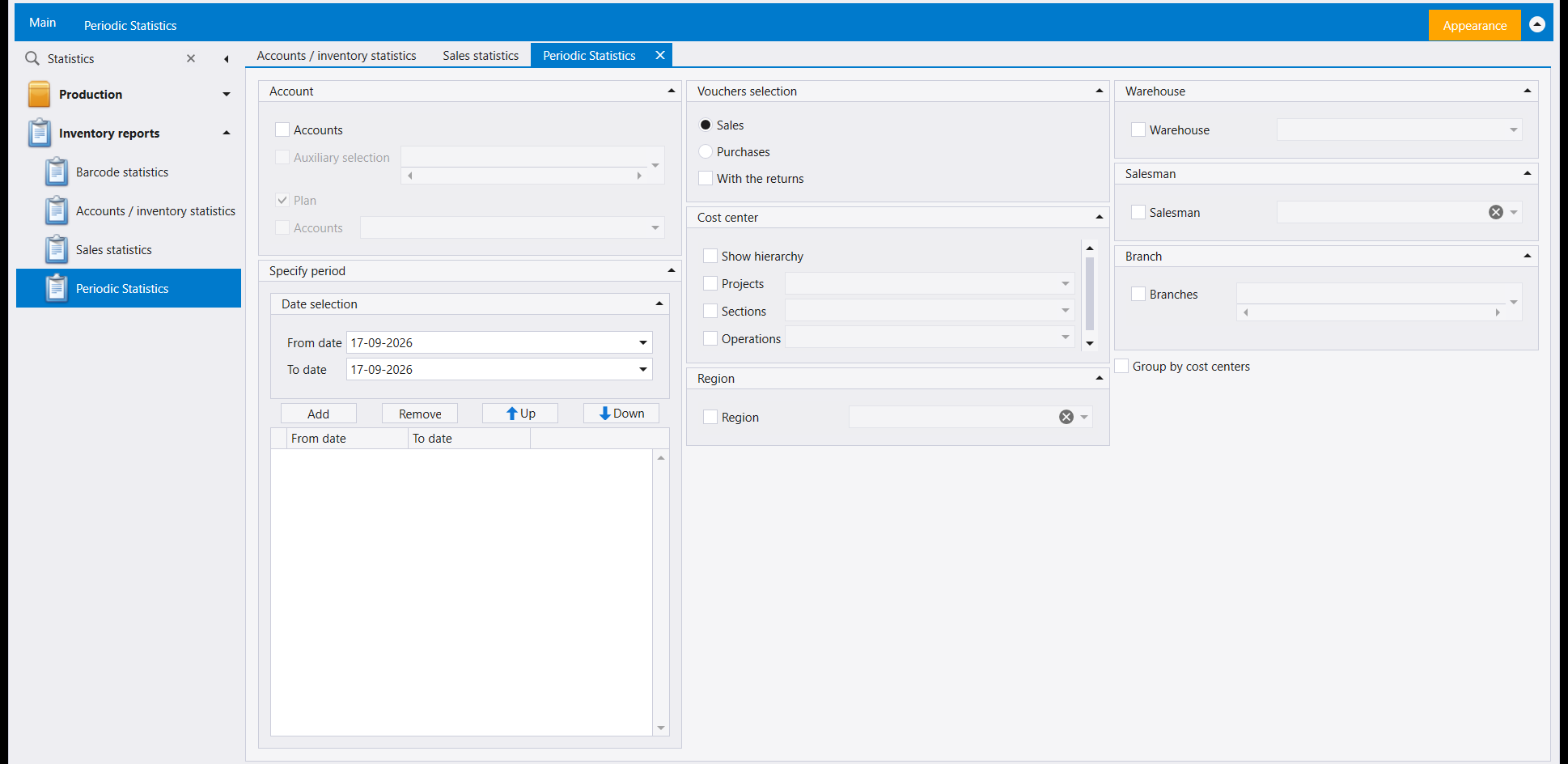
The one screen in this menu built to compare periods rather than report on one: Add a date range, Add another, and the list under Specify period holds as many as you need side by side - Remove, Up and Down manage the list. Vouchers selection narrows to Sales, Purchases, or With the returns included, and the same Region, Warehouse, Salesman and Branch filters as the other statistics screens apply across every period at once.
4. Inventory price evolution
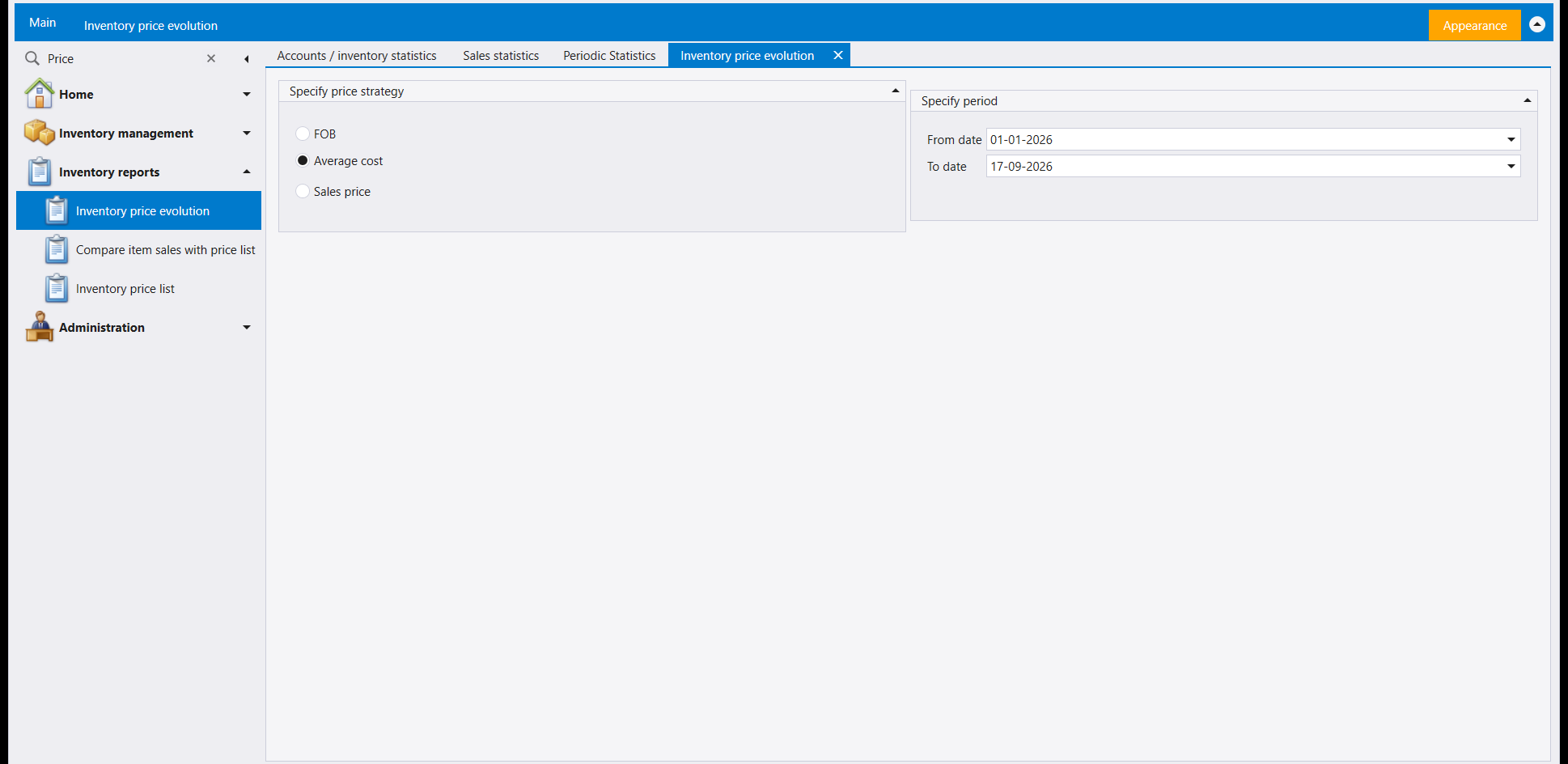
Tracks one figure over a date range: Specify price strategy chooses whether that figure is FOB, Average cost or Sales price, over the dates in Specify period.
5. Compare item sales with price list
Checks what items actually sold for against a chosen Specify price list, over a date range, by Salesman or cost centre. Show differences only trims the result down to the lines that don't match the list - the ones worth a second look.
6. Inventory price list
A price list over a date range, in a chosen Result currency, with Hide items with zero onhand, Hide items with no price and Basic unit only as options. Narrow by Supplier, Warehouse or Customer name.
7. Items profits
Margin by item over a date range, with the Costing method - Last cost price or Average cost, optionally Based on current costs - deciding what "cost" means for the calculation. Profits margin sets a From/To band for the margin. Summary by reads the result Detailed, Balances only, or Group by family, one to three levels deep. Result currency covers Invoice currency, Item currency, LBP or USD.
8. Invoice profit
The same margin question, per invoice rather than per item, with an Invoice Number box (0 when the screen opens) and a date range. Group by re-sorts the result by Receivables, Invoice dates or Salesman, and the same Costing method choice as Items profits decides what "cost" means.
9. Client items report
What a customer has actually bought, over a date range, in Sales, Purchases or All invoice kinds. Group by reads the result as Receivables or by Items, with With cost centers adding that breakdown; Currency chooses LBP, USD, or each line's own Invoice currency. Narrow by Auxiliary account, Salesman, Warehouses, Region or Branches.
10. Commission report
The shortest of the sales screens: a Salesman, a date range, a Currency, and a Detailed option.
الشريط الذي تتشارك فيه كل هذه الشاشات - Preview و Direct printing وصندوق اختيار التقرير وصندوق المرشِّحات المحفوظة - مشروح في تقارير المخزون: كيف تعمل شاشات التقارير. وهذه الصفحة تتناول ما تطلبه وتجيب عنه كل واحدة من العشر شاشات التالية.
١. Accounts / inventory statistics
يُجمِّل مدى زمنيًا من السندات بحسب الحساب، مُجمَّعًا بحسب Receivables أو Items، ومرتَّبًا Ascending أو Descending. ويضيّق Vouchers selection أولًا إلى Purchases أو Sales؛ ثم يختار Report information أي أنواع الوثائق تدخل في المجموع - Sales و Sales Returns و Stock out و POS sales و POS returns. ويختار Summary by قراءة النتيجة بـ Amounts أو Quantities.
٢. Sales statistics
اختيار Report type بين Sales و Monthly. وضيّق بـ Region أو Warehouse أو Cost center أو Salesman أو Account، واختر LBP أو USD أو Account currency للنتيجة. ويعيد Group by ترتيب المجاميع نفسها بحسب Salesmen أو Region أو Projects، أو يتركها رقمًا واحدًا مجمَّعًا (No grouping).
٣. Periodic Statistics
الشاشة الوحيدة في هذه القائمة المبنية لمقارنة فترات لا للتقرير عن واحدة: Add مدى زمنيًا، ثم Add آخر، وتحمل اللائحة تحت Specify period ما تحتاجه منها جنبًا إلى جنب - و Remove و Up و Down تُدبِّر اللائحة. ويضيّق Vouchers selection إلى Sales أو Purchases، أو With the returns مُضمَّنة، وتنطبق مرشِّحات Region و Warehouse و Salesman و Branch نفسها التي في شاشات الإحصاءات الأخرى على كل الفترات دفعة واحدة.
٤. Inventory price evolution
يتابع رقمًا واحدًا عبر مدى زمني: يختار Specify price strategy إن كان ذلك الرقم FOB أو Average cost أو Sales price، عبر تواريخ Specify period.
٥. Compare item sales with price list
يفحص ما بِيعت به الأصناف فعلًا مقارنةً بـ Specify price list مختارة، عبر مدى زمني، بحسب Salesman أو مركز الكلفة. ويُقلِّص Show differences only النتيجة إلى السطور التي لا تطابق اللائحة - وهي التي تستحق نظرة ثانية.
٦. Inventory price list
لائحة أسعار في مدى زمني، بـ Result currency مختارة، مع Hide items with zero onhand و Hide items with no price و Basic unit only خيارات. وضيّق بـ Supplier أو Warehouse أو Customer name.
٧. Items profits
هامش الربح بحسب الصنف عبر مدى زمني، مع Costing method - Last cost price أو Average cost، واختياريًا Based on current costs - يقرّر ماذا تعني «الكلفة» في الحساب. ويضع Profits margin حدَّين From/To للهامش. ويقرأ Summary by النتيجة Detailed أو Balances only أو Group by الفئة، من مستوى إلى ثلاثة. و Result currency يشمل Invoice currency و Item currency و LBP و USD.
٨. Invoice profit
السؤال نفسه عن الهامش، بحسب الفاتورة لا الصنف، مع صندوق Invoice Number (0 عند فتح الشاشة) ومدى زمني. ويعيد Group by ترتيب النتيجة بحسب Receivables أو Invoice dates أو Salesman، ويقرّر اختيار Costing method نفسه الذي في Items profits ماذا تعني «الكلفة».
٩. Client items report
ما اشتراه الزبون فعلًا، عبر مدى زمني، من أنواع فواتير Sales أو Purchases أو All. ويقرأ Group by النتيجة بحسب Receivables أو Items، مع With cost centers يضيف ذلك التفصيل؛ ويختار Currency بين LBP و USD أو Invoice currency الخاصة بكل سطر. وضيّق بـ Auxiliary account أو Salesman أو Warehouses أو Region أو Branches.
١٠. Commission report
أقصر شاشات المبيعات: Salesman، ومدى زمني، و Currency، وخيار Detailed.