
Old Plan vs New Planالخطة القديمة مقابل الخطة الجديدة
Use the New Plan
For any company you create today, use the New Plan. the Old Plan is legacy and being retired.
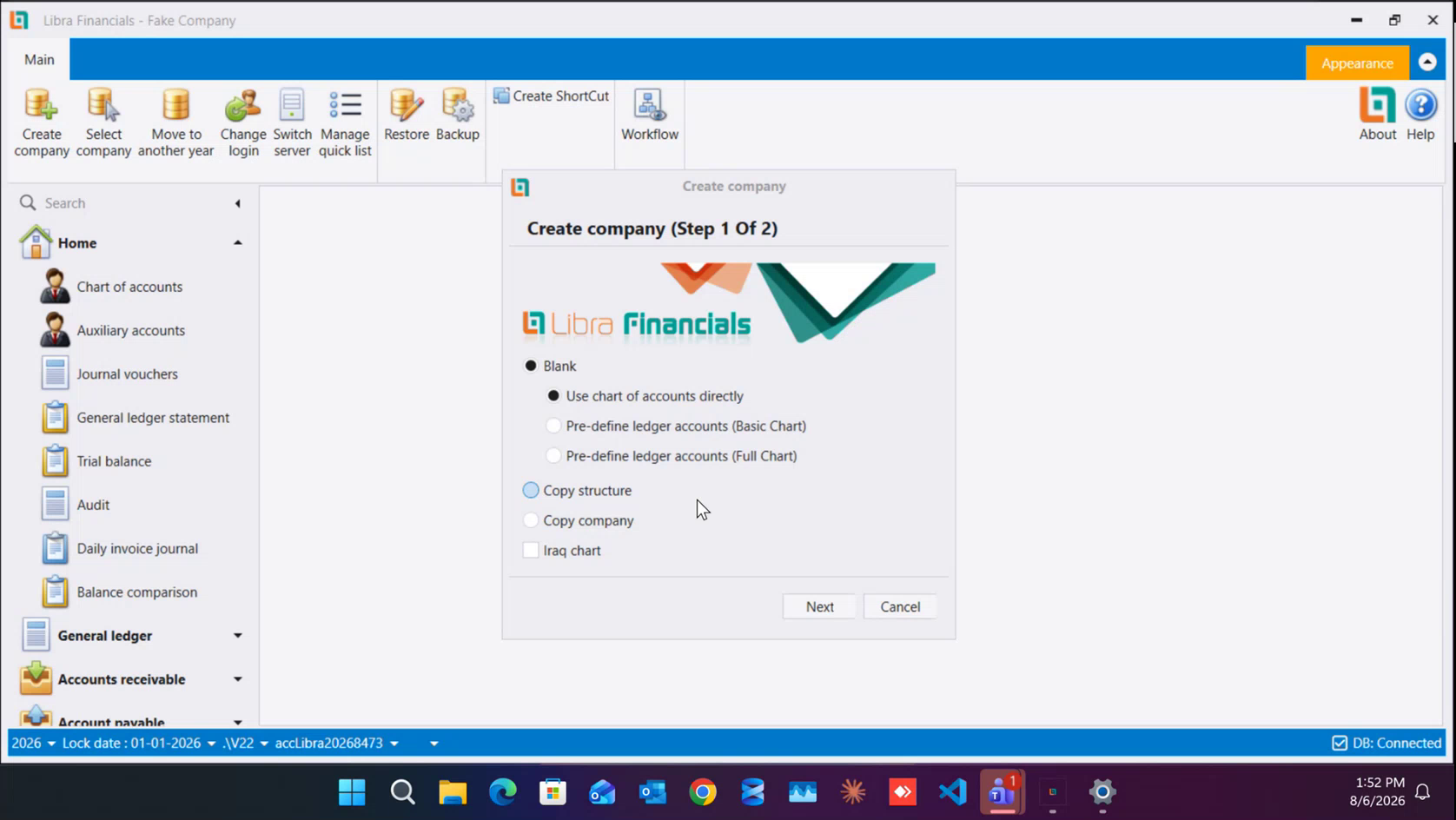
The choice is made Once, on step 1 of the Create Company wizard, and it shapes how the whole company works from then on. In the wizard the New Plan is Blank → Use chart of accounts directly. leave it selected.
What the two plans mean
- New Plan: you work directly on the Chart of Accounts. You do not open separate accounts per currency; Libra handles that underneath, so you get the same result with far less setup.
- Old Plan: the way old Libra worked. Account numbers are written in parts separated by a dash - the chart number, then the currency, so account
1013in Lebanese pounds is1013-1- and you had both a Chart of Account and a Ledger Account, one per currency. In the wizard these are the Pre-define ledger accounts (Basic Chart) and (Full Chart) options. Full Chart is the same plan as Basic Chart, with the ledger accounts generated for you up front instead of created as you go.
How to tell which plan a company is on
Open the company and look at the account screen in the menu:
- New Plan → it is called Chart of accounts.
- Old Plan → it is called General ledger accounts (it appears as Ledger Accounts when you add screens through Manage quick list). Account numbers on this screen carry a dash, like
1013-1.
One warning: a menu group called General ledger exists on both plans - it is one of the standard groups every company has. Go by the name of the account screen, not by that group.
Next: How to set up a company. Step 1 of that guide also covers the wizard's other starting options - Copy structure, Copy company and the Iraq chart.
استخدم الخطة الجديدة
لأي شركة تنشئها اليوم، استخدم الخطة الجديدة. والخطة القديمة قديمة وفي طريقها إلى الانتهاء.
ويُتخذ هذا القرار مرة واحدة في الخطوة الأولى من معالج إنشاء الشركة، ويحدد طريقة عمل الشركة كلها بعدها. والخطة الجديدة في المعالج هي فارغة (Blank) ← استخدام شجرة الحسابات مباشرة (Use chart of accounts directly)؛ اترك هذا الخيار محددًا.
ماذا تعني الخطتان
- الخطة الجديدة: تعمل مباشرة على شجرة الحسابات، ولا تفتح حسابات منفصلة لكل عملة، بل يتولى ليبرا ذلك داخليًا، فتحصل على النتيجة نفسها بإعداد أقل بكثير.
- الخطة القديمة: طريقة عمل ليبرا القديم: تُكتب أرقام الحسابات على أجزاء يفصل بينها شَرطة (dash) - رقم الحساب في الشجرة ثم العملة، فيصبح الحساب
1013بالليرة اللبنانية1013-1- ويكون لديك شجرة حسابات ودفتر أستاذ منفصلان لكل عملة. وهي في المعالج خيارا حسابات أستاذ معرّفة مسبقًا (Pre-define ledger accounts): المخطط الأساسي (Basic Chart) والمخطط الكامل (Full Chart). والمخطط الكامل هو الخطة نفسها، غير أن حسابات الأستاذ تُولَّد لك مسبقًا بدل أن تُنشئها تباعًا.
كيف تعرف خطة الشركة
افتح الشركة وانظر إلى اسم شاشة الحسابات في القائمة:
- الخطة الجديدة: تُسمّى شجرة الحسابات (Chart of accounts).
- الخطة القديمة: تُسمّى حسابات دفتر الأستاذ (General ledger accounts)، وتظهر باسم Ledger Accounts عند إضافة الشاشات من إدارة القائمة السريعة (Manage quick list). وأرقام الحسابات في هذه الشاشة تحمل شَرطة مثل
1013-1.
وانتبه: مجموعة القائمة المسماة دفتر الأستاذ (General ledger) موجودة في الخطتين معًا، فهي من المجموعات الثابتة في كل شركة. فاعتمد على اسم شاشة الحسابات لا على هذه المجموعة.
التالي: كيفية إنشاء شركة. وتشرح الخطوة الأولى من ذلك الدليل أيضًا خيارات البدء الأخرى في المعالج: نسخ الهيكل (Copy structure) ونسخ الشركة (Copy company) والمخطط العراقي (Iraq chart).