
The Chart of Accountsشجرة الحسابات
What the Chart of Accounts is:
Every time your company pays or receives money, the amount has to land somewhere. The Chart of Accounts is the full list of the places it can land, one numbered account for every kind of money that moves.
You do not need to be an accountant to read it. Two ideas carry the whole thing:
- Every entry touches two accounts. Money always comes from somewhere and goes somewhere.
- The digits are the structure.
4→41→411→4111→41111. Each extra digit is one level deeper, so the account number by itself tells you where the account sits. That is why Libra draws the chart as a tree, and why the account form has a Length box:41111has a length of5because it is five levels down.
A Worked example
You sell to a client on credit and issue an invoice. Two things happened at the same moment:
- You earned money - that is income, class
7. - The client now owes you money - that is a receivable, class
4→41 Debtors (Customers)→411 Invoices→4111 Clients→41111 Ordinary Clients.
One invoice, two accounts. When the client eventually pays, the receivable closes and a cash account moves instead. Every report Libra produces (trial balance, balance sheet, income statement) is built by adding these numbers up, which is why putting an amount on the wrong account is not a cosmetic mistake.
Which plan Libra uses
Libra is built on the Lebanese plan, which is also used across Africa and by Gulf customers. It is the wider of the two common plans: the Lebanese plan covers what the international plan does, but not the other way round. A customer who needs a different plan starts from a blank chart and opens only the accounts they want (that is how the Iraqi chart now shipped with the system was built). See Old Plan vs New Plan for the two ways a new company's accounts can be started.
The classes
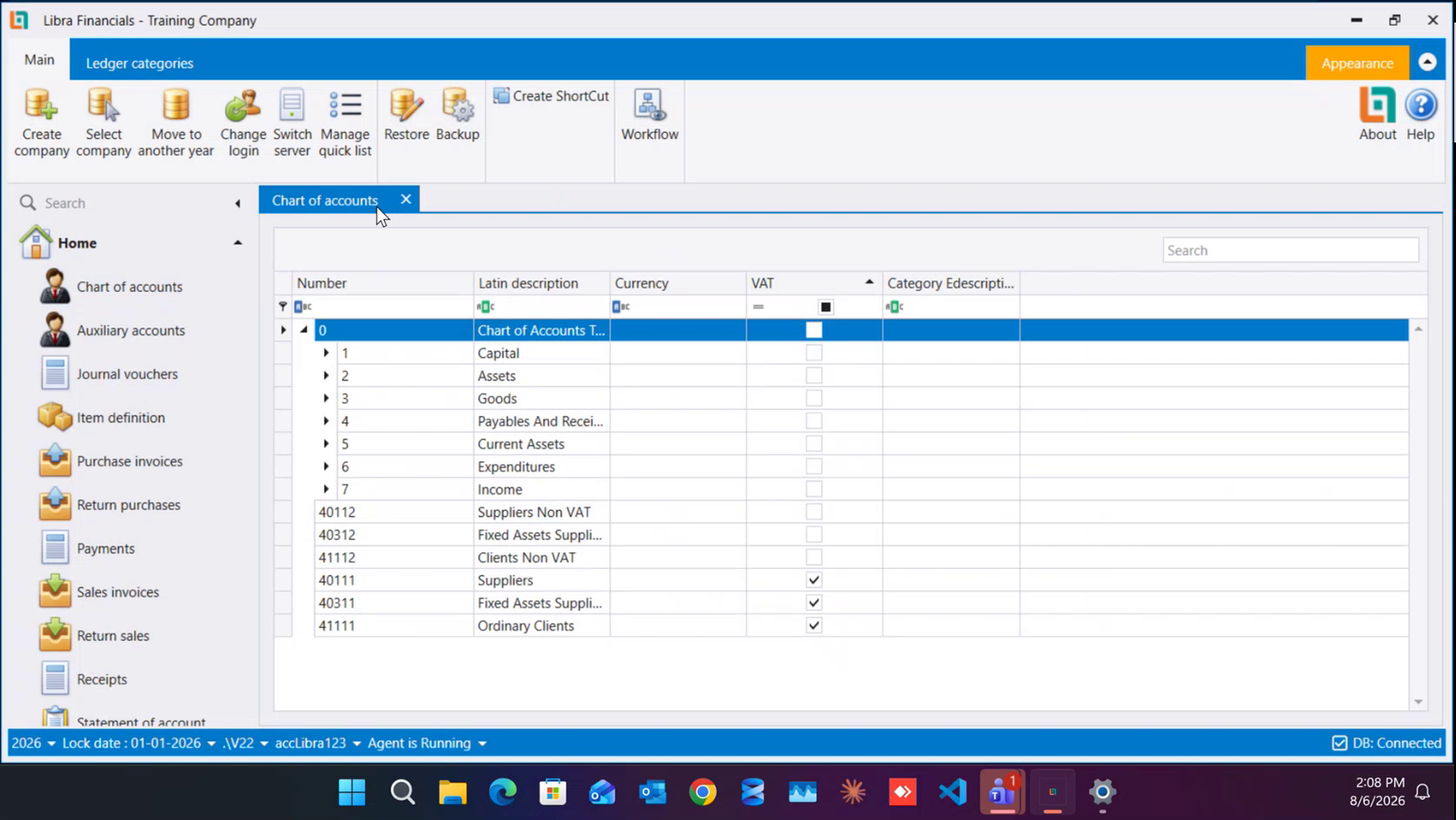
Open the chart and the top level is seven classes, sitting under a single root row, 0 Chart of Accounts Tree View:
| Class | On screen | What goes in it |
|---|---|---|
| 1 | Capital | the money put in to start the business, profit distribution |
| 2 | Assets | what the company owns, tangible and intangible |
| 3 | Goods | the value of stock - used with periodic inventory, at the start and end of the year |
| 4 | Payables And Receivables | everything owed to you or by you: clients, suppliers, employees |
| 5 | Current Assets | cash: the safe, the bank, cheques |
| 6 | Expenditures | purchases, raw materials, salaries, taxes |
| 7 | Income | sales of goods, of raw materials, of manufactured goods, of services |
The plan itself defines classes 1 to 9. Libra ships 1 to 7, and that is what the tree shows. Classes 8 and 9 are analytical and production accounting, and are not used.
Class 3 is worth a note: it holds the value of your stock rather than its movements. Companies on periodic inventory touch it at the start and the end of the year the difference between the two, positive or negative, is what raises or lowers the profit being distributed.
The screen
Open it from the left menu: Chart of accounts. It opens as its own tab, so you can leave it open while you work elsewhere.
Each row is one account, with the columns Number, Latin description, Currency, VAT and Category Edescription. Under the column headers there is a filter row, type in it to narrow that column, and there is a Search box at the top right of the tab.
The ribbon above the tree carries seven buttons:
- New: open a new account under the row you have selected.
- Edit: open the selected account's details.
- Delete: remove the selected account.
- Refresh: reload the tree.
- Preview: a print preview of the chart.
- Expand all nodes: open every branch at once.
- Ledger categories: the ledger-category screen, described at the end of this guide.
Every class opens into levels
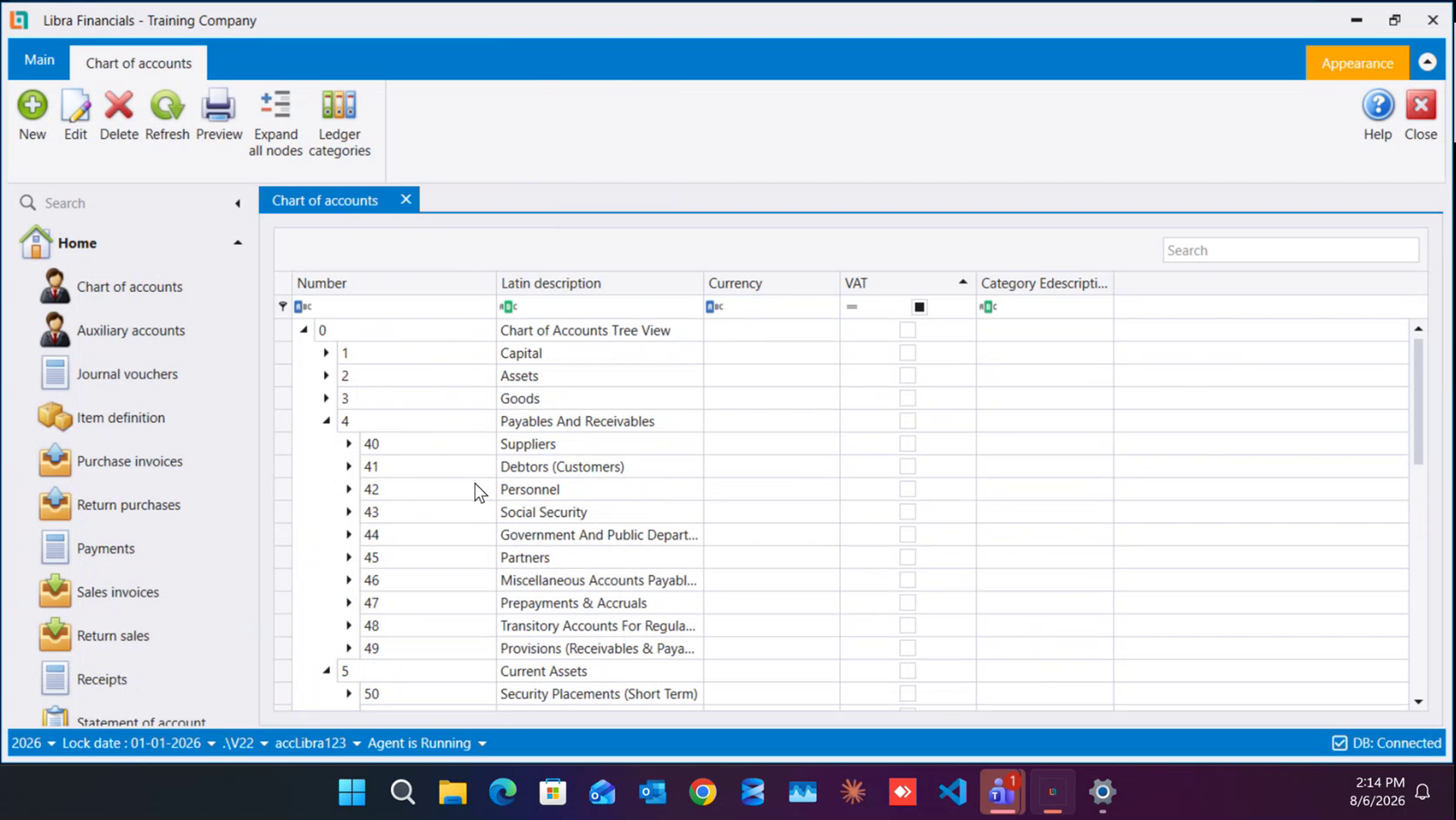
The seven classes are only the first level. Class 4 shows how far it goes it alone has ten groups underneath it:
| Number | Latin description |
|---|---|
| 40 | Suppliers |
| 41 | Debtors (Customers) |
| 42 | Personnel |
| 43 | Social Security |
| 44 | Government And Public Departments |
| 45 | Partners |
| 46 | Miscellaneous Accounts Payable & Receivable |
| 47 | Prepayments & Accruals |
| 48 | Transitory Accounts For Regularization |
| 49 | Provisions (Receivables & Payables) |
Classes 6 and 7 break down the same way, and you can add your own accounts wherever you need more detail - the plan is designed to be extended, on paper and in the system alike.
Down to a real account
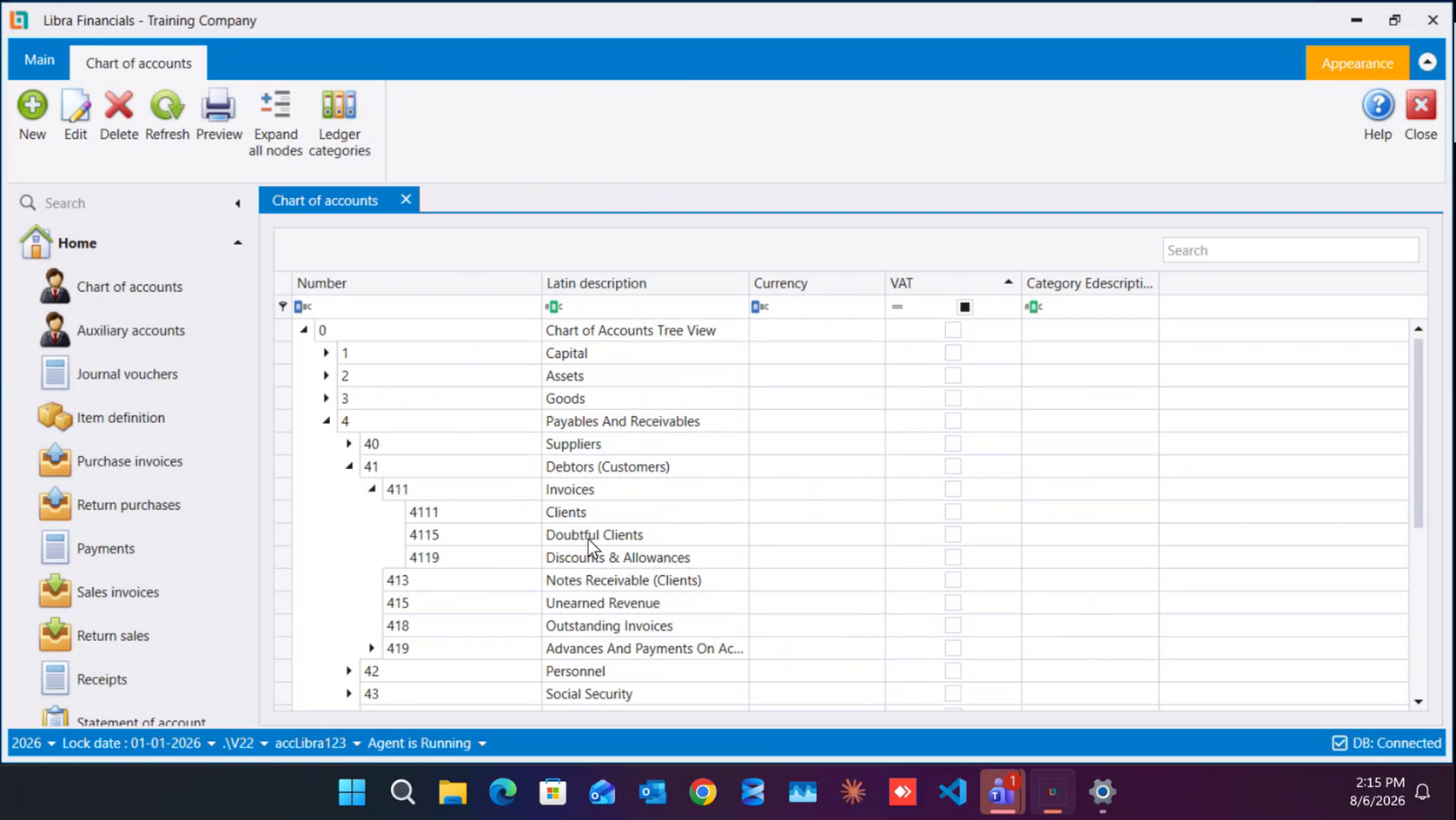
Keep opening: 41 Debtors (Customers) → 411 Invoices → 4111 Clients. Around them sit the other accounts a real business needs:
| Number | Latin description |
|---|---|
| 4111 | Clients |
| 4115 | Doubtful Clients |
| 4119 | Discounts & Allowances |
| 413 | Notes Receivable (Clients) |
| 415 | Unearned Revenue |
| 418 | Outstanding Invoices |
| 419 | Advances And Payments On Ac… |
Clients who are registered for VAT and clients who are not are kept on two separate accounts - 41111 Ordinary Clients, which has VAT ticked, and 41112 Clients Non VAT. Suppliers are split the same way. This split is what makes a VAT return come out right, so it is worth putting each new client on the correct account from the start.
The parent/child rule
This is the most important rule on this screen, and the one behind the most support calls. Learn it before you open your first account.
- You post only on the last account in a branch the child, never the parent.
4111 Clientsis a heading;41111 Ordinary Clientsis where an entry actually lands. - Once an account has been used, its shape is frozen. If entries have been posted on it, you can no longer open accounts underneath it it can never become a parent.
- And the other way round: once the children carry entries, the parent can no longer be posted on.
So when someone asks to split an existing account in two, the first question is always: Have you already posted on it?
If the answer is yes, it is still fixable it just takes a detour:
- Move the existing postings onto a plain, unrelated account.
- Open the new accounts you want the detail to sit on.
- Move the postings back, spreading them across the new accounts.
Ledger categories
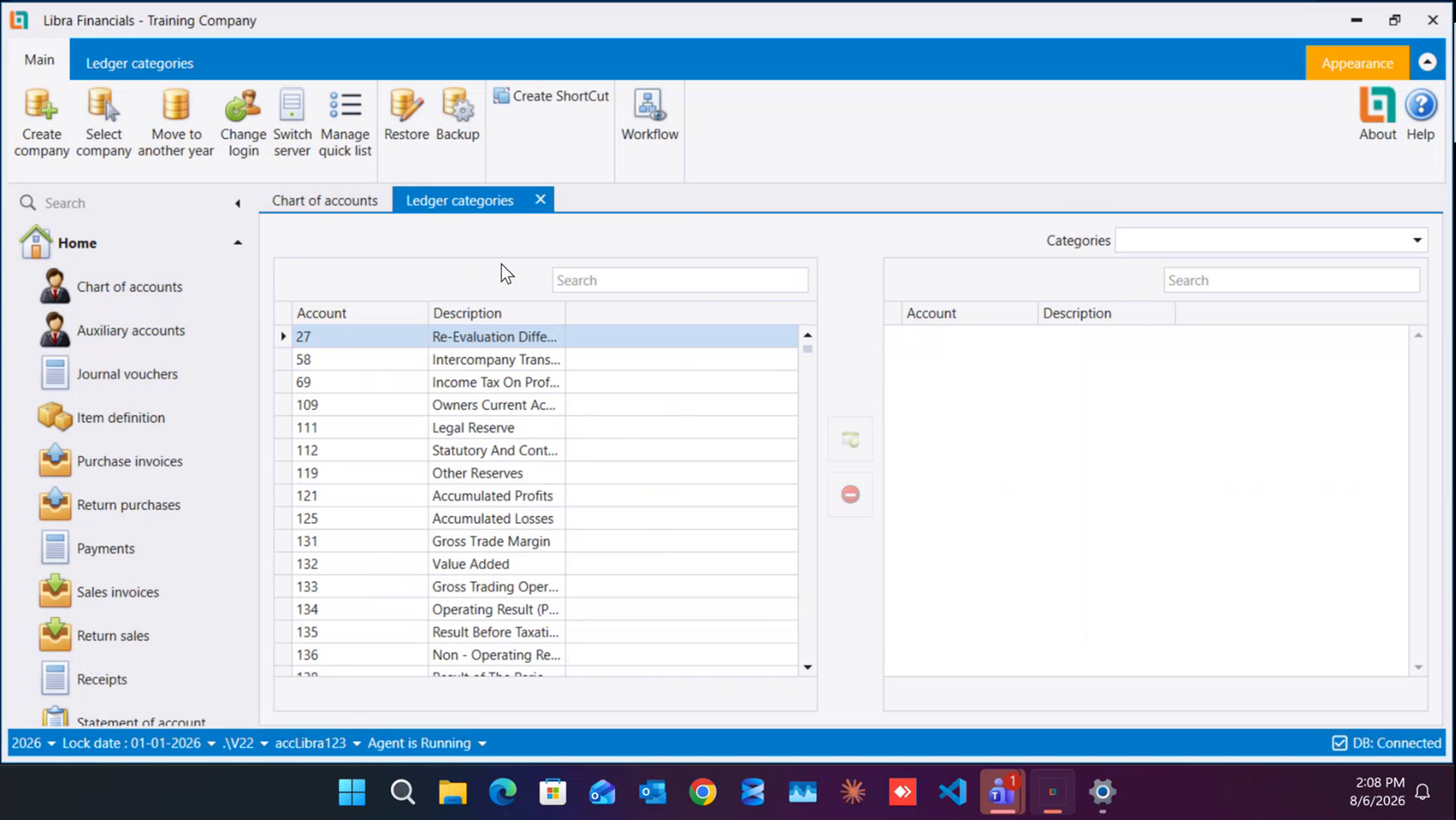
The last ribbon button opens Ledger categories in its own tab. Pick an entry from the Categories list at the top right, then move ledger accounts between the two panes with the green add and red remove buttons in the middle - the same mechanic as the Quick List. The left pane is everything available (111 Legal Reserve, 121 Accumulated Profits, 131 Gross Trade Margin, 132 Value Added, 134 Operating Result (P…) and so on); the right pane is what the chosen category contains.
Next: How to open an account - the New → fill → Save walkthrough, field by field.
ما هي شجرة الحسابات؟
في كل مرة تدفع فيها شركتك مالًا أو تقبضه، لا بد أن يستقرّ المبلغ في مكان ما. وشجرة الحسابات هي القائمة الكاملة لتلك الأماكن: حساب مرقَّم لكل نوع من حركة المال.
ولست بحاجة لأن تكون محاسبًا لتقرأها؛ فكرتان تحملان الموضوع كله:
- كل قيد يحرّك حسابين. فالمال يأتي دائمًا من مكان ويذهب إلى مكان.
- الأرقام نفسها هي البنية.
4ثم41ثم411ثم4111ثم41111؛ كل خانة إضافية تعني مستوى أعمق، فرقم الحساب وحده يخبرك أين يقع. ولهذا يعرض ليبرا الشجرة على شكل أغصان، ولهذا يوجد في نموذج الحساب حقل الطول (Length): فالحساب41111طوله5لأنه في المستوى الخامس.
مثال عملي
تبيع لزبون بالأجل وتصدر فاتورة. أمران حدثا في اللحظة نفسها:
- ربحت مالًا - وهذا إيراد، أي الصنف
7. - وصار الزبون مدينًا لك - وهذه ذمة مدينة، أي الصنف
4←41 المدينون / الزبائن (Debtors (Customers))←411 الفوترة (Invoices)←4111 الزبائن (Clients)←41111 زبائن عاديون (Ordinary Clients).
فاتورة واحدة، وحسابان. وحين يدفع الزبون لاحقًا تُقفل الذمة ويتحرّك حساب النقد بدلًا منها. وكل تقرير يصدره ليبرا - ميزان المراجعة والميزانية وحساب الأرباح والخسائر - يُبنى بجمع هذه الأرقام، ولهذا فإن وضع مبلغ على الحساب الخطأ ليس خطأً شكليًا.
أي مخطط يعتمد ليبرا؟
ليبرا مبني على المخطط اللبناني (Lebanese plan)، وهو معتمد أيضًا في معظم أفريقيا وعند عملاء في الخليج. وهو الأوسع بين المخططين الشائعين: فالمخطط اللبناني يستوعب ما يستوعبه المخطط الدولي، لا العكس. ومن يحتاج مخططًا مختلفًا يبدأ من شجرة فارغة ويفتح الحسابات التي يريدها فقط - وهكذا بُني المخطط العراقي الموجود اليوم داخل النظام. انظر الخطة القديمة مقابل الخطة الجديدة لمعرفة الطريقتين اللتين تبدأ بهما حسابات شركة جديدة.
الأصناف
عند فتح الشجرة يظهر المستوى الأول: سبعة أصناف تحت صفّ جذر واحد هو 0 Chart of Accounts Tree View:
| الصنف | كما يظهر على الشاشة | ما الذي يدخل فيه |
|---|---|---|
| 1 | رأس المال (Capital) | المال الذي يوضع لبدء العمل، وتوزيع الأرباح |
| 2 | الأصول (Assets) | ما تملكه الشركة، الملموس وغير الملموس |
| 3 | البضائع (Goods) | قيمة المخزون - تُستعمل مع الجرد الدوري، أول السنة وآخرها |
| 4 | الذمم الدائنة والمدينة (Payables And Receivables) | كل ما لك وما عليك: زبائن، موردون، موظفون |
| 5 | الأصول المتداولة (Current Assets) | النقد: الصندوق، المصرف، الشيكات |
| 6 | المصاريف (Expenditures) | المشتريات، المواد الأولية، الرواتب، الضرائب |
| 7 | الإيرادات (Income) | مبيعات البضاعة والمواد الأولية والمواد المصنّعة والخدمات |
يعرّف المخطط نفسه الأصناف من 1 إلى 9، لكن ليبرا يشحن 1 إلى 7 وهذا ما تعرضه الشجرة. أما الصنفان 8 و9 فهما للمحاسبة التحليلية والإنتاج ولا يُستعملان.
والصنف 3 يستحق ملاحظة: فهو يحمل قيمة المخزون لا حركاته. والشركات التي تعمل بالجرد الدوري تلمسه أول السنة وآخرها، والفرق بين الرقمين موجبًا كان أم سالبًا - هو ما يرفع الأرباح الموزَّعة أو يخفضها.
الشاشة
تُفتح من القائمة اليسرى: شجرة الحسابات (Chart of accounts). وتفتح في تبويب خاص بها، فيمكنك تركها مفتوحة بينما تعمل في شاشة أخرى.
كل صف هو حساب، والأعمدة هي الرقم (Number) والوصف اللاتيني (Latin description) والعملة (Currency) والضريبة (VAT) ووصف الفئة (Category Edescription). وتحت عناوين الأعمدة يوجد صفّ تصفية - اكتب فيه لتضييق نتائج ذلك العمود - كما يوجد مربع بحث (Search) أعلى يمين التبويب.
ويحمل الشريط فوق الشجرة سبعة أزرار:
- جديد (New): فتح حساب جديد تحت الصف المحدَّد.
- تعديل (Edit): فتح تفاصيل الحساب المحدَّد.
- حذف (Delete): إزالة الحساب المحدَّد.
- تحديث (Refresh): إعادة تحميل الشجرة.
- معاينة (Preview): معاينة طباعة للشجرة.
- توسيع كل العقد (Expand all nodes): فتح كل الأغصان دفعة واحدة.
- فئات الأستاذ (Ledger categories): شاشة فئات الأستاذ، وهي في آخر هذا الدليل.
كل صنف يتفرّع إلى مستويات
الأصناف السبعة هي المستوى الأول فقط. والصنف 4 يوضّح إلى أي مدى تمتدّ الشجرة، فتحته وحده عشر مجموعات:
| الرقم | الوصف اللاتيني |
|---|---|
| 40 | Suppliers - الموردون |
| 41 | Debtors (Customers) - المدينون (الزبائن) |
| 42 | Personnel - الموظفون |
| 43 | Social Security - الضمان الاجتماعي |
| 44 | Government And Public Departments - الدوائر الحكومية والعامة |
| 45 | Partners - الشركاء |
| 46 | Miscellaneous Accounts Payable & Receivable - ذمم دائنة متنوعة |
| 47 | Prepayments & Accruals - المدفوعات المسبقة والمستحقات |
| 48 | Transitory Accounts For Regularization - حسابات انتقالية للتسوية |
| 49 | Provisions (Receivables & Payables) - المؤونات |
والصنفان 6 و7 يتفرّعان بالطريقة نفسها، ويمكنك إضافة حساباتك أينما احتجت تفصيلًا أكثر - فالمخطط مصمّم ليُوسَّع، على الورق وفي النظام سواء.
نزولًا إلى حساب حقيقي
تابع الفتح: 41 Debtors (Customers) ← 411 Invoices ← 4111 Clients. وحولها تجلس بقية الحسابات التي يحتاجها عمل حقيقي:
| الرقم | الوصف اللاتيني |
|---|---|
| 4111 | Clients - الزبائن |
| 4115 | Doubtful Clients - زبائن مشكوك في تحصيلهم |
| 4119 | Discounts & Allowances - الحسومات والتنزيلات |
| 413 | Notes Receivable (Clients) - أوراق قبض (زبائن) |
| 415 | Unearned Revenue - إيرادات غير مكتسبة |
| 418 | Outstanding Invoices - فواتير معلّقة |
| 419 | Advances And Payments On Ac… - تسبيقات ودفعات على الحساب |
والزبائن المسجَّلون بالضريبة وغير المسجَّلين يُحفظون على حسابين منفصلين: 41111 زبائن عاديون (Ordinary Clients) وعليه علامة الضريبة (VAT)، و41112 زبائن غير خاضعين (Clients Non VAT). والموردون مقسومون بالطريقة نفسها. وهذا التقسيم هو ما يجعل التصريح الضريبي يخرج صحيحًا، فيستحق أن تضع كل زبون جديد على الحساب الصحيح من البداية.
قاعدة الأب والابن
هذه أهم قاعدة في هذه الشاشة، وهي سبب أكثر اتصالات الدعم. تعلَّمها قبل أن تفتح حسابك الأول.
- ترحّل فقط على آخر حساب في الغصن - الابن، لا الأب أبدًا. فـ
4111 Clientsعنوان، أما41111 Ordinary Clientsفهو المكان الذي يستقر فيه القيد فعلًا. - وبمجرد أن يُستعمل الحساب يتجمّد شكله. فإذا رُحِّلت عليه قيود لم يعد ممكنًا فتح حسابات تحته - ولن يصير أبًا أبدًا.
- والعكس صحيح: متى حملت الأبناء قيودًا لم يعد ممكنًا الترحيل على الأب.
فحين يطلب أحدهم تقسيم حساب قائم إلى حسابين، يكون السؤال الأول دائمًا: هل رحّلت عليه قيودًا من قبل؟
وإن كان الجواب نعم فالأمر ما يزال قابلًا للحل، لكن عبر طريق غير مباشر:
- انقل القيود الموجودة إلى حساب بسيط لا علاقة له بالموضوع.
- افتح الحسابات الجديدة التي تريد أن يستقر التفصيل عليها.
- أعد القيود ووزّعها على الحسابات الجديدة.
فئات الأستاذ
آخر أزرار الشريط يفتح فئات الأستاذ (Ledger categories) في تبويب خاص. اختر عنصرًا من قائمة الفئات (Categories) أعلى اليمين، ثم انقل حسابات الأستاذ بين اللوحين بزرّي الإضافة الأخضر والإزالة الأحمر في الوسط - وهي الآلية نفسها المستعملة في القائمة السريعة. اللوح الأيسر هو كل المتاح (111 Legal Reserve، 121 Accumulated Profits، 131 Gross Trade Margin، 132 Value Added، 134 Operating Result (P…) وغيرها)، واللوح الأيمن هو ما تحتويه الفئة المختارة.
التالي: كيفية فتح حساب - خطوات جديد ← تعبئة ← حفظ، حقلًا حقلًا.