
Consignment stockبضاعة الأمانة (كونساينمنت)
Consignment is goods sitting in your shop that are not yours. A supplier puts a stand and stock with you; you sell from it; you owe them only for what actually sold, and only once they invoice you. It is a common arrangement and a very easy one to record wrongly.
This differs from business to business. Know how the arrangement actually works with your consignor before modelling it.
1. What goes wrong if you treat it as a purchase
The tempting shortcut is to receive the stand as a purchase and be done with it. Two things break at once:
- Your stock value is wrong. Ask for the value of your inventory and it includes goods you have not bought and may hand back. The figure is not yours.
- Your payables are wrong. You are showing a debt for the whole stand when you owe only for the three units that sold.
The rule underneath: you may hold ten of them, but they are not yours.
2. One warehouse per consignor
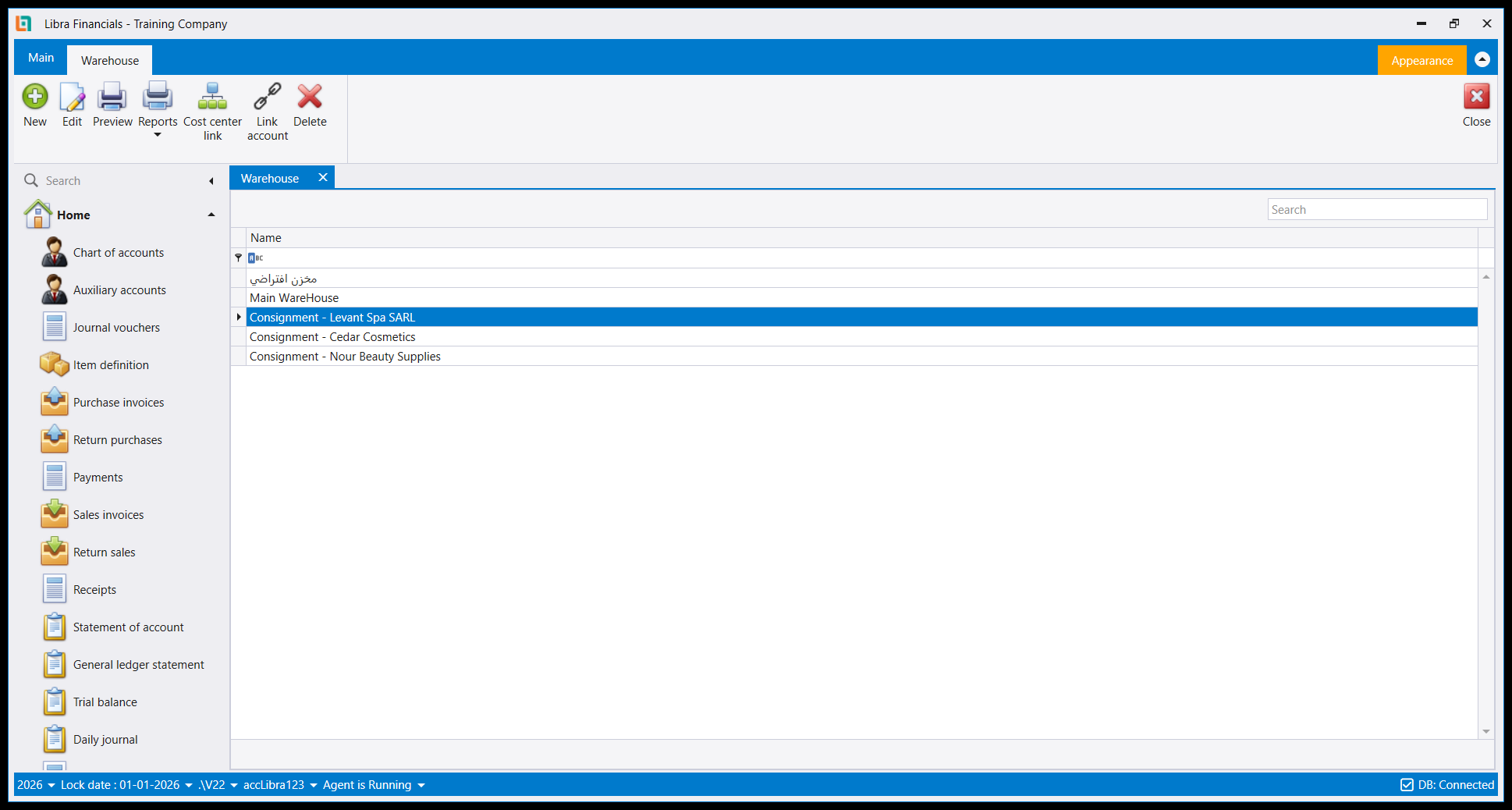
Give each consignor their own warehouse. The warehouse record is defined in General setup → Inventory control setup, where Warehouse is one of the tiles, and the training names them after the consignor (Consignment - <consignor name>) so the list tells you whose goods each one holds at a glance. They sit in the same list as your own warehouses, and the name is what keeps them apart:
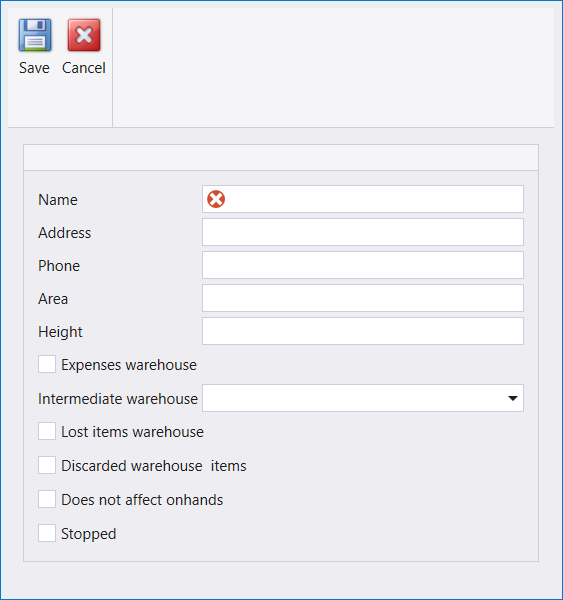
The warehouse record itself carries Name, Address, Phone, Area and Height, an Intermediate warehouse picker, and a set of behaviour flags:
| Flag | What it does |
|---|---|
Does not affect onhands | keeps this warehouse's stock out of your on-hand figures |
Expenses warehouse | marks the warehouse as carrying expenses |
Lost items warehouse / Discarded warehouse items | destinations for losses and write-offs |
Stopped | takes the warehouse out of use |
Does not affect onhands is the one that matters here, because it produces exactly the behaviour consignment needs: goods you are holding and can sell, that do not inflate the stock you report as yours.
Set it when you create the warehouse. On a new record the box is available; on a warehouse that has already been saved it is greyed out. LikePIDon an account andListon an auxiliary record, this is a decision the record locks after the first save.
The warehouse ribbon also offers Cost center link and Link account, so a warehouse can be tied to a cost center and to a chart account.
One warehouse per consignor, not one for all of them. Two suppliers with stands in the same shop are two separate stock positions to reconcile and two separate people to pay, so keeping them in one warehouse just recreates the problem you are avoiding.
3. Move the goods in as a transfer, not a purchase
When the stand arrives, record a warehouse transfer into that consignment warehouse. A transfer moves stock without buying it: no purchase, no payable, no effect on what you owe.
Now your ordinary stock reports cover your own goods, and the consigned goods sit visibly apart in their own warehouse where you can still see and sell them.
4. Sell from it, and only then buy
Sell from the consignment warehouse as normal. Each sale takes a unit off that warehouse, so at any moment the warehouse tells you how much of the consignor's stock is left and how much has gone.
When the consignor sends an invoice for the units that sold, then you record the purchase - for those units only. That is the whole flow:
transfer in → sell (virtually, from their stock) → their invoice → purchaseYou sell them virtually until the invoice arrives; the purchase, when it comes, is for exactly what sold.
Libra's shipped chart has an account for the payable side of this: 4611 Accounts Payable - For Consignments, sitting beside 4619 Others under 461.
5. The top-up visit
Consignment arrangements run on the rep's visit. He comes by, your warehouse says six units, he counts four on the stand, and he leaves two more to bring it back up. Record that top-up as an inventory count against the consignment warehouse so the system agrees with the shelf.
That count is also the moment the two of you reconcile your warehouse figure against his physical count - which only works if his goods were never mixed into your own stock in the first place.
Next: Suppliers · The chart of accounts · Key rules.
بضاعة الأمانة بضاعة في محلك ليست ملكك. يضع عندك مورد ستاندًا وبضاعة؛ فتبيع منها؛ ولا تدين له إلا بما بيع فعلًا، ولا إلا متى أرسل لك الفاتورة. وهو ترتيب شائع، وسهل جدًا تسجيله خطأً.
وهذا يختلف من منشأة إلى أخرى. فاعرف كيف يعمل الترتيب فعلًا مع المودع عندك قبل نمذجته.
1. ما الذي يفسد إن عاملتها شراءً
الاختصار المغري أن تستلم الستاند شراءً وتنتهي. فينكسر أمران دفعة واحدة:
- قيمة مخزونك تصير خاطئة. فاطلب قيمة مخزونك تجدها تشمل بضاعة لم تشترها وقد تعيدها. والرقم ليس رقمك.
- ذممك الدائنة تصير خاطئة. فأنت تُظهر دينًا بالستاند كله بينما لا تدين إلا بالحبات الثلاث التي بيعت.
والقاعدة تحت هذا كله: قد يكون عندك عشر حبات، لكنها ليست لك.
2. مستودع لكل مودع
أعطِ كل مودع مستودعه الخاص. ويُعرَّف سجل المستودع في General setup ← Inventory control setup حيث Warehouse أحد المربّعات، ويسمّيها التدريب باسم المودع - Consignment - <اسم المودع> - فتخبرك القائمة بضاعةَ مَن يحمل كلٌّ منها بنظرة واحدة. وهي تجلس في الجدول نفسه الذي فيه مستودعاتك أنت، والاسم هو ما يفصل بينها:
ويحمل سجل المستودع نفسه الاسم (Name) والعنوان (Address) والهاتف (Phone) والمساحة (Area) والارتفاع (Height)، ومنتقي المستودع الوسيط (Intermediate warehouse)، ومجموعة من أعلام السلوك:
| العلم | ماذا يفعل |
|---|---|
Does not affect onhands | يُبقي مخزون هذا المستودع خارج أرقام الموجود لديك |
Expenses warehouse | يجعل المستودع حاملًا للمصاريف |
Lost items warehouse / Discarded warehouse items | وجهتا الفاقد والمشطوب |
Stopped | يوقف استعمال المستودع |
وDoes not affect onhands هو المهم هنا، لأنه ينتج بالضبط السلوك الذي تحتاجه الأمانة: بضاعة تحوزها وتستطيع بيعها، ولا تضخّم المخزون الذي تُظهره ملكًا لك.
اضبطه عند إنشاء المستودع. فعلى السجل الجديد يكون المربع متاحًا؛ وعلى مستودع سبق حفظه يكون معطَّلًا. وهذا - مثلPIDعلى الحساب وListعلى السجل المساعد - قرار يقفله السجل بعد أول حفظ.
ويعرض شريط المستودع أيضًا Cost center link وLink account، فيمكن ربط المستودع بمركز تكلفة وبحساب في الشجرة.
مستودع لكل مودع، لا مستودع واحد لهم جميعًا. فموردان لهما ستاندان في المحل نفسه هما وضعان مخزنيان منفصلان يجب تسويتهما وشخصان منفصلان يجب الدفع لهما، وجمعهما في مستودع واحد يعيد إنشاء المشكلة نفسها التي تتجنّبها.
3. أدخل البضاعة تحويلًا لا شراءً
حين يصل الستاند، سجّل تحويل مستودع (warehouse transfer) إلى مستودع الأمانة ذاك. فالتحويل ينقل المخزون دون شرائه: لا شراء ولا ذمة دائنة ولا أثر على ما تدين به.
فتصير تقاريرك المخزنية العادية تغطي بضاعتك أنت، وتجلس بضاعة الأمانة منفصلة ظاهرةً في مستودعها حيث تراها وتبيع منها.
4. بِع منها، وعندها فقط اشترِ
بِع من مستودع الأمانة كالمعتاد. فكل بيع ينقص حبة من ذلك المستودع، وهكذا يخبرك المستودع في أي لحظة كم بقي من بضاعة المودع وكم مضى منها.
ومتى أرسل المودع فاتورة بالحبات التي بيعت، عندها تسجّل الشراء (purchase) - بتلك الحبات وحدها. وهذا هو التدفق كله:
تحويل دخول ← بيع (افتراضيًا، من بضاعته) ← فاتورته ← شراءفأنت تبيعها افتراضيًا حتى تصل الفاتورة؛ والشراء حين يأتي يكون بما بيع بالضبط.
وفي الشجرة المشحونة في ليبرا حساب للجانب الدائن من هذا: 4611 Accounts Payable - For Consignments، يجلس بجانب 4619 Others تحت 461.
5. زيارة التعبئة
ترتيبات الأمانة تدور حول زيارة المندوب. يمرّ عليك، فيقول مستودعك ست حبات، ويعدّ هو أربعًا على الستاند، فيترك حبتين ليعيدها إلى ما كانت. سجّل هذه التعبئة جردة (inventory count) على مستودع الأمانة ليتفق النظام مع الرف.
وتلك الجردة هي أيضًا لحظة التسوية بينكما رقم مستودعك مقابل عدّه المادي - وهي لا تنجح إلا إن لم تختلط بضاعته ببضاعتك من الأساس.
التالي: الموردون · شجرة الحسابات · القواعد الأساسية.