
How to record a payment or a transferكيفية تسجيل مدفوع أو تحويل
Payments and internal transfers work the same way as a receipt, with the grids arranged differently. Read How to record a receipt first - this guide only covers what changes.
1. A payment: the receipt, upside down
Open Payments, click New. The two grids have swapped roles:
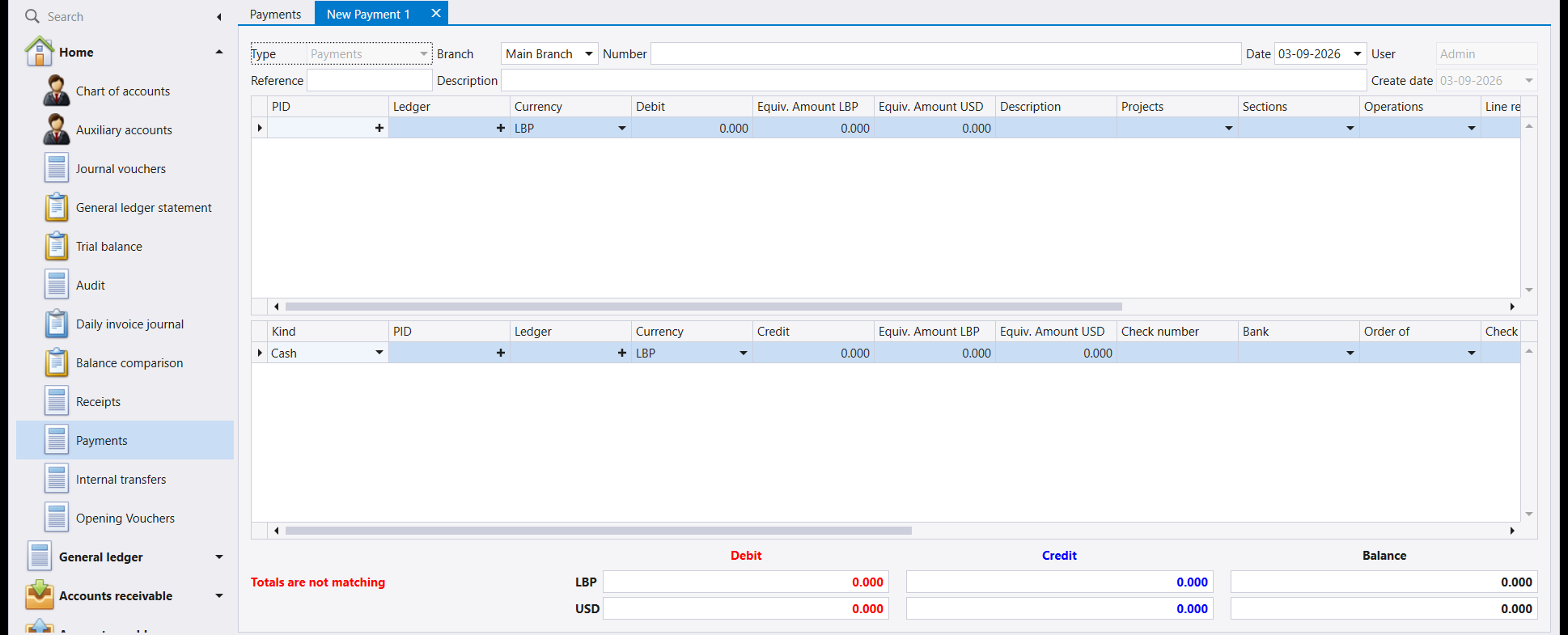
- Top grid - what you paid for. The supplier, the expense, the loan being repaid. Put the PID here if the account carries auxiliaries, and the amount in Debit.
- Bottom grid - how you paid. This is the one with Kind, and with Check number, Bank and Order of beside it. The amount goes in Credit.
The example below pays 500,000 LBP of freight in cash: 60181 - Freight in the top grid, and the cash box in the bottom grid.
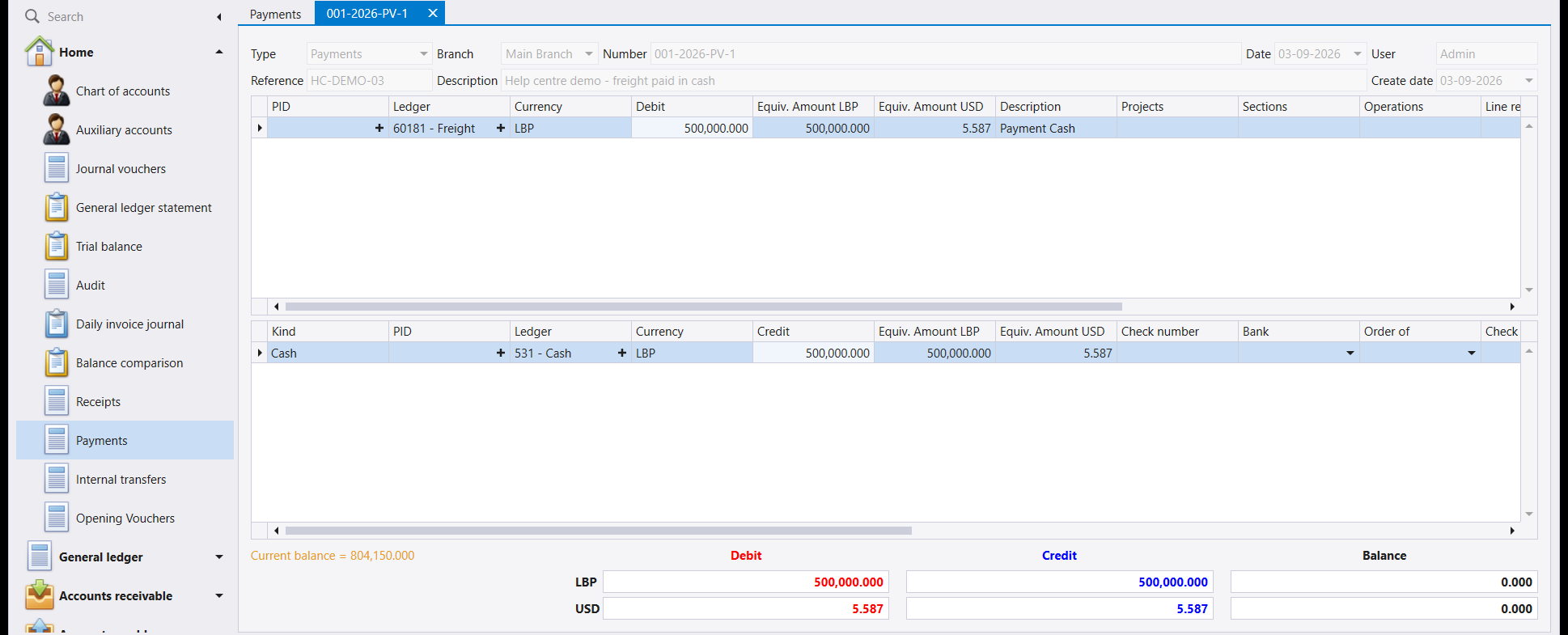
Saved, it is numbered 001-2026-PV-1 - PV for a payment.
You do not need a supplier to make a payment. The top grid takes any account, so paying an expense straight out of the cash box - as here - is one document, not a voucher plus a payment.
2. An internal transfer: your money, your other account
Open Internal transfers, click New. Now both grids carry a Kind, because both sides are money:
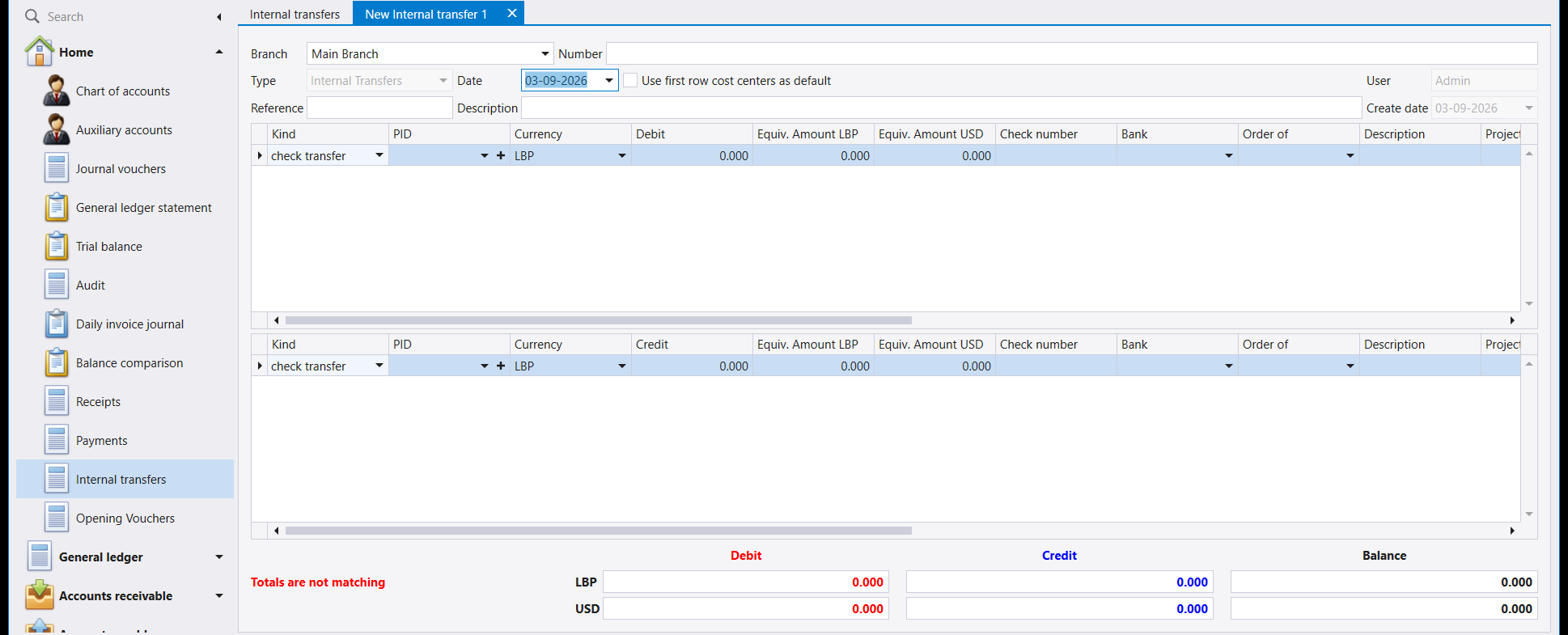
- Top grid - where the money is going. Amount in Debit.
- Bottom grid - where it is coming from. Amount in Credit.
Use it for cash banked, a transfer between two bank accounts, or money moved between branches - anything where no one outside the company is involved. Saved, it is numbered 001-2026-IT-1.
3. The cheque number rule bites here
Transfers are usually done by cheque, so this is the screen where you will meet it: if the Kind you picked is marked as requiring a cheque number, F12 does not save. Libra answers Enter Check number and waits.
Fill in the Check number column - it is in the same grid as the Kind, and on a transfer both grids have one - then save again. Nothing is lost while the message is up.
4. Which screen should I use?
| What happened | Screen |
|---|---|
| Someone paid you | Receipts |
| You paid someone | Payments |
| Your money moved between your own accounts | Internal transfers |
| None of the above, or nothing moved at all | Journal vouchers |
If money genuinely changed hands, prefer one of the first three over a journal voucher. They record the cheque number, the bank and the payee, and those fields have nowhere to live on a voucher.
تعمل المدفوعات والتحويلات الداخلية كما يعمل المقبوض، مع ترتيب مختلف للجدولين. اقرأ أولًا كيفية تسجيل مقبوض - فهذا الدليل لا يغطي إلا ما يتغيّر.
١. المدفوع: المقبوض مقلوبًا
افتح المدفوعات (Payments) واضغط جديد (New). وقد تبادل الجدولان دوريهما:
- الجدول العلوي - ما دفعت لأجله. المورّد أو المصروف أو القرض الذي تسدّده. ضع الذمة (PID) هنا إن كان الحساب يحمل ذممًا، والمبلغ في مدين (Debit).
- الجدول السفلي - كيف دفعت. وهو الذي يحمل النوع (Kind)، ومعه رقم الشيك والمصرف ولأمر. ويوضع المبلغ في دائن (Credit).
والمثال أدناه يدفع 500,000 ل.ل. أجور نقل نقدًا: 60181 - Freight في الجدول العلوي، والصندوق في الجدول السفلي.
وبعد الحفظ يحمل الرقم 001-2026-PV-1 - وPV للمدفوع.
لا تحتاج إلى مورّد لتسجيل مدفوع. فالجدول العلوي يقبل أي حساب، ودفع مصروف مباشرة من الصندوق - كما هنا - مستند واحد، لا قيدٌ ومدفوع.
٢. التحويل الداخلي: مالك، إلى حسابك الآخر
افتح التحويلات الداخلية (Internal transfers) واضغط جديد (New). والآن يحمل كلا الجدولين عمود النوع (Kind)، لأن الجهتين مال:
- الجدول العلوي - إلى أين يذهب المال. المبلغ في مدين (Debit).
- الجدول السفلي - من أين يأتي. المبلغ في دائن (Credit).
استعمله لإيداع النقد في المصرف، أو للتحويل بين حسابين مصرفيين، أو لنقل المال بين الفروع - أي حالة لا يدخل فيها أحد من خارج الشركة. وبعد الحفظ يحمل الرقم 001-2026-IT-1.
٣. وقاعدة رقم الشيك تظهر هنا
تُنفَّذ التحويلات بالشيكات غالبًا، ولذلك ستصادفها في هذه الشاشة: فإن كان النوع الذي اخترته مؤشَّرًا باشتراط رقم شيك لم يحفظ F12. ويجيب ليبرا بعبارة Enter Check number وينتظر.
املأ عمود رقم الشيك (Check number) - وهو في الجدول نفسه الذي فيه النوع، وفي التحويل يوجد في الجدولين - ثم احفظ مجددًا. ولا يضيع شيء ما دامت الرسالة ظاهرة.
٤. أي شاشة أستعمل؟
| ما الذي حدث | الشاشة |
|---|---|
| أحدهم دفع لك | المقبوضات |
| دفعتَ لأحدهم | المدفوعات |
| مالك انتقل بين حساباتك أنت | التحويلات الداخلية |
| لا شيء مما سبق، أو لم يتحرّك مال أصلًا | القيود المحاسبية |
فإن كان المال قد انتقل فعلًا فقدّم إحدى الشاشات الثلاث الأولى على القيد المحاسبي. فهي تسجّل رقم الشيك والمصرف والمستفيد، وهذه الحقول لا مكان لها في القيد.