
How to create a journal voucherكيفية إنشاء قيد محاسبي
This guide walks one entry from an empty form to a saved, numbered voucher. For what a voucher is and what each column means, read Journal vouchers first.
The example: 1,000,000 LBP of freight paid in cash. Freight is an expense, so it is debited; the cash box paid it, so it is credited.
1. Open a new voucher
From the left menu open Journal vouchers, then click New in the ribbon. A tab opens named New Voucher 1 - it keeps that name until you save.
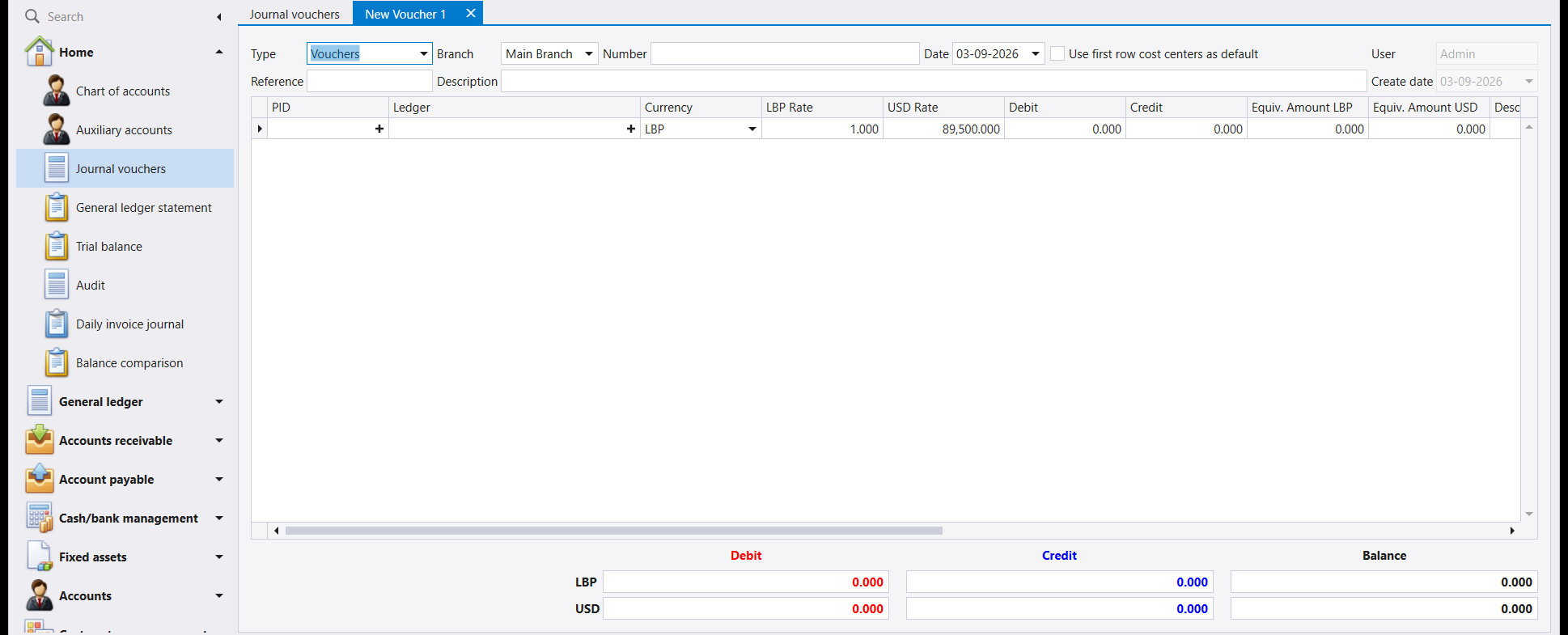
Three things are already filled in, and it is worth knowing where they came from:
- Number is empty on purpose. Libra assigns it when you save, not before.
- Date is today. Change it if the entry belongs to a different day - this is the date the entry counts for, and the one that decides which exchange rate applies.
- One empty line is already in the grid, in the company's first currency, with today's rates filled in.
2. Fill in the header
- Type - leave it on
Vouchersfor an ordinary entry. - Branch - the branch the entry belongs to.
- Reference - your own reference. Use the number of whatever document the entry comes from, so you can find it again: an invoice number, a receipt number, a file number.
- Description - explain the entry in words. This is what appears on the list screen and on statements, and it is what makes an entry understandable a year later. Write it for someone else.
3. Enter the first line
Click into the Ledger cell and type the account number. You do not need the full name - typing 60181 is enough, and Libra completes it to 60181 - Freight.
Then type the amount into Debit.
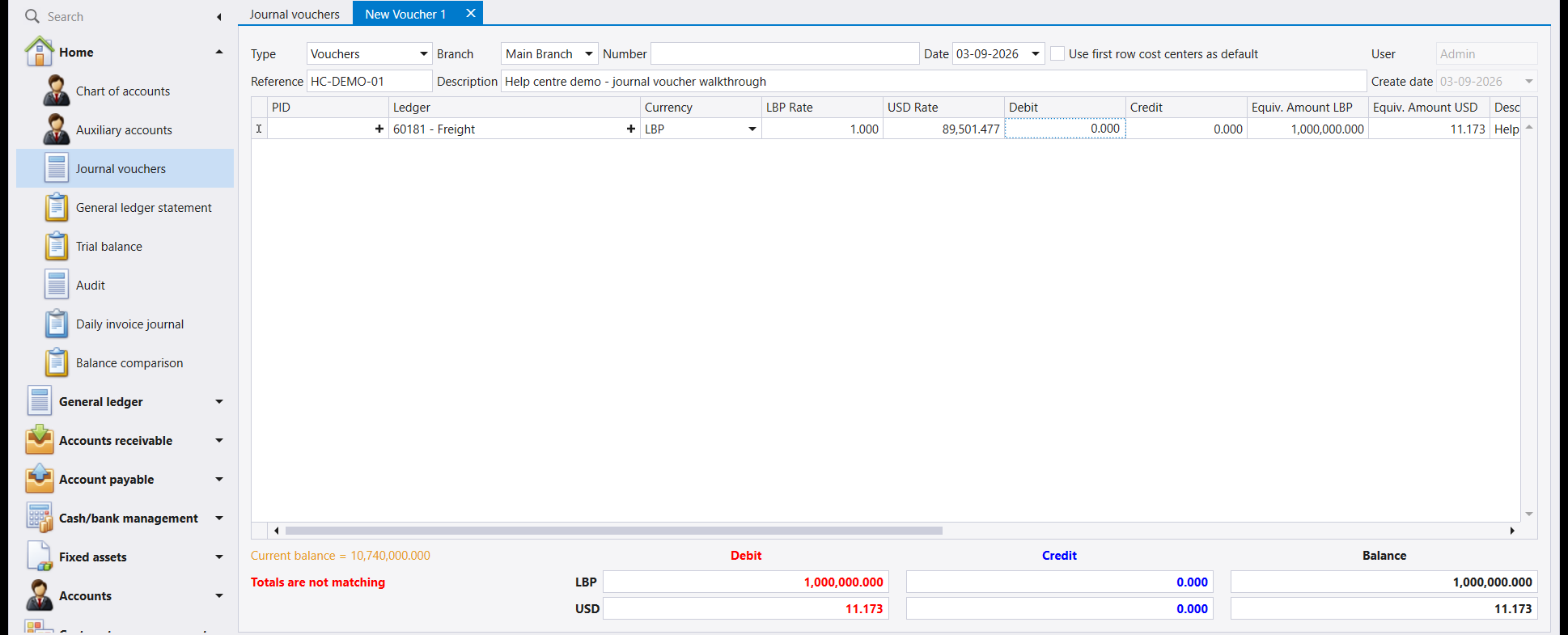
Look at the bottom of the screen. Totals are not matching is showing in red, and the Balance column carries the full 1,000,000. That is correct - the entry is genuinely incomplete, because nothing has been credited yet.
Two columns fill themselves in as you type:
- Equiv. Amount LBP and Equiv. Amount USD convert the line into both company currencies using the rates on the line. You never type these.
- If the account carries auxiliaries - a supplier, a client, an employee, a bank - the PID column becomes the place to name which one. Accounts that do not use auxiliaries leave it empty.
4. Add the balancing line
Press ↓ (the down arrow) to add a second line, then fill it the same way: 531 in Ledger, which completes to 531 - Cash, and the amount in Credit this time.
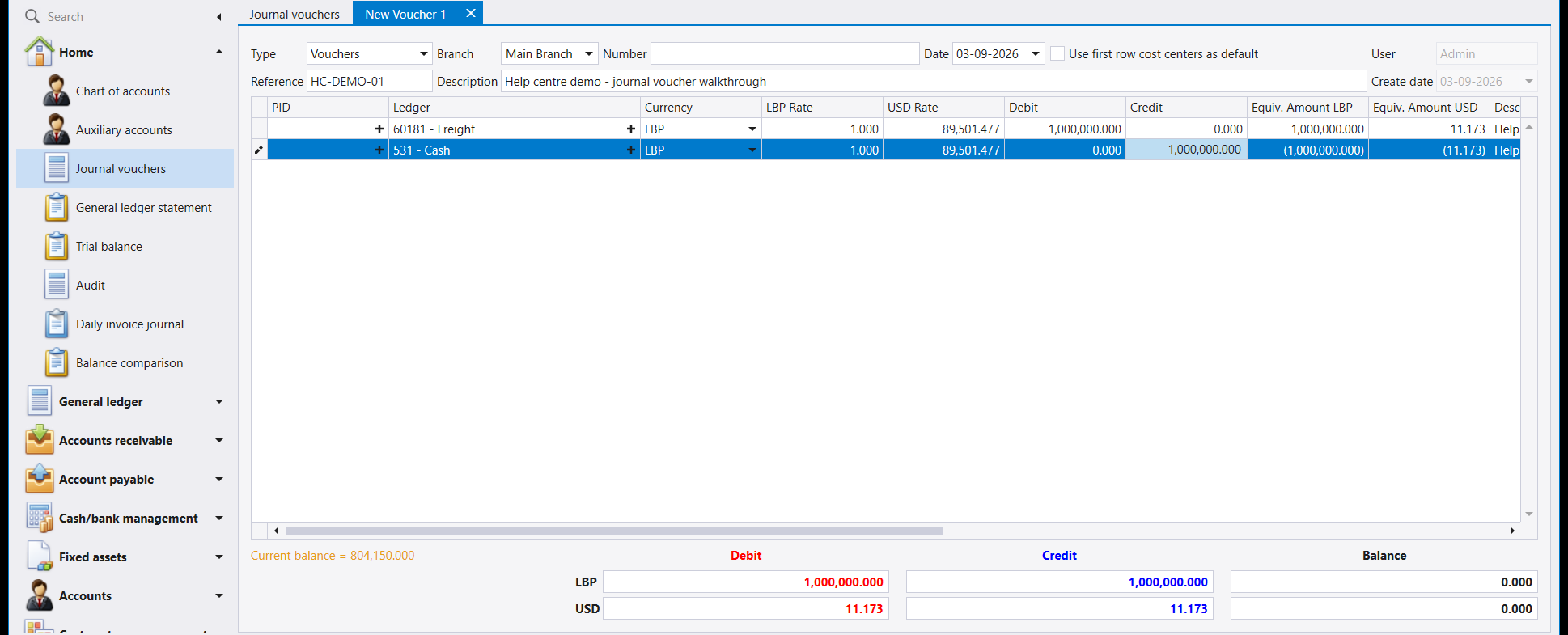
The red warning has gone, and Balance reads 0.000 on both the LBP row and the USD row. The voucher is now complete.
A voucher is not limited to two lines. One debit can be balanced by several credits, or the other way round. Keep pressing ↓ and adding lines - all that matters is that both currency rows end at zero.
5. Save
Press F12 to save.
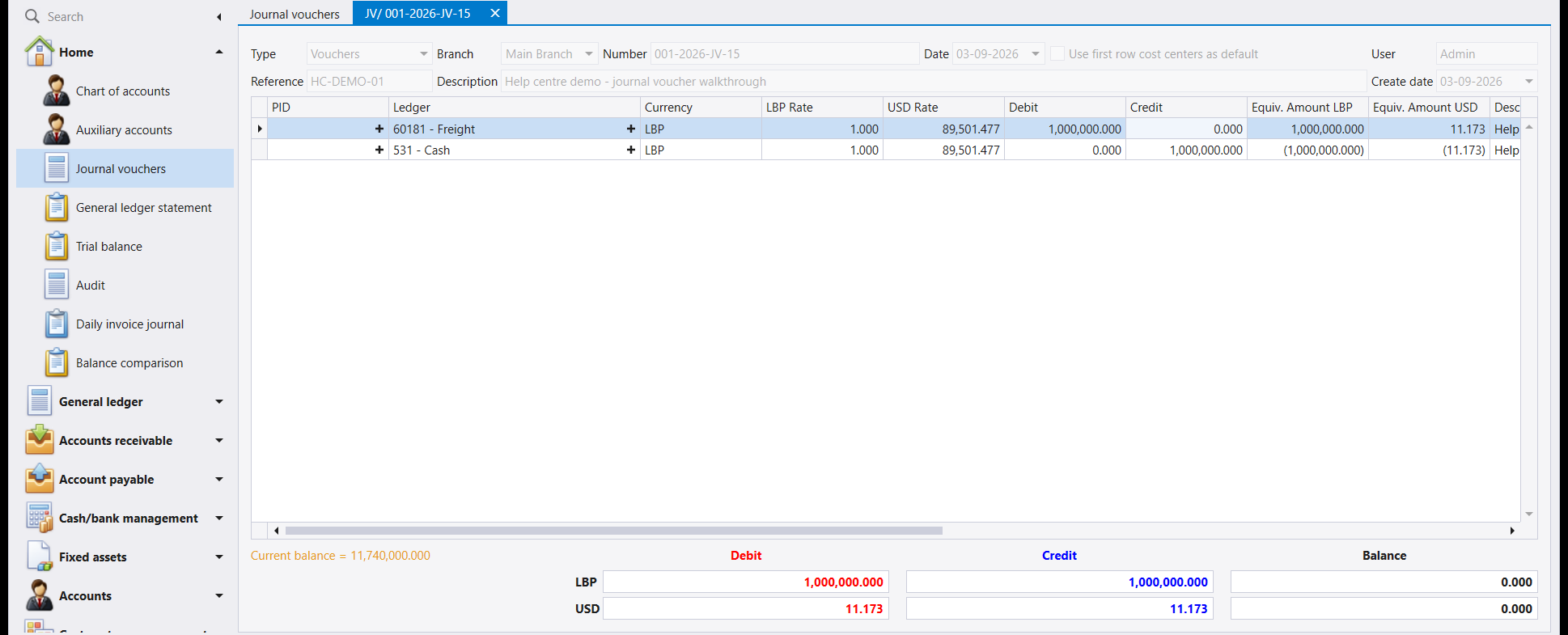
Two things confirm the save, and they are worth checking every time:
- The tab is no longer New Voucher 1 - it now carries the voucher's number.
- The Number field has filled in, here
001-2026-JV-15.
The fields go grey because the voucher is now a saved record rather than a form you are filling in.
6. Keyboard shortcuts
These work on the voucher form and save a great deal of reaching for the mouse:
| Key | What it does |
|---|---|
| F12 | Save |
| F2 | Cancel |
| Esc | Close |
| ↓ | Add a line, when you are on the last one |
| Enter | Move to the next field |
7. If something is wrong
- Totals are not matching won't go away. Check every line's Currency column, not just the amounts. A line entered against an account held in the other currency balances one currency row and not the other.
- The account number is not accepted. Only accounts that entries can be posted to are accepted - a heading that has children beneath it is not one of them. See The chart of accounts.
- The rate looks wrong. The rate comes from the voucher's Date, not from today. Fix the rate first - see How to set an exchange rate - then re-enter the voucher.
يمشي هذا الدليل بقيد واحد من نموذج فارغ إلى قيد محفوظ ومرقّم. ولمعرفة ما هو القيد وما معنى كل عمود، اقرأ أولًا القيود المحاسبية.
والمثال: 1,000,000 ل.ل. أجور نقل مدفوعة نقدًا. فأجور النقل مصروف، ولذلك تُجعل مدينة؛ والصندوق هو الذي دفعها، ولذلك يُجعل دائنًا.
١. افتح قيدًا جديدًا
من القائمة اليسرى افتح القيود المحاسبية (Journal vouchers)، ثم اضغط جديد (New) في الشريط. تُفتح صفحة باسم New Voucher 1 تحمل هذا الاسم حتى تحفظ.
وثلاثة حقول مملوءة سلفًا، ويجدر معرفة مصدرها:
- الرقم (Number) فارغ عن قصد. فليبرا يخصّصه عند الحفظ لا قبله.
- التاريخ (Date) هو تاريخ اليوم. غيّره إن كان القيد يعود ليوم آخر - فهذا هو التاريخ الذي يُحتسب عليه القيد، وهو الذي يحدد سعر الصرف المطبَّق.
- سطر فارغ واحد موجود في الجدول أصلًا، بعملة الشركة الأولى، وبأسعار اليوم مملوءة فيه.
٢. املأ الرأس
- النوع (Type) - اتركه على
Vouchersللقيد العادي. - الفرع (Branch) - الفرع الذي يعود إليه القيد.
- المرجع (Reference) - مرجعك أنت. استعمل رقم المستند الذي جاء منه القيد لتعود إليه لاحقًا: رقم فاتورة أو رقم إيصال أو رقم ملف.
- الشرح (Description) - اشرح القيد بالكلمات. فهذا ما يظهر في شاشة اللائحة وفي كشوف الحساب، وهو ما يجعل القيد مفهومًا بعد سنة. اكتبه لغيرك.
٣. أدخل السطر الأول
اضغط في خانة الحساب (Ledger) واكتب رقم الحساب. ولا تحتاج إلى الاسم الكامل - يكفي أن تكتب 60181 فيكمله ليبرا إلى 60181 - Freight.
ثم اكتب المبلغ في خانة مدين (Debit).
انظر إلى أسفل الشاشة. عبارة Totals are not matching ظاهرة بالأحمر، وعمود الرصيد (Balance) يحمل الـ1,000,000 كاملة. وهذا صحيح - فالقيد ناقص فعلًا، إذ لم يُجعل شيء دائنًا بعد.
وعمودان يُملآن تلقائيًا وأنت تكتب:
- المعادل (Equiv. Amount LBP / USD) يحوّل السطر إلى عملتي الشركة بالأسعار المدرجة في السطر. ولا تكتبهما أبدًا.
- وإذا كان الحساب يحمل ذممًا - مورّدًا أو زبونًا أو موظفًا أو مصرفًا - صار عمود الذمة (PID) هو موضع تحديد أيّها. أما الحسابات التي لا تستعمل الذمم فيبقى فارغًا فيها.
٤. أضف السطر الموازن
اضغط ↓ (السهم الأسفل) لإضافة سطر ثانٍ، ثم املأه بالطريقة نفسها: 531 في خانة الحساب، فيكتمل إلى 531 - Cash، والمبلغ في خانة دائن (Credit) هذه المرة.
اختفى التنبيه الأحمر، وصار الرصيد (Balance) يساوي 0.000 في سطر اللّيرة وسطر الدولار معًا. والقيد الآن كامل.
القيد لا يقتصر على سطرين. فقد يوازَن مدين واحد بعدة دائنين، أو العكس. تابع الضغط على ↓ وإضافة السطور - وكل ما يهم أن ينتهي سطرا العملتين إلى الصفر.
٥. احفظ
اضغط F12 للحفظ.
وأمران يؤكدان الحفظ، ويجدر التحقق منهما في كل مرة:
- لم تعد الصفحة تحمل اسم New Voucher 1 - بل صارت تحمل رقم القيد.
- امتلأ حقل الرقم (Number)، وهو هنا
001-2026-JV-15.
وتصير الحقول رمادية لأن القيد صار سجلًا محفوظًا لا نموذجًا تملأه.
٦. اختصارات لوحة المفاتيح
تعمل هذه في نموذج القيد وتغني عن كثير من استعمال الفأرة:
| المفتاح | وظيفته |
|---|---|
| F12 | حفظ |
| F2 | إلغاء |
| Esc | إغلاق |
| ↓ | إضافة سطر، حين تكون على السطر الأخير |
| Enter | الانتقال إلى الحقل التالي |
٧. إذا حدث خطأ
- عبارة Totals are not matching لا تختفي. تحقق من عمود العملة (Currency) في كل سطر، لا من المبالغ وحدها. فالسطر المُدخَل على حساب بالعملة الأخرى يوازن سطر عملة واحدة دون الأخرى.
- رقم الحساب غير مقبول. لا تُقبل إلا الحسابات التي يمكن الترحيل إليها - والعنوان الذي تحته أبناء ليس منها. انظر شجرة الحسابات.
- سعر الصرف يبدو خاطئًا. يأتي السعر من تاريخ القيد لا من تاريخ اليوم. صحّح السعر أولًا - انظر كيفية تحديد سعر الصرف - ثم أعد إدخال القيد.