
Posted: when an entry actually reaches the ledgerالترحيل: متى يصل القيد إلى الأستاذ فعلًا
Every voucher list in Libra has a column called Posted, and it answers one question: has this entry reached the ledger? A ticked box means yes - the entry is in the balances, and every report that reads those balances includes it.
This guide explains what that tick means, why it is almost certainly ticked on every row you will ever see, and what changes in the companies where it is not.
1. The column
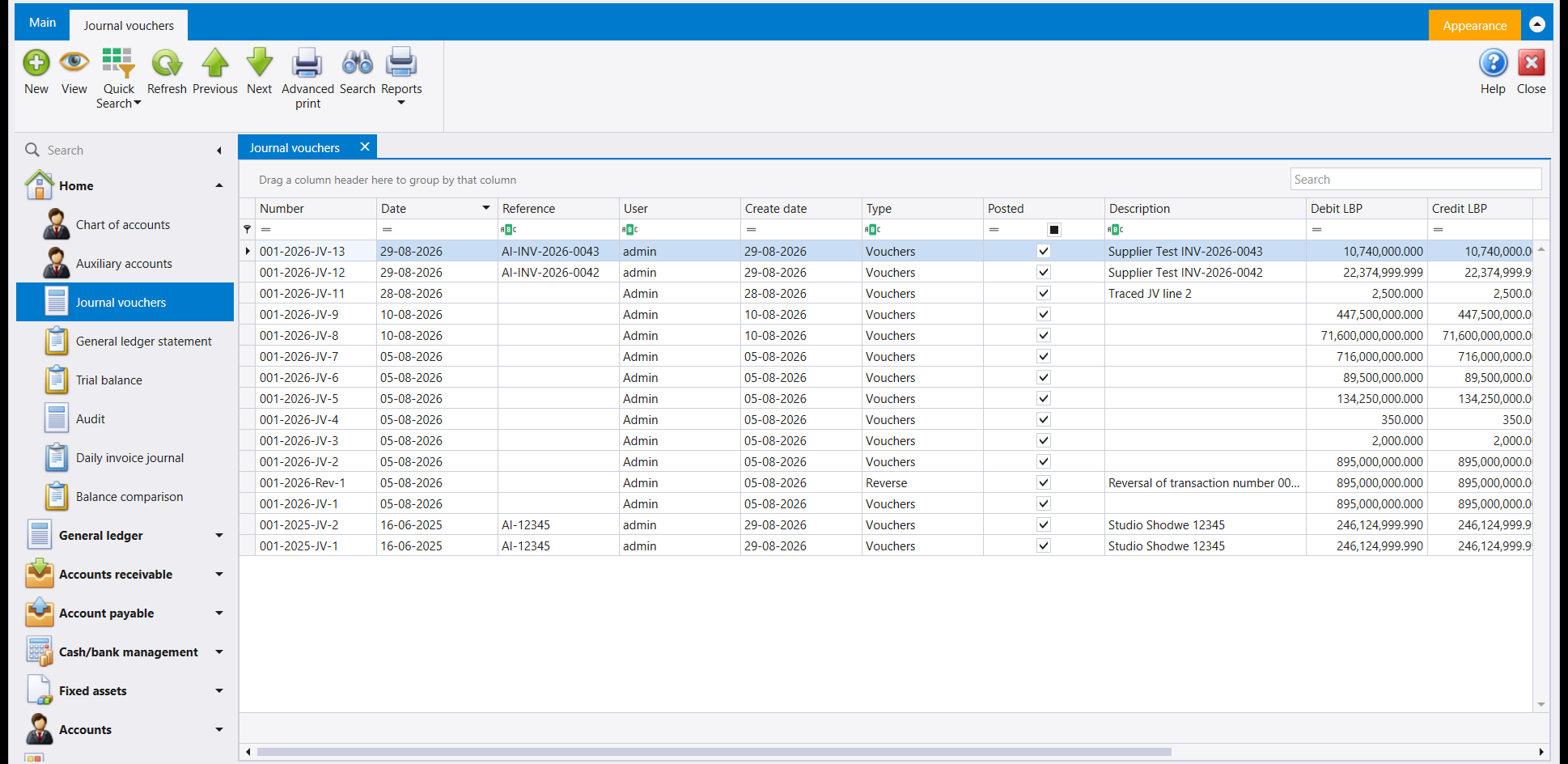
Ticked on every row, including one saved a minute ago. That is not a coincidence, and it is not the column being decorative.
2. Unless your company was set up otherwise, saving is posting
The moment you press F12 on a balanced voucher, it is in the ledger. There is no draft state and no second step, which is why the column above reads the way it does.
That is worth knowing before you type, because it means there is no "save it and think about it tomorrow". As soon as a voucher is saved:
- the trial balance includes it,
- the client's or supplier's statement includes it,
- and every balance it touched has already moved.
So a mistake is not fixed by editing a draft. It is fixed by another entry - a correction, or a reversal - which is the right answer anyway, because the ledger is supposed to be a record of what happened, including the correction.
This is also why the balance rule is strict. Libra refuses to save an unbalanced voucher rather than holding it aside, because there is nowhere to hold it. See Journal vouchers.
3. Some companies add a second step
Libra can be set up so that a voucher is typed and saved but does not reach the ledger until somebody releases it. That buys a review step - one person enters the day's work, another checks it and releases it - and until it is released the entry changes no balance and appears in no report.
Where that is switched on, two extra screens appear under General ledger: Unposted transactions, which lists everything still waiting, and Post transactions, which releases a batch of them. Your company either has them or it does not; they are not hidden behind a permission you can ask for.
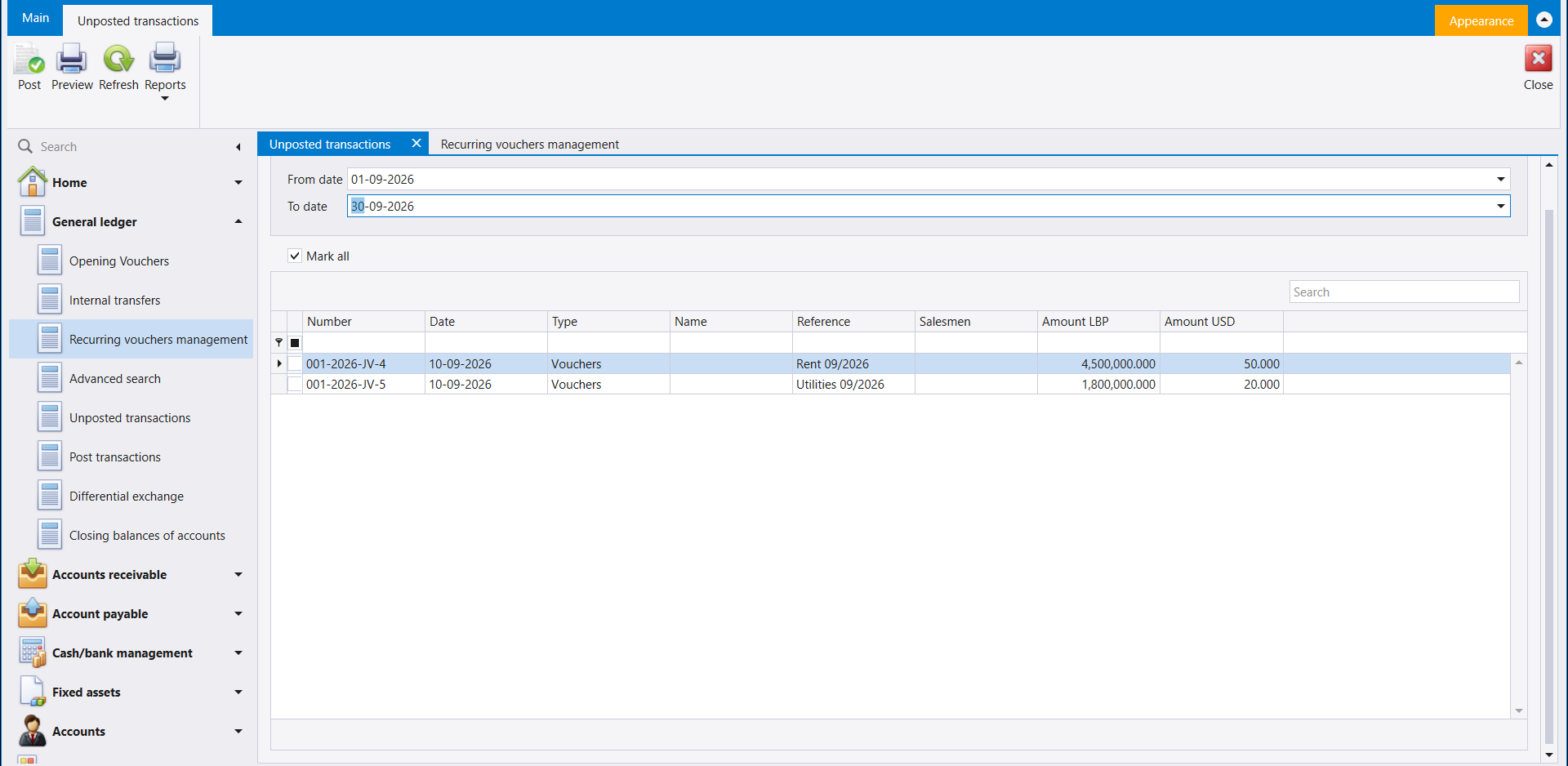
Unposted transactions opens on a date range. Pick the period, press Refresh, and the vouchers still waiting appear - one row each, with the reference you typed and the amount in each currency. Tick the ones you have checked (or Mark all), then press Post. They leave the list and, from that moment, they are in the balances.
Nothing in that list has reached the ledger yet. A voucher sitting here changes no balance and appears in no report, which is the whole point of the extra step.
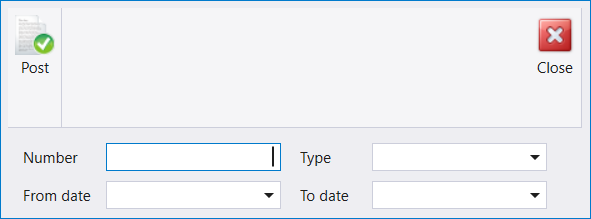
Post transactions does the same job without the list, for when you already know what you want to release: fill in a voucher number, a type, a date range, or any combination, and press Post.
4. Which one is your company? Two ways to tell
Look at the newest row of any voucher list. Save a voucher, then look at Posted on its row. Ticked straight away means your company posts on save.
Or open Advanced search under General ledger and look in the Other panel:
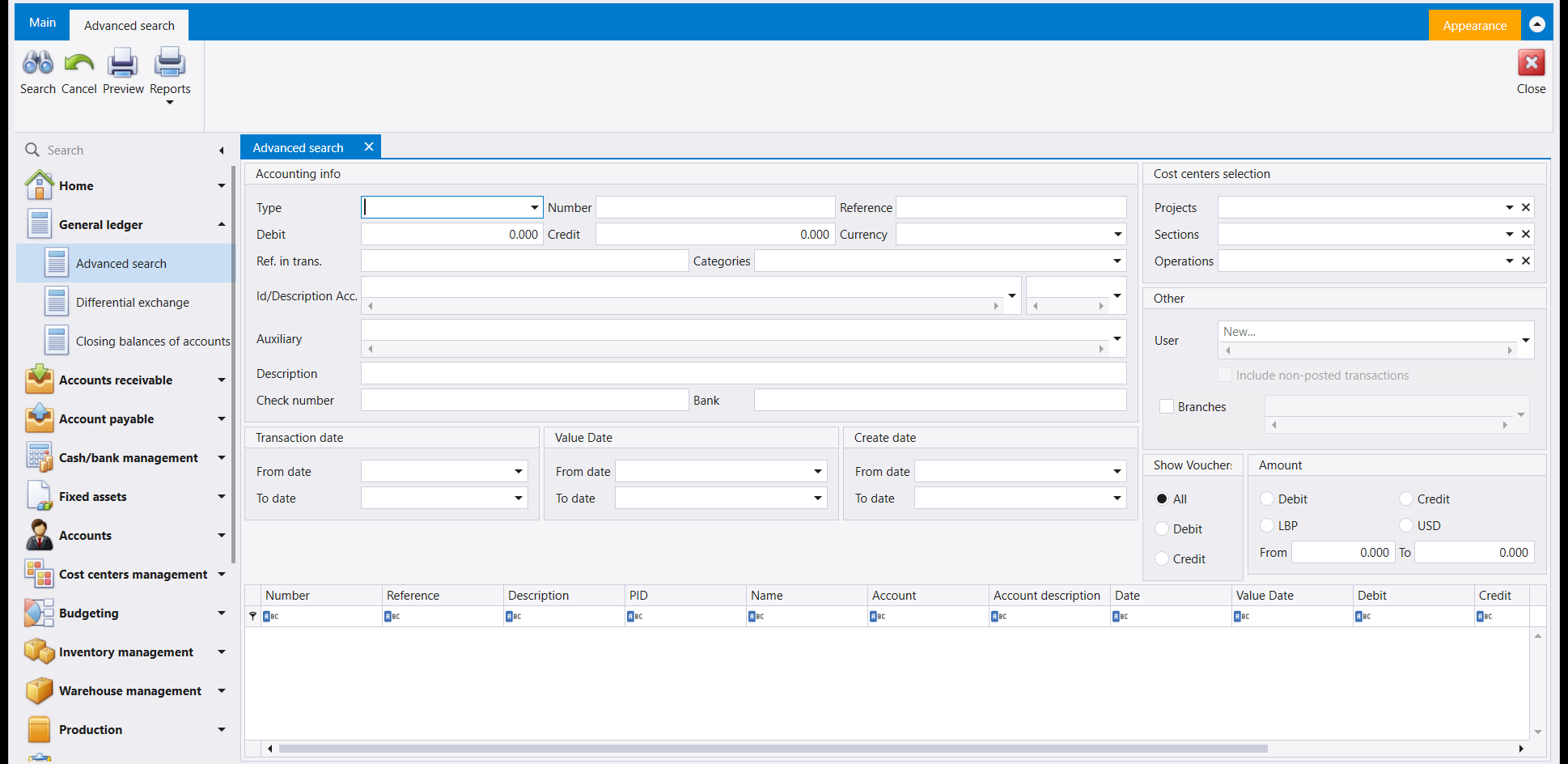
Include non-posted transactions is greyed out. Libra disables it when there can be nothing to include - which is exactly the case in a company where every entry is posted the moment it is saved. Where the second step is in use, that box can be ticked, and ticking it widens the search to entries that have not been released yet.
5. Filtering a list by it
The Posted column has a small box in the filter row under its heading, like every other column. Click it to narrow a long list to one state or the other. In a company that posts on save this always returns either everything or nothing, which is itself a quick way to confirm which mode you are in.
يحمل كل جدول قيود في ليبرا عمودًا اسمه مُرحَّل (Posted)، وهو يجيب عن سؤال واحد: هل وصل هذا القيد إلى الأستاذ؟ فالمربّع المؤشَّر يعني نعم - القيد داخل الأرصدة، وكل تقرير يقرأ تلك الأرصدة يتضمّنه.
ويشرح هذا الدليل معنى تلك العلامة، ولماذا تكاد تكون مؤشَّرة في كل سطر تراه، وما الذي يتغيّر في الشركات التي لا تكون فيها كذلك.
١. العمود
مؤشَّر في كل سطر، بما في ذلك قيد حُفظ قبل دقيقة. وهذه ليست مصادفة، وليس العمود زينة.
٢. ما لم تُجهَّز شركتك على خلاف ذلك، فالحفظ هو الترحيل
في اللحظة التي تضغط فيها F12 على قيد متوازن يصير القيد في الأستاذ. فلا حالة مسوّدة ولا خطوة ثانية، ولهذا يقرأ العمود أعلاه على النحو الذي رأيته.
ويستحق هذا أن تعرفه قبل أن تكتب، لأنه يعني أنه لا وجود لـ"أحفظه وأفكّر فيه غدًا". فبمجرد حفظ القيد:
- يتضمّنه ميزان المراجعة،
- ويتضمّنه كشف حساب الزبون أو المورّد،
- وكل رصيد لمسه يكون قد تحرّك أصلًا.
فالخطأ لا يُصحَّح بتعديل مسوّدة، بل بقيد آخر - تصحيح أو عكس - وهو الجواب الصحيح على كل حال، لأن الأستاذ سجلٌّ لما حدث، بما في ذلك التصحيح.
ولهذا أيضًا تشتدّ قاعدة التوازن. يرفض ليبرا حفظ قيد غير متوازن بدل أن يضعه جانبًا، لأنه لا مكان يضعه فيه. انظر القيود المحاسبية.
٣. وبعض الشركات تضيف خطوة ثانية
يمكن تجهيز ليبرا بحيث يُكتب القيد ويُحفظ ولكنه لا يصل إلى الأستاذ حتى يفرج عنه أحدهم. وهذا يوفّر خطوة مراجعة - شخص يُدخل عمل اليوم وآخر يدقّقه ويفرج عنه - ولا يغيّر القيد أي رصيد ولا يظهر في أي تقرير قبل الإفراج.
وحيث تكون هذه الخطوة مفعّلة تظهر شاشتان إضافيتان تحت الأستاذ العام (General ledger): القيود غير المرحّلة (Unposted transactions) التي تعرض كل ما ينتظر، وترحيل القيود (Post transactions) التي تفرج عن دفعة منه. وشركتك إما أن تملكهما وإما لا؛ وهما ليستا محجوبتين خلف صلاحية تطلبها.
تفتح القيود غير المرحّلة على مجال تاريخ. اختر الفترة واضغط Refresh فتظهر القيود التي ما زالت تنتظر - سطر لكل قيد، مع المرجع الذي كتبته والمبلغ بكل عملة. أشّر ما دقّقته (أو Mark all) ثم اضغط Post. فتخرج من الجدول وتصبح منذ تلك اللحظة ضمن الأرصدة.
ولا شيء في هذا الجدول قد وصل إلى الأستاذ بعد. فالقيد الجالس هنا لا يغيّر رصيدًا ولا يظهر في تقرير، وهذا هو مغزى الخطوة الإضافية كلها.
أما ترحيل القيود فتؤدي العمل نفسه بلا جدول، حين تعرف سلفًا ما تريد الإفراج عنه: املأ رقم قيد أو نوعًا أو مجال تاريخ أو أي مزيج منها واضغط Post.
٤. أي الحالتين شركتك؟ طريقتان للمعرفة
انظر إلى أحدث سطر في أي جدول قيود. احفظ قيدًا ثم انظر إلى Posted في سطره. فالتأشير الفوري يعني أن شركتك ترحّل عند الحفظ.
أو افتح البحث المتطوّر (Advanced search) تحت الأستاذ العام وانظر في لوحة Other:
خيار Include non-posted transactions رمادي. فليبرا يعطّله حين لا يمكن أن يكون هناك ما يُضاف - وهذه هي حال الشركة التي يُرحَّل فيها كل قيد لحظة حفظه. أما حيث تُستعمل الخطوة الثانية فيمكن تأشير ذلك المربّع، وتأشيره يوسّع البحث ليشمل القيود التي لم يُفرج عنها بعد.
٥. التصفية بحسبه
لعمود Posted مربّع صغير في صفّ التصفية أسفل عنوانه، شأنه شأن كل عمود آخر. اضغطه لتحصر لائحة طويلة في إحدى الحالتين. وفي الشركة التي ترحّل عند الحفظ يعيد هذا دائمًا إما كل شيء وإما لا شيء، وهو بحدّ ذاته طريقة سريعة للتأكد من الحالة التي أنت فيها.