
Journal vouchers: how entries reach the ledgerالقيود المحاسبية: كيف تصل الحركات إلى الأستاذ
Everything you have set up so far - the chart of accounts, the auxiliary accounts, the currencies and rates - exists so that you can record what the business actually does. A journal voucher is how you record it. It is the entry itself: a date, a description, and two or more lines that say which accounts moved and by how much.
To create one step by step, read How to create a journal voucher.
1. Where they live
Open Journal vouchers from the left menu. The screen opens on the list of every voucher already recorded, newest first.
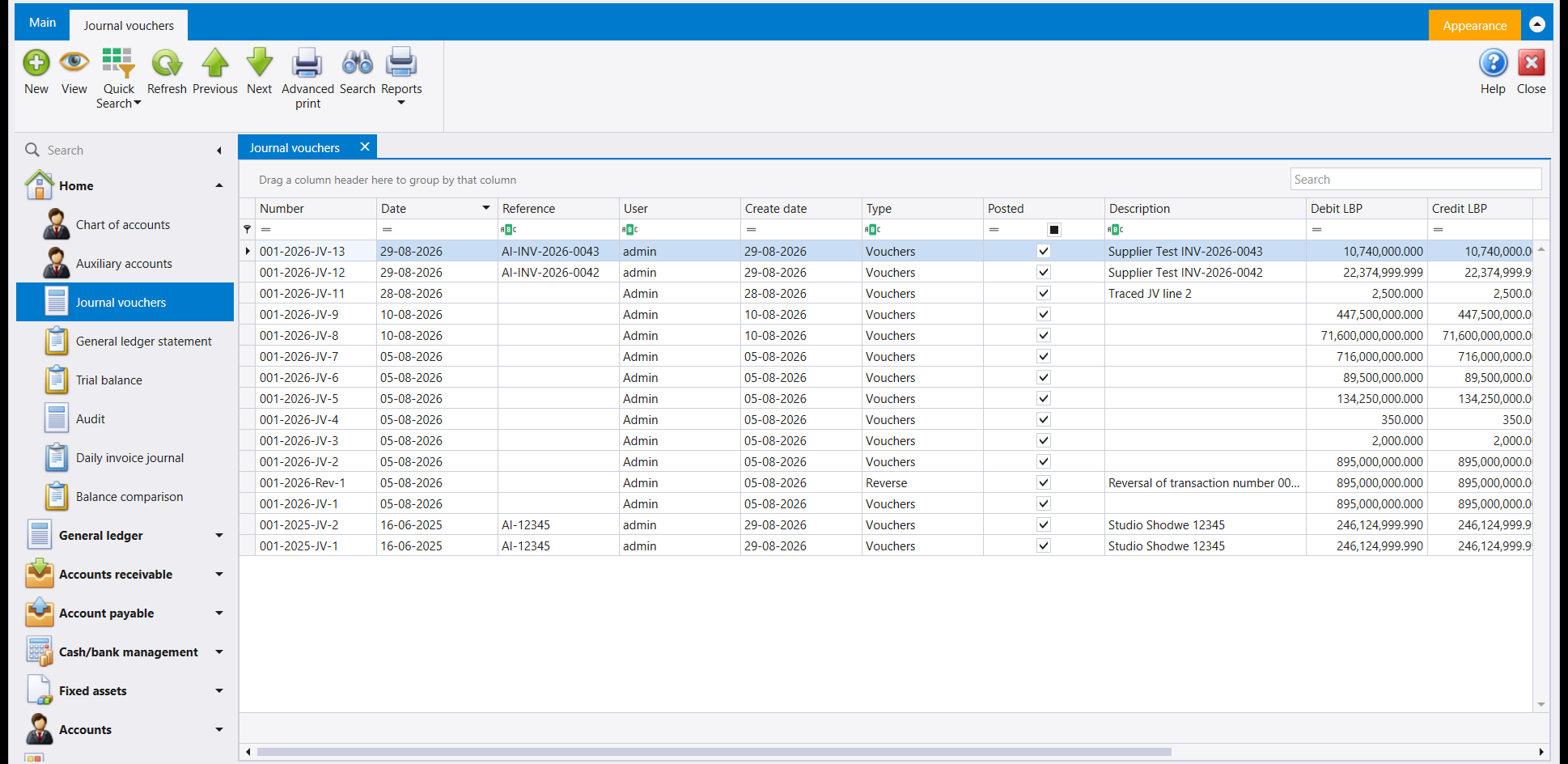
Each column answers a different question:
| Column | What it tells you |
|---|---|
| Number | The voucher's own number, assigned by Libra. |
| Date | The date the entry belongs to accounting-wise - not necessarily the day it was typed. |
| Reference | Your own reference: an invoice number, a receipt number, a file number. |
| User | Who created it. |
| Create date | The day it was actually typed, which is why it can differ from Date. |
| Type | Which kind of voucher it is. Vouchers is an ordinary entry; Reverse is one Libra generated to cancel another. |
| Posted | Whether the entry has reached the ledger. Ticked on every row here, because saving posts - see Posted: when an entry reaches the ledger. |
| Description | The free-text explanation you wrote. |
| Debit LBP / Credit LBP | The voucher's totals. On a correct voucher these two are equal. |
The row of small boxes under the headings is the filter row - type in it to narrow the list to one account, one date, or one reference. Dragging a column heading into the strip above the grid groups the list by that column.
2. The voucher number is not a plain counter
A number like 001-2026-JV-15 is four pieces of information joined together:
001- the branch the voucher belongs to.2026- the year.JV- the kind of voucher.15- the sequence within that branch, that year, that kind.
So the numbering restarts each year and runs separately per branch. Two branches can both have a voucher 15 in 2026 without any clash, because the full number differs.
3. What one voucher looks like
Opening a voucher shows a header and a grid of lines.
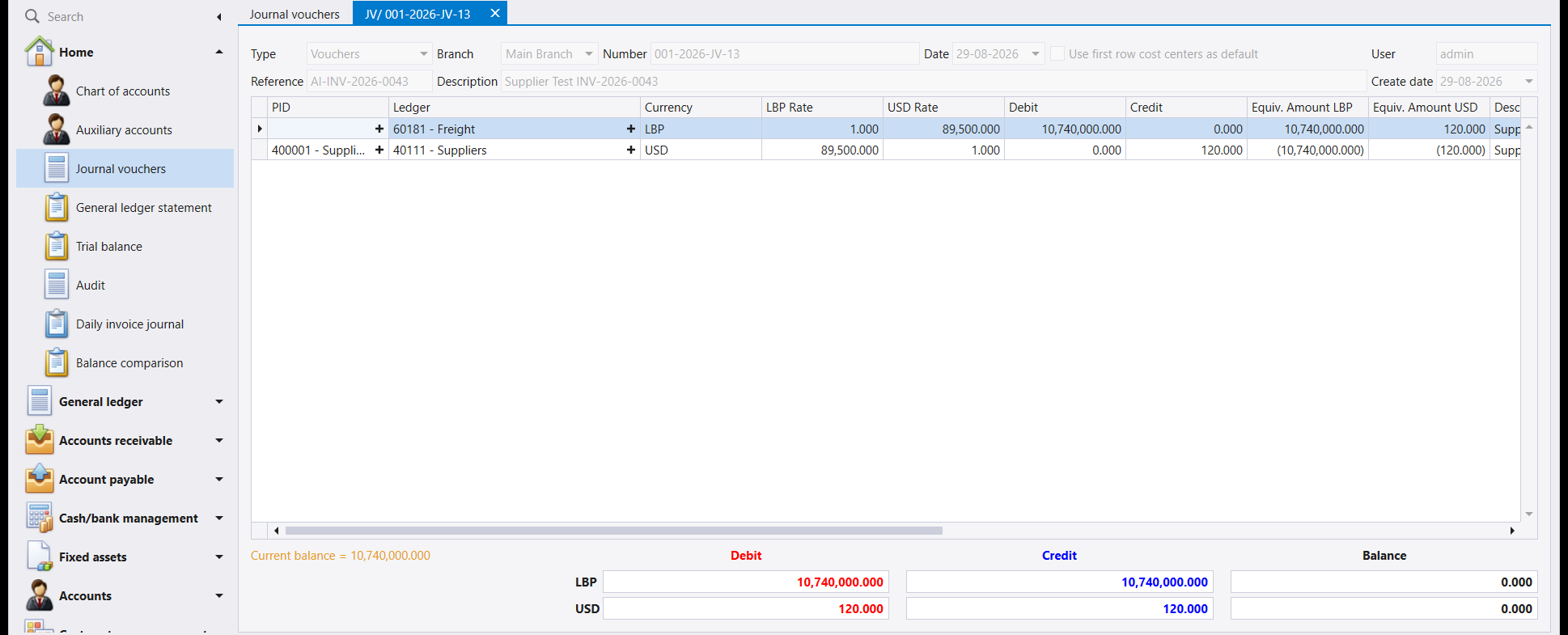
The header describes the entry as a whole - its type, branch, number, date, your reference and your description. The grid is the entry itself, one row per account that moved:
| Column | Meaning |
|---|---|
| PID | The auxiliary record, when the account is one that carries them - a specific supplier, client, employee or bank. Left empty on accounts that do not use auxiliaries. |
| Ledger | The account being moved. |
| Currency | The currency of this line. |
| LBP Rate / USD Rate | The exchange rates applied to this line. |
| Debit / Credit | The amount, in the line's own currency. Every line is one or the other, never both. |
| Equiv. Amount LBP / USD | The same amount expressed in each of the company's two currencies. A credit shows in brackets. |
4. Debits must equal credits - in every currency
The bar under the grid is the voucher's conscience. It shows the total debit, the total credit and the difference, on a separate row for each of the company's two currencies.
A voucher is only complete when the Balance is 0.000 on both rows. While it is not, Libra prints Totals are not matching in red at the bottom-left and will not let the voucher be saved.
Both currency rows must balance, not just one. This matters the moment a voucher mixes currencies - paying a supplier who is billed in USD out of an LBP account, for instance. The two lines carry different amounts in their own currencies, but the LBP row and the USD row each add up to zero, because Libra converts every line into both.
5. Mixed-currency vouchers
The voucher above is the ordinary case. Its first line moves an expense account held in LBP; its second moves a supplier account held in USD. Neither line was converted by hand - each line carries the rate, and the equivalent columns show what the line is worth in the other currency.
This is why the exchange rate has to be right before the voucher is entered: the rate in force on the voucher's Date is the one applied, and it is baked into the entry when you save.
6. Types of voucher
The Type dropdown in the header decides what kind of entry you are making. Vouchers is the ordinary one and is what the rest of this guide describes. The Reverse rows you may see in the list are not typed by anyone - Libra creates them when a voucher is reversed, and their description names the voucher they cancel.
7. A voucher is not the only way entries appear
Journal vouchers are the manual route. Most entries in a working company are not typed here at all
- an invoice, a receipt, a payment or a stock movement each generate their own entries when they
are saved. The journal voucher is what you use for everything that has no document of its own: opening balances, corrections, depreciation, accruals, and any adjustment your accountant asks for.
كل ما جهّزته حتى الآن - شجرة الحسابات والحسابات المساعدة والعملات وأسعار الصرف - موجود لكي تسجّل به ما تفعله الشركة فعلًا. والقيد المحاسبي (Journal voucher) هو وسيلة التسجيل. فهو الحركة نفسها: تاريخ، وشرح، وسطران أو أكثر تبيّن أي الحسابات تحرّكت وبأي مبلغ.
ولإنشاء قيد خطوة بخطوة، اقرأ كيفية إنشاء قيد محاسبي.
١. أين تجدها
افتح القيود المحاسبية (Journal vouchers) من القائمة اليسرى. تُفتح الشاشة على لائحة كل القيود المسجّلة، الأحدث أولًا.
ويجيب كل عمود عن سؤال مختلف:
| العمود | ما الذي يخبرك به |
|---|---|
| الرقم (Number) | رقم القيد الذي يخصّصه ليبرا. |
| التاريخ (Date) | التاريخ الذي يعود إليه القيد محاسبيًا - وليس بالضرورة يوم إدخاله. |
| المرجع (Reference) | مرجعك أنت: رقم فاتورة أو رقم إيصال أو رقم ملف. |
| المستخدم (User) | من أنشأ القيد. |
| تاريخ الإنشاء (Create date) | اليوم الذي أُدخل فيه فعلًا، ولهذا قد يختلف عن التاريخ. |
| النوع (Type) | نوع القيد. فـVouchers قيد عادي، وReverse قيد أنشأه ليبرا لإلغاء قيد آخر. |
| مُرحَّل (Posted) | هل وصل القيد إلى الأستاذ. وهو مؤشَّر في كل سطر هنا لأن الحفظ يرحّل - انظر الترحيل: متى يصل القيد إلى الأستاذ. |
| الشرح (Description) | الشرح الحر الذي كتبته. |
| مدين ودائن (Debit LBP / Credit LBP) | مجموعا القيد. وهما متساويان في القيد الصحيح. |
وصفّ المربّعات الصغيرة أسفل العناوين هو صفّ التصفية - اكتب فيه لتحصر اللائحة بحساب واحد أو تاريخ واحد أو مرجع واحد. وسحب عنوان عمود إلى الشريط فوق الجدول يجمّع اللائحة بحسب ذلك العمود.
٢. رقم القيد ليس عدّادًا بسيطًا
رقم مثل 001-2026-JV-15 هو أربع معلومات مجموعة معًا:
001- الفرع الذي يعود إليه القيد.2026- السنة.JV- نوع القيد.15- التسلسل ضمن ذلك الفرع وتلك السنة وذلك النوع.
فالترقيم يبدأ من جديد كل سنة ويسير منفصلًا لكل فرع. ويمكن أن يكون لدى فرعين كليهما قيد رقم 15 في سنة 2026 دون أي تعارض، لأن الرقم الكامل مختلف.
٣. كيف يبدو القيد الواحد
يُظهر فتح القيد رأسًا وجدولًا من السطور.
فـالرأس يصف القيد ككل - نوعه وفرعه ورقمه وتاريخه ومرجعك وشرحك. والجدول هو القيد نفسه، سطر لكل حساب تحرّك:
| العمود | معناه |
|---|---|
| الذمة (PID) | السجل المساعد، حين يكون الحساب من الحسابات التي تحملها - مورّد أو زبون أو موظف أو مصرف بعينه. ويُترك فارغًا في الحسابات التي لا تستعمل الذمم. |
| الحساب (Ledger) | الحساب الذي يتحرّك. |
| العملة (Currency) | عملة هذا السطر. |
| سعر الصرف (LBP Rate / USD Rate) | أسعار الصرف المطبّقة على هذا السطر. |
| مدين ودائن (Debit / Credit) | المبلغ بعملة السطر نفسه. وكل سطر إما مدين وإما دائن، لا الاثنان معًا. |
| المعادل (Equiv. Amount LBP / USD) | المبلغ نفسه معبَّرًا عنه بكل من عملتي الشركة. ويظهر الدائن بين قوسين. |
٤. المدين يساوي الدائن - في كل عملة
الشريط أسفل الجدول هو ضمير القيد. يعرض مجموع المدين ومجموع الدائن والفرق بينهما، في سطر منفصل لكل من عملتي الشركة.
ولا يكتمل القيد إلا حين يكون الرصيد (Balance) مساويًا 0.000 في السطرين معًا. وما دام غير ذلك يطبع ليبرا عبارة Totals are not matching بالأحمر أسفل اليسار ولا يسمح بحفظ القيد.
يجب أن يتوازن سطرا العملتين معًا، لا سطر واحد. ويظهر أثر ذلك فور خلط العملات في قيد واحد - كدفع مستحقات مورّد مفوتَرة بالدولار من حساب باللّيرة مثلًا. فالسطران يحملان مبلغين مختلفين بعملة كل منهما، لكن سطر اللّيرة وسطر الدولار يبلغ كل منهما صفرًا، لأن ليبرا يحوّل كل سطر إلى العملتين.
٥. القيود متعدّدة العملات
القيد أعلاه هو الحالة العادية. فسطره الأول يحرّك حساب مصاريف بالـLBP، وسطره الثاني يحرّك حساب مورّد بالـUSD. ولم يُحوَّل أي من السطرين يدويًا - فكل سطر يحمل سعره، وتُظهر أعمدة المعادل قيمة السطر بالعملة الأخرى.
ولهذا يجب أن يكون سعر الصرف صحيحًا قبل إدخال القيد: فالسعر الساري في تاريخ القيد هو المطبَّق، ويُثبَّت داخل القيد عند الحفظ.
٦. أنواع القيود
قائمة النوع (Type) في الرأس تحدد نوع الحركة التي تسجّلها. وVouchers هو النوع العادي وهو ما يصفه باقي هذا الدليل. أما سطور Reverse التي قد تراها في اللائحة فلا يكتبها أحد - ينشئها ليبرا عند عكس قيد، ويسمّي شرحُها القيدَ الذي تُلغيه.
٧. القيد ليس الطريق الوحيد لظهور الحركات
القيود المحاسبية هي الطريق اليدوي. ومعظم حركات الشركة العاملة لا تُكتب هنا أصلًا - فالفاتورة والإيصال والدفعة وحركة المخزون يولّد كل منها قيوده الخاصة عند الحفظ. وإنما تستعمل القيد المحاسبي لكل ما لا مستند له: الأرصدة الافتتاحية والتصحيحات والاستهلاكات والمستحقات، وأي تسوية يطلبها محاسبك.