
Opening vouchers: starting from where you already areالقيود الافتتاحية: البدء من حيث أنت فعلًا
No company starts from nothing. On the day you begin using Libra you already have money in the cash box, money in the bank, clients who owe you, suppliers you owe, and equipment you bought years ago. An opening voucher is how all of that gets in.
It is the same voucher you already know - a date, a description, and lines that say which accounts moved - so read Journal vouchers and How to create a journal voucher first. This guide only covers what is different.
1. Where they live
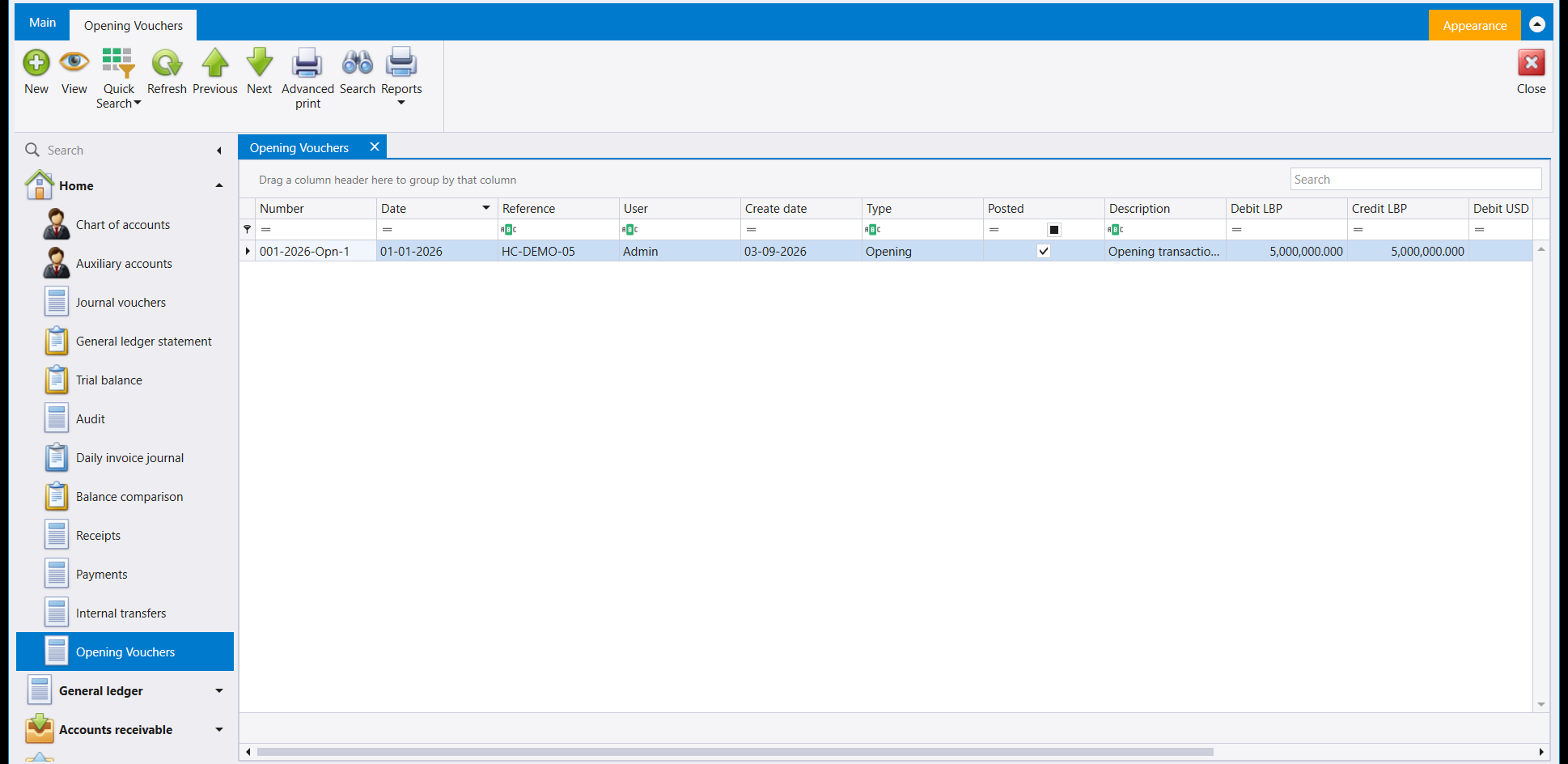
Open Opening Vouchers from the left menu. The screen opens on the list of the opening vouchers already recorded, and the columns are the same ones the journal voucher list uses.
2. Four things that are not the same as a journal voucher
| On an opening voucher | |
|---|---|
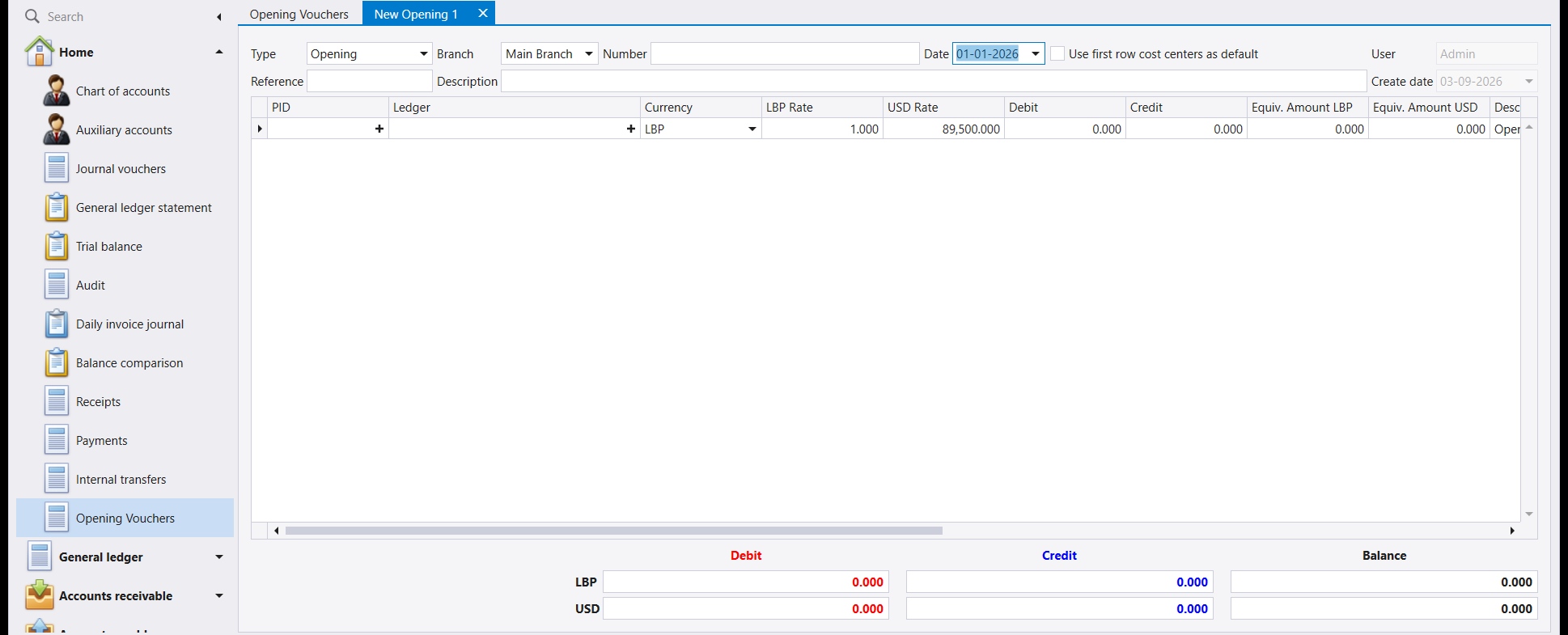
| Type | Fixed at Opening. You cannot change it - the screen you opened decides it. |
| Date | Filled in by Libra with the company's opening date - the Opening voucher date set when the company was created - and read-only. Above it reads 01-01-2026, although the voucher was typed in September. |
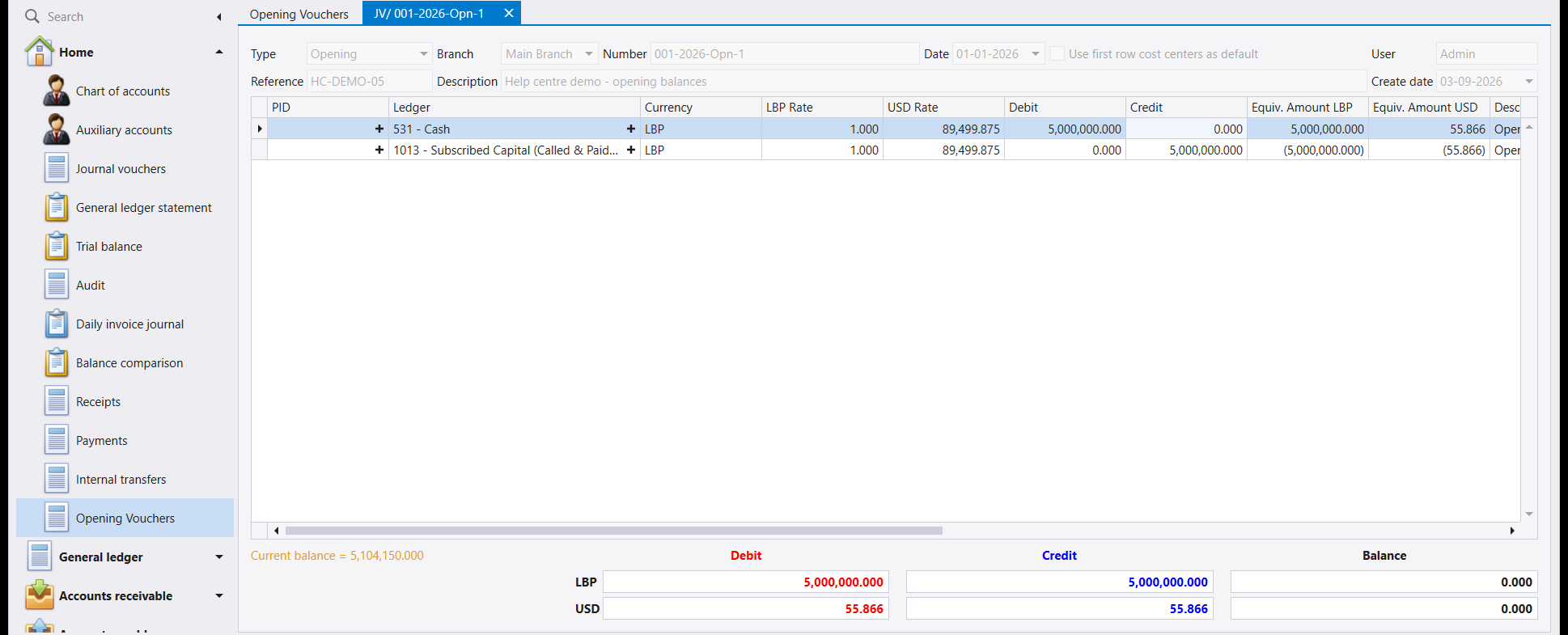
| Description on each line | Writes itself. Once saved, every line reads Opening transaction of date 1/1/2026. You do not type it. |
| Number | Carries Opn where a journal voucher carries JV - here 001-2026-Opn-1. |
The date is the one to understand. An opening balance belongs to the moment before trading starts, so every opening voucher carries the same date - the company's opening date. Libra fills it in and keeps it there: the calendar beside the field still opens, but picking another day leaves the date as it was. The same holds when you edit or copy an opening voucher.
3. What goes into one
One line for every account that already carries a balance on the day you start:
- what is in the cash box and in each bank account,
- what each client still owes you, and what you still owe each supplier - one line per party, with the party chosen in PID,
- stock on hand, and equipment and vehicles you already own,
- loans outstanding,
- and finally the capital and accumulated profit that make the whole thing balance.
That last one is not an afterthought. The difference between everything you own and everything you owe is the owners' stake, so it is what the balancing line records.
4. It still has to balance
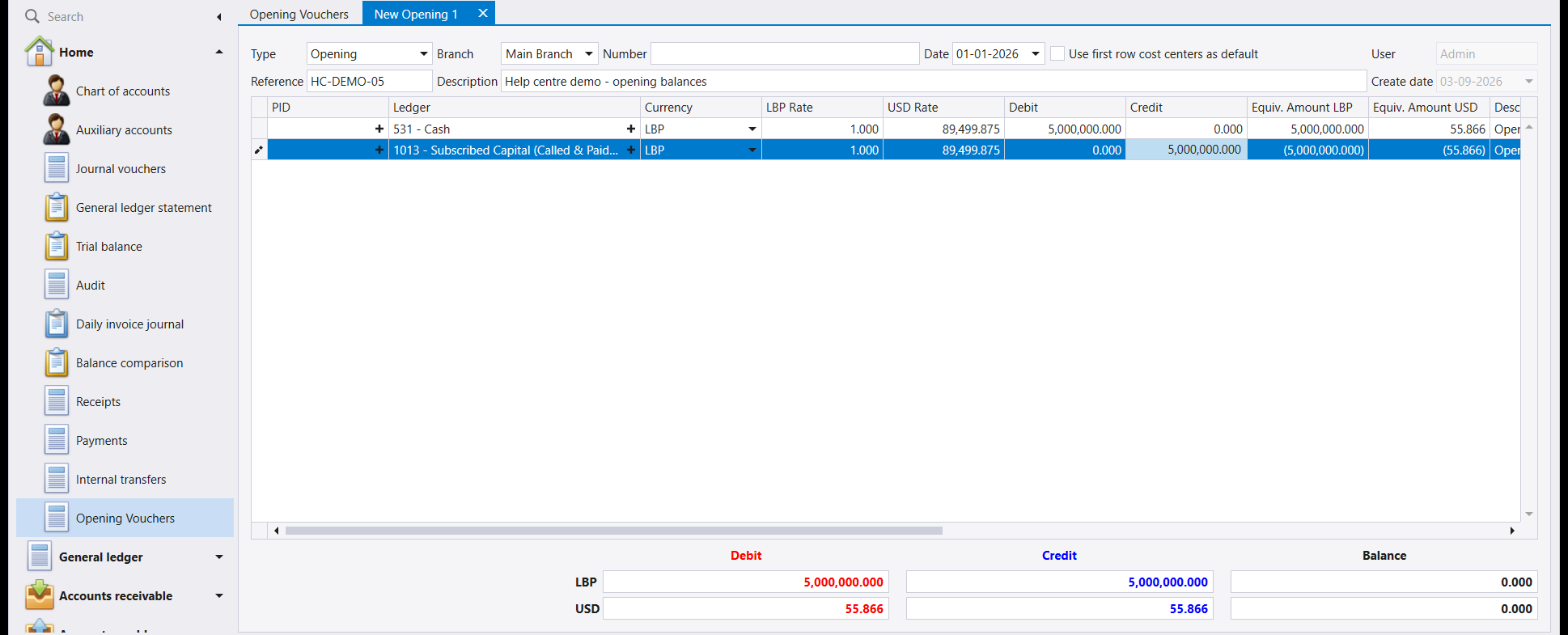
The bar under the grid behaves exactly as it does on a journal voucher: a total debit, a total credit and a Balance, on a separate row for each of the company's two currencies, and both must read 0.000 before Libra will save.
The example above is the simplest possible opening voucher - 5,000,000 LBP sitting in the cash box on 1 January, against the capital that paid for it. A real one has many more lines, but it foots to zero the same way.
5. Save
Press F12.
Two things to notice:
- The header greys out. An opening voucher, once saved, is a record of a decision already made.
- Current balance appears at the bottom left. It is the running balance of the account on the line you are standing on - a quick check that the figure you just entered produced the balance you expected.
6. Afterwards
An opening voucher is not a special case for anything downstream. It reaches the ledger like every other entry, and from that moment the trial balance, the statement of account and every report start from the figures you gave them.
Which is why it is worth getting right the first time. If an opening figure is wrong, every statement that account ever prints is wrong by the same amount.
7. If something is wrong
- The date is not the day you expected. It is the company's opening date, set when the company was created (see How to set up a company). On a new company, before any voucher or invoice has been saved, it can still be changed in Company properties, under Opening voucher date - then close Libra and log in again before entering opening vouchers. After that the field is locked: contact Libra Support.
- Totals will not balance. You are almost certainly missing the capital line - the one that absorbs the difference between what the company owns and what it owes.
- The party does not appear in PID. They have no auxiliary record yet - see How to create a client or How to create a supplier.
- You need to correct one after saving. Do not delete history. Ask your accountant whether the right answer is an adjusting journal voucher instead.
لا تبدأ أي شركة من الصفر. ففي اليوم الذي تبدأ فيه استعمال ليبرا يكون لديك مال في الصندوق ومال في المصرف، وزبائن مدينون لك، ومورّدون أنت مدين لهم، ومعدّات اشتريتها منذ سنوات. والقيد الافتتاحي (Opening voucher) هو وسيلة إدخال ذلك كلّه.
وهو القيد نفسه الذي تعرفه - تاريخ وشرح وسطور تبيّن أي الحسابات تحرّكت - فاقرأ أولًا القيود المحاسبية وكيفية إنشاء قيد محاسبي. ولا يتناول هذا الدليل إلا ما يختلف.
١. أين تجدها
افتح القيود الافتتاحية (Opening Vouchers) من القائمة اليسرى. تُفتح الشاشة على لائحة القيود الافتتاحية المسجّلة، وأعمدتها هي أعمدة لائحة القيود المحاسبية نفسها.
٢. أربعة فروق عن القيد المحاسبي
| في القيد الافتتاحي | |
|---|---|
| النوع (Type) | ثابت على Opening. ولا يمكنك تغييره - فالشاشة التي فتحتها هي التي تحدّده. |
| التاريخ (Date) | يملؤه ليبرا بـتاريخ افتتاح الشركة - أي تاريخ قيد الافتتاح (Opening voucher date) المحدَّد عند إنشاء الشركة - ولا يُعدَّل. فهو أعلاه 01-01-2026 مع أن القيد أُدخل في أيلول. |
| شرح كل سطر | يكتب نفسه. فبعد الحفظ يقرأ كل سطر Opening transaction of date 1/1/2026. ولا تكتبه أنت. |
| الرقم (Number) | يحمل Opn حيث يحمل القيد المحاسبي JV - وهو هنا 001-2026-Opn-1. |
والتاريخ هو ما يستحق الفهم. فالرصيد الافتتاحي يعود إلى اللحظة التي تسبق بدء العمل، ولذلك تحمل القيود الافتتاحية كلها التاريخ نفسه - تاريخ افتتاح الشركة. يملؤه ليبرا ويُبقيه كما هو: يمكن فتح التقويم بجانب الحقل، لكن اختيار يوم آخر لا يغيّر التاريخ. ويصحّ ذلك أيضًا عند تعديل قيد افتتاحي أو نسخه.
٣. ماذا يدخل فيه
سطر لكل حساب يحمل رصيدًا فعلًا في اليوم الذي تبدأ منه:
- ما في الصندوق وما في كل حساب مصرفي،
- ما يدين به كل زبون لك، وما تدين به أنت لكل مورّد - سطر لكل طرف، ويُختار الطرف في خانة الذمة (PID)،
- البضاعة الموجودة، والمعدّات والسيارات التي تملكها،
- القروض القائمة،
- وأخيرًا رأس المال والأرباح المتراكمة التي توازن المجموع كلّه.
وهذا الأخير ليس تفصيلًا لاحقًا. فالفرق بين كل ما تملكه وكل ما عليك هو حصّة أصحاب الشركة، وهو ما يسجّله السطر الموازِن.
٤. ويجب أن يتوازن
يتصرّف الشريط أسفل الجدول كما يتصرّف في القيد المحاسبي تمامًا: مجموع مدين ومجموع دائن ورصيد (Balance)، في سطر منفصل لكل من عملتي الشركة، ويجب أن يقرأ كلاهما 0.000 قبل أن يحفظ ليبرا.
والمثال أعلاه أبسط قيد افتتاحي ممكن - 5,000,000 ل.ل. في الصندوق في الأول من كانون الثاني، مقابل رأس المال الذي دفعها. أما القيد الحقيقي فسطوره أكثر بكثير، لكنه يبلغ الصفر بالطريقة نفسها.
٥. احفظ
اضغط F12.
وأمران يستحقّان الانتباه:
- يصير الرأس رماديًا. فالقيد الافتتاحي بعد حفظه سجلٌّ لقرار اتُّخذ سلفًا.
- تظهر عبارة الرصيد الحالي (Current balance) أسفل اليسار. وهي الرصيد الجاري لحساب السطر الذي تقف عليه - تحقّق سريع من أن الرقم الذي أدخلته أعطى الرصيد الذي توقّعته.
٦. وبعد ذلك
القيد الافتتاحي ليس حالة خاصة في أي شيء بعده. فهو يصل إلى الأستاذ كسائر القيود، ومن تلك اللحظة يبدأ ميزان المراجعة وكشف الحساب وكل تقرير من الأرقام التي أعطيتها إياه.
ولهذا يستحق أن يُضبط من المرة الأولى. فإن كان رقم افتتاحي خاطئًا، صار كل كشف يطبعه ذلك الحساب خاطئًا بالمقدار نفسه.
٧. إذا حدث خطأ
- التاريخ ليس اليوم الذي توقّعته. إنه تاريخ افتتاح الشركة المحدَّد عند إنشائها (انظر كيفية إنشاء شركة). وفي شركة جديدة، قبل حفظ أي قيد أو فاتورة، يمكن تغييره من خصائص الشركة (Company properties) في خانة تاريخ قيد الافتتاح (Opening voucher date) - ثم أغلق ليبرا وسجّل الدخول من جديد قبل إدخال القيود الافتتاحية. وبعد ذلك يُقفل الحقل: فاتصل بدعم ليبرا.
- المجاميع لا تتوازن. الأرجح أنك نسيت سطر رأس المال - وهو السطر الذي يستوعب الفرق بين ما تملكه الشركة وما عليها.
- الطرف لا يظهر في خانة الذمة. ليس له سجل مساعد بعد - انظر كيفية إنشاء زبون أو كيفية إنشاء مورّد.
- تحتاج إلى تصحيح قيد بعد حفظه. لا تمحُ السجل. اسأل محاسبك إن كان الجواب الصحيح قيدًا محاسبيًا تصحيحيًا بدلًا من ذلك.