
Cash and bank: accounts, cheques and reconciliationالنقد والمصارف: الحسابات والشيكات والمطابقة
Cash/bank management holds six entries. They do three different jobs, and knowing which is which saves a lot of hunting:
| Entry | What it is for |
|---|---|
| Bank setup | Recording your bank accounts and their details |
| Check deposit | Banking a batch of cheques you have received |
| Check transfer | Moving cheques from one cash box to another |
| Bank reconciliation | Agreeing your balance with the bank's |
| Check search | Finding one cheque by its number |
| Cash flow | Deciding what counts as cash, and reporting on it |
The first is setup you do once. The middle three are day-to-day work. The last two are for looking things up.
A bank account is an account first. Before any of this is useful, the bank has to exist in your chart of accounts - see Banks and How to open a bank account. Bank setup does not create the account; it records the extra details that belong to the bank, not to the bookkeeping.
1. Bank setup - the details the ledger has nowhere to put
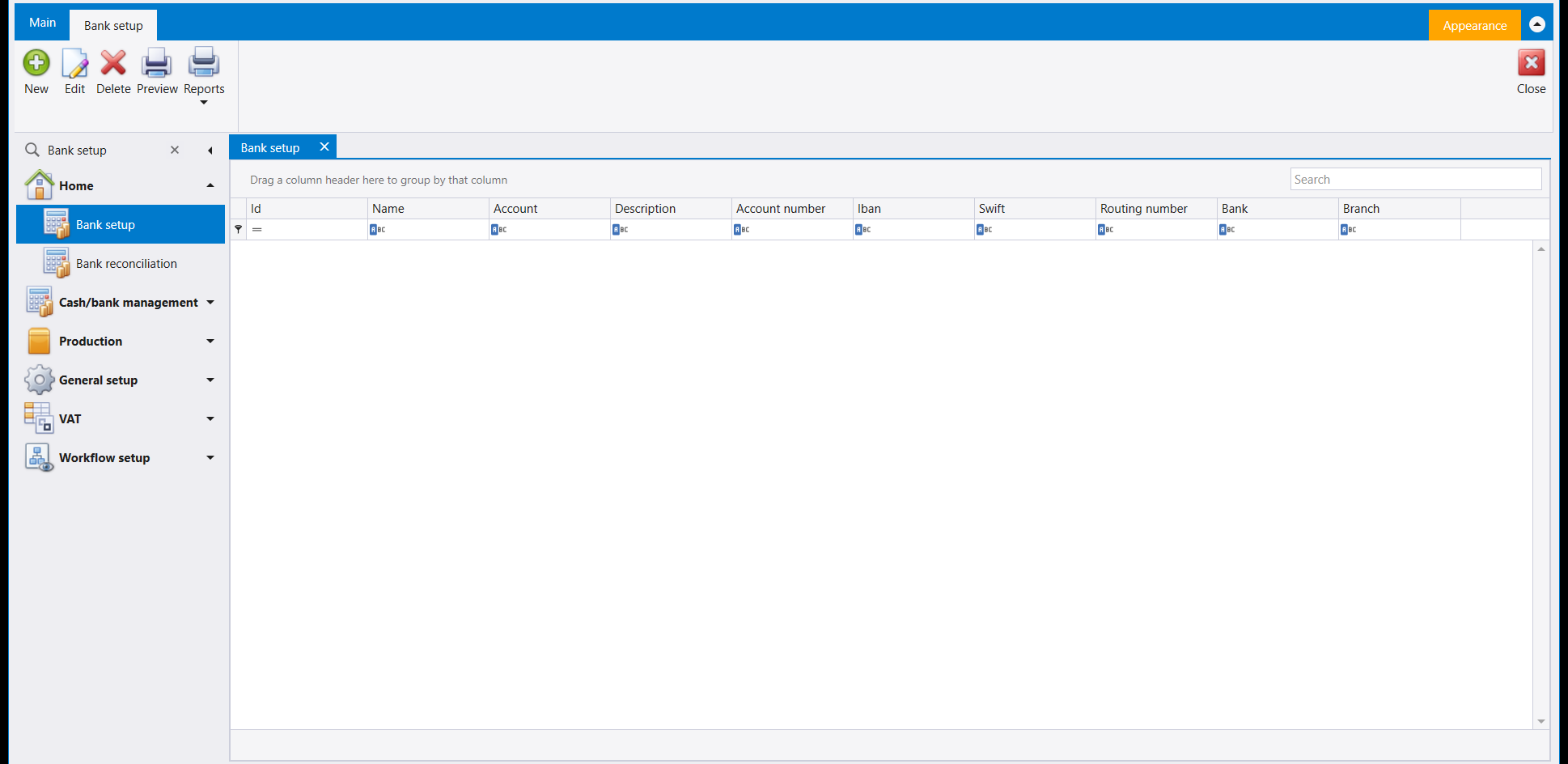
Your chart of accounts knows a bank account as a number and a balance. It has nowhere to keep the IBAN, the Swift code, the routing number, the account number the bank itself uses, or which branch you deal with. That is what this list is for: one row per bank account, linked to the ledger account by the Account column.
Fill it in once. Everything else in this group, and every cheque you print, reads from here.
2. Check deposit - banking a batch of cheques
This is the one you will use most. You have taken in several cheques; you are walking them to the bank as one deposit.
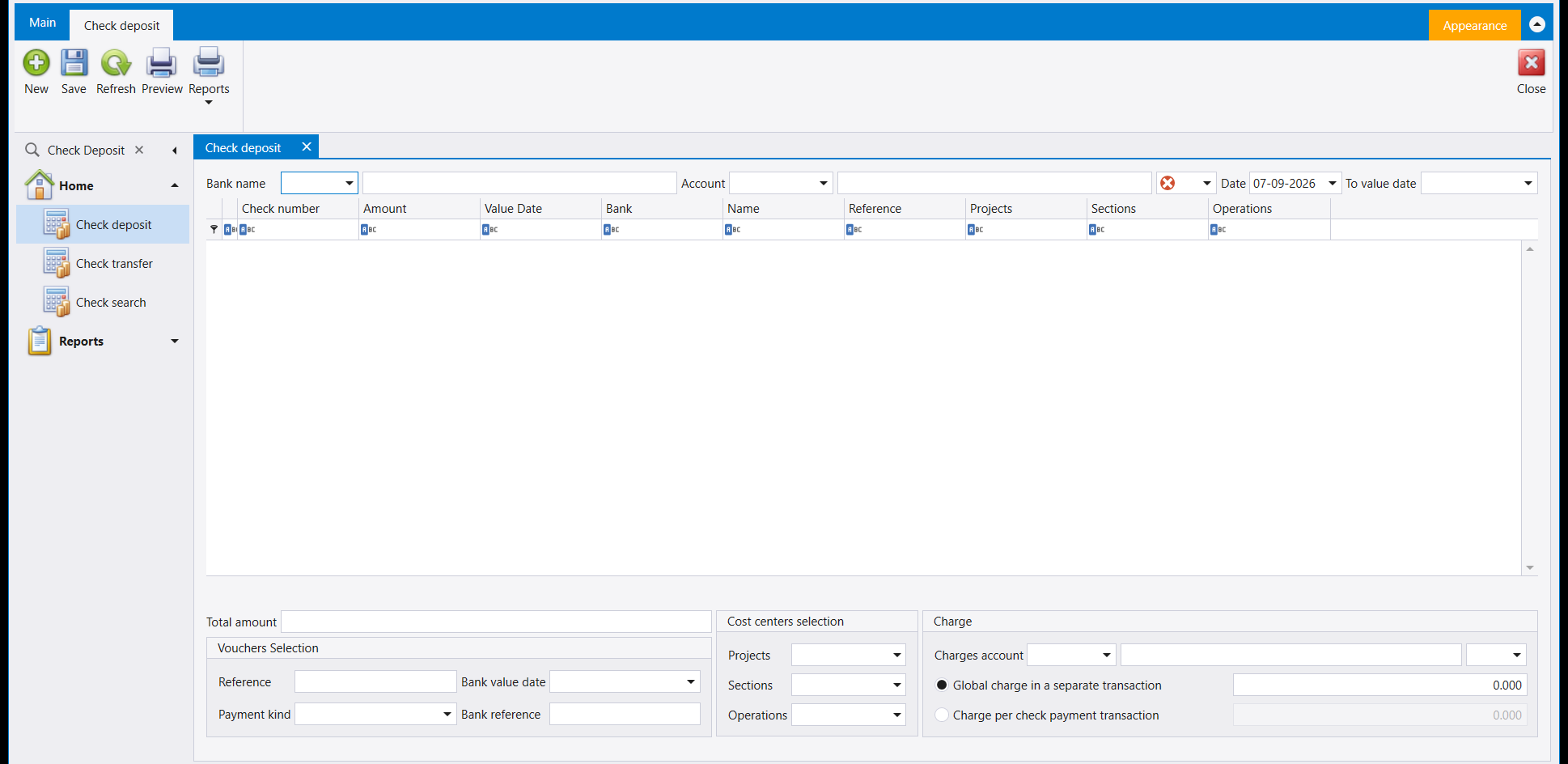
Choose the Bank name and the Account the money is going into, then list the cheques. Each line carries the cheque's own number, amount, value date and the bank it is drawn on, so the deposit slip and your books say the same thing.
Two things here are worth knowing before you need them:
- Vouchers Selection pulls in cheques you have already recorded on a receipt, instead of making you type them again. Filter by Reference, Payment kind, Bank value date or Bank reference.
- Charge handles the bank's fee, and it offers a real choice: Global charge in a separate transaction puts one fee against the whole deposit, while Charge per check payment transaction attaches a fee to each cheque. Pick the one that matches how your bank actually bills you, because it changes what your costs look like per customer.
Value date is not the date. Date is when you made the deposit; value date is when the bank will treat the money as available. On a post-dated cheque these are weeks apart, and it is the value date that decides when you can spend it.
3. Check transfer - moving cheques without banking them
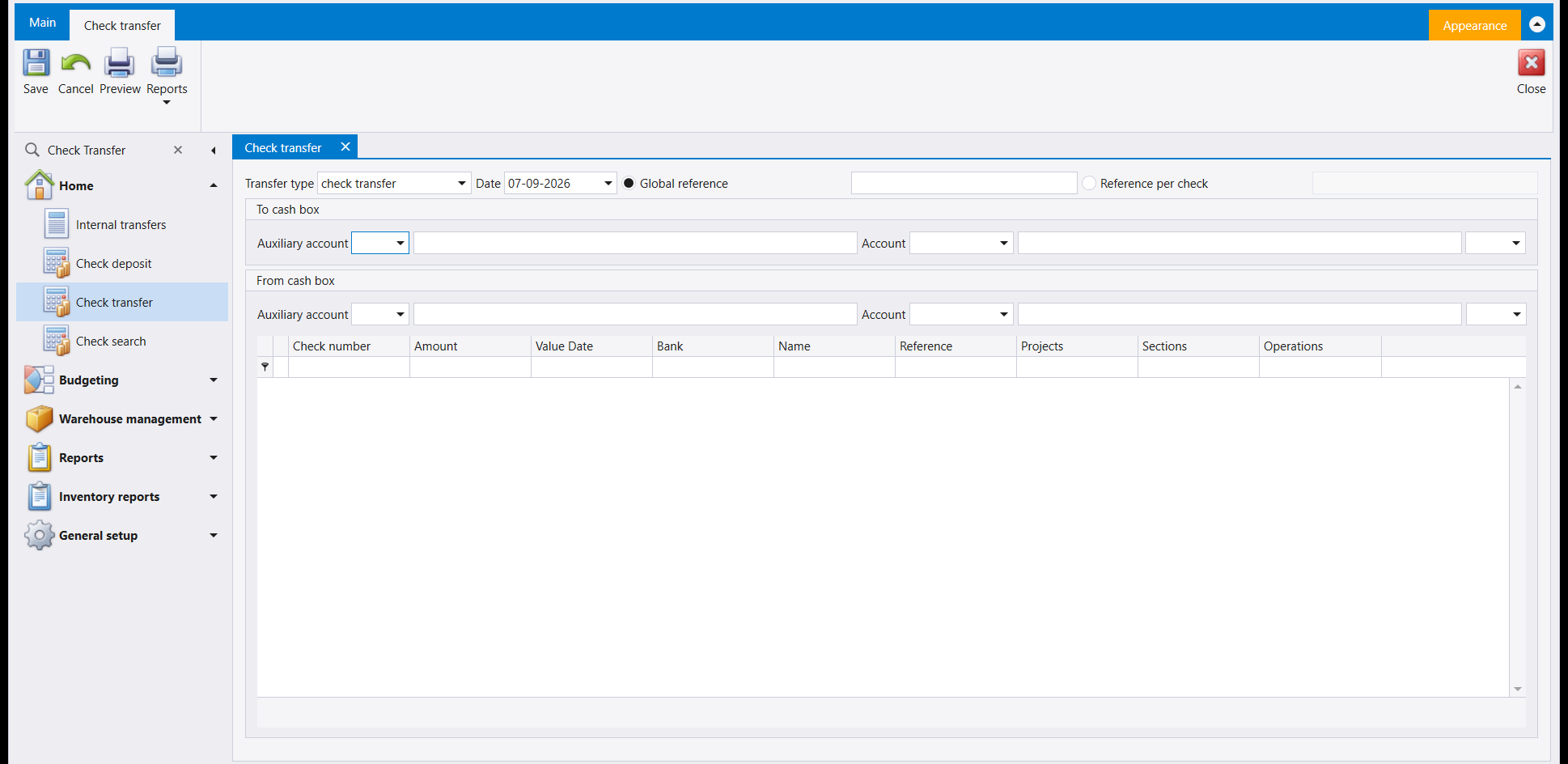
A cheque sitting in one cash box needs to be in another - it is moving from the branch safe to head office, or from a salesperson's collection to the main box. Nothing is being paid or banked; the cheque is just changing hands.
Set the From cash box and the To cash box, list the cheques, and save. Global reference puts one reference on the whole transfer; Reference per check lets each cheque carry its own.
4. Bank reconciliation - the difference is the point
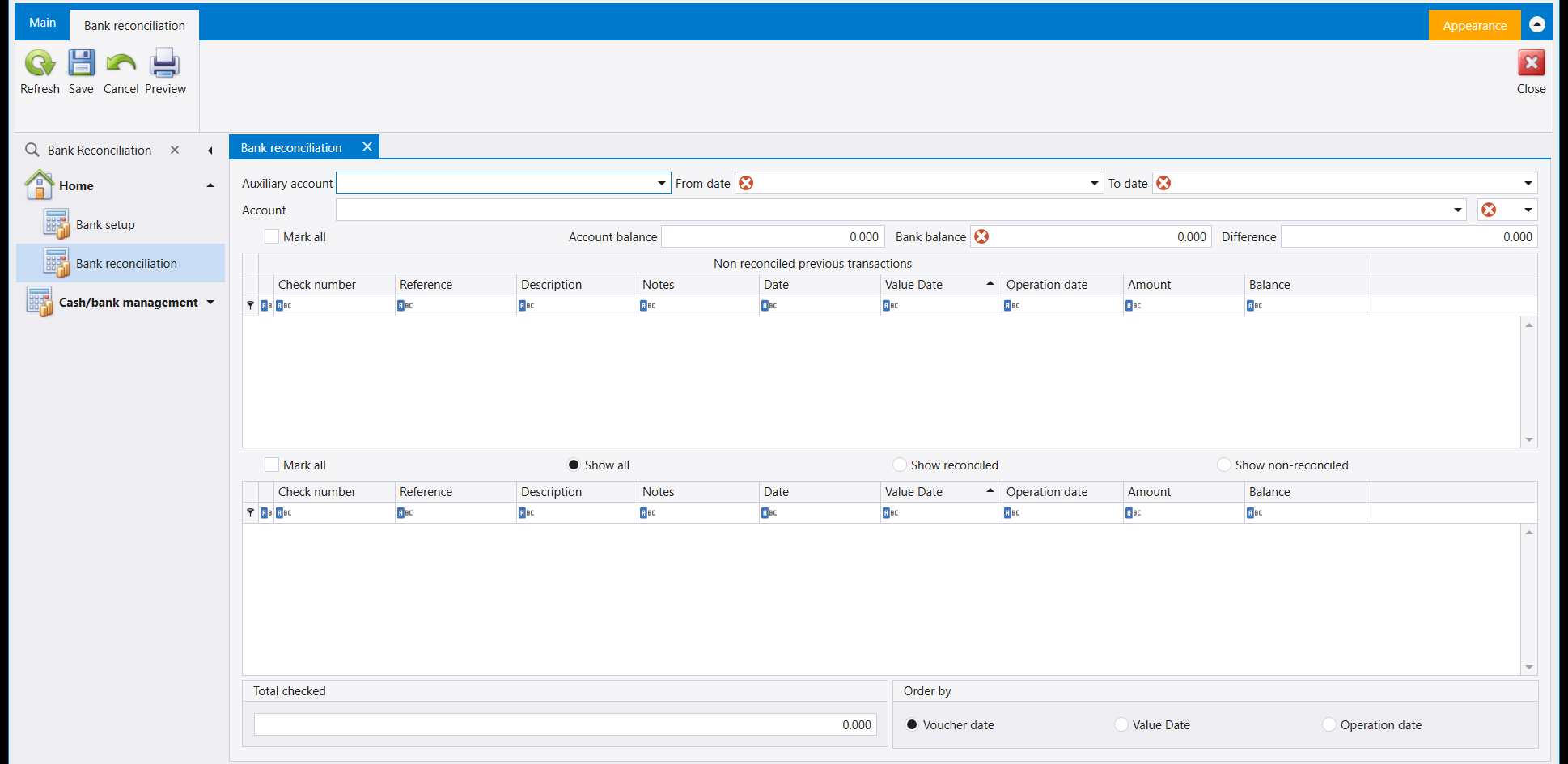
This is the screen that answers "why does the bank say I have a different amount than my books do?"
You give it your bank account and a date range. It shows your Account balance - what your books say - and you type in the Bank balance from the statement. Difference is the gap, and the whole job is to explain it away.
Work down the list and tick every entry that appears on the bank statement. What stays unticked is your answer: cheques you have written that nobody has cashed yet, deposits the bank has not credited yet. Total checked adds up what you have ticked as you go.
Two details make it usable on a long list. The upper grid is Non reconciled previous transactions - things left over from earlier periods that never cleared, which is exactly where an old unexplained difference hides. And Order by lets you sort by Voucher date, Value Date or Operation date; matching a bank statement is far easier by value date, because that is the order the bank used.
Reconciling changes nothing about your balance. Ticking an entry records that you have seen it on the statement. It does not move money, and it does not correct anything. If the difference will not close, the fix is a journal entry, not a tick.
5. Check search - finding one cheque
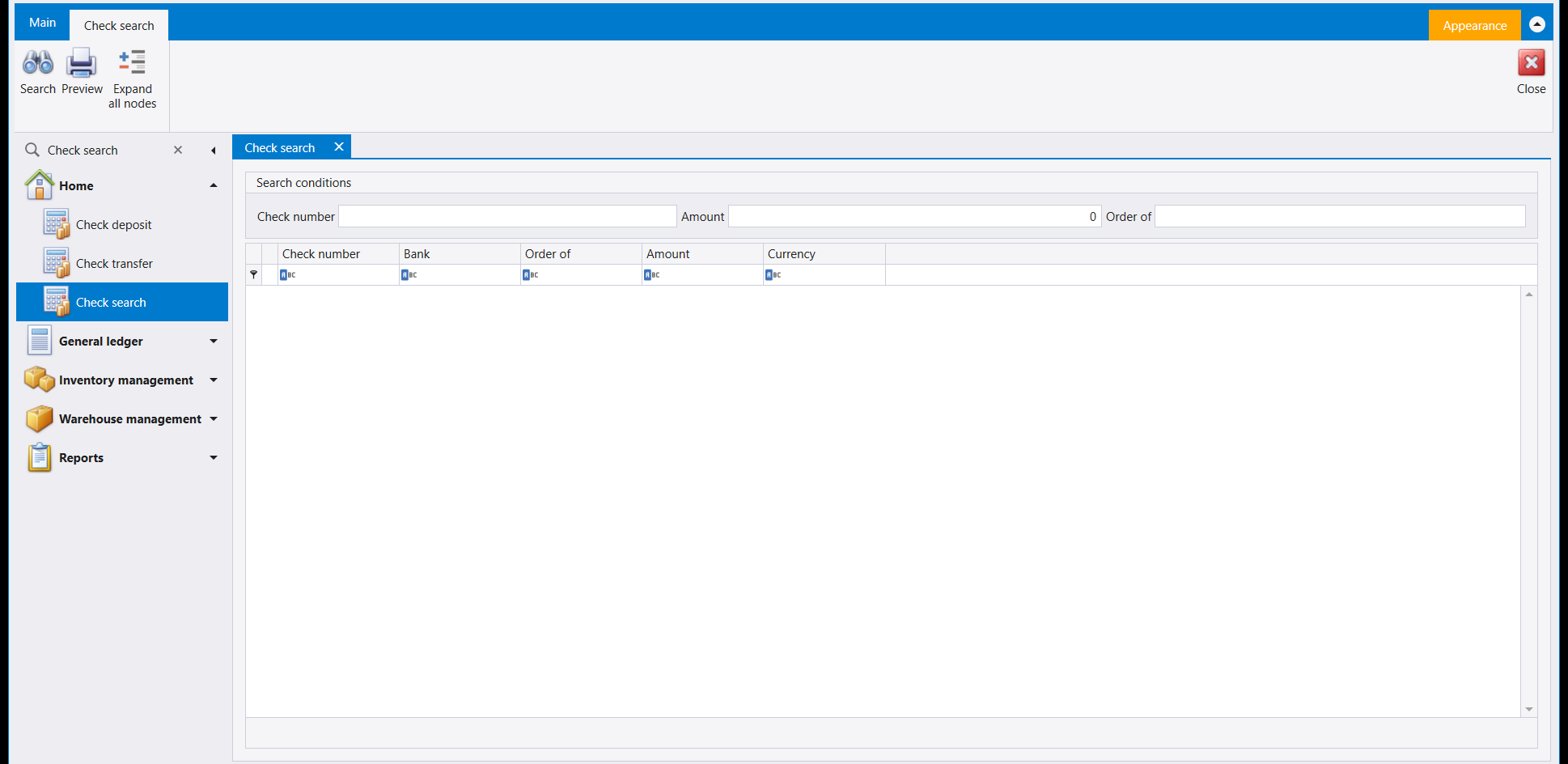
Someone rings up about a cheque. You have the number and nothing else. This searches every cheque in the company by Check number, Amount or Order of - the name it was made out to - and tells you which bank it is drawn on and in what currency.
6. Cash flow - deciding what counts as cash
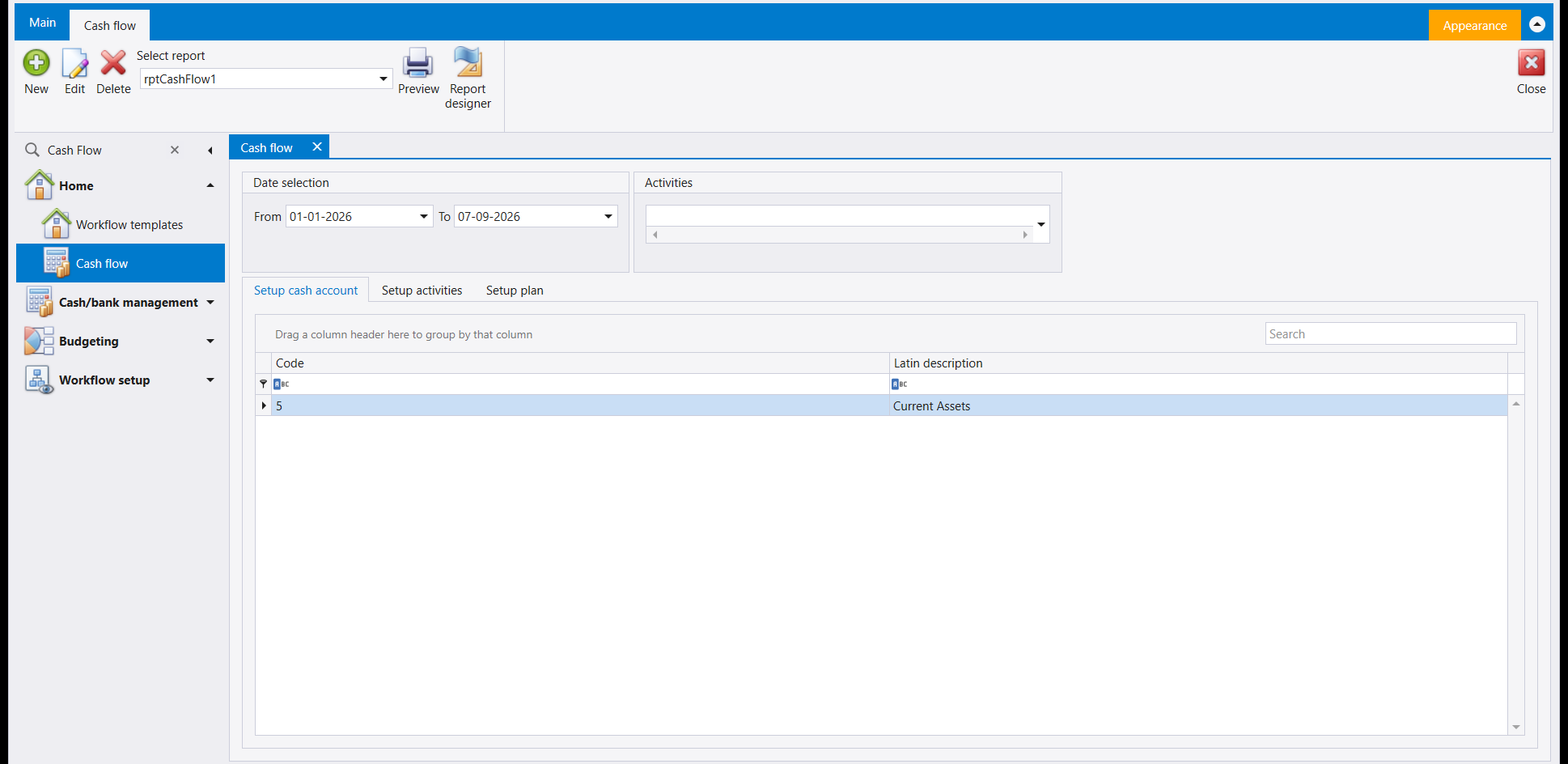
Cash flow is not a report you simply run: it has to be told what "cash" means in your company first. The three tabs are the setup, in order.
- Setup cash account - which accounts are cash. In the example above the whole of Current Assets is included, at code
5. - Setup activities - the headings you want the movement grouped under.
- Setup plan - what you expected, so the report can show planned against actual.
Then pick a date range and preview. Select report in the ribbon chooses the layout, exactly as it does on every other report in Libra.
7. Workflow setup - the workflow tiles
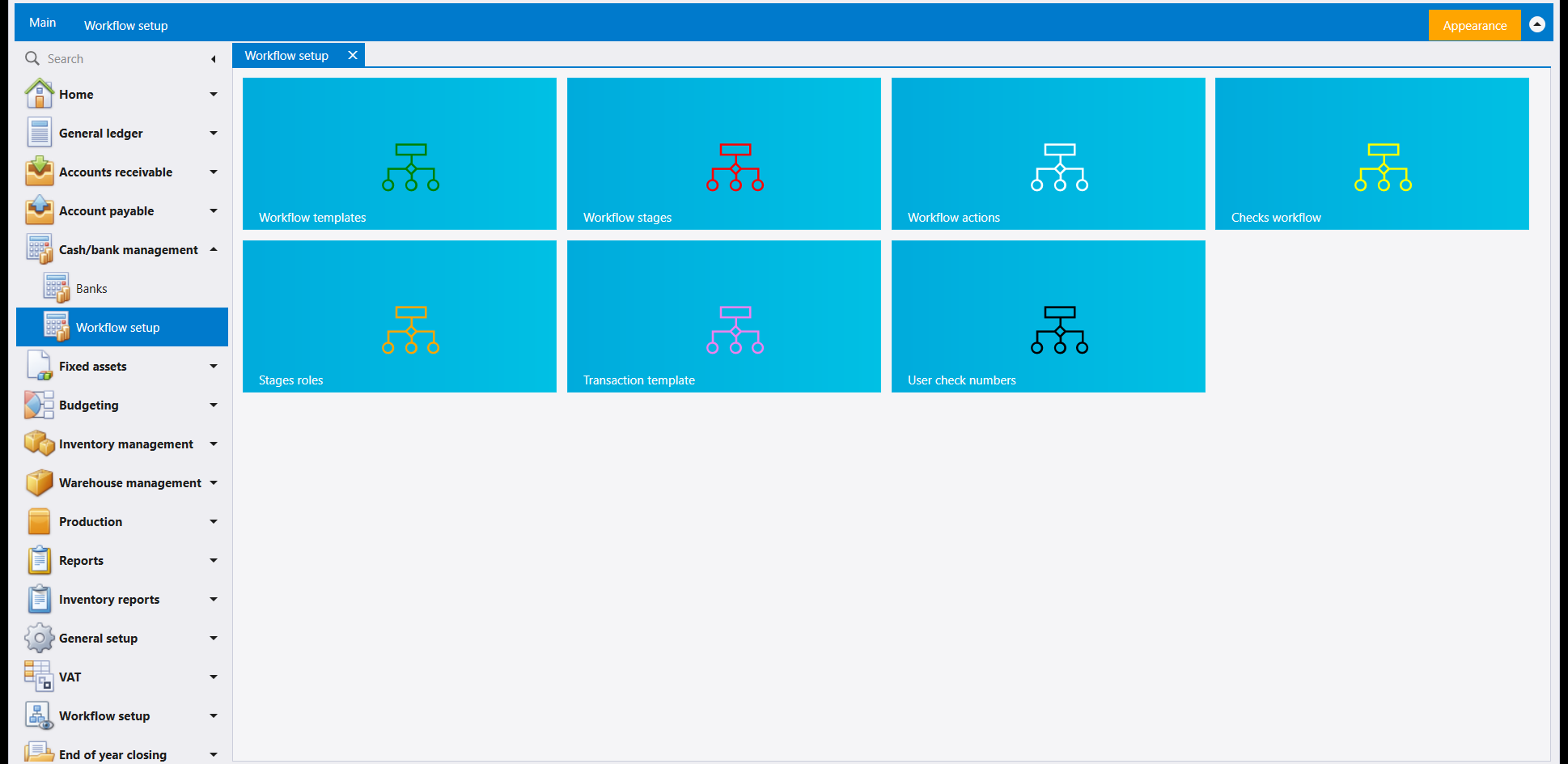
Workflow setup sits in the same group as Banks. It opens as a page of seven tiles, each of which opens one part of the workflow setup: Workflow templates, Workflow stages, Workflow actions, Checks workflow, Stages roles, Transaction template and User check numbers. A Workflow setup group of its own also appears further down the navbar.
تضم Cash/bank management (إدارة النقد والمصارف) ستة مداخل. وهي تؤدي ثلاث وظائف مختلفة، ومعرفة أيّها أيّ توفّر كثيرًا من البحث:
| المدخل | لماذا هو |
|---|---|
| Bank setup | تسجيل حساباتك المصرفية وتفاصيلها |
| Check deposit | إيداع دفعة من الشيكات التي قبضتها |
| Check transfer | نقل الشيكات من صندوق إلى آخر |
| Bank reconciliation | مطابقة رصيدك مع رصيد المصرف |
| Check search | البحث عن شيك واحد برقمه |
| Cash flow | تحديد ما يُعدّ نقدًا، والتقرير عنه |
الأول إعداد تفعله مرة واحدة. والثلاثة الوسطى عمل يومي. والأخيران للبحث والاطّلاع.
الحساب المصرفي حسابٌ أولًا. قبل أن ينفع أيّ من هذا، يجب أن يكون المصرف موجودًا في دليل حساباتك - انظر المصارف وكيفية فتح حساب مصرفي. وBank setup لا يُنشئ الحساب؛ بل يسجّل التفاصيل الإضافية التي تخصّ المصرف لا المحاسبة.
١. Bank setup - التفاصيل التي لا مكان لها في الدفاتر
دليل حساباتك يعرف الحساب المصرفي رقمًا ورصيدًا. ولا مكان فيه لحفظ IBAN أو رمز Swift أو Routing number أو رقم الحساب الذي يستعمله المصرف نفسه أو الفرع الذي تتعامل معه. وهذا ما وُجدت له هذه القائمة: سطر لكل حساب مصرفي، مربوط بحساب الدفاتر عبر عمود Account.
املأها مرة واحدة. فكل ما تبقّى في هذه المجموعة، وكل شيك تطبعه، يقرأ من هنا.
٢. Check deposit - إيداع دفعة من الشيكات
هذا هو المدخل الذي ستستعمله أكثر من غيره. قبضت عدة شيكات، وأنت ذاهب بها إلى المصرف كإيداع واحد.
اختر Bank name وAccount الذي تدخل إليه الأموال، ثم عدّد الشيكات. ويحمل كل سطر رقم الشيك ومبلغه وتاريخ استحقاقه والمصرف المسحوب عليه، فيقول إشعار الإيداع ودفاترك الشيء نفسه.
وأمران هنا يستحقان أن تعرفهما قبل أن تحتاجهما:
- Vouchers Selection يستدعي الشيكات التي سجّلتها أصلًا على سند قبض، بدل أن تكتبها مجددًا. فلتِر بـReference أو Payment kind أو Bank value date أو Bank reference.
- Charge يعالج عمولة المصرف، ويعرض خيارًا حقيقيًا: Global charge in a separate transaction يضع عمولة واحدة على الإيداع كلّه، بينما Charge per check payment transaction يُلحق عمولة بكل شيك. اختر ما يطابق طريقة احتساب مصرفك فعلًا، فهو يغيّر شكل كلفتك على كل زبون.
تاريخ الاستحقاق ليس التاريخ. فـDate هو يوم قيامك بالإيداع، وvalue date هو اليوم الذي يعتبر المصرف فيه المال متاحًا. وفي شيك مؤجّل يفصل بينهما أسابيع، وتاريخ الاستحقاق هو الذي يحدّد متى يمكنك أن تصرفه.
٣. Check transfer - نقل الشيكات دون إيداعها
شيك موجود في صندوق ويجب أن يصير في آخر - ينتقل من خزنة الفرع إلى الإدارة، أو من تحصيل مندوب إلى الصندوق الرئيسي. لا شيء يُدفع ولا يُودع؛ الشيك يغيّر يدًا فقط.
حدّد From cash box وTo cash box، وعدّد الشيكات، واحفظ. وGlobal reference يضع مرجعًا واحدًا على النقل كلّه، بينما Reference per check يجعل كل شيك يحمل مرجعه.
٤. Bank reconciliation - الفرق هو المقصود
هذه هي الشاشة التي تجيب عن سؤال «لماذا يقول المصرف إن لديّ مبلغًا يختلف عمّا تقوله دفاتري؟»
تعطيها حسابك المصرفي ومدى تواريخ. فتُظهر Account balance - ما تقوله دفاترك - وتكتب أنت Bank balance من كشف المصرف. وDifference هو الفجوة، والعمل كلّه أن تفسّرها.
انزل في اللائحة وأشِّر على كل حركة ظهرت في كشف المصرف. وما يبقى بلا تأشير هو جوابك: شيكات كتبتها ولم يصرفها أحد بعد، أو إيداعات لم يقيّدها المصرف بعد. وTotal checked يجمع ما أشّرت عليه أولًا بأول.
وتفصيلان يجعلانها صالحة للاستعمال على لائحة طويلة. الشبكة العليا هي Non reconciled previous transactions - بقايا من فترات سابقة لم تُصفَّ قط، وهي بالضبط حيث يختبئ فرقٌ قديم بلا تفسير. وOrder by يتيح الترتيب بـVoucher date أو Value Date أو Operation date؛ ومطابقة كشف مصرفي أسهل بكثير بتاريخ الاستحقاق، لأنه الترتيب الذي استعمله المصرف.
المطابقة لا تغيّر رصيدك. فالتأشير على حركة يسجّل أنك رأيتها في الكشف. وهو لا يحرّك مالًا ولا يصحّح شيئًا. وإن أبى الفرق أن يُقفل، فالعلاج قيدٌ محاسبي لا علامة تأشير.
٥. Check search - العثور على شيك واحد
يتصل أحدهم بشأن شيك. معك رقمه ولا شيء غيره. هذه الشاشة تبحث في كل شيكات الشركة بـCheck number أو Amount أو Order of - الاسم المحرَّر له - وتخبرك على أي مصرف هو مسحوب وبأي عملة.
٦. Cash flow - تحديد ما يُعدّ نقدًا
التدفق النقدي ليس تقريرًا تشغّله وحسب: يجب أن تخبره أولًا ما معنى «النقد» في شركتك. والألسنة الثلاثة هي الإعداد، بالترتيب.
- Setup cash account - أي الحسابات نقد. وفي المثال أعلاه أُدرجت Current Assets كلّها بالرمز
5. - Setup activities - العناوين التي تريد تجميع الحركة تحتها.
- Setup plan - ما كنت تتوقّعه، ليُظهر التقرير المخطَّط مقابل الفعلي.
ثم اختر مدى التواريخ واعرض. وSelect report في الشريط يختار التصميم، تمامًا كما يفعل في كل تقرير آخر في ليبرا.
٧. Workflow setup - بلاطات سير العمل
تقع Workflow setup في المجموعة نفسها مع Banks. وتُفتح على صفحة من سبع بلاطات، تفتح كلٌّ منها جزءًا من إعداد سير العمل: Workflow templates وWorkflow stages وWorkflow actions وChecks workflow وStages roles وTransaction template وUser check numbers. وتظهر أيضًا مجموعة Workflow setup مستقلة في أسفل شريط التصفح.