
How to set an exchange rateكيفية تحديد سعر الصرف
Adding a currency and giving it a rate are two separate jobs on the same screen. Adding the currency takes a moment; the rate is the part with rules - it is dated, it is kept as a history, and one pair of currencies moves together.
1. Open the Currencies screen
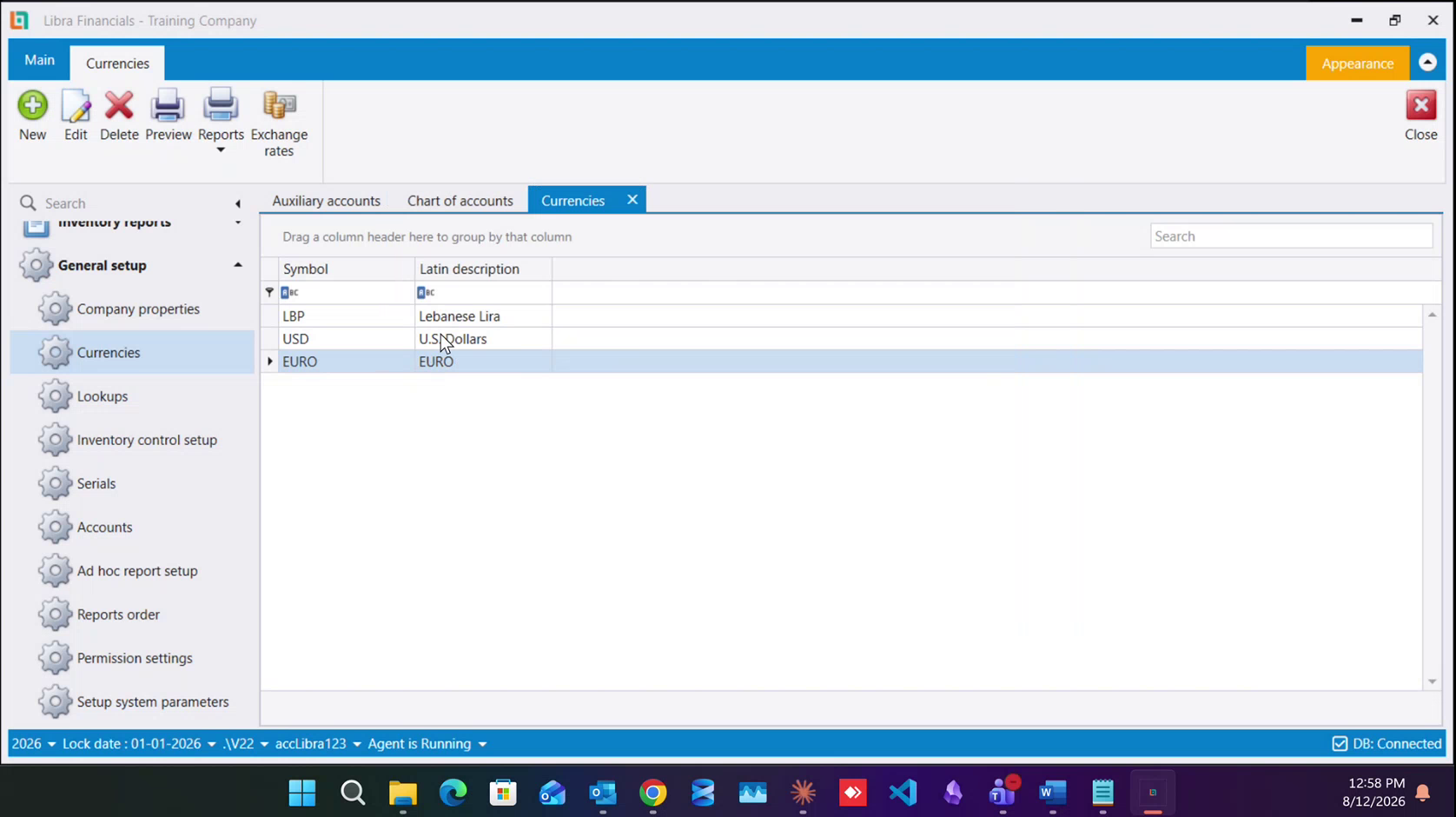
From the left menu: General setup → Currencies. The list has two columns, Symbol and Latin description, and a company set up for Lebanon starts with LBP Lebanese Lira and USD U.S Dollars.
2. Select the currency, then click Exchange rates
Click once on the row for the currency you are rating, then press Exchange rates in the toolbar. The rate belongs to the row you selected - open the dialog with the wrong row highlighted and you will file the rate against the wrong currency.
3. Add a rate from a start date
The dialog has its own New / Edit / Delete / Preview toolbar and a grid of four columns: Date, LBP Rate, Foreign Currency V... and Currency. Press New, give the date the rate takes effect from, and type the rate.
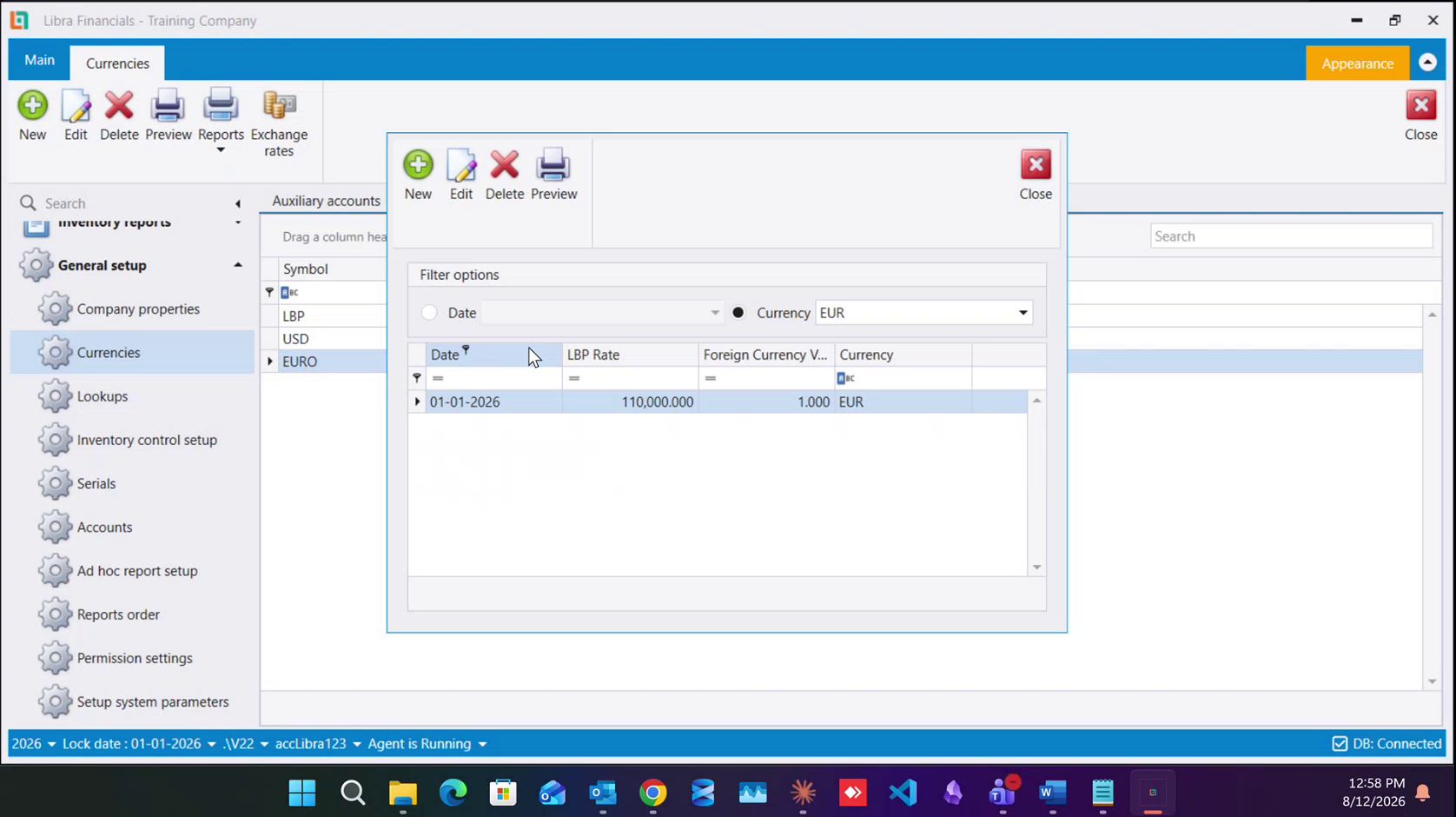
A rate is effective from a date, not simply "the rate". Everything posted on or after that date uses it, and everything before it keeps the rate that was in force then.
4. Read the history
Rates are never overwritten - each new one is another row. The Filter options at the top of the dialog let you narrow the grid by Date or by Currency, which is how you read one currency's history on its own.
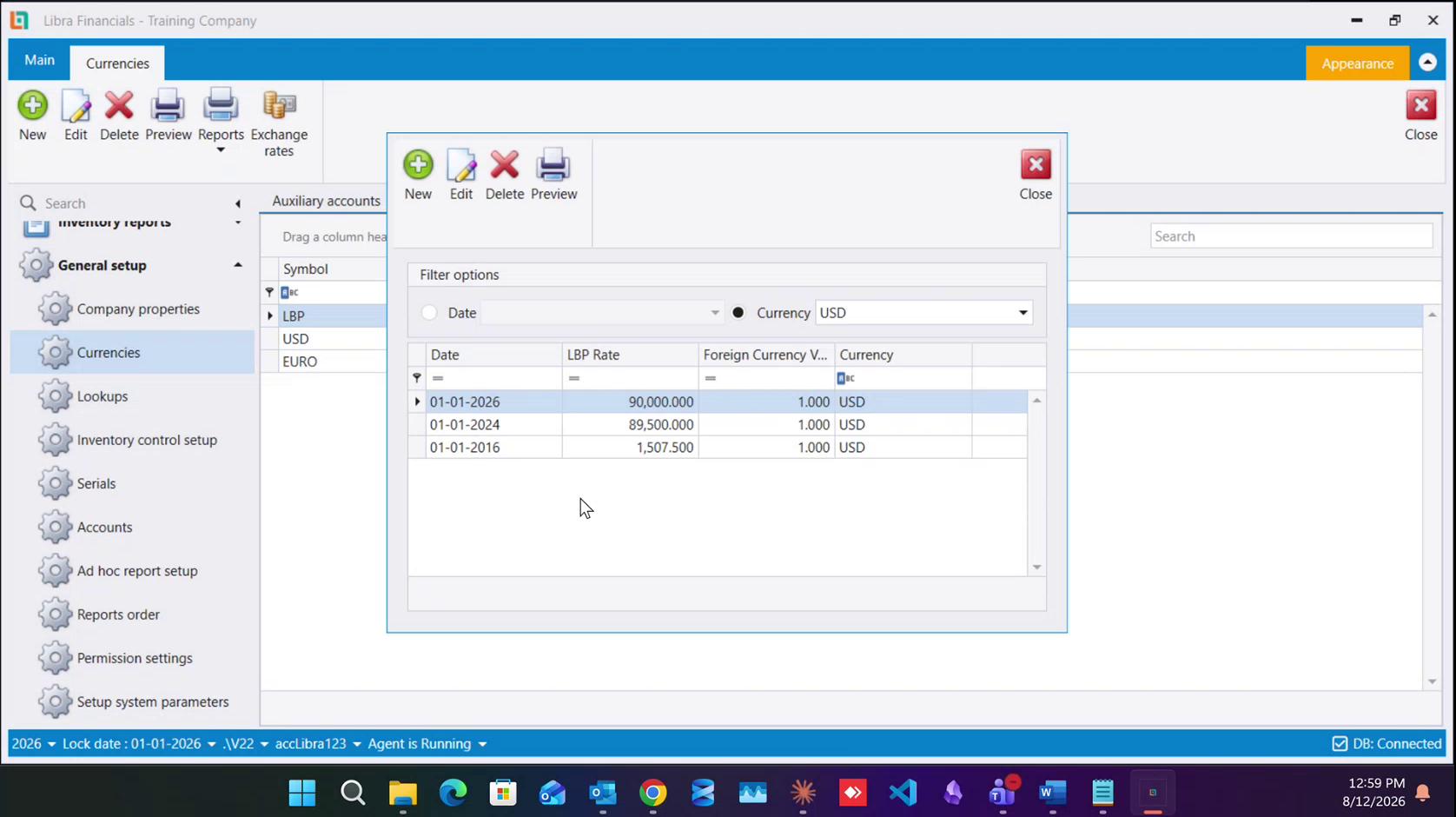
That is a real audit trail. An invoice from 2016 is still converted at 1,507.500, because that is what the row for 01-01-2016 says - which is exactly why you add a row instead of editing the old one.
Note the two figures side by side:89,500is the official rate that was in force, and90,000is the rate this business chose to work at from 2026. They are allowed to differ, and the system stores whichever you tell it.
5. The Lebanese pound and the dollar move together
LBP and USD are one linked pair. Set the rate on either and the other follows on its own - you do not enter it twice.
Every other currency behaves differently: it is rated against the Lebanese-pound base, and it stays independent. Change the dollar and the euro does not follow, so if you re-base the dollar you must revisit the others yourself.
6. Deriving a rate you were not given
Rates for other currencies are usually quoted against the dollar, not against the pound, so you do the division yourself. The UAE dirham is pegged at 3.75 AED per USD, and this company works at 90,000 LBP per USD:
90,000 / 3.75 = 24,000So 1 AED = 24,000 LBP is what goes in the LBP Rate column. The same arithmetic works for any currency you can find a dollar quote for.
When you add the currency itself, the top field is its symbol (AED) and the field below is the description you will recognise it by.Next: How to add a currency · Currencies & cash for the base rate and the cash structure · Banks for locking an account to one currency.
إضافة العملة وإعطاؤها سعرًا عملان منفصلان على الشاشة نفسها. إضافة العملة تستغرق لحظة؛ أما السعر فهو الجزء ذو القواعد - فهو مؤرَّخ، ويُحفظ كسجل تاريخي، وهناك زوج من العملات يتحرك معًا.
1. افتح شاشة العملات
من القائمة اليسرى: الإعداد العام (General setup) ← العملات (Currencies). للقائمة عمودان، Symbol وLatin description، وتبدأ الشركة المُعدّة للبنان بـ LBP Lebanese Lira وUSD U.S Dollars.
2. اختر العملة ثم اضغط أسعار الصرف
اضغط ضغطة واحدة على سطر العملة التي تسعّرها، ثم اضغط أسعار الصرف (Exchange rates) في الشريط. فالسعر يخصّ السطر الذي اخترته - وإن فتحت النافذة والسطر الخطأ مظلَّل سجّلت السعر على العملة الخطأ.
3. أضف سعرًا من تاريخ بداية
للنافذة شريطها الخاص جديد / تعديل / حذف / معاينة (New / Edit / Delete / Preview) وجدول من أربعة أعمدة: Date وLBP Rate وForeign Currency V... وCurrency. اضغط جديد (New)، وأعطِ التاريخ الذي يسري منه السعر، ثم اكتب السعر.
فالسعر يسري من تاريخ، لا أنه "السعر" فحسب. فكل ما يُرحَّل في ذلك التاريخ أو بعده يستعمله، وكل ما قبله يبقى على السعر الذي كان ساريًا حينها.
4. اقرأ السجل التاريخي
لا تُستبدل الأسعار أبدًا - فكل سعر جديد سطر إضافي. وتتيح لك خيارات التصفية (Filter options) في أعلى النافذة تضييق الجدول بحسب Date أو Currency، وهكذا تقرأ تاريخ عملة واحدة وحدها.
وهذا أثر تدقيقي حقيقي. ففاتورة من 2016 ما تزال تُحوَّل على 1,507.500، لأن هذا ما يقوله سطر 01-01-2016 - وهذا بالضبط سبب إضافتك سطرًا بدل تعديل القديم.
لاحظ الرقمين جنبًا إلى جنب:89,500هو السعر الرسمي الذي كان ساريًا، و90,000هو السعر الذي اختارت هذه المنشأة العمل به من 2026. ويجوز أن يختلفا، والنظام يخزّن ما تُمليه عليه أنت.
5. الليرة اللبنانية والدولار يتحركان معًا
الليرة والدولار زوج مترابط واحد. حدّد السعر على أيّهما شئت فيتبعه الآخر من تلقائه - ولا تُدخله مرتين.
أما كل عملة أخرى فتسلك سلوكًا مختلفًا: تُسعَّر مقابل أساس الليرة اللبنانية، وتبقى مستقلة. فتغيير الدولار لا يجرّ اليورو معه، وإن أعدت تأسيس الدولار وجب أن تعود إلى الباقيات بنفسك.
6. اشتقاق سعر لم يُعطَ لك
تُسعَّر العملات الأخرى عادةً مقابل الدولار لا مقابل الليرة، فتقوم أنت بالقسمة. فالدرهم الإماراتي مربوط عند 3.75 درهم للدولار، وهذه الشركة تعمل عند 90,000 ليرة للدولار:
90,000 ÷ 3.75 = 24,000فيكون 1 درهم = 24,000 ليرة هو ما يوضع في عمود LBP Rate. والحساب نفسه يصلح لأي عملة تجد لها تسعيرة بالدولار.
وحين تضيف العملة نفسها، الحقل الأعلى هو الرمز (symbol) مثل AED، والحقل الذي تحته هو الوصف الذي تعرفها به.التالي: كيفية إضافة عملة · العملات والنقد للسعر الأساسي وهيكل النقد · المصارف لتثبيت حساب على عملة واحدة.