
Receipts, payments and transfers: money in and outالمقبوضات والمدفوعات والتحويلات: دخول المال وخروجه
A journal voucher can record anything, including money coming in and going out. But money moves so often, and always in the same shape, that Libra gives it three screens of its own - Receipts, Payments and Internal transfers. Use them instead of a journal voucher: they do the accounting for you, they cannot be put the wrong way round, and they capture the things a voucher has nowhere to put - a cheque number, a bank, who the cheque is made out to.
To record one step by step, read How to record a receipt and How to record a payment or a transfer.
1. Two grids instead of one
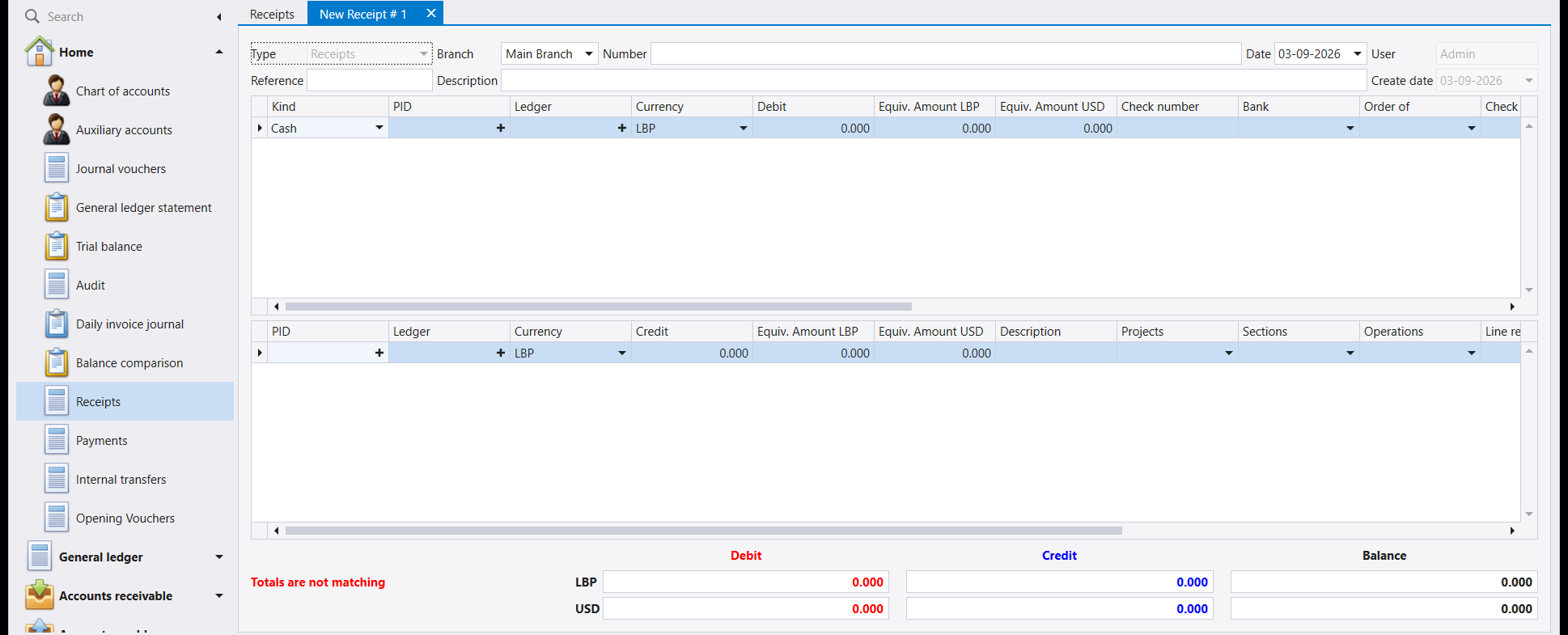
A journal voucher is one grid where you decide, line by line, what is debited and what is credited. These three screens are two grids, and which grid a line goes in already decides its side. You never choose debit or credit.
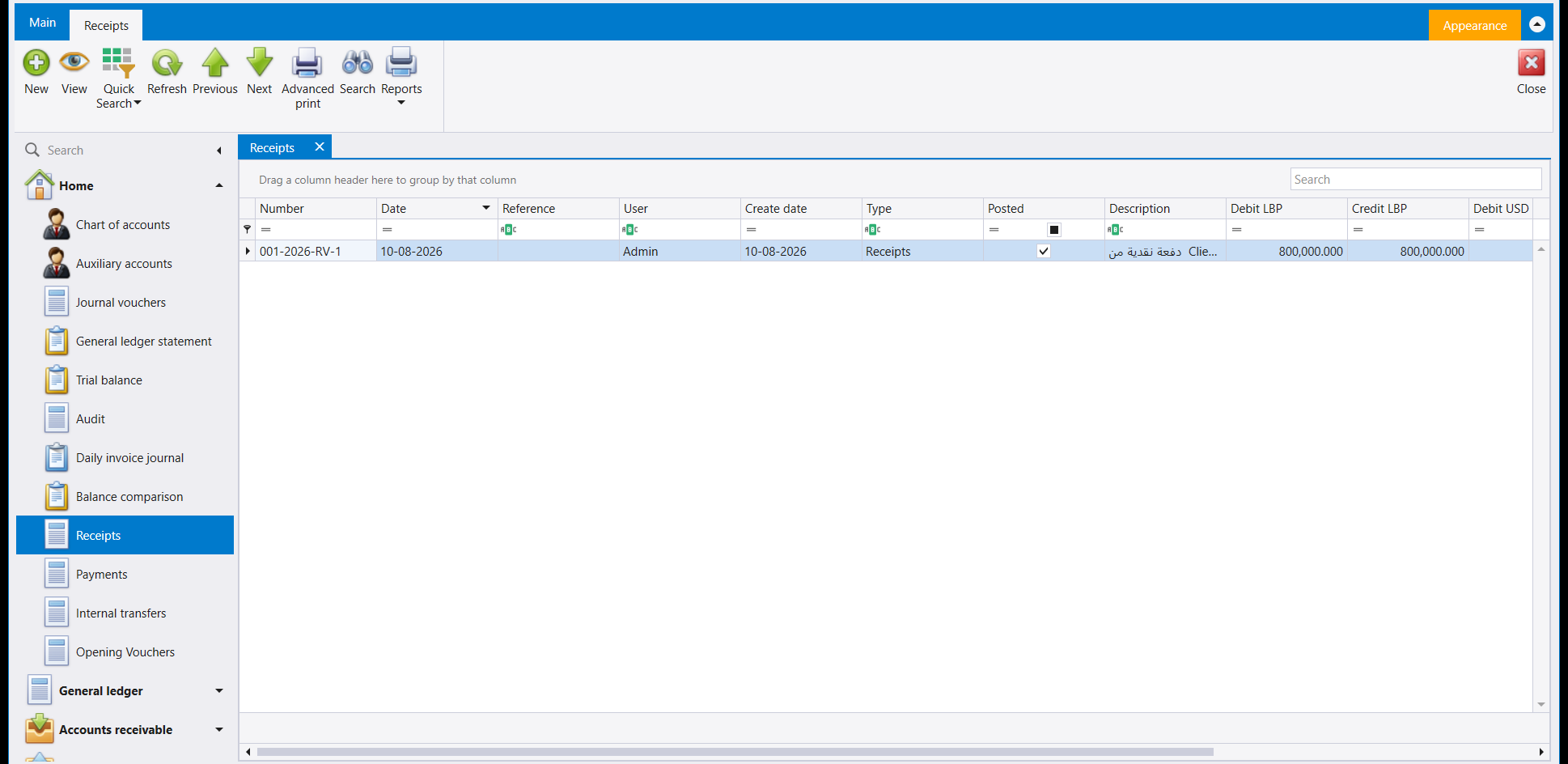
The lists look and behave exactly like the journal voucher list - same columns, same filter row, same ribbon - so everything in guide 33 about finding and reading them applies here too.
2. The three shapes
Open a new document on each of the three screens and the difference is immediate.
A receipt - money arriving. The top grid is what you received; the bottom grid is who it came from.
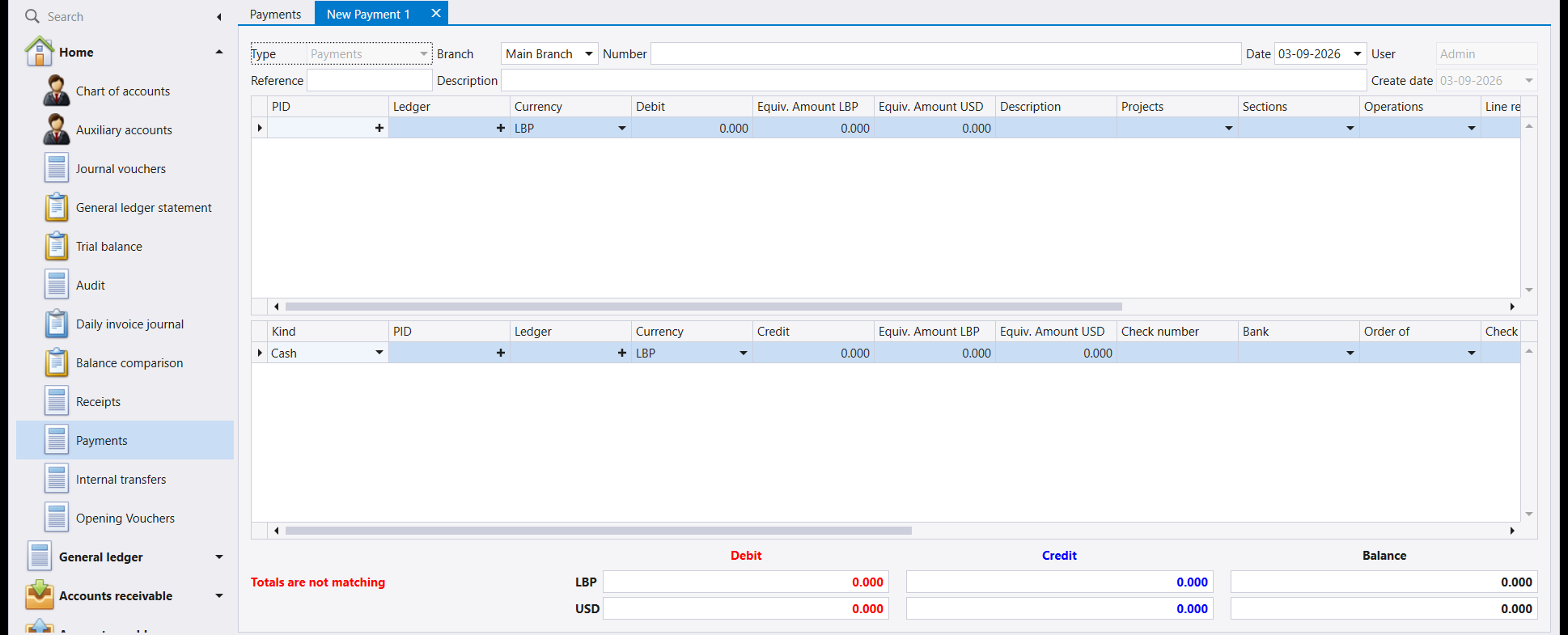
A payment - money leaving. The same two grids, the other way round: the top grid is what you paid for, the bottom grid is how you paid.
An internal transfer - your own money moving between your own accounts. Here both grids carry a Kind, because both sides are money.
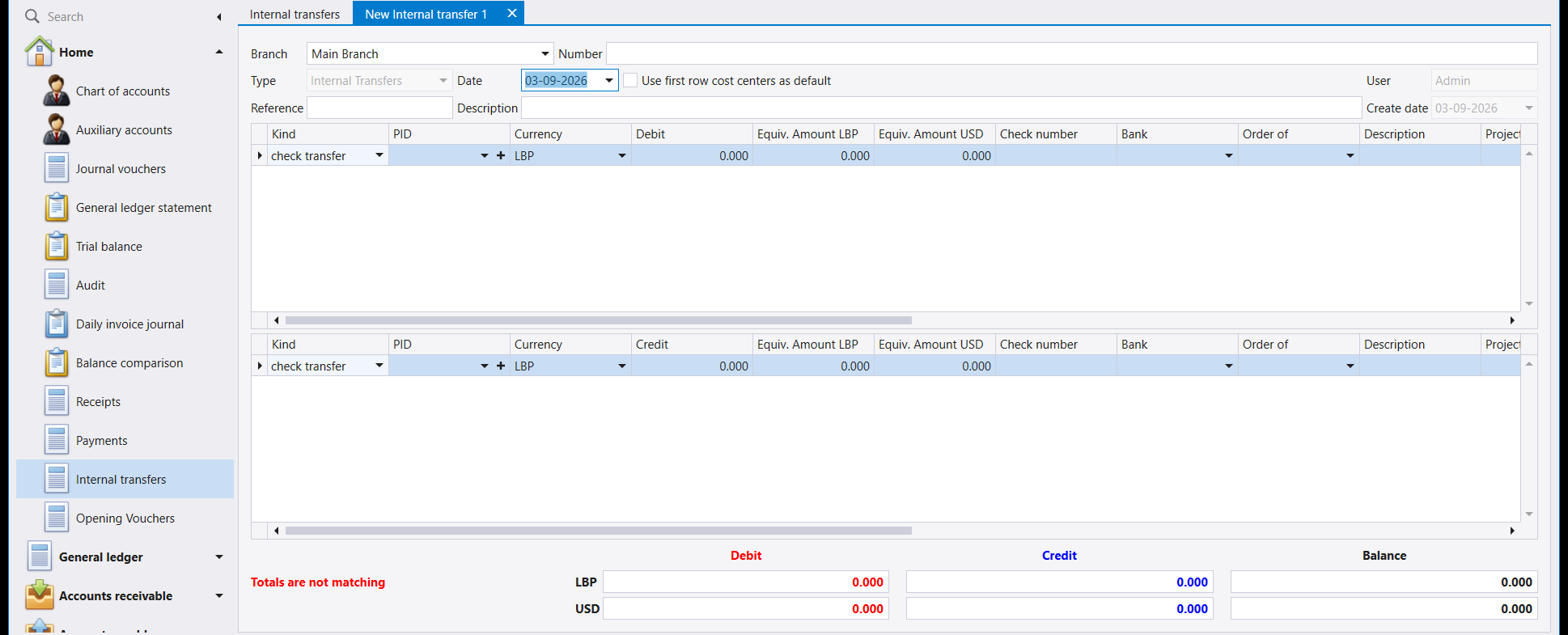
The rule underneath all three: the grid carrying the Kind column is the money side. On a receipt it is on top, on a payment it is at the bottom, and on a transfer it is both.
3. Kind: the one field that does the work
Kind says how the money moved - cash, cheque, bank transfer. Picking one fills in the account for you, so nobody has to remember which account the cash box is.
The list of kinds is not fixed by Libra. It is set up per company on the Payment and receipt screen, and it is worth looking at once so you know what your own list means:
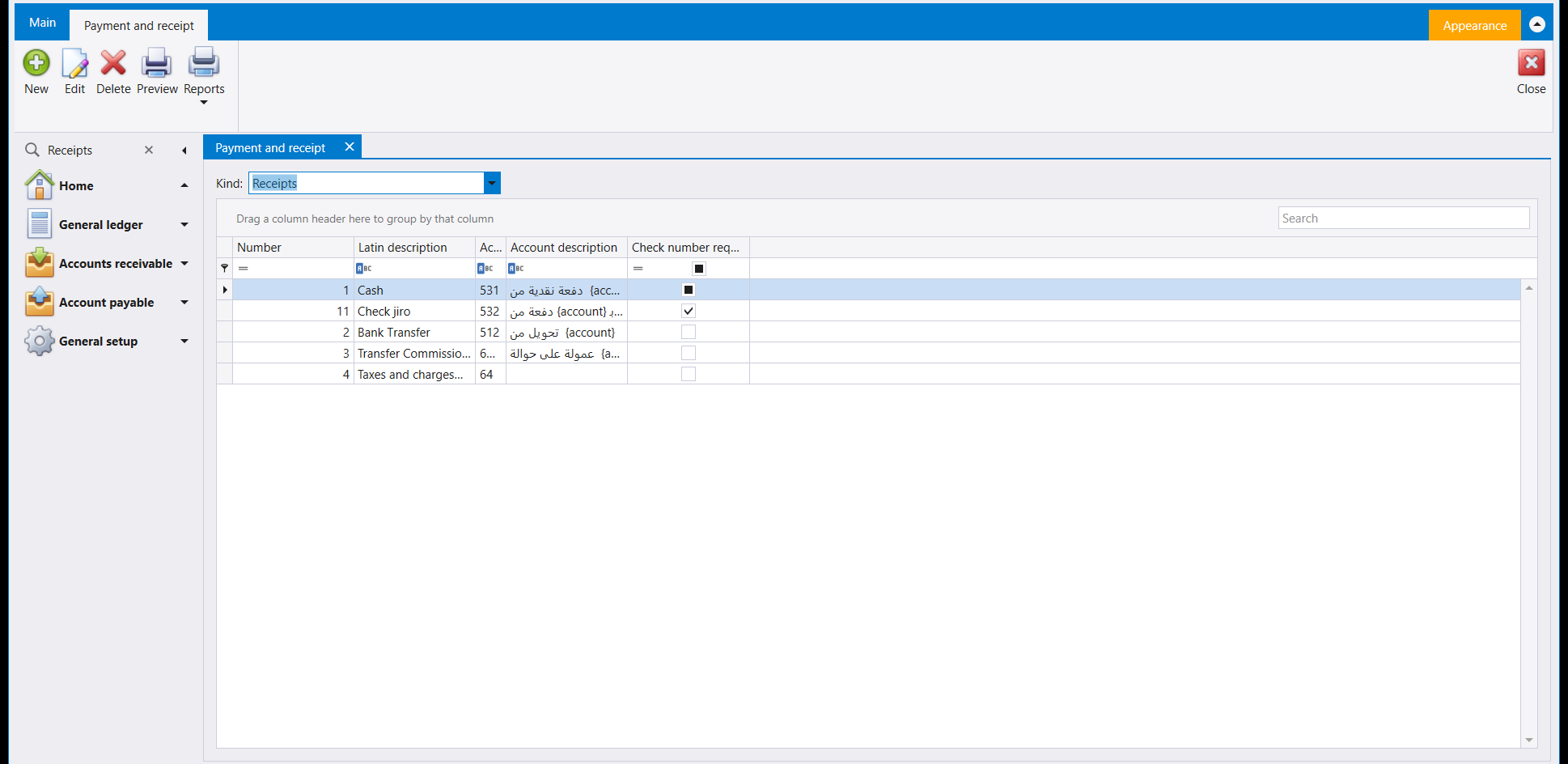
Each row ties four things together:
| Column | What it does |
|---|---|
| Number | The kind's own code. It is stored on the voucher line, which is how a report can tell a cash receipt from a cheque one. |
| Latin description | The name you pick from in the Kind dropdown. |
| Account | The account the money side posts to. In the company above, Cash posts to 531, Check jiro to 532 and Bank Transfer to 512. |
| Account description | A template for the line's description. It is why a saved receipt already has words in its Description column that nobody typed. |
| Check number required | If ticked, Libra will not save the document until a cheque number is entered. |
Two of the kinds are easy to mix up. Check is a cheque you write yourself, drawn on your own company chequebook. Check jiro is a cheque someone else already wrote - one you are holding and passing on to a third party instead of depositing it or writing your own.
A kind that requires a cheque number really does refuse to save. Leave it blank and the save is rejected with Enter Check number - the document is not written, and nothing is lost; fill the Check number column in and save again.
4. Everything else works like a journal voucher
The rules you already know still hold, and it is the same bar at the bottom of the screen:
- Debits must equal credits, in both company currencies. Until they do, Totals are not matching shows in red and the document will not save.
- Each line carries its own currency and its own rate, and the equivalent columns are filled in for you.
- F12 saves, and the number is assigned then, not before.
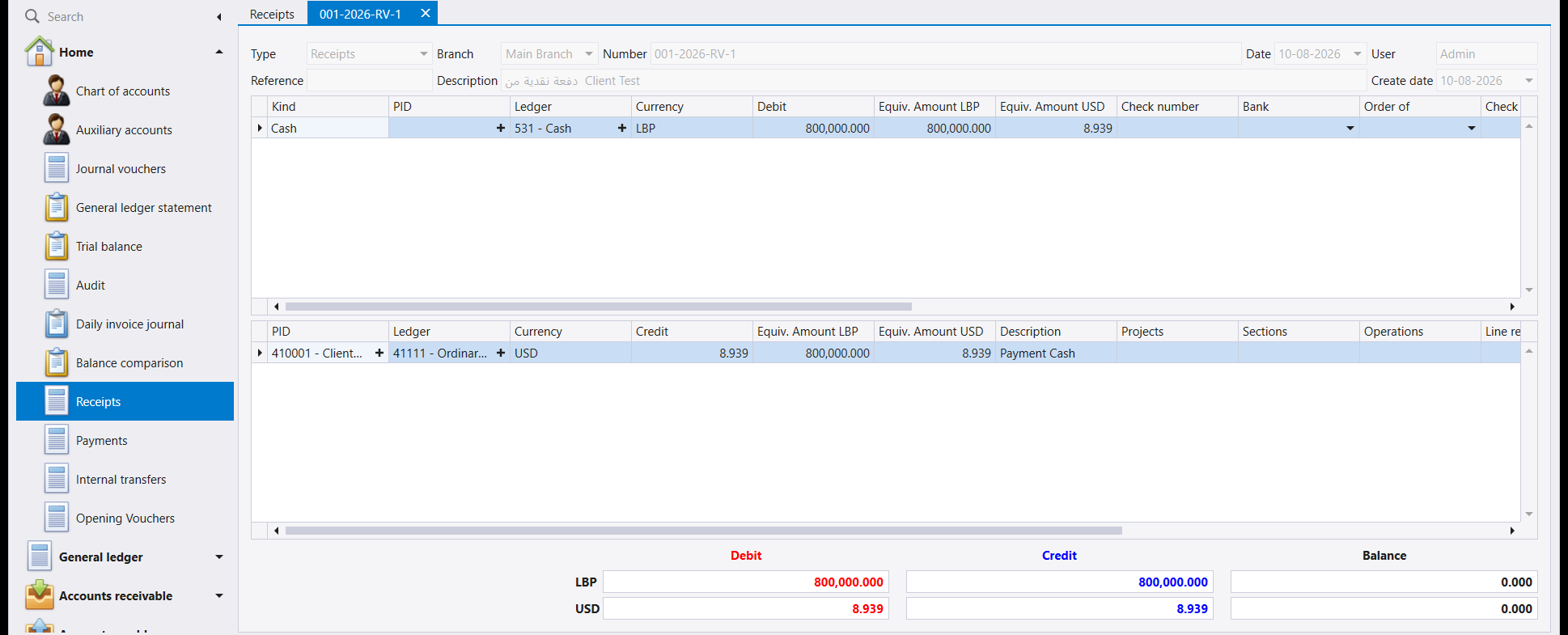
Mixed currencies work here exactly as they do on a voucher. This receipt takes cash into an LBP account from a client whose account is held in USD; neither side was converted by hand:
5. The number tells you which screen made it
Every document made on these screens carries the same branch-year-kind-sequence number as a journal voucher, and the kind letters are what separate them:
| Looks like | Made on |
|---|---|
001-2026-JV-15 | Journal vouchers |
001-2026-RV-2 | Receipts |
001-2026-PV-1 | Payments |
001-2026-IT-1 | Internal transfers |
So the number alone tells you where a document came from, which is useful when you meet one in a statement or a report months later.
يستطيع القيد المحاسبي تسجيل أي شيء، بما في ذلك دخول المال وخروجه. لكن المال يتحرك كثيرًا، وبالشكل نفسه دائمًا، ولذلك يفرد له ليبرا ثلاث شاشات خاصة - المقبوضات (Receipts) والمدفوعات (Payments) والتحويلات الداخلية (Internal transfers). استعملها بدل القيد المحاسبي: فهي تتولّى المحاسبة عنك، ولا يمكن أن تُقلب رأسًا على عقب، وتلتقط ما لا مكان له في القيد - رقم الشيك، والمصرف، واسم المستفيد.
ولتسجيل واحدة خطوة بخطوة، اقرأ كيفية تسجيل مقبوض وكيفية تسجيل مدفوع أو تحويل.
١. جدولان بدل جدول واحد
القيد المحاسبي جدول واحد تقرّر فيه، سطرًا سطرًا، ما هو المدين وما هو الدائن. أما هذه الشاشات الثلاث فهي جدولان، والجدول الذي يقع فيه السطر يحدّد جهته سلفًا. فأنت لا تختار المدين والدائن أبدًا.
وتبدو اللوائح وتتصرّف تمامًا كلائحة القيود المحاسبية - الأعمدة نفسها وصفّ التصفية نفسه والشريط نفسه - فكل ما في الدليل 33 عن إيجادها وقراءتها ينطبق هنا أيضًا.
٢. الأشكال الثلاثة
افتح مستندًا جديدًا في كل من الشاشات الثلاث ويظهر الفرق فورًا.
المقبوض - مال داخل. الجدول العلوي هو ما قبضته؛ والجدول السفلي هو من دفعه.
المدفوع - مال خارج. الجدولان نفسهما بالعكس: الجدول العلوي هو ما دفعت لأجله، والجدول السفلي هو كيف دفعت.
التحويل الداخلي - مالك أنت ينتقل بين حساباتك أنت. وهنا يحمل كلا الجدولين عمود Kind، لأن الجهتين مال.
والقاعدة تحت هذا كله: الجدول الذي يحمل عمود Kind هو جهة المال. ففي المقبوض يكون في الأعلى، وفي المدفوع في الأسفل، وفي التحويل في الاثنين معًا.
٣. النوع (Kind): الحقل الذي يقوم بالعمل
يقول Kind كيف تحرّك المال - نقدًا أو بشيك أو بحوالة مصرفية. واختيار أحدها يملأ لك الحساب، فلا يحتاج أحد إلى تذكّر أي حساب هو الصندوق.
ولائحة الأنواع ليست ثابتة في ليبرا. بل تُجهَّز لكل شركة على شاشة الدفع والقبض (Payment and receipt)، ويجدر النظر إليها مرة لتعرف ما تعنيه لائحتك أنت:
ويربط كل سطر أربعة أمور معًا:
| العمود | وظيفته |
|---|---|
| الرقم (Number) | رمز النوع. ويُحفظ على سطر المستند، وبه يميّز التقرير المقبوض النقدي من المقبوض بشيك. |
| الاسم اللاتيني (Latin description) | الاسم الذي تختاره من قائمة Kind. |
| الحساب (Account) | الحساب الذي تُرحَّل إليه جهة المال. ففي الشركة أعلاه يُرحَّل Cash إلى 531 وCheck jiro إلى 532 وBank Transfer إلى 512. |
| وصف الحساب (Account description) | نموذج لوصف السطر. وهو سبب ظهور كلمات في عمود الوصف في مقبوض محفوظ لم يكتبها أحد. |
| اشتراط رقم الشيك | إن كانت مؤشَّرة لم يحفظ ليبرا المستند حتى يُدخَل رقم الشيك. |
ويسهل الخلط بين نوعين من الأنواع. فـCheck شيك تكتبه أنت بنفسك من دفتر شيكات شركتك. أما Check jiro فشيك كتبه طرف آخر أصلًا - تحمله أنت وتُمرّره إلى طرف ثالث بدل أن تودعه أو تكتب شيكك أنت.
النوع الذي يشترط رقم شيك يرفض الحفظ فعلًا. اتركه فارغًا فيُرفض الحفظ برسالة Enter Check number - ولا يُكتب المستند، ولا يضيع شيء؛ املأ عمود رقم الشيك (Check number) ثم احفظ مجددًا.
٤. وما عدا ذلك يعمل كالقيد المحاسبي
القواعد التي تعرفها سلفًا ما تزال قائمة، وهو الشريط نفسه أسفل الشاشة:
- المدين يساوي الدائن، في عملتي الشركة معًا. وإلى أن يتساويا تظهر عبارة Totals are not matching بالأحمر ولا يُحفظ المستند.
- كل سطر يحمل عملته وسعره، وتُملأ لك أعمدة المعادل.
- F12 يحفظ، ويُخصَّص الرقم عندها لا قبلها.
وتعمل العملات المختلطة هنا كما تعمل في القيد تمامًا. فهذا المقبوض يُدخل نقدًا إلى حساب بالـLBP من زبون حسابه بالـUSD؛ ولم تُحوَّل أي من الجهتين يدويًا:
٥. الرقم يخبرك بالشاشة التي أنشأته
كل مستند يُصنع على هذه الشاشات يحمل رقم الفرع والسنة والنوع والتسلسل نفسه الذي يحمله القيد المحاسبي، وحروف النوع هي ما يفرّق بينها:
| شكله | صُنع على |
|---|---|
001-2026-JV-15 | القيود المحاسبية |
001-2026-RV-2 | المقبوضات |
001-2026-PV-1 | المدفوعات |
001-2026-IT-1 | التحويلات الداخلية |
فالرقم وحده يخبرك من أين جاء المستند، وهو أمر مفيد حين تصادفه في كشف حساب أو تقرير بعد أشهر.