
Six more reports: aging, cheques, instalments, assets and budgetستة تقارير أخرى: التقادم، والشيكات، والأقساط، والأصول، والموازنة
These six sit in the same Reports menu as Reports: one screen, twenty-two answers and Reading your accounts: the reporting screens, and open with the same ribbon - a report layout box, Preview, Direct printing beside it, and the usual Report designer / Layout customization / Save layout / Default layout / named-filter pair. This guide does not repeat that; it only covers what each of the six screens asks and answers.
1. Aging reports
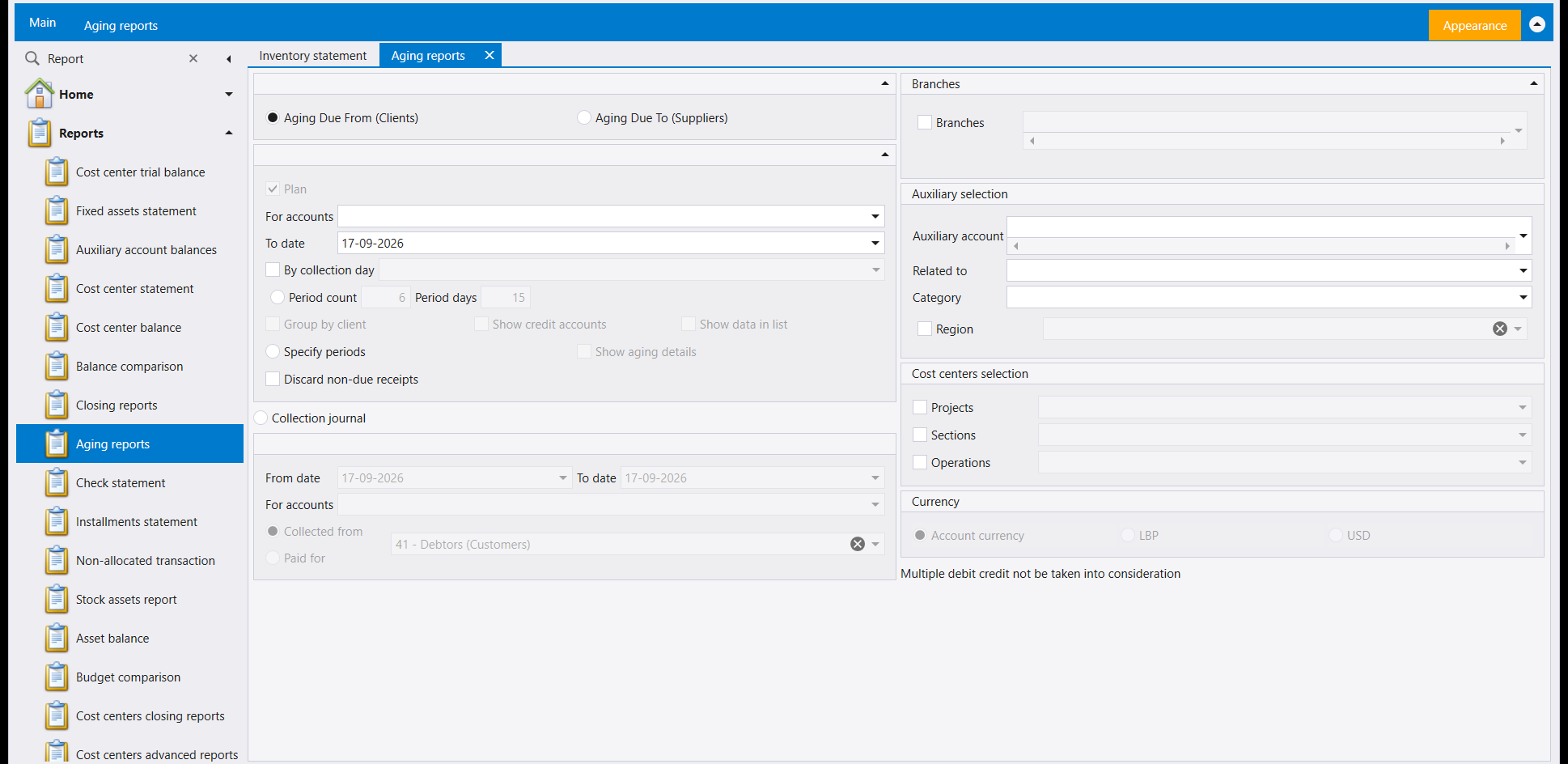
Splits what a customer or supplier owes into age bands instead of one balance - choose Aging Due From (Clients) or Aging Due To (Suppliers), then either Period count and Period days or your own Specify periods. Group by client, Show credit accounts and Discard non-due receipts shape which balances make the list. Underneath, a separate Collection journal option turns the same screen into a plain list of what was collected in a date range, Collected from or Paid for a chosen account. The screen itself warns: «Multiple debit credit not be taken into consideration».
2. Check statement
Which cheques moved through a chosen cashier or bank account, in a date range, and in what state. Check Selection offers a named Statement layout, plus Jiro Check List, Show Paid Checks and Show Balances. The Account panel narrows to Bank Default Accounts, All Accounts, a Specific Account, Ledger Accounts or Auxiliary Accounts, and an amount range filters by value in Account currency.
3. Installments statement
Instalment payments due or paid, seen three ways through Report view: a plain List, an Aging breakdown, or a Collection view. Payment relates to narrows by Type and by status - All, Not paid entirely, Not or partially paid, Paid, Settled after value date. Three separate date ranges - Value Date, Date selection and PaymentDate - let you ask about when something was due, entered, or actually paid, one at a time.
4. Non-allocated transaction
Receipts, sales returns, payments or purchase returns that have not yet been matched to an invoice or bill - Type chooses between Receipts and sales returns and Payments and purchase returns, narrowed further by account, salesman, category, date range or branch.
5. Stock assets report
The fixed-asset register itself, filtered by Assets having depreciation, Grouped by account number or With purchasing details, by a Depreciation Date, and by Closed status - Closed assets or Non closed assets. For the similarly named Stock Fixed Assets screen in the inventory reports, see Inventory reports: how the report screens work.
6. Budget comparison
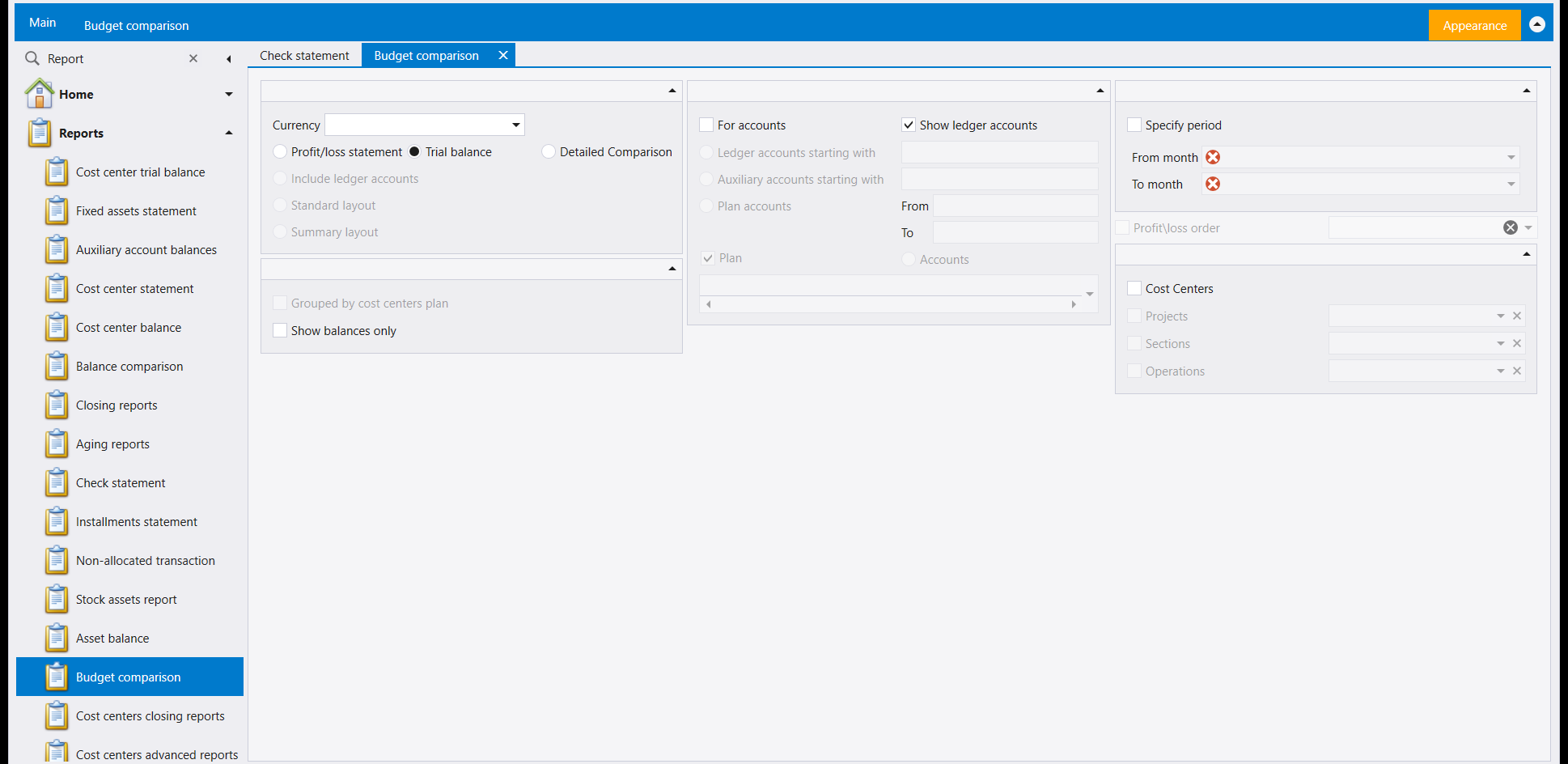
Actual figures against budget, shown as a Profit/loss statement, a Trial balance, or a Detailed Comparison side by side. Show ledger accounts, Ledger accounts starting with and Auxiliary accounts starting with narrow which accounts are compared; Specify period (From month / To month) sets the window, and Cost Centers (Projects, Sections, Operations) breaks the comparison down further.
تقع هذه الستة في قائمة Reports نفسها التي تحمل التقارير: شاشة واحدة واثنتان وعشرون إجابة و قراءة حساباتك: شاشات التقارير، وتُفتَح بالشريط نفسه - صندوق تخطيط التقرير، وPreview، وDirect printing بجانبه، والمعتاد Report designer / Layout customization / Save layout / Default layout / زوج الفلتر المسمّى. ولا يكرّر هذا الدليل ذلك؛ فهو يغطّي فقط ما تسأله وتجيب عنه كل شاشة من الست.
١. Aging reports
يقسّم ما يدين به زبون أو مورّد إلى فئات عمرية بدل رصيد واحد - اختر Aging Due From (Clients) أو Aging Due To (Suppliers)، ثم Period count وPeriod days أو Specify periods الخاص بك. وGroup by client وShow credit accounts وDiscard non-due receipts تُشكِّل أي الأرصدة تدخل اللائحة. وتحتها، خيار Collection journal مستقل يحوّل الشاشة نفسها إلى لائحة بسيطة لما جُمِع في مدى زمني، Collected from أو Paid for حساب تختاره. وتحذّر الشاشة نفسها: «Multiple debit credit not be taken into consideration».
٢. Check statement
أي الشيكات تحرّكت عبر صندوق أو حساب مصرفي تختاره، في مدى زمني، وبأي حالة. ويعرض Check Selection تخطيط Statement مسمّى، إضافةً إلى Jiro Check List وShow Paid Checks وShow Balances. وتُضيِّق لوحة Account إلى Bank Default Accounts أو All Accounts أو Specific Account أو Ledger Accounts أو Auxiliary Accounts، ويُرشِّح مدى المبلغ بالقيمة بـAccount currency.
٣. Installments statement
أقساط مستحقة أو مسدَّدة، تُرى بثلاث طرق عبر Report view: List بسيطة، أو تفصيل Aging، أو عرض Collection. ويُضيِّق Payment relates to بحسب Type والحالة - All أو Not paid entirely أو Not or partially paid أو Paid أو Settled after value date. وثلاثة مديات زمنية منفصلة - Value Date وDate selection وPaymentDate - تتيح لك السؤال عن متى استُحقّ الشيء أو أُدخِل أو سُدِّد فعلًا، واحدًا تلو الآخر.
٤. Non-allocated transaction
مقبوضات أو مردودات مبيعات أو مدفوعات أو مردودات مشتريات لم تُطابَق بفاتورة أو سند بعد - يختار Type بين Receipts and sales returns وPayments and purchase returns، ويُضيَّق أكثر بالحساب أو المندوب أو الفئة أو مدى التاريخ أو الفرع.
٥. Stock assets report
سجل الأصول الثابتة نفسه، مُرشَّحًا بـAssets having depreciation أو Grouped by account number أو With purchasing details، وبـDepreciation Date، وبـClosed status - Closed assets أو Non closed assets. وللشاشة ذات الاسم القريب Stock Fixed Assets ضمن تقارير المخزون، راجع تقارير المخزون: كيف تعمل شاشات التقارير.
٦. Budget comparison
الأرقام الفعلية مقابل الموازنة، تُعرَض كـProfit/loss statement أو Trial balance أو Detailed Comparison جنبًا إلى جنب. ويُضيِّق Show ledger accounts وLedger accounts starting with وAuxiliary accounts starting with أي الحسابات تُقارَن؛ ويضبط Specify period (From month / To month) المدى، وCost Centers (Projects وSections و Operations) يُفصِّل المقارنة أكثر.