
Reports: one screen, twenty-two answersالتقارير: شاشة واحدة واثنتان وعشرون إجابة
The Reports group holds twenty-two entries and they all open the same kind of screen: a page of criteria on the left and middle, and a Preview button at the top. Nothing runs until you press it. Learn the screen once and every report in Libra is familiar.
1. The shape of every report
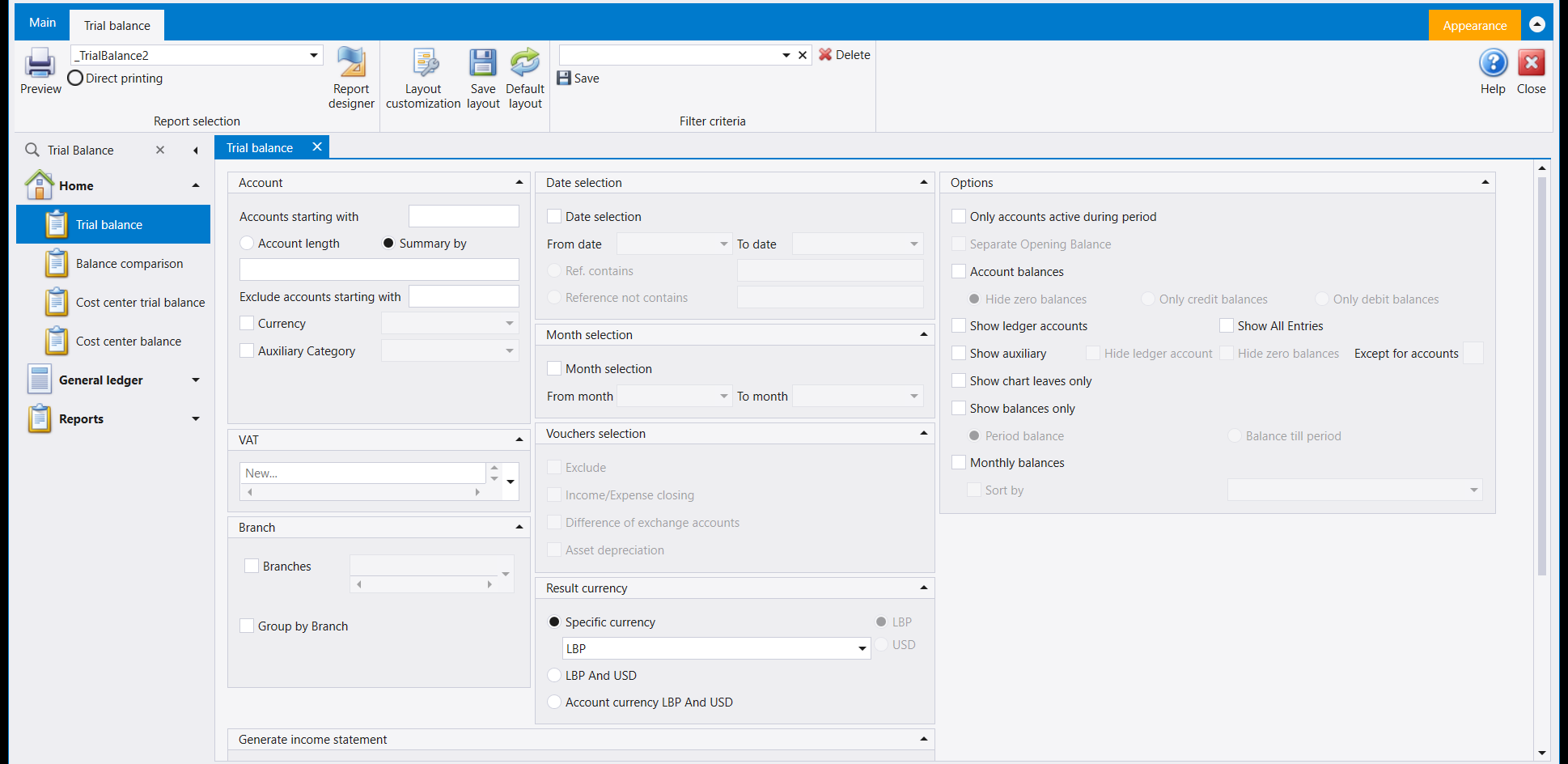
Four things in the ribbon matter every day. The others change the printed page (Report designer, see its guide) or arrange this screen for you (Layout customization, Save layout, Default layout, see Libra remembers your screen). How a report travels from this screen to paper is in From screen to paper.
- Report selection - the dropdown naming the layout. A report can ship with more than one design, and this is where you choose between them.
- Direct printing - send it straight to the printer instead of showing it on screen.
- Preview - run it. This is the button.
- Filter criteria - the box beside Save and Delete. Fill in a set of criteria you use every month, give it a name, and Save. Next month you pick the name instead of filling the page in again. This is the single biggest time-saver on these screens and it is easy to miss.
2. The panels you will meet
Not every report shows all of them, but they always mean the same thing:
| Panel | What it narrows |
|---|---|
| Account | Which accounts - "accounts starting with", one account or all, and what to exclude. "Accounts starting with" pairs with "Exclude accounts starting with", and both take a comma-separated list, so one run can cover two ranges and still drop a narrower one sitting inside them |
| Date selection | The period - and on richer reports it is really three separate questions: the entry's own date, its Value Date, and its Operation date, which is when the entry was actually typed rather than which period it belongs to. Some reports offer since a specific date or since the last statement |
| Month selection | Whole months instead of dates |
| Vouchers selection | Which kinds of entry to include or leave out |
| Branch | One branch, or grouped by branch |
| Cost center | Projects, Sections and Operations |
| Result currency | What the figures are expressed in |
| Options | The report's own switches - zero balances, hierarchy, aging, and so on |
Result currency is the setting people get wrong. The choices are Specific currency (one currency, everything converted into it), LBP And USD (both, side by side) and Account currency (each account in whatever currency it is held in). A trial balance that looks wrong is very often a trial balance in the wrong result currency.
3. Which report answers which question
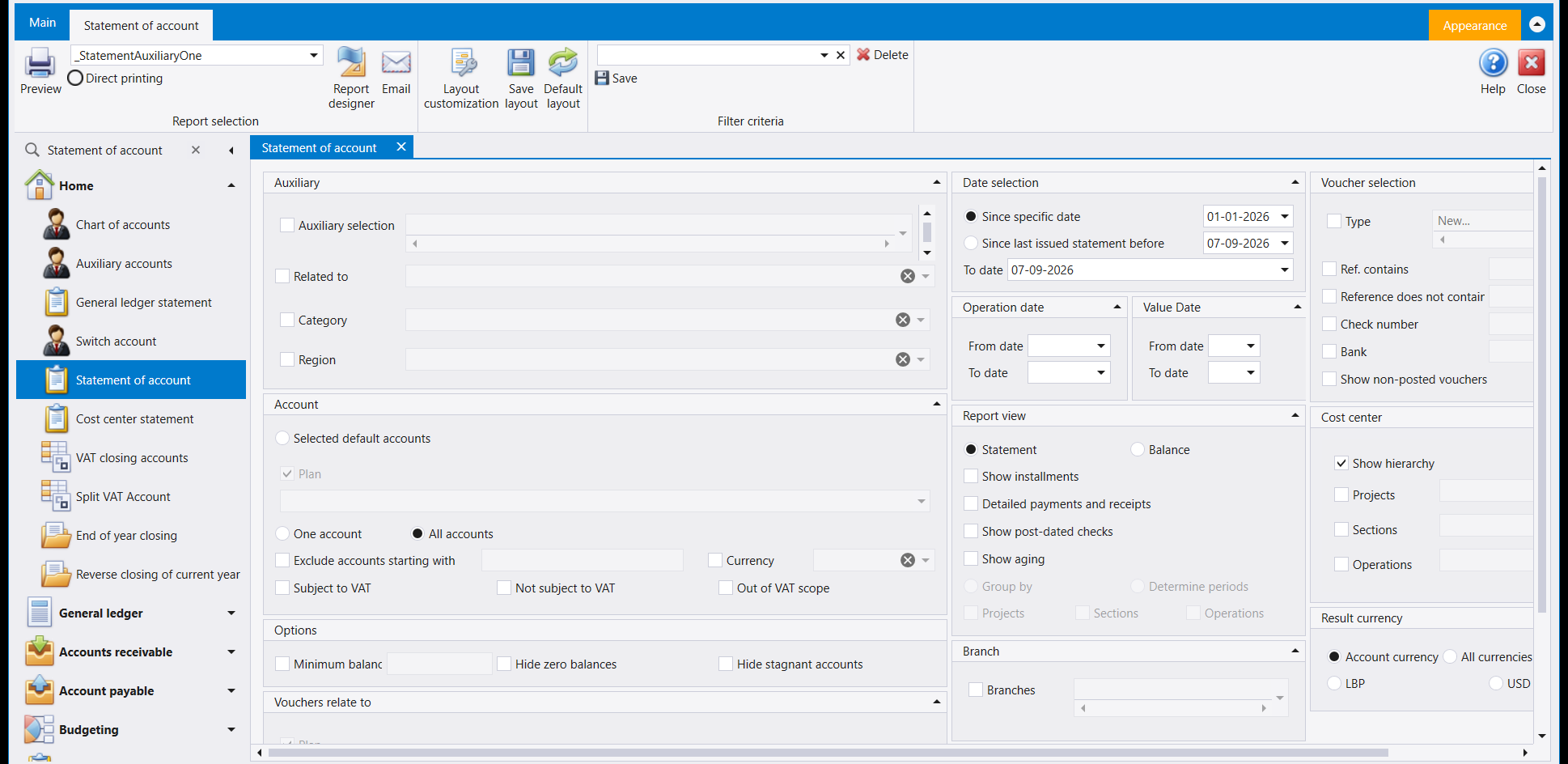
The twenty-two fall into four families:
What is my position? Trial balance - every account with its debit and credit totals; the report an accountant asks for first. Balance comparison - the same figures against another period. Financial statements report and Closing reports - the year-end presentations.
What happened on one account? General ledger statement for a ledger account, Statement of account for a customer or supplier, Auxiliary account balances for all of them at once. The statement screen above is the richest in the group: it can show a Statement or just a Balance, add aging, include post-dated cheques, and start either from a date you choose or from the last statement you issued - which is what you want when you are chasing a customer month after month.
What happened on one day? Daily journal and Daily reports printing. Non-allocated transactions finds entries that never got matched to anything.
What about cost centres, cheques and assets? Cost center statement, Cost center balance, Cost centre statement (Dynamic), Cost centers closing reports and Cost centers advanced reports for projects and sections. Check statements and Installment statements for cheques and instalments. Fixed assets statement, Asset list and Asset balance for the asset register. Collection reports for what has been collected, and Budget balance for budget against actual. The general ledger and cost-centre reports are shown one by one in Ledger and cost-centre statements.
4. When two reports disagree
This is worth knowing before it happens to you, because it looks like a fault and is not.
A statement and a trial balance do not get their figures from the same place. A statement adds up your entries every time you run it. A trial balance reads a running total that Libra keeps up to date as entries are saved. In normal use they agree exactly.
They come apart in one situation: an entry dated before your company's start date. The running total only counts entries from the start date onward, so a back-dated entry lands in the statement and never in the trial balance - permanently. In the company these screenshots come from, two such entries make the two reports differ by a fixed amount that never goes away on its own.
So if a trial balance and a statement disagree, check the dates first. Look for an entry dated before the company's opening date. Re-dating it into the period, or asking your accountant to correct it, is what closes the gap - re-running the report will not.
5. Two habits worth forming
- Save your criteria. Any report you run monthly deserves a named filter. It removes the whole class of mistake where last month's report and this month's were not asked the same question. A saved filter belongs to the user who saved it, though - a colleague building their own criteria will not see yours. A firm that wants every user to start from the same saved filters builds them once in the company it copies new companies from, so every company and user copied from it inherits them too. More in Libra remembers your screen.
- Check the date range and the result currency before you read the numbers. Between them they explain most of the reports people believe are wrong.
تضم مجموعة Reports (التقارير) اثنين وعشرين مدخلًا، وكلّها تفتح النوع نفسه من الشاشات: صفحة معايير في اليسار والوسط، وزر Preview في الأعلى. ولا يعمل شيء حتى تضغطه. تعلّم الشاشة مرة واحدة فيصير كل تقرير في ليبرا مألوفًا.
١. شكل كل تقرير
أربعة أشياء في الشريط تهمّ كل يوم. أمّا البقية فتغيّر الصفحة المطبوعة (Report designer، انظر دليله) أو ترتّب هذه الشاشة لك (Layout customization وSave layout وDefault layout، انظر ليبرا يتذكّر شاشتك). وكيف ينتقل التقرير من هذه الشاشة إلى الورق مشروح في من الشاشة إلى الورق.
- Report selection - القائمة التي تسمّي التصميم. فقد يأتي التقرير بأكثر من تصميم، ومن هنا تختار بينها.
- Direct printing - أرسله إلى الطابعة مباشرةً بدل عرضه على الشاشة.
- Preview - شغّله. هذا هو الزر.
- Filter criteria - الصندوق الذي بجانب Save وDelete. املأ مجموعة المعايير التي تستعملها كل شهر، وسمّها، ثم اضغط Save. وفي الشهر التالي تختار الاسم بدل ملء الصفحة من جديد. وهذا أكبر موفّر للوقت في هذه الشاشات، ومن السهل ألّا تنتبه له.
٢. اللوحات التي ستقابلها
ليست كل التقارير تُظهرها جميعًا، لكنها تعني الشيء نفسه دائمًا:
| اللوحة | ماذا تضيّق |
|---|---|
| Account | أي الحسابات - «الحسابات التي تبدأ بـ»، حساب واحد أو الكل، وما يُستثنى. و«الحسابات التي تبدأ بـ» تقترن بـ«استثناء الحسابات التي تبدأ بـ»، وكلتاهما تأخذ لائحة مفصولة بفواصل، فيغطي التشغيل الواحد نطاقين ويُسقط منهما نطاقًا أضيق داخلهما |
| Date selection | الفترة - وهي في التقارير الأغنى ثلاثة أسئلة منفصلة فعليًا: تاريخ القيد نفسه، وValue Date، وOperation date وهو متى أُدخل القيد فعلًا لا الفترة التي يعود إليها. وبعض التقارير تعرض منذ تاريخ محدّد أو منذ آخر كشف |
| Month selection | أشهر كاملة بدل التواريخ |
| Vouchers selection | أي أنواع القيود تُدرَج أو تُترَك |
| Branch | فرع واحد، أو تجميع حسب الفرع |
| Cost center | المشاريع والأقسام والعمليات |
| Result currency | العملة التي تُعرض بها الأرقام |
| Options | مفاتيح التقرير نفسه - الأرصدة الصفرية والتسلسل الهرمي والأعمار وغيرها |
Result currency هو الإعداد الذي يخطئ فيه الناس. والخيارات هي Specific currency (عملة واحدة يُحوَّل إليها كل شيء) وLBP And USD (كلتاهما جنبًا إلى جنب) وAccount currency (كل حساب بالعملة المحفوظ بها). وميزان المراجعة الذي يبدو خاطئًا هو في الغالب ميزان مراجعة بعملة نتيجة خاطئة.
٣. أي تقرير يجيب عن أي سؤال
تنقسم الاثنان والعشرون إلى أربع عائلات:
ما وضعي؟ Trial balance - كل حساب بمجموعَي مدينه ودائنه؛ وهو التقرير الذي يطلبه المحاسب أولًا. وBalance comparison - الأرقام نفسها مقابل فترة أخرى. وFinancial statements report وClosing reports - عروض نهاية السنة.
ماذا جرى على حساب واحد؟ General ledger statement لحساب أستاذ، وStatement of account لزبون أو مورّد، وAuxiliary account balances لهم جميعًا دفعةً واحدة. وشاشة الكشف أعلاه أغنى ما في المجموعة: تستطيع أن تُظهر Statement أو Balance فقط، وأن تضيف الأعمار، وأن تُدرج الشيكات المؤجّلة، وأن تبدأ من تاريخ تختاره أو من آخر كشف أصدرته - وهو ما تريده حين تتابع زبونًا شهرًا بعد شهر.
ماذا جرى في يوم واحد؟ Daily journal وDaily reports printing. وNon allocated transactions يجد القيود التي لم تُطابَق بشيء قط.
وماذا عن المتحركات والشيكات والأصول؟ Cost center statement وCost center balance وCost centre statement (Dynamic) وCost centers closing reports وCost centers advanced reports للمشاريع والأقسام. وCheck statements وInstallment statements للشيكات والأقساط. وFixed assets statement وAsset list وAsset balance لسجل الأصول. وCollection reports لما جرى تحصيله، وBudget balance للموازنة مقابل الفعلي. وتقارير الأستاذ العام ومراكز الكلفة معروضة واحدًا واحدًا في كشوف الأستاذ ومراكز التكلفة.
٤. حين يختلف تقريران
يستحق هذا أن تعرفه قبل أن يحدث لك، لأنه يبدو عطلًا وليس كذلك.
الكشف وميزان المراجعة لا يأخذان أرقامهما من المكان نفسه. فالكشف يجمع قيودك في كل مرة تشغّله فيها. أما ميزان المراجعة فيقرأ مجموعًا جاريًا يبقيه ليبرا محدَّثًا كلما حُفظ قيد. وفي الاستعمال العادي يتطابقان تمامًا.
ويفترقان في حالة واحدة: قيد مؤرَّخ قبل تاريخ بدء شركتك. فالمجموع الجاري لا يَعُدّ إلا القيود من تاريخ البدء فصاعدًا، فيقع القيد المؤرَّخ إلى الوراء في الكشف ولا يقع في ميزان المراجعة أبدًا. وفي الشركة التي أُخذت منها هذه الصور، يجعل قيدان من هذا النوع التقريرين يختلفان بمبلغ ثابت لا يزول تلقائيًا.
فإن اختلف ميزان المراجعة عن الكشف، تحقّق من التواريخ أولًا. ابحث عن قيد مؤرَّخ قبل تاريخ افتتاح الشركة. وإعادة تأريخه داخل الفترة، أو أن يصحّحه محاسبك، هو ما يُقفل الفجوة - وإعادة تشغيل التقرير لن تفعل.
٥. عادتان تستحقان التكوين
- احفظ معاييرك. كل تقرير تشغّله شهريًا يستحق فلترًا مسمّى. فذلك يزيل صنفًا كاملًا من الأخطاء، حيث لا يكون تقرير الشهر الماضي وتقرير هذا الشهر قد سُئلا السؤال نفسه. غير أن الفلتر المحفوظ يخصّ المستخدم الذي حفظه - فزميل يبني معاييره الخاصة لن يراه. والمكتب الذي يريد أن يبدأ كل مستخدم لديه بالفلاتر المحفوظة نفسها يبنيها مرة واحدة في الشركة التي ينسخ منها شركاته الجديدة، فترثها كل شركة ومستخدم يُنسخ منها. والمزيد في ليبرا يتذكّر شاشتك.
- تحقّق من مدى التواريخ وعملة النتيجة قبل أن تقرأ الأرقام. فهما بينهما يفسّران معظم التقارير التي يظنّها الناس خاطئة.