
Paying a supplier in a different currency from their invoiceدفع مبلغ لمورّد بعملة مختلفة عن عملة فاتورته
A supplier's invoice sits in whatever currency it was raised in, but the cash box or bank account you settle it from does not have to match. This guide walks through paying a USD invoice with LBP cash, and the screen that shows which invoice the money actually landed on.
1. Before you pay: pull the statement, then open Payments
Before paying anyone, pull their statement to see what is actually owed and in which currency - see Reports for the Statement of account screen. Once you know the figure, open Payments and click New; How to record a payment or a transfer covers the screen's own two grids - the top one is what you paid for, the bottom one is how you paid.
2. Kind: how you paid
The bottom grid's Kind column is where you say how the money moved. Its dropdown offers exactly four choices, in this order:
- Cash
- Check jiro
- Check
- Bank Transfer
Receipts, payments and transfers explains what each one posts to and the difference between a Check you write yourself and a Check jiro you are passing on from someone else. Picking Cash and leaving the ledger box empty resolves it on its own to the company's own cash account - nothing needs to be typed.
3. A worked case: a USD invoice, paid with LBP cash
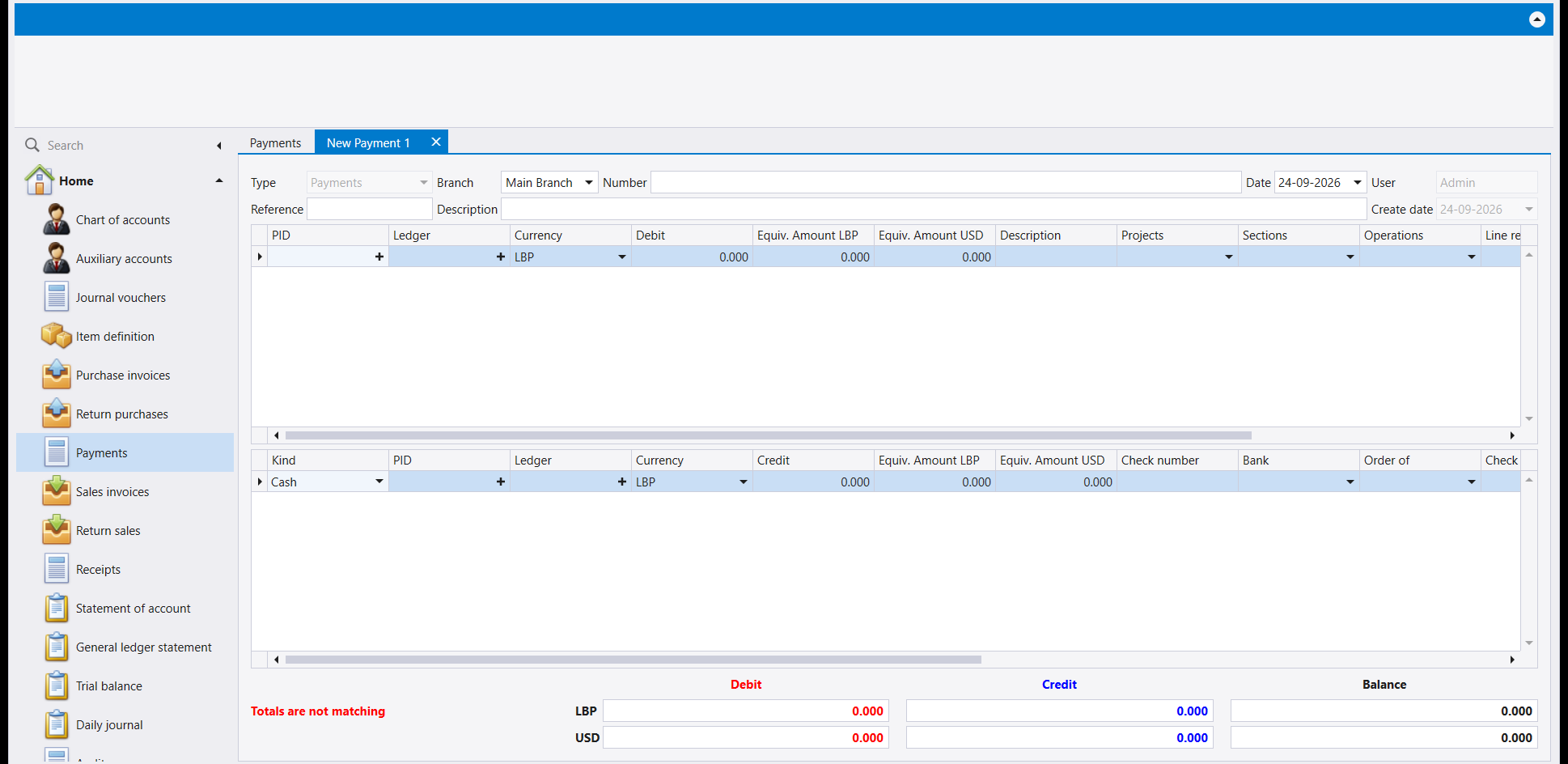
Picking the supplier on the top row fills the Ledger and Currency columns for you - here, a supplier held in USD. That top line is what you paid for, and it stays in the supplier's own currency:
Set the bottom row's Kind to Cash and enter the amount in the cash account's own currency, LBP. Entering 47,952,000 on the cash line derives the top line's own-currency equivalent for you: filling the supplier line's Debit with the matching 532.800 brings both currencies to zero at once:
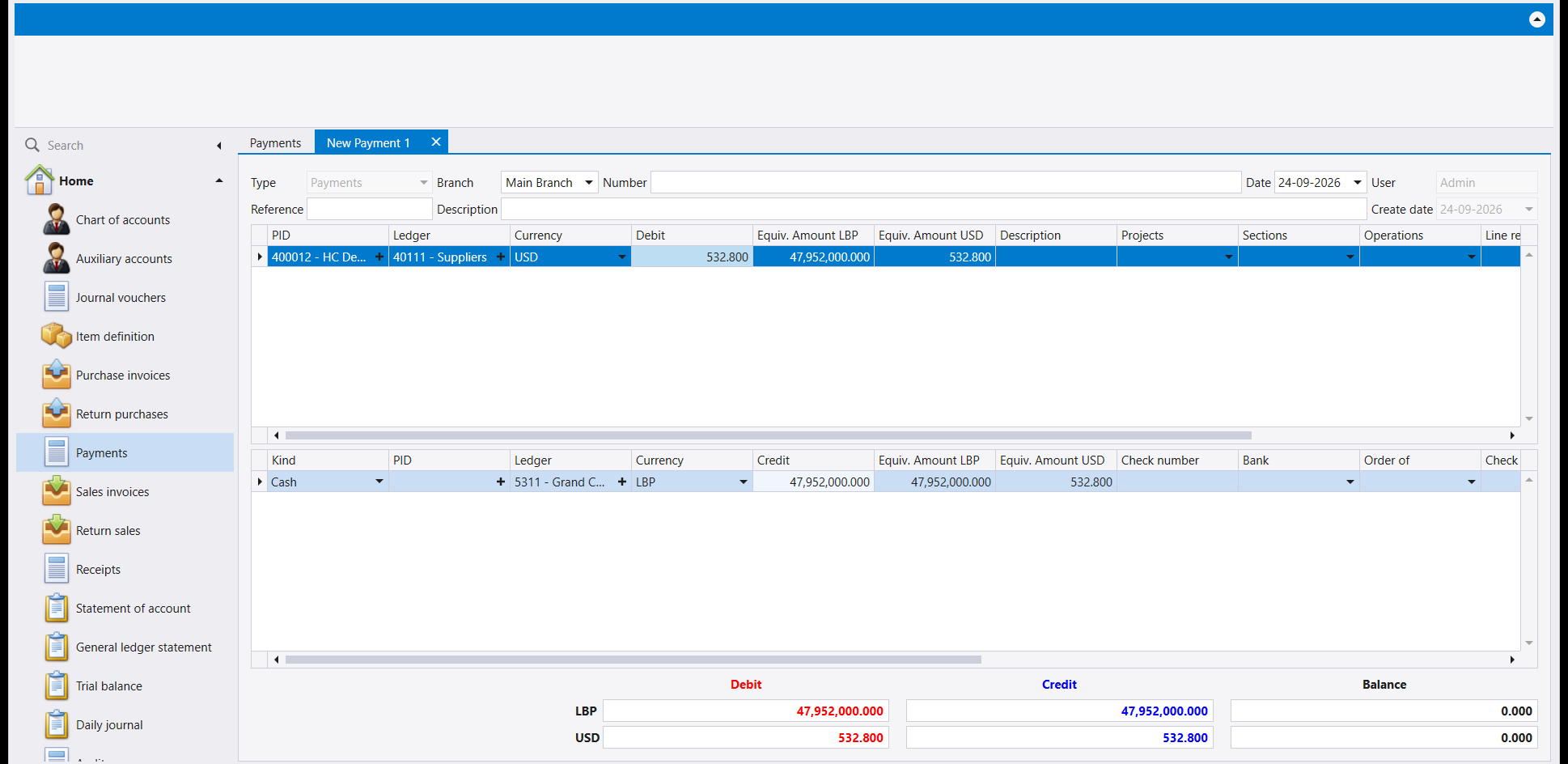
The document balances on this pair - LBP against LBP, USD against USD - not on one converted number standing in for the other. Save it, and it is numbered the same way any payment is, 001-2026-PV-1, with PV for Payments.
4. Payment allocation: check where the money landed
Once the payment is saved, the ribbon's Payment allocation button opens an inline panel listing the supplier's open invoices, with Save pay and Delete pay above it and Show totally paid installments / Delete virtual pay checkboxes on its header row:
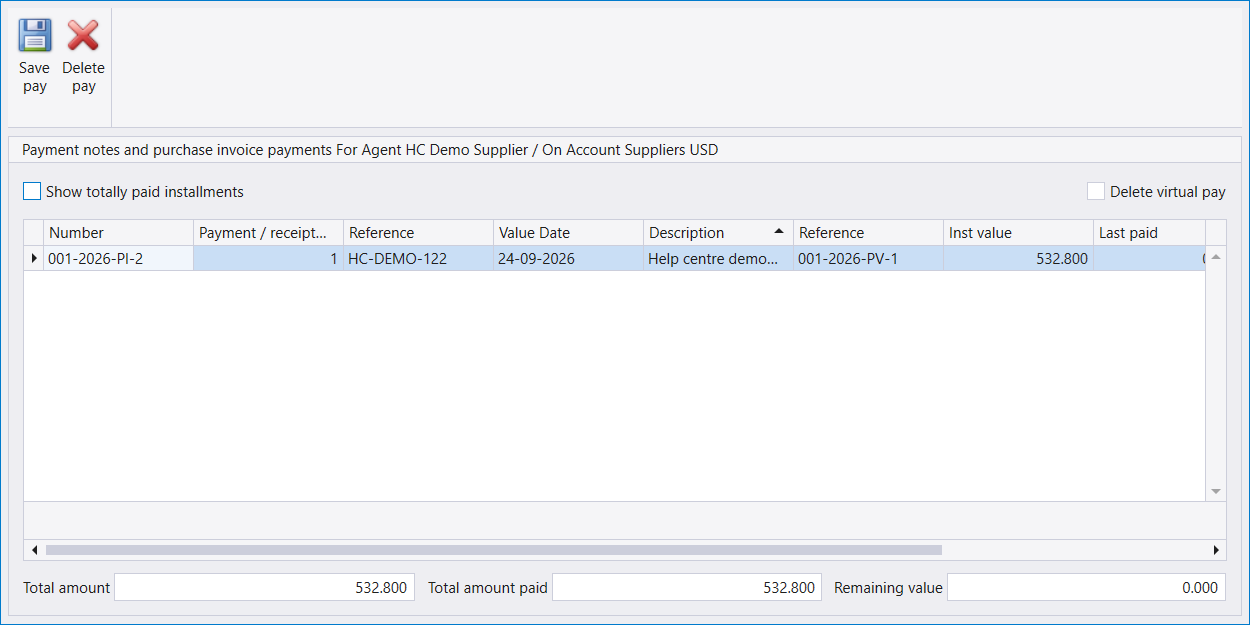
Libra pre-matches the payment against the party's open invoices, oldest first, before you touch anything - here, against the one open invoice, in full. Review the grid before saving: if the payment should be split differently across several invoices, Delete pay clears the automatic match so you can enter your own Paid value per row, then Save pay commits whichever split you land on.
Once it is saved, run the supplier's statement again - the payment now shows on it, against the invoice it settled, with the balance carried forward.
تقع فاتورة المورّد بأي عملة صدرت بها، لكن الصندوق أو الحساب المصرفي الذي تسدّد منه لا يلزم أن يطابقها. ويشرح هذا الدليل خطوة بخطوة دفع فاتورة بالدولار نقدًا بالليرة اللبنانية، والشاشة التي تُظهر أي فاتورة وصل إليها المال فعلًا.
١. قبل الدفع: اسحب كشف الحساب، ثم افتح Payments
قبل أن تدفع لأحد، اسحب كشف حسابه لترى ما هو مستحق فعلًا وبأي عملة - راجع التقارير لشاشة Statement of account. ومتى عرفت الرقم، افتح Payments واضغط New؛ ويغطي دليل كيفية تسجيل مدفوع أو تحويل جدولي الشاشة نفسها - العلوي هو ما دفعت لأجله، والسفلي هو كيف دفعت.
٢. Kind: كيف دفعت
عمود Kind في الجدول السفلي هو حيث تحدد كيف تحرّك المال. وتعرض قائمته أربعة خيارات بالضبط، بهذا الترتيب:
- Cash
- Check jiro
- Check
- Bank Transfer
ويشرح دليل المقبوضات والمدفوعات والتحويلات إلى أين يُرحَّل كل نوع والفرق بين Check تكتبه أنت بنفسك وCheck jiro تُمرّره من طرف آخر. واختيار Cash مع ترك خانة الحساب فارغة يحلّها من تلقاء نفسه إلى حساب الصندوق الخاص بالشركة - دون أن تكتب شيئًا.
٣. حالة مطبَّقة: فاتورة بالدولار، تُدفع نقدًا بالليرة
اختيار المورّد في السطر العلوي يملأ لك عمودي Ledger وCurrency - هنا، مورّد حسابه بالـ USD. وذلك السطر العلوي هو ما دفعت لأجله، ويبقى بعملة المورّد نفسها:
اضبط Kind في السطر السفلي على Cash وأدخل المبلغ بعملة حساب النقد نفسها، أي LBP. وإدخال 47,952,000 على سطر النقد يشتق لك المعادل بعملة السطر العلوي نفسه: فملء Debit في سطر المورّد بالمبلغ المطابق 532.800 يُنزل العملتين معًا إلى الصفر دفعة واحدة:
ويتوازن المستند على هذا الزوج - ليرة مقابل ليرة، ودولار مقابل دولار - لا على رقم مُحوَّل واحد يقوم مقام الآخر. احفظه، فيُرقَّم كأي مدفوع آخر، 001-2026-PV-1، وحرفا PV للمدفوعات.
٤. Payment allocation: تحقّق أين وصل المال
فور حفظ الدفعة، يفتح زر Payment allocation في الشريط لوحة داخلية تسرد فواتير المورّد المفتوحة، وفوقها Save pay وDelete pay، ومربعا اختيار Show totally paid installments وDelete virtual pay على سطر ترويستها:
يطابق ليبرا الدفعة تلقائيًا مع فواتير الطرف المفتوحة، الأقدم أولًا، قبل أن تلمس أي شيء - وهنا، مع الفاتورة المفتوحة الوحيدة، بالكامل. راجع الجدول قبل الحفظ: فإن كان يجب توزيع الدفعة بشكل مختلف على عدة فواتير، يمسح Delete pay المطابقة التلقائية لتُدخل أنت Paid value الخاص بك لكل سطر، ثم يثبّت Save pay أي توزيع تستقر عليه.
ومتى حُفظت، أعد تشغيل كشف حساب المورّد - فتظهر الدفعة عليه الآن، مقابل الفاتورة التي سدّدتها، مع الرصيد المرحَّل.