
Special reports: a printed layout for one companyالتقارير الخاصة: تصميم مطبوع لشركة واحدة
Several companies can run on one Libra installation, and out of the box they all print from the same standard layouts. When one company needs its own invoice, voucher or report layout (its own logo, its own paper size, its own wording) without changing what the other companies print, that layout goes into Special reports. This guide explains how Libra picks a layout, what changes once a company has its own, and what to ask for when you need one.
How to edit a layout itself is in Changing how a printed page looks: the Report designer.
1. How Libra picks a layout
Each time a report or document screen opens, Libra fills Report selection by looking in three places, in this order:
- layouts kept for this company only;
- layouts kept for the whole installation, shared by every company;
- the standard layouts shipped with Libra.
The first place that has a folder for that report wins outright, even an empty one (see section 5). Libra does not merge the three: the list shows the layouts from that one place and nothing else. The first two places are both inside Special reports; the third is the standard set.
2. What changes once a company has its own layouts
As soon as a company has its own layouts for a report, Report selection shows only those for that company, in that language. The standard layouts disappear from its list. Other companies are unaffected and keep seeing the standard list.
So a company-specific set should contain every layout people still need: a copy of each standard layout they use, plus the new one. When users of one company say «the other layouts disappeared», this is almost always the reason.
3. Worked example: the Trial balance
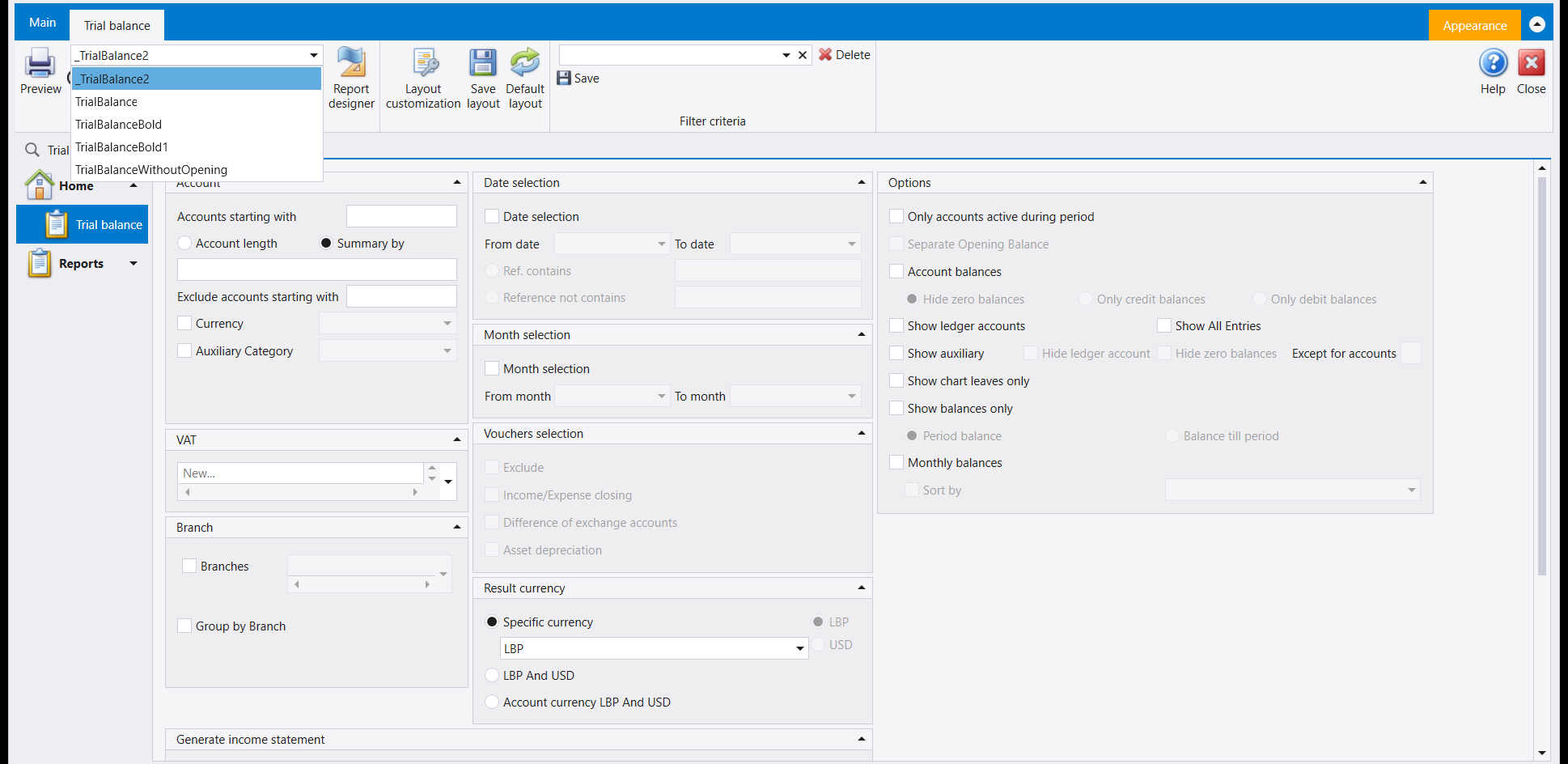
With the standard set, the Trial balance lists five layouts in Report selection: _TrialBalance2, TrialBalance, TrialBalanceBold, TrialBalanceBold1 and TrialBalanceWithoutOpening. The first one is selected when the screen opens.

Here two layouts were installed in Special reports for one company, in English: Company trial balance and Company trial balance bold. That company's English users now see those two names and nothing else, with Company trial balance selected when the screen opens. The five standard names are gone from their list, because they were not copied into the set. Users of every other company still see the five, and so do this company's Arabic users until an Arabic set is added.

One more detail: a report whose options change its shape keeps a separate set for each shape. The Trial balance in two currencies, or with balances only, reads its own set of layouts, so a company layout made for the usual shape leaves the other shapes on the standard list.
4. Where special layouts are kept, and who installs them
Special layouts are kept in the Special reports folder of the Libra installation, next to the folder holding the standard layouts. Inside it there is a folder for each company, then one for each report, then one for each language. If your installation uses a shared report folder on the network, set in Setup system parameters in the Common reports path box (see System parameters), Special reports sits in that shared folder instead.
Installing, replacing or removing a special layout is a file task, best done with Libra closed, by whoever manages your installation or by IDS support. To ask for one, give them:
- the company;
- the report, and which of its options you print with (for example two currencies);
- the language or languages your users log in with;
- the standard layouts to keep in the list beside the new one.
Once it is installed, a user with the Report designer right can open the company layout from Report selection and edit it as in Changing how a printed page looks: the Report designer. The change stays in the company's own set, and the standard layouts are left alone.
5. Things to know before relying on it
- Each computer reads its own folder unless the folder is shared. A layout installed on one computer is seen on another only when both use the same shared report folder. The Common reports path is set on each computer, for each Windows user, so check it everywhere you print.
- Layouts are kept per language. An English set changes nothing for an Arabic login. Add a set for each language the company logs in with.
- Names without dots. The list cuts a name at its first dot, and the shortened name then fails with Missing report.
- Keep a backup before every update. Keep your own layouts in Special reports, never saved over the standard files, and ask for a copy of the Special reports folder before each Libra update. A company's copy is its own file, so an improvement to a standard layout in a new version reaches it only when the copy is refreshed. Ask for a comparison after each update.
- Going back to the standard list means removing the company folder for that report completely. An emptied folder still counts, and leaves the list empty.
- A company copied or restored under a new name: ask whoever manages the installation to check that its special layouts came with it.
6. Special series is a different thing
The Special series screen has a Link to specific report box (see Document numbering). That box belongs to numbering: it ties a numbered range of documents to the layout that prints them. It is set inside Libra, and it does not decide where layouts are kept or which ones a company sees in Report selection.
Printouts made from a list screen are a third thing again, and they are kept on each computer: see Printing any list: the Reports menu.
يمكن أن تعمل عدة شركات على تثبيت واحد لـLibra، وفي الأصل تطبع كلها من التصاميم القياسية نفسها. حين تحتاج شركة واحدة إلى تصميم خاص بها لفاتورة أو قيد أو تقرير (شعارها، حجم ورقها، صياغتها) دون أن يتغيّر ما تطبعه الشركات الأخرى، يوضع ذلك التصميم في Special reports (التقارير الخاصة). يشرح هذا الدليل كيف يختار Libra التصميم، وما الذي يتغيّر حين يصبح لشركة تصاميمها الخاصة، وماذا تطلب حين تحتاج إلى واحد منها.
طريقة تعديل التصميم نفسه في تغيير شكل الصفحة المطبوعة: مصمّم التقارير.
١. كيف يختار Libra التصميم
في كل مرة تُفتح فيها شاشة تقرير أو مستند، يملأ Libra قائمة Report selection بالبحث في ثلاثة أماكن بهذا الترتيب:
- التصاميم المحفوظة لهذه الشركة وحدها؛
- التصاميم المحفوظة للتثبيت كله، وتشترك فيها كل الشركات؛
- التصاميم القياسية التي تأتي مع Libra.
أول مكان فيه مجلد لذلك التقرير يفوز وحده، ولو كان المجلد فارغًا (راجع القسم ٥). لا يدمج Libra الأماكن الثلاثة: تعرض القائمة تصاميم ذلك المكان وحده ولا شيء غيرها. المكانان الأول والثاني كلاهما داخل Special reports؛ والثالث هو المجموعة القياسية.
٢. ما الذي يتغيّر حين يصبح للشركة تصاميمها الخاصة
ما إن يصبح لشركة تصاميمها الخاصة لتقرير ما، حتى تعرض Report selection تلك التصاميم وحدها لتلك الشركة وبتلك اللغة. تختفي التصاميم القياسية من قائمتها. ولا تتأثر الشركات الأخرى، فتبقى ترى القائمة القياسية.
لذلك يجب أن تحتوي مجموعة الشركة على كل تصميم ما زال الناس يحتاجونه: نسخة من كل تصميم قياسي يستعملونه، إضافة إلى التصميم الجديد. حين يقول مستخدمو شركة ما «اختفت التصاميم الأخرى»، فهذا هو السبب في أغلب الأحيان.
٣. مثال عملي: Trial balance
مع المجموعة القياسية، تعرض Report selection في Trial balance خمسة تصاميم: _TrialBalance2 وTrialBalance وTrialBalanceBold وTrialBalanceBold1 و TrialBalanceWithoutOpening. ويكون الأول منها مختارًا حين تُفتح الشاشة.
هنا ثُبّت تصميمان في Special reports لشركة واحدة بالإنكليزية: Company trial balance وCompany trial balance bold. فصار مستخدمو تلك الشركة الذين يدخلون بالإنكليزية يرون هذين الاسمين ولا شيء غيرهما، وCompany trial balance مختار حين تُفتح الشاشة. وغابت الأسماء القياسية الخمسة عن قائمتهم، لأنها لم تُنسخ إلى المجموعة. أما مستخدمو كل الشركات الأخرى فما زالوا يرون الخمسة، وكذلك مستخدمو هذه الشركة الذين يدخلون بالعربية إلى أن تُضاف مجموعة عربية.
تفصيل آخر: التقرير الذي تغيّر خياراتُه شكلَه يحتفظ بمجموعة منفصلة لكل شكل. فميزان المراجعة بعملتين، أو بالأرصدة فقط، يقرأ مجموعة تصاميم خاصة به، لذلك يترك التصميم الخاص بالشركة للشكل المعتاد الأشكالَ الأخرى على القائمة القياسية.
٤. أين تُحفظ التصاميم الخاصة، ومن يثبّتها
تُحفظ التصاميم الخاصة في مجلد Special reports ضمن تثبيت Libra، بجانب المجلد الذي يحمل التصاميم القياسية. في داخله مجلد لكل شركة، ثم مجلد لكل تقرير، ثم مجلد لكل لغة. إذا كان التثبيت لديكم يستعمل مجلد تقارير مشتركًا على الشبكة، يُحدَّد في Setup system parameters في خانة Common reports path (راجع معايير النظام)، فإن Special reports يكون داخل ذلك المجلد المشترك.
تثبيت تصميم خاص أو استبداله أو حذفه عمل على الملفات، يُفضَّل أن يتم وLibra مغلق، ويقوم به من يدير التثبيت لديكم أو دعم IDS. لطلب تصميم، أعطهم:
- الشركة؛
- التقرير، والخيارات التي تطبع بها (مثلًا بعملتين)؛
- اللغة أو اللغات التي يدخل بها مستخدموكم؛
- التصاميم القياسية التي يجب أن تبقى في القائمة بجانب التصميم الجديد.
بعد التثبيت، يستطيع مستخدم يحمل صلاحية Report designer أن يفتح تصميم الشركة من Report selection ويعدّله كما في تغيير شكل الصفحة المطبوعة: مصمّم التقارير. يبقى التعديل في مجموعة الشركة، ولا تُمسّ التصاميم القياسية.
٥. ما يجب معرفته قبل الاعتماد عليه
- كل جهاز يقرأ مجلده الخاص ما لم يكن المجلد مشتركًا. التصميم المثبّت على جهاز لا يظهر على جهاز آخر إلا إذا استعمل الاثنان مجلد التقارير المشترك نفسه. وخانة Common reports path تُضبط على كل جهاز ولكل مستخدم Windows، فافحصها في كل مكان تطبعون منه.
- التصاميم محفوظة لكل لغة. المجموعة الإنكليزية لا تغيّر شيئًا عند الدخول بالعربية. أضف مجموعة لكل لغة تدخل بها الشركة.
- أسماء بلا نقاط. القائمة تقطع الاسم عند أول نقطة، ثم يفشل الاسم المختصر برسالة Missing report.
- احتفظ بنسخة احتياطية قبل كل تحديث. احفظ تصاميمك في Special reports، ولا تحفظها أبدًا فوق الملفات القياسية، واطلب نسخة من مجلد Special reports قبل كل تحديث لـLibra. نسخة الشركة ملف خاص بها، فلا يصلها تحسين أُدخل على تصميم قياسي في إصدار جديد إلا حين تُجدَّد. اطلب مقارنة بعد كل تحديث.
- العودة إلى القائمة القياسية تعني حذف مجلد الشركة لذلك التقرير بالكامل. المجلد الفارغ يبقى محسوبًا، فيترك القائمة فارغة.
- شركة نُسخت أو استُرجعت باسم جديد: اطلب ممن يدير التثبيت التأكد من أن تصاميمها الخاصة انتقلت معها.
٦. Special series شيء مختلف
في شاشة Special series خانة Link to specific report (راجع ترقيم المستندات). هذه الخانة تتعلّق بالترقيم: تربط مجموعة أرقام من المستندات بالتصميم الذي يطبعها. تُضبط داخل Libra، ولا تحدّد مكان حفظ التصاميم ولا أيّها تراه الشركة في Report selection.
والمطبوعات المصنوعة من شاشات القوائم شيء ثالث، وتُحفظ على كل جهاز: راجع طباعة أي قائمة: قائمة Reports.