
Item familiesعائلات الأصناف
A family is a group of items that share a place in the tree and, more importantly, share default accounts. Set the family up once and every item you create under it starts with the right sales account, purchase account, VAT rate and warehouse already filled in.
That is the whole point. The person entering items all day is rarely an accountant, and the family is what stops them having to be one.
Where it lives
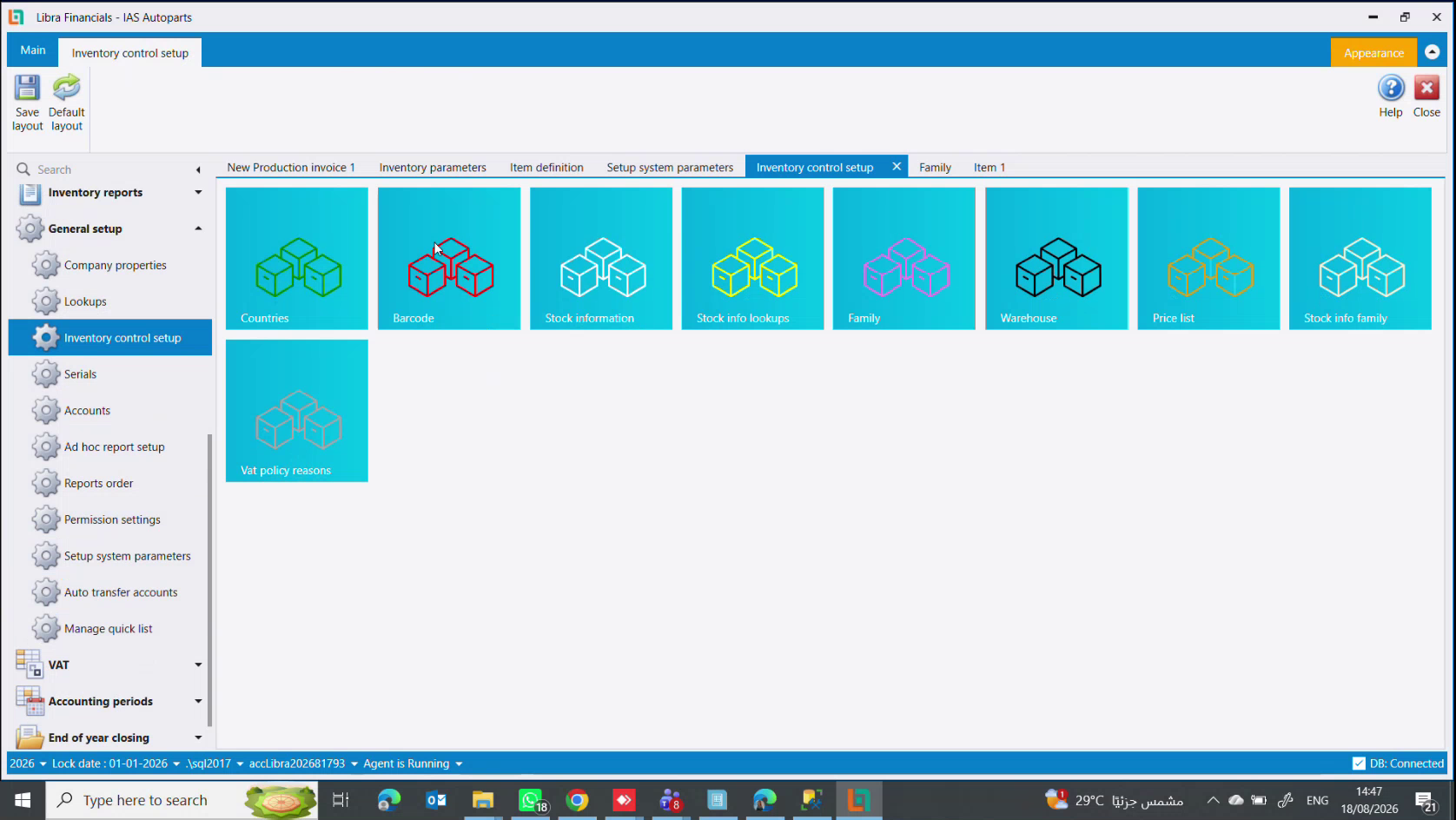
Open General setup → Inventory control setup. It is a page of tiles, and Family is one of them.
Three levels, and the numbering
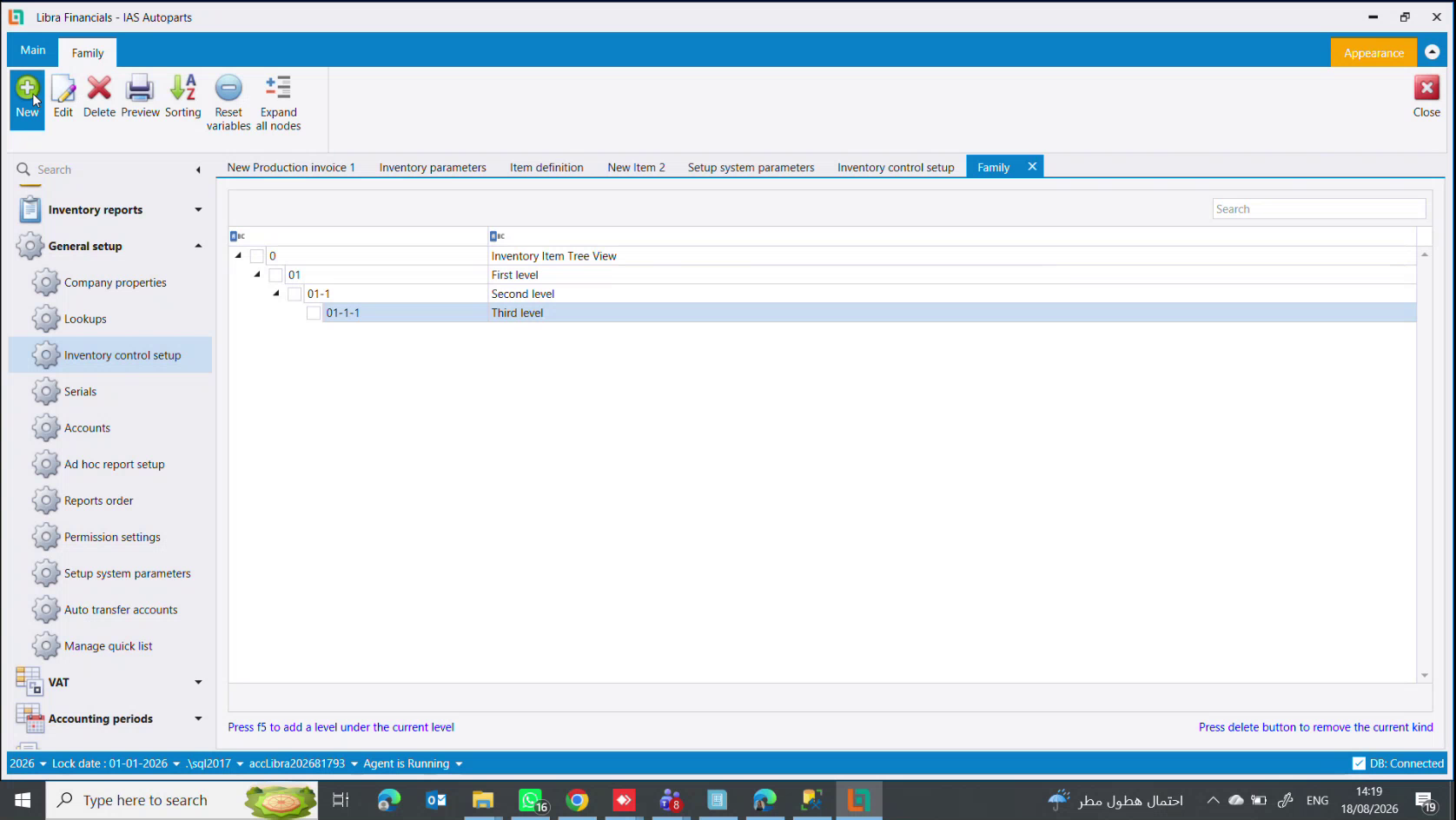
The tree is three levels deep at most, under a fixed root called Inventory Item Tree View. The numbering is positional and Libra maintains it: 01 → 01-1 → 01-1-1. The Description beside each number is the name you actually read.
The footer tells you how to build it: Press f5 to add a level under the current level and Press delete button to remove the current kind. The ribbon adds Sorting, Reset variables and Expand all nodes.
How deep should you go? Only as deep as the business really divides. A workshop that sells whole cars, spare parts and fitting services needs three families at the top level and often nothing below. Splitting finely at the start is easy; unpicking it later is not, because the accounts hang off the level you chose.
What a family carries
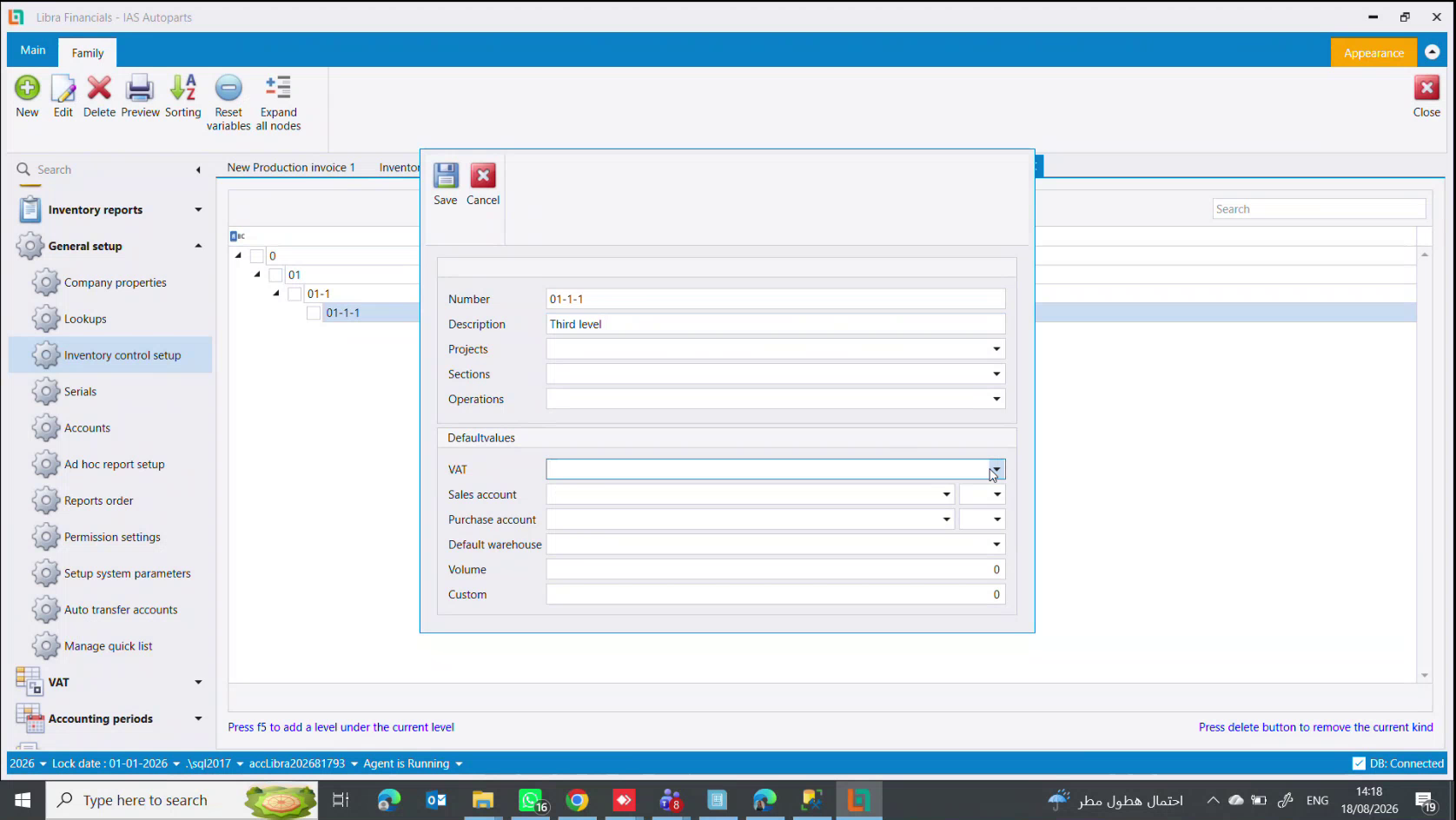
| Field | Meaning |
|---|---|
Number | the positional number, maintained by Libra |
Description | the family's name |
Projects / Sections / Operations | the three cost centre kinds, defaulted for items in this family - see Cost centers |
Then the Defaultvalues panel, which is what the family is for:
| Default | Effect on a new item |
|---|---|
VAT | the tax rate arrives already chosen |
Sales account | the income account the item sells to, with its currency |
Purchase account | the expense/goods account the item buys into, with its currency |
Default warehouse | where the item lives unless told otherwise |
Volume | a default volume |
Custom | a default customs percentage |
A worked example
An auto-parts business separates:
- Cars - whole vehicles bought and resold, on their own sales account
- Spare parts - the pieces, on the goods accounts (
7011/60111for VAT-subject goods) - Services - fitting and labour, on a service income account, and every item under it ticked
Service
Three families, three sets of accounts, and from then on the person creating an item picks the family and the accounting is already right.
What the default does and does not do
The values are copied into the item when you pick the family, not linked to it. Change a family's sales account later and items already created keep the old one - you edit those yourself. The default decides where a new item starts.
An individual item can always override any of them, and an auxiliary record's account can be reassigned later. That is unlike the chart of accounts, whose parent/child structure freezes once a posting exists - see How to open an account.
Next steps
- The item definition screen - where the defaults land
- How to create an item - the walkthrough
العائلة (Family) مجموعة أصناف تشترك في موقع من الشجرة، والأهم أنها تشترك في حسابات افتراضية. تُعِدّ العائلة مرة واحدة، فيبدأ كل صنف تنشئه تحتها وحساب المبيعات وحساب المشتريات ونسبة الضريبة والمستودع معبّأة سلفًا.
هذا هو المقصد كله. فمن يُدخل الأصناف طوال اليوم نادرًا ما يكون محاسبًا، والعائلة هي ما يعفيه من أن يكون كذلك.
أين تجدها
افتح General setup ← Inventory control setup. إنها صفحة مربّعات، وFamily أحدها.
ثلاثة مستويات، والترقيم
الشجرة ثلاثة مستويات كحدّ أقصى، تحت جذر ثابت اسمه Inventory Item Tree View. والترقيم موضعي يديره ليبرا: 01 ← 01-1 ← 01-1-1. وDescription بجانب كل رقم هو الاسم الذي تقرأه فعلًا.
يخبرك أسفل الشاشة كيف تبنيها: Press f5 to add a level under the current level و Press delete button to remove the current kind. ويضيف الشريط Sorting وReset variables و Expand all nodes.
إلى أي عمق تنزل؟ إلى حيث ينقسم العمل فعلًا لا أكثر. ورشة تبيع سيارات كاملة وقطع غيار وخدمات تركيب تحتاج ثلاث عائلات في المستوى الأول وغالبًا لا شيء تحتها. التفصيل الدقيق في البداية سهل، أما التراجع عنه لاحقًا فليس كذلك، لأن الحسابات معلّقة على المستوى الذي اخترته.
ماذا تحمل العائلة
| الحقل | المعنى |
|---|---|
Number | الرقم الموضعي، يديره ليبرا |
Description | اسم العائلة |
Projects / Sections / Operations | أنواع مراكز الكلفة الثلاثة، افتراضية لأصناف هذه العائلة - راجع مراكز الكلفة |
ثم لوحة Defaultvalues، وهي سبب وجود العائلة:
| الافتراضي | أثره على صنف جديد |
|---|---|
VAT | تصل نسبة الضريبة مختارة سلفًا |
Sales account | حساب الإيراد الذي يُباع عليه الصنف، مع عملته |
Purchase account | حساب البضاعة/المصروف الذي يُشترى عليه الصنف، مع عملته |
Default warehouse | أين يقيم الصنف ما لم يُقل غير ذلك |
Volume | حجم افتراضي |
Custom | نسبة جمرك افتراضية |
مثال عملي
محل قطع غيار سيارات يفصل:
- Cars - سيارات كاملة تُشترى وتُباع، على حساب مبيعات خاص بها
- Spare parts - القطع، على حسابات البضائع (
7011/60111للبضائع الخاضعة) - Services - التركيب واليد العاملة، على حساب إيراد خدمات، وكل صنف تحتها معلّم
Service
ثلاث عائلات وثلاث مجموعات حسابات، ومن بعدها يختار مُنشئ الصنف العائلةَ فتكون المحاسبة صحيحة سلفًا.
ما يفعله الافتراضي وما لا يفعله
القيم تُنسَخ إلى الصنف عند اختيار العائلة، لا تُربَط به. غيّر حساب مبيعات عائلة لاحقًا فتبقى الأصناف المنشأة سابقًا على القديم - وتعدّلها أنت بنفسك. الافتراضي يقرّر من أين يبدأ الصنف الجديد.
ويستطيع أي صنف مفرد تجاوز أيٍّ منها دائمًا، كما يمكن إعادة تعيين حساب سجلٍّ مساعد لاحقًا. وهذا بخلاف دليل الحسابات الذي تتجمّد بنية الأب/الابن فيه بمجرد وجود قيد - راجع كيفية فتح حساب.
الخطوات التالية
- شاشة تعريف الأصناف - حيث تصل الافتراضيات
- كيفية إنشاء صنف - الشرح خطوة بخطوة