
How to dismantle a whole into partsكيفية تفكيك الكل إلى أجزاء
You bought a wrecked car front for 1,000 USD. A customer wants the headlight. You never bought a headlight, so there is nothing in stock to sell and nothing to cost it at.
Dismantling solves this: it is production run backwards - one raw material in, many products out - and it creates the parts as real stock with a real cost.
Before you start you need the advanced production tier, the one with a Percentage column. If your production invoice has no such column, stop here and ask your Libra provider - it is a licence level, not a setting. See Items, kits & dismantling.
1. Create an item for the whole, and one for each part
Every part you intend to sell needs its own item, created before you dismantle anything. The headlight, the left fender, the right fender, the radiator, the alternator.
They will normally sit in the same family as the whole, so they inherit the same accounts - see How to create an item and Item families.
2. Open a production invoice
Inventory management → Production → Production invoices → New.
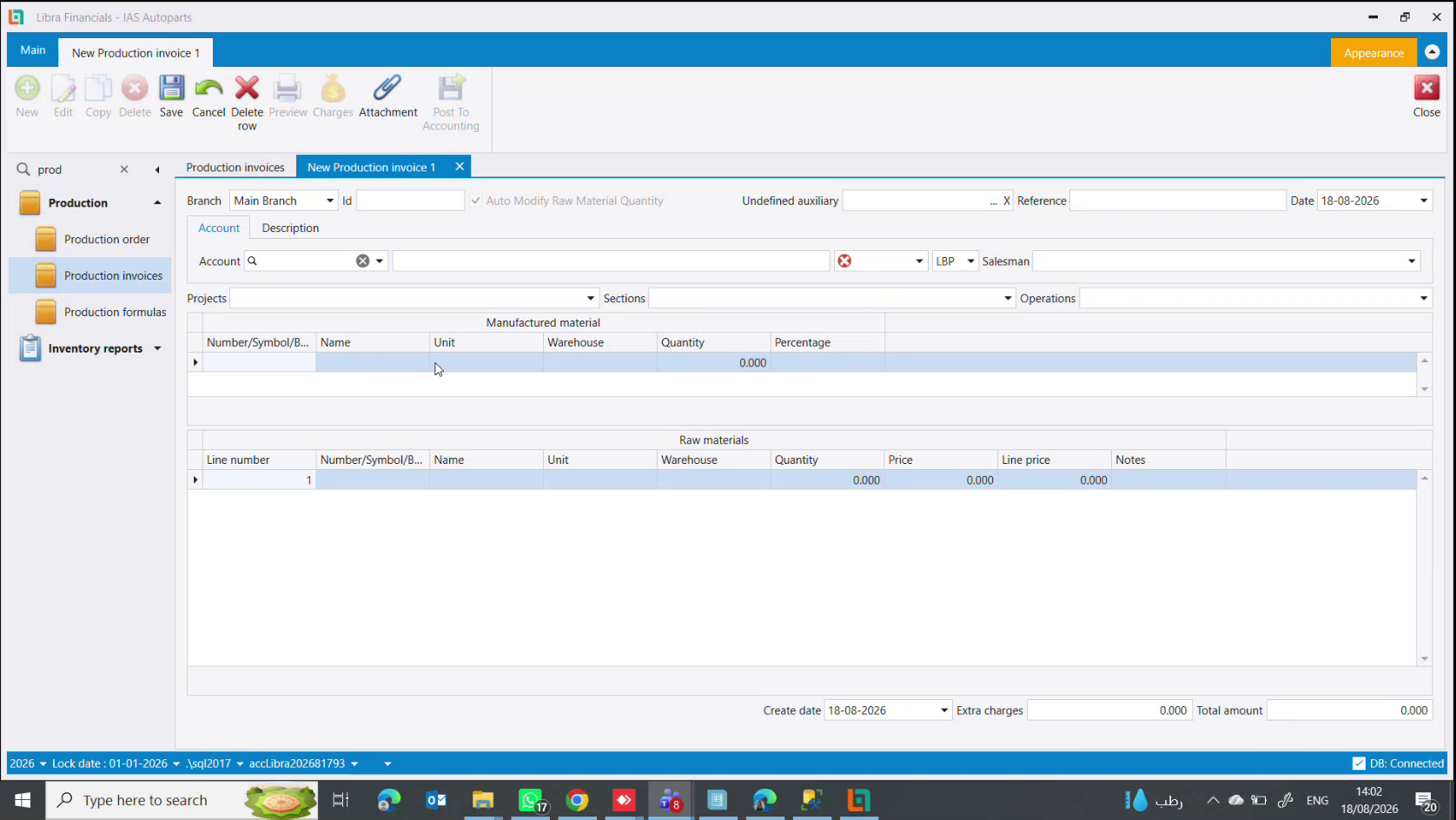
Work from the bottom up, because that is the order the business happens in:
Raw materials (lower grid) - one line: the car front, quantity 1, with its warehouse and its price. This is what gets consumed.
Manufactured material (upper grid) - one line per part: headlight, left fender, right fender, radiator, alternator, each with its quantity and warehouse.
3. Split the cost with percentages
The Percentage column on each output line says how much of the raw material's cost that part carries. The percentages must total 100.
For a 1,000 USD front:
| Part | Percentage | Cost it receives |
|---|---|---|
| Headlight (left) | 10 | 100 USD |
| Headlight (right) | 10 | 100 USD |
| Fender (left) | 20 | 200 USD |
| Fender (right) | 20 | 200 USD |
| Radiator | 25 | 250 USD |
| Alternator | 15 | 150 USD |
| Total | 100 | 1,000 USD |
You control the split, and you should: parts are not worth equal fractions of a wreck. Weight the percentage towards what actually sells for more. If the total is not 100 the costing is wrong and the difference has nowhere to go.
4. Save, then post
Saving moves the stock: the front leaves, the parts arrive with their costs. Post To Accounting puts it in the ledger.
Dismantling only part of a whole
You rarely break everything down. The motor is often worth more intact, and a customer may want it whole.
So dismantle to the level that sells, and make an item for the remainder:
- Put only the parts you are actually removing in the upper grid - say the bonnet and the fenders.
- Add one more output line for what is left: an item named something like
Car front - less bonnet and fenders. - Give the remainder the balance of the percentage, so the column still totals 100.
The remainder is now an ordinary item. Sell it whole, or run it through a second production invoice later when someone wants the motor out of it. This is how breakers normally work - dismantle coarsely on arrival, then break down further on demand.
If you do this repeatedly
A wreck is different every time, so most dismantling is done straight on the production invoice with no saved recipe.
But if you genuinely repeat the same breakdown, save it as a production formula and press Copy to turn it into an invoice each time. See Production formulas, invoices & orders.
Next steps
اشتريت مقدّمة سيارة محطّمة بـ 1,000 دولار. جاء زبون يريد المصباح. أنت لم تشترِ مصباحًا قط، فلا شيء في المخزون لتبيعه ولا كلفة لتسعّره بها.
يحلّ التفكيك هذا: فهو الإنتاج بالمقلوب - مادة خام واحدة تدخل ومنتجات كثيرة تخرج - ويُنشئ القطع كمخزون حقيقي بكلفة حقيقية.
قبل أن تبدأ تحتاج مستوى الإنتاج المتقدم، ذاك الذي فيه عمود Percentage. فإن خلت قسيمة الإنتاج عندك من هذا العمود فقف هنا واسأل مزوّد ليبرا - إنه مستوى ترخيص لا إعداد. راجع الأصناف والأطقم والتفكيك.
1. أنشئ صنفًا للكل وصنفًا لكل جزء
كل قطعة تنوي بيعها تحتاج صنفها الخاص، يُنشأ قبل أن تفكّك شيئًا. المصباح، الرفراف الأيسر، الرفراف الأيمن، الرادياتور، الدينامو.
وستكون عادةً في عائلة الكل نفسها لترث الحسابات نفسها - راجع كيفية إنشاء صنف وعائلات الأصناف.
2. افتح قسيمة إنتاج
Inventory management ← Production ← Production invoices ← New.
اعمل من الأسفل إلى الأعلى، لأن هذا ترتيب ما يحدث في الواقع:
Raw materials (الجدول السفلي) - سطر واحد: مقدّمة السيارة، كمية 1، مع مستودعها وسعرها. هذا ما يُستهلك.
Manufactured material (الجدول العلوي) - سطر لكل قطعة: مصباح، رفراف أيسر، رفراف أيمن، رادياتور، دينامو، لكلٍّ كميته ومستودعه.
3. وزّع الكلفة بالنسب
يقول عمود Percentage على كل سطر مخرَج كم يتحمّل ذلك الجزء من كلفة المادة الخام. ويجب أن يكون مجموع النسب 100.
لمقدّمة بـ 1,000 دولار:
| القطعة | Percentage | الكلفة التي تنالها |
|---|---|---|
| مصباح (يسار) | 10 | 100 دولار |
| مصباح (يمين) | 10 | 100 دولار |
| رفراف (يسار) | 20 | 200 دولار |
| رفراف (يمين) | 20 | 200 دولار |
| رادياتور | 25 | 250 دولار |
| دينامو | 15 | 150 دولار |
| المجموع | 100 | 1,000 دولار |
أنت من يتحكم بالتوزيع، ويجب أن تفعل: فالقطع لا تساوي أجزاءً متساوية من حطام. رجّح النسبة نحو ما يُباع فعلًا بأغلى. وإن لم يكن المجموع 100 كان التكليف خاطئًا ولم يجد الفرقُ مكانًا يذهب إليه.
4. احفظ ثم رحّل
الحفظ يحرّك المخزون: تخرج المقدّمة وتدخل القطع بكلفها. وPost To Accounting يضعها في الدفاتر.
تفكيك جزء من الكل فقط
نادرًا ما تفكّك كل شيء. فالموتور غالبًا أثمن سليمًا، وقد يريده زبون كاملًا.
لذا فكّك إلى المستوى الذي يُباع، وأنشئ صنفًا للباقي:
- ضع في الجدول العلوي القطع التي تنزعها فعلًا فقط - غطاء الموتور والرفارف مثلًا.
- أضف سطر مخرَج واحدًا لما تبقّى: صنفًا باسم مثل
مقدّمة سيارة - ناقص الغطاء والرفارف. - أعطِ الباقي رصيد النسبة، ليبقى مجموع العمود 100.
صار الباقي صنفًا عاديًا. بِعه كاملًا، أو مرّره في قسيمة إنتاج ثانية لاحقًا حين يريد أحدهم الموتور منه. وهكذا يعمل الكسّارون عادةً - تفكيك خشن عند الوصول، ثم تفكيك أدق عند الطلب.
إذا كررت هذا
الحطام مختلف في كل مرة، لذا يجري معظم التفكيك مباشرة على قسيمة الإنتاج بلا وصفة محفوظة.
أما إن كررت التفكيك نفسه فعلًا فاحفظه تركيبة إنتاج واضغط Copy لتحويلها إلى قسيمة كل مرة. راجع تركيبات وقسائم وأوامر الإنتاج.