
How to create an itemكيفية إنشاء صنف
This is the walkthrough. For the screen field by field, see The item definition screen.
1. Make sure the family exists first
Items inherit their accounts from their family, so create the family before the item and you will not have to type an account number at all. General setup → Inventory control setup → Family. See Item families.
2. Open a new item
Inventory management → Item definition → New.
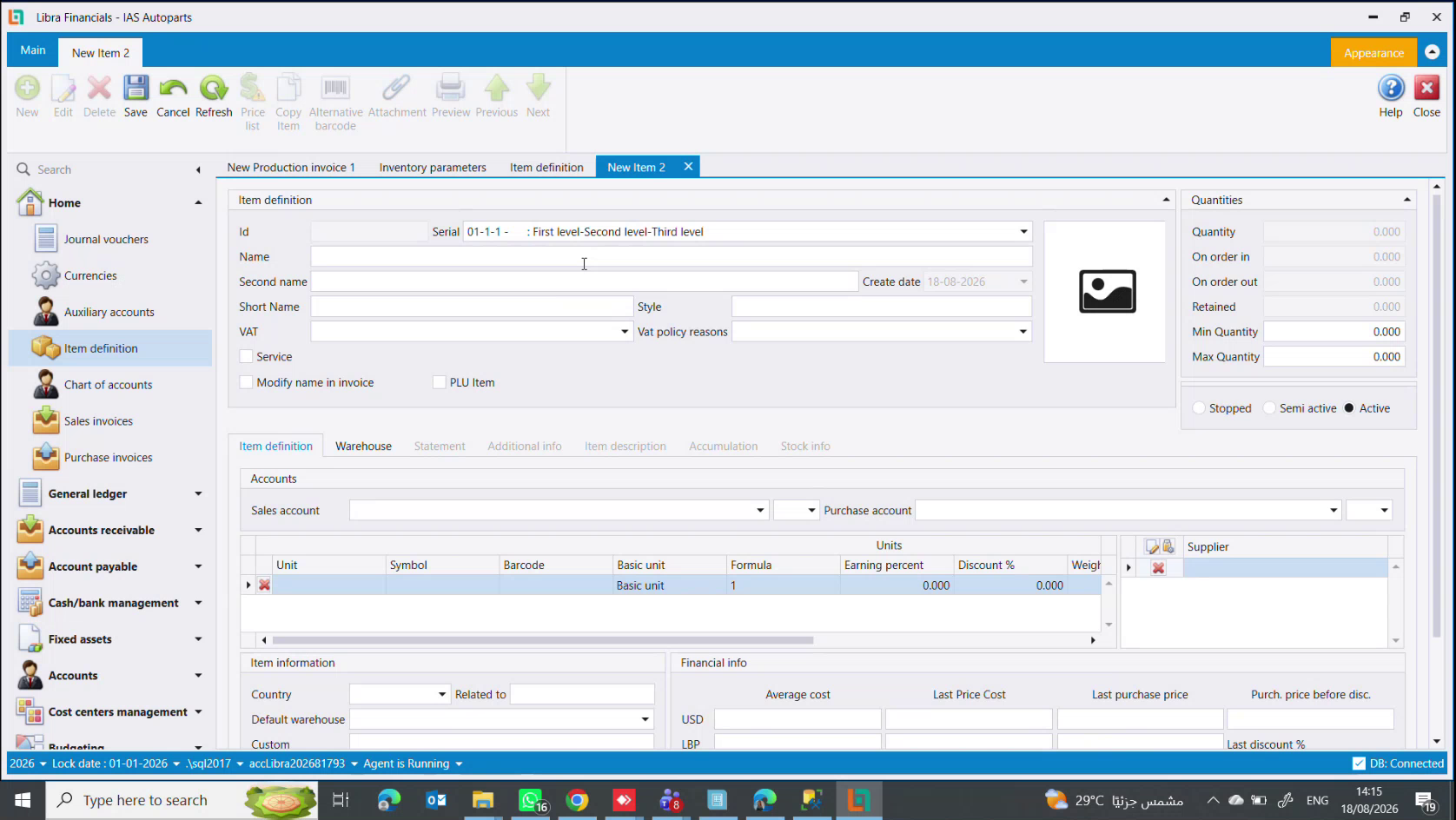
3. Pick the family, then name the item
Set Serial to the family. This is the step that fills in the accounts, so do it first.
Then:
NameandSecond name- the full descriptive name in both languages. Be precise:Bonnet BMW 535 2020 whiteis a good name, because it is what you tell someone to go and fetch.Short Name- a shortened version for POS receipts, which are about 8 cm wide and will not fit the long one.
4. Set the VAT rate
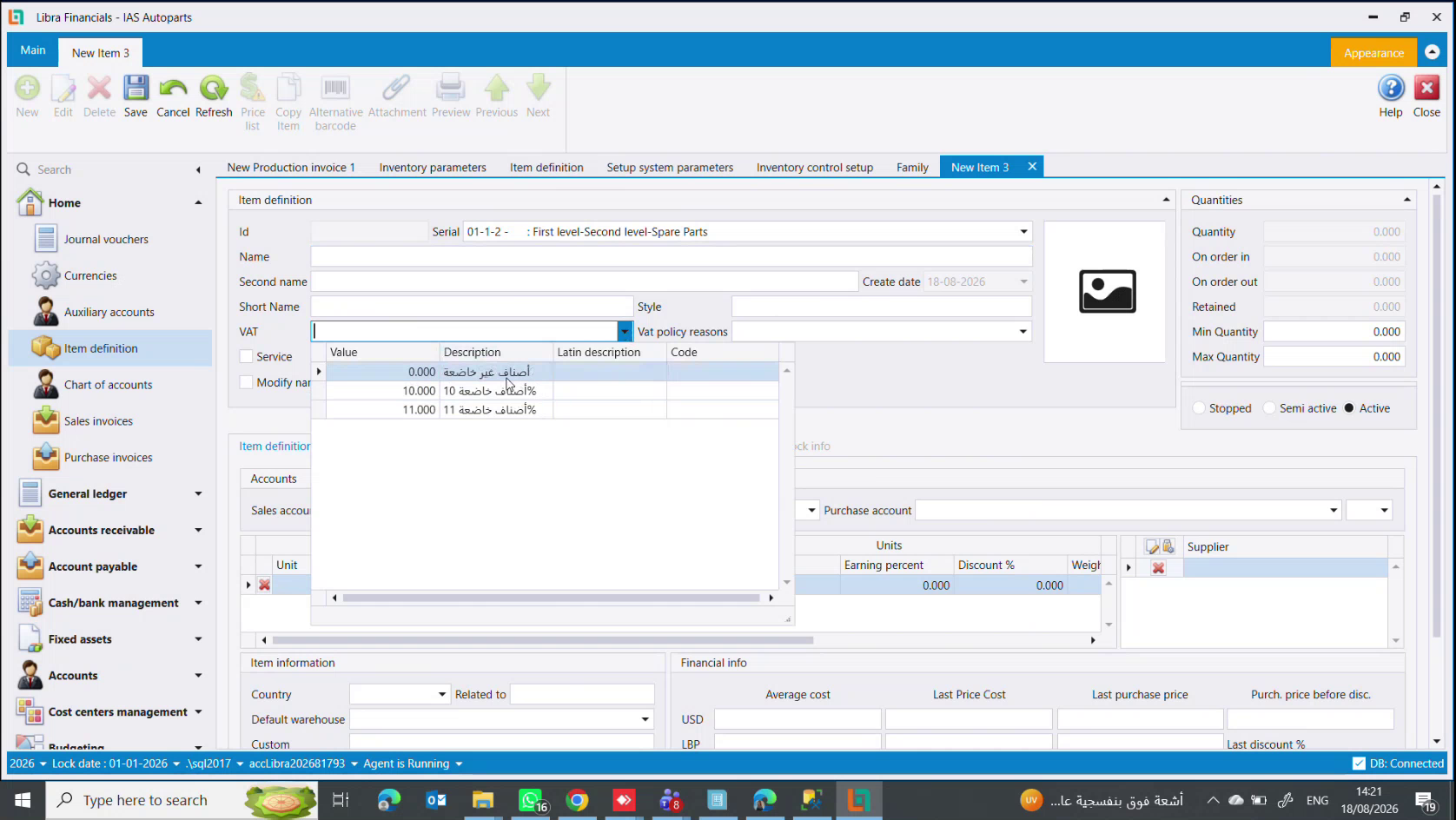
The VAT dropdown offers three values: 0.000 (not subject), 10.000 (subject at 10%) and 11.000 (subject at 11%).
Most goods and all services are 11. Use 0 only for goods the state has exempted - bread, flour, the staples. If the family set a rate, it is already chosen.
5. Tick the flags that apply
Service- for anything with no stock: fitting, labour, repairs. Libra then stops checking stock when it is sold, so a service line never goes negative and never blocks an invoice.Modify name in invoice- lets the seller retype the name on the sales invoice, when the stored name is more technical than the customer needs.PLU Item- only for items weighed on a shop scale, where the printed barcode carries the weight or price inside it.
6. Check the accounts
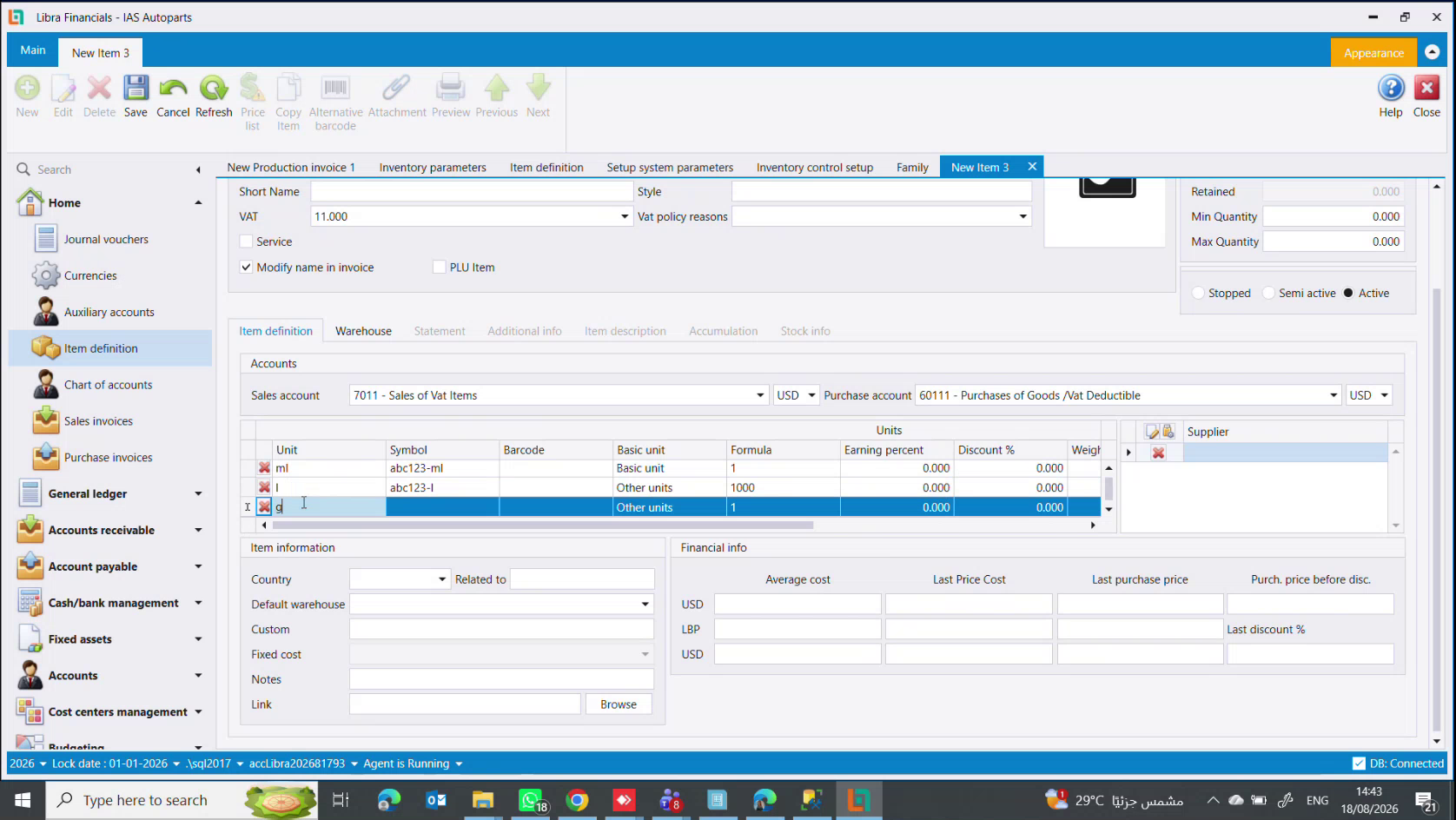
Sales account and Purchase account should already be filled from the family - here 7011 - Sales of Vat Items and 60111 - Purchases of Goods /Vat Deductible. Set each one's currency to the one you price in.
If they are empty, the family had no defaults. Fill them here, then fix the family so the next item does not need it.
7. Add the units
One row per unit. Exactly one row is the Basic unit - always the smallest - and Formula says how many basic units each other unit holds. Give each its own Symbol and Barcode.
Full detail, including the naming convention: How to set up units.
8. Save
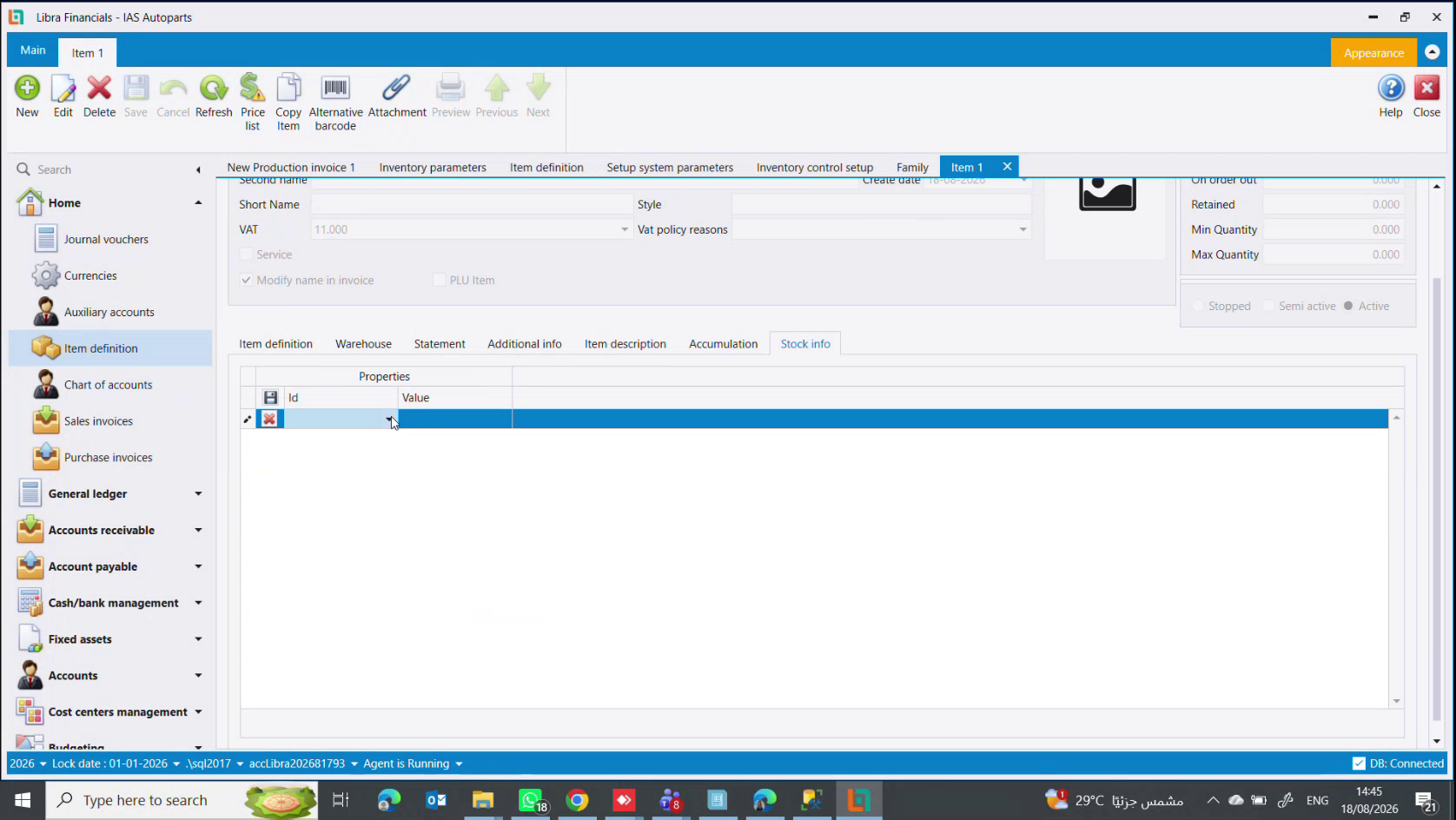
Saving assigns the Id and unlocks the rest of the screen: the Accumulation and Stock info tabs, and the Price list, Copy Item and Alternative barcode ribbon buttons all become available. They were greyed out because they need an item to attach to.
9. Come back for the optional parts
Stock info- brand, model, year, origin. See Item properties & categoriesAccumulation- only if this item is a bundle. See Items, kits & dismantlingCountry,Default warehouse,Custom(customs %),Notes,Link
The item is ready to buy and sell.
Next steps
- The item definition screen - every field explained
- How to set up units of measure
هذا هو الشرح خطوة بخطوة. وللشاشة حقلًا حقلًا راجع شاشة تعريف الأصناف.
1. تأكد أولًا من وجود العائلة
ترث الأصناف حساباتها من عائلتها، فأنشئ العائلة قبل الصنف ولن تحتاج كتابة رقم حساب إطلاقًا. General setup ← Inventory control setup ← Family. راجع عائلات الأصناف.
2. افتح صنفًا جديدًا
Inventory management ← Item definition ← New.
3. اختر العائلة ثم سمِّ الصنف
اضبط Serial على العائلة. هذه هي الخطوة التي تملأ الحسابات، فابدأ بها.
ثم:
NameوSecond name- الاسم الوصفي الكامل بلغتين. كن دقيقًا:Bonnet BMW 535 2020 whiteاسم جيد، لأنه ما تقوله لأحدهم ليذهب ويحضره.Short Name- نسخة مختصرة لإيصالات نقاط البيع، وعرضها نحو 8 سم ولا يتّسع للاسم الطويل.
4. حدّد نسبة الضريبة
تعرض قائمة VAT ثلاث قيم: 0.000 (غير خاضع) و10.000 (خاضع 10%) و11.000 (خاضع 11%).
معظم البضائع وكل الخدمات على 11. ولا تستعمل 0 إلا للبضائع التي أعفتها الدولة - الخبز والطحين والمواد الأساسية. وإن كانت العائلة قد حدّدت نسبة فهي مختارة سلفًا.
5. علّم الخانات المناسبة
Service- لكل ما لا مخزون له: التركيب واليد العاملة والتصليح. عندها يتوقف ليبرا عن فحص المخزون عند بيعه، فلا يصبح سطر الخدمة بالسالب ولا يعطّل فاتورة.Modify name in invoice- يتيح للبائع إعادة كتابة الاسم على فاتورة البيع، حين يكون الاسم المخزَّن أكثر تقنية مما يحتاجه الزبون.PLU Item- فقط للأصناف التي تُوزن على ميزان المحل، حيث يحمل الباركود المطبوع الوزن أو السعر بداخله.
6. تحقّق من الحسابات
يُفترض أن يكون Sales account وPurchase account معبّأين من العائلة - هنا 7011 - Sales of Vat Items و60111 - Purchases of Goods /Vat Deductible. واضبط عملة كلٍّ منهما على التي تسعّر بها.
فإن كانا فارغين فالعائلة بلا افتراضيات. املأهما هنا ثم أصلح العائلة كي لا يحتاج الصنف التالي ذلك.
7. أضف الوحدات
سطر لكل وحدة. وسطر واحد فقط هو Basic unit - الأصغر دائمًا - وFormula يقول كم وحدة أساسية تحمل كل وحدة أخرى. وأعطِ كلًّا منها Symbol وBarcode خاصين.
التفصيل الكامل، مع عرف التسمية: كيفية إعداد الوحدات.
8. احفظ
الحفظ يعطي Id ويفتح بقية الشاشة: لسانا Accumulation وStock info، وأزرار Price list و Copy Item وAlternative barcode في الشريط، كلها تصبح متاحة. وكانت مطفأة لأنها تحتاج صنفًا ترتبط به.
9. عُد للأجزاء الاختيارية
Stock info- الماركة والموديل والسنة والمنشأ. راجع خصائص الأصناف وفئاتهاAccumulation- فقط إن كان هذا الصنف طقمًا. راجع الأصناف والأطقم والتفكيكCountryوDefault warehouseوCustom(نسبة الجمرك) وNotesوLink
أصبح الصنف جاهزًا للشراء والبيع.
الخطوات التالية
- شاشة تعريف الأصناف - كل حقل مشروحًا
- كيفية إعداد وحدات القياس