
The item definition screenشاشة تعريف الأصناف
Every item you buy, sell or manufacture is a record on one screen: Item definition (Inventory management → Item definition). It is the busiest screen in the product, so this guide walks it panel by panel. The step-by-step version is How to create an item.
Finding an item: the list
Item definition opens on a list of every item, and you open a record from here.
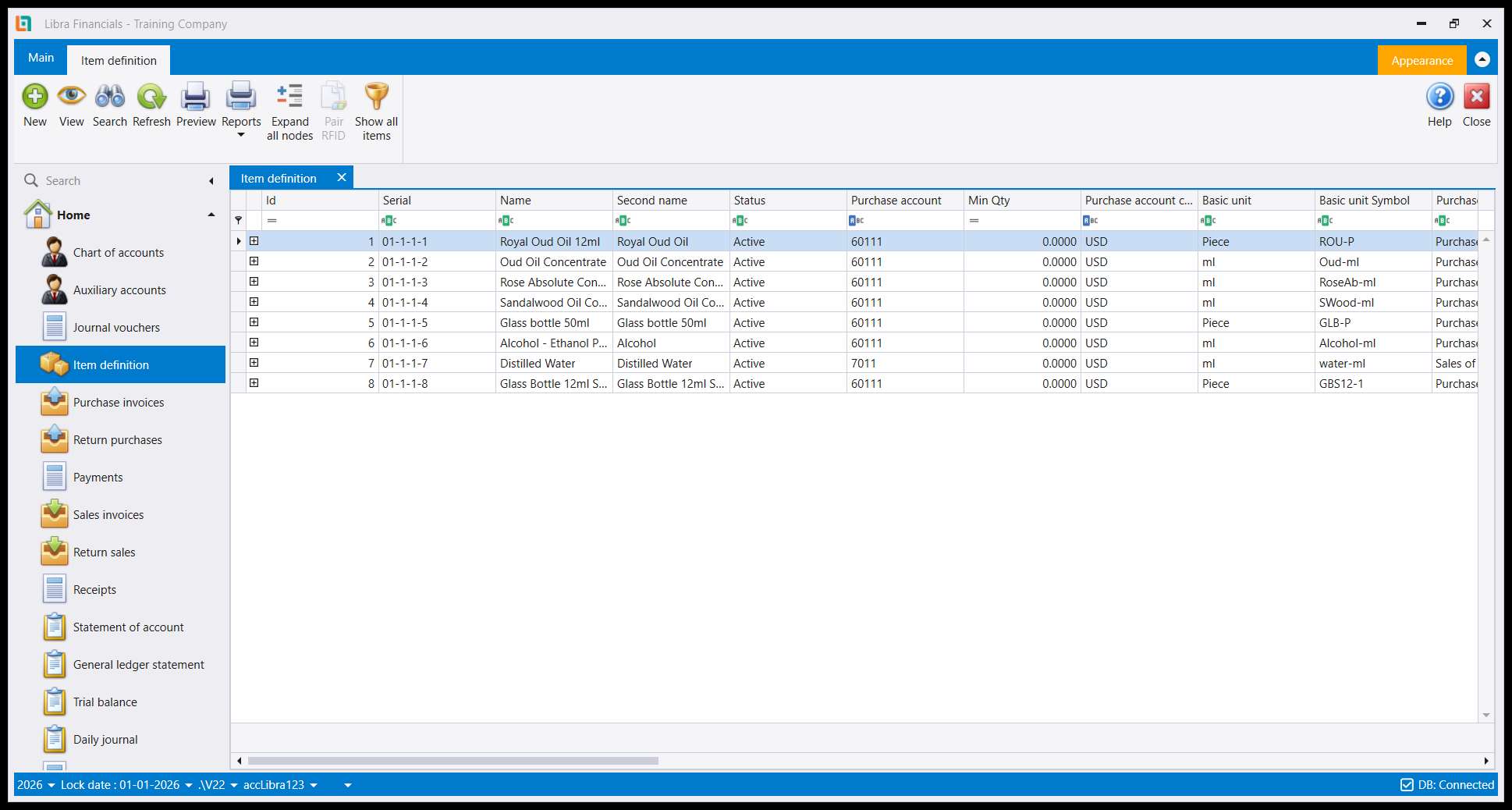
The columns are a useful summary in themselves - Id, Serial, Name, Second name, Status, Purchase account and its currency, Min Qty, Basic unit and Basic unit Symbol - so you can check a whole catalogue's accounts and units without opening anything.
Note the Serial has four segments (01-1-1-1): the three-level family path, then the item's own number within that family. See Item families.
The ribbon carries New, View, Search, Refresh, Preview, Reports, Expand all nodes, Pair RFID and Show all items - that last one reveals items whose status is Stopped, which the list hides by default. If an item you know exists is missing, try it before creating a duplicate.
Type into the filter row under the headers to narrow the list.
The header
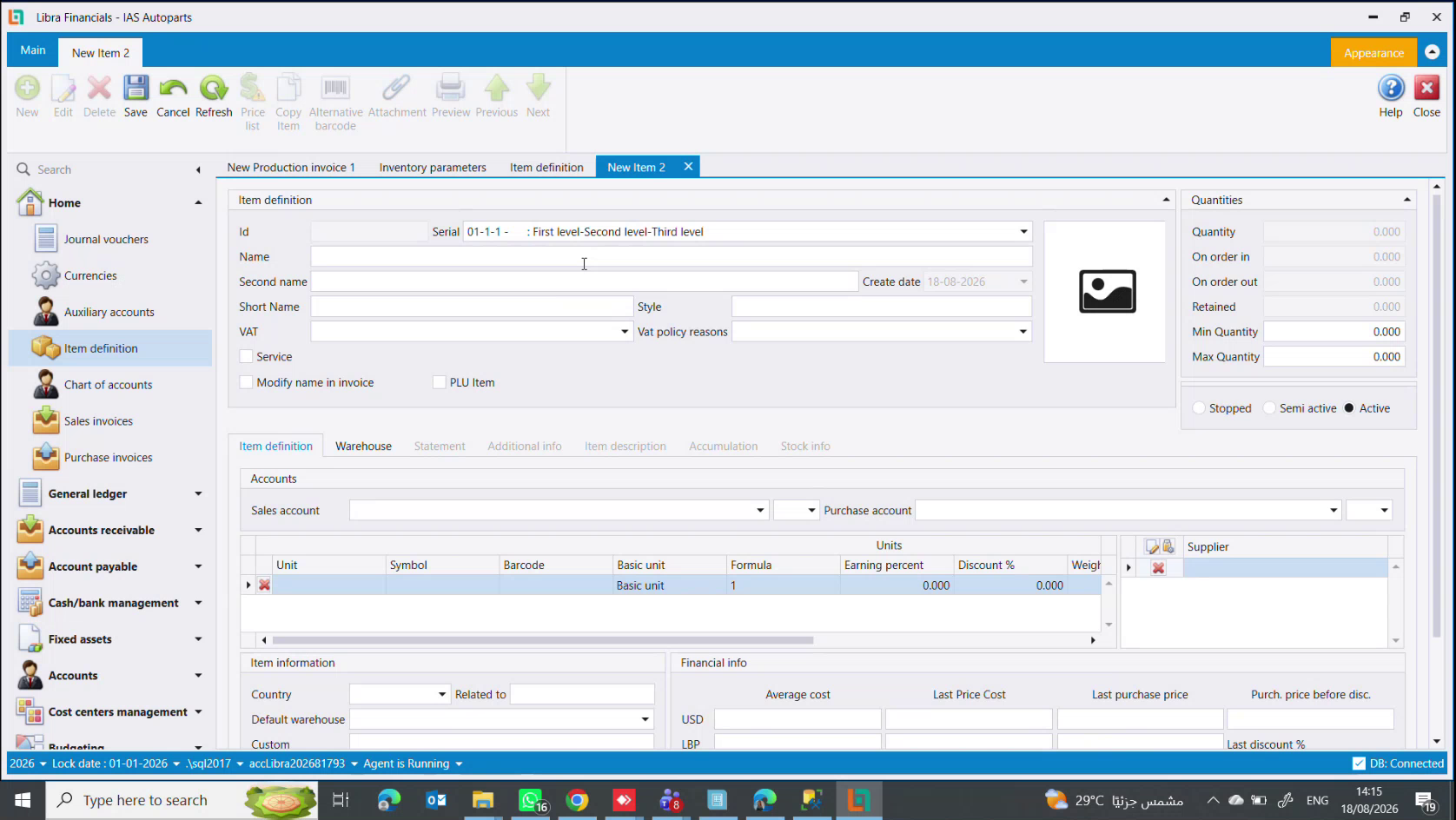
| Field | What it is |
|---|---|
Id | assigned by Libra when you save. You do not type it |
Serial | the family this item belongs to, shown as the path (01-1-2 - : First level-Second level-Spare Parts). Picking it is what makes the item inherit accounts - see Item families |
Name / Second name | the full descriptive name in two languages. Both appear on invoices |
Short Name | a shortened name for the narrow POS receipt, where the full name will not fit |
Style | a free label of your own |
VAT | the tax rate - see below |
Vat policy reasons | why this item departs from the normal rate, chosen from a list you define |
Create date | filled by Libra |
Three checkboxes sit under them:
Service- the item has no stock. Libra stops checking stock levels when you sell it, so a service never goes negative and never blocks an invoice. You can still buy and sell it, and it still carries a price and accounts; it just has no quantity. Fitting, labour and repair lines belong here.Modify name in invoice- lets the seller retype the item's name on the sales invoice. Useful when the stored name is a precise technical description (Bonnet BMW 535 2020 white) and the customer's copy should read something plainer.PLU Item- the item is weighed. A shop scale prints a barcode that carries the weight or the price inside it, and this flag tells Libra to read it that way. Cheese, fruit, vegetables and anything sold by weight. Without it the barcode is read as a plain code and the quantity is lost.
VAT: three rates, not two
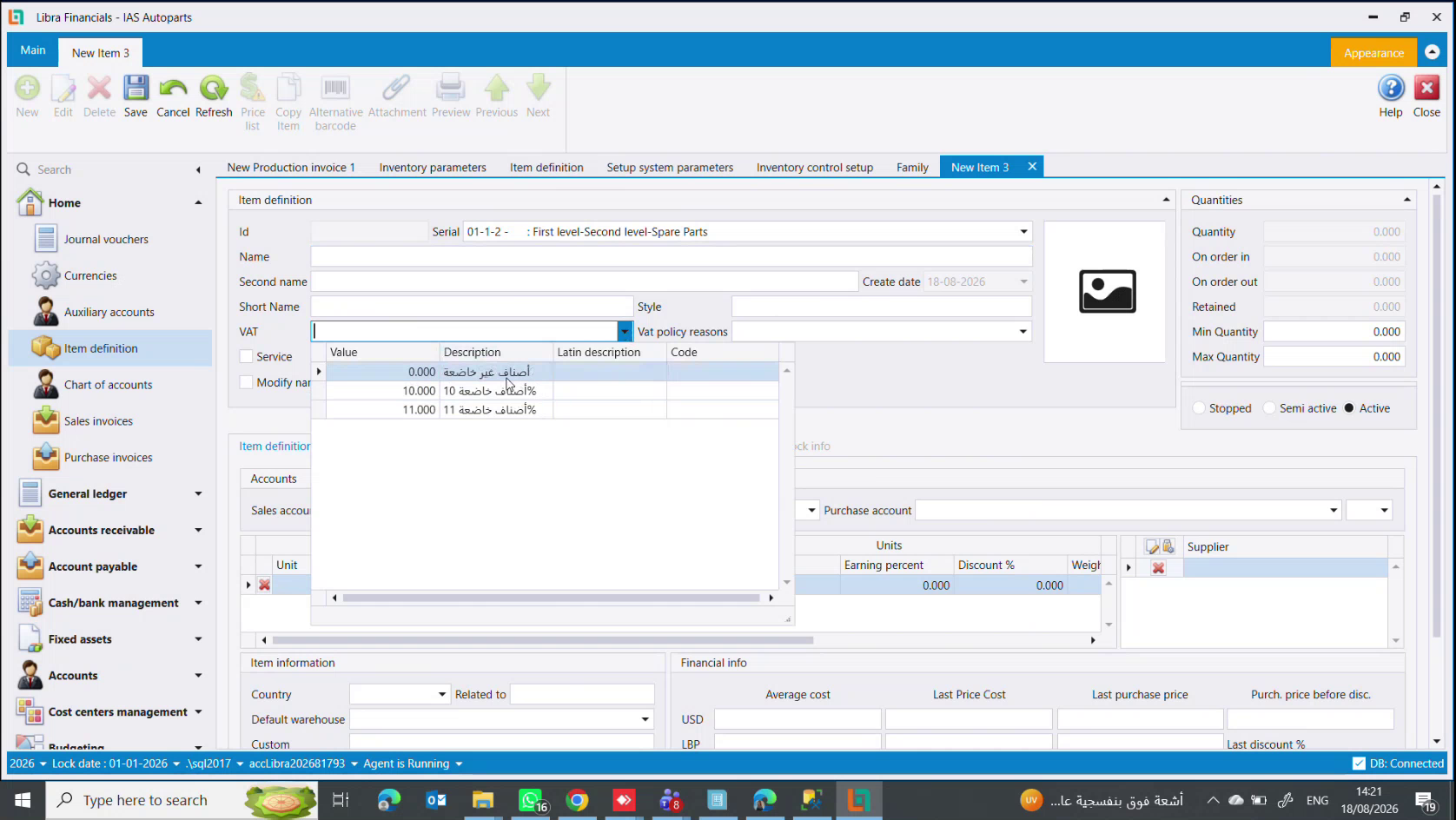
The VAT dropdown offers three values, not a subject/exempt pair:
| Value | Description on screen |
|---|---|
0.000 | أصناف غير خاضعة - items not subject to VAT |
10.000 | أصناف خاضعة 10% - items subject at 10% |
11.000 | أصناف خاضعة 11% - items subject at 11% |
11 is the current Lebanese rate and is what most goods and all services carry. 0 is for the goods the state has exempted - bread, wheat, barley, flour, the staples. 10 is kept for items on the older rate.
VAT is decided in three places at once - on the item, on the client, and on the supplier - and the invoice is only free of VAT when the rule says so at every level. A client who brings a government exemption certificate is invoiced without VAT even for a subject item. See Key rules.
Quantities and status
The right-hand panel is read-only except for the last two:
Quantity (what you hold now) · On order in (bought, not yet received) · On order out (sold, not yet delivered) · Retained (reserved) · Min Quantity / Max Quantity, which you set yourself and which drive the reorder reports.
Below them, the item's life: Stopped (unusable), Semi active (sell down existing stock, buy no more), Active. Retiring an item is a status change, never a deletion - deleting would take its history with it.
Accounts and units
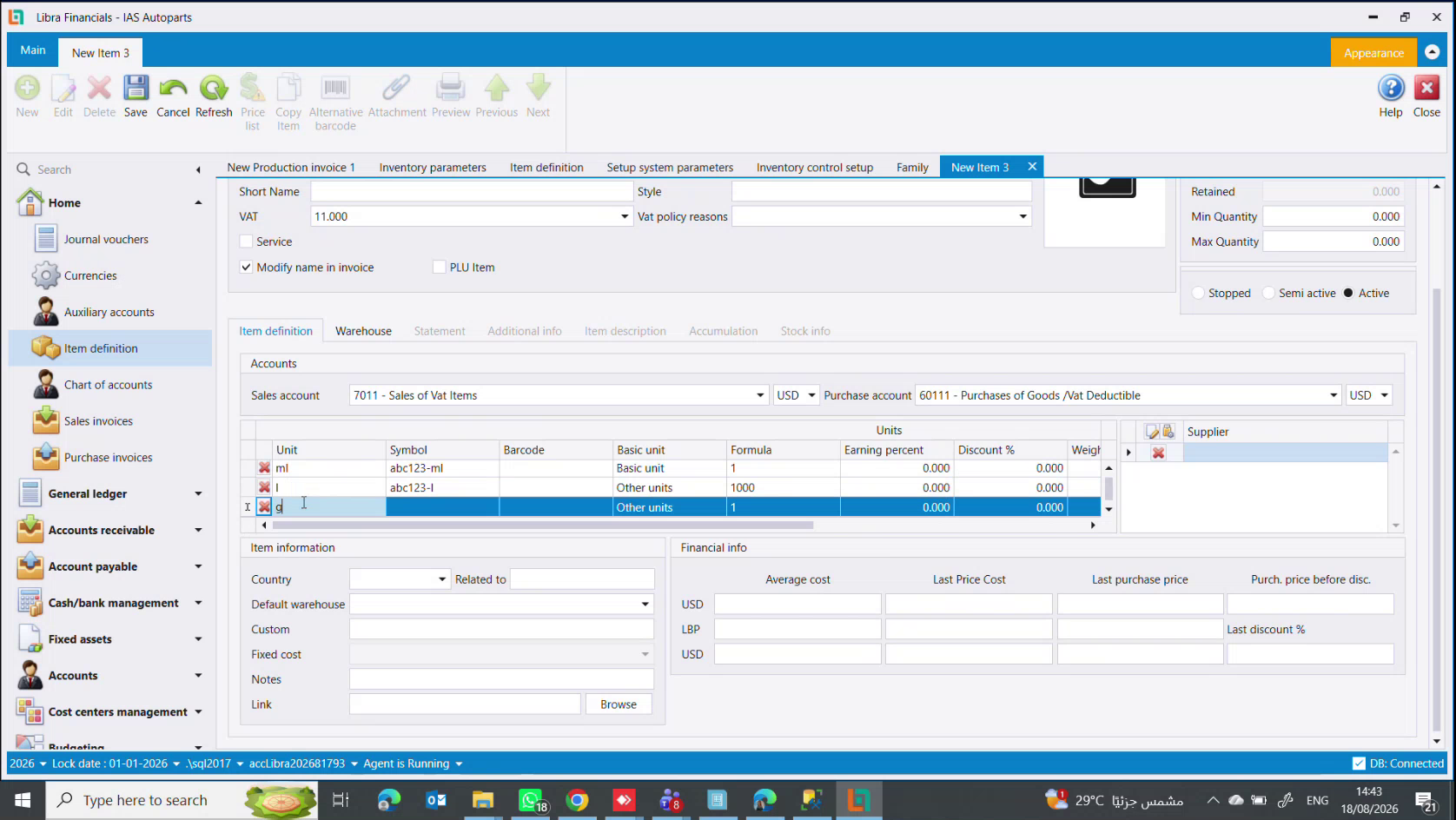
Sales account and Purchase account, each with its own currency. They arrive pre-filled from the family and can be overridden per item. The currency is the one you price in - set it to USD and "9" on this item means nine dollars.
In the picture the pair is 7011 - Sales of Vat Items and 60111 - Purchases of Goods /Vat Deductible - the standard pairing for a VAT-subject good.
The Units grid underneath is one of the most useful things on the screen, and it has its own guide: How to set up units of measure. In short: one row per unit, exactly one marked Basic unit, and Formula says how many basic units each other unit contains.
The tabs, and what unlocks them
Item definition · Warehouse · Statement · Additional info · Item description · Accumulation · Stock info
Four of them are greyed out until the item is saved, and so are the Price list, Copy Item and Alternative barcode ribbon buttons. That is not a fault: they all need an item id to attach to. Save first, then come back.
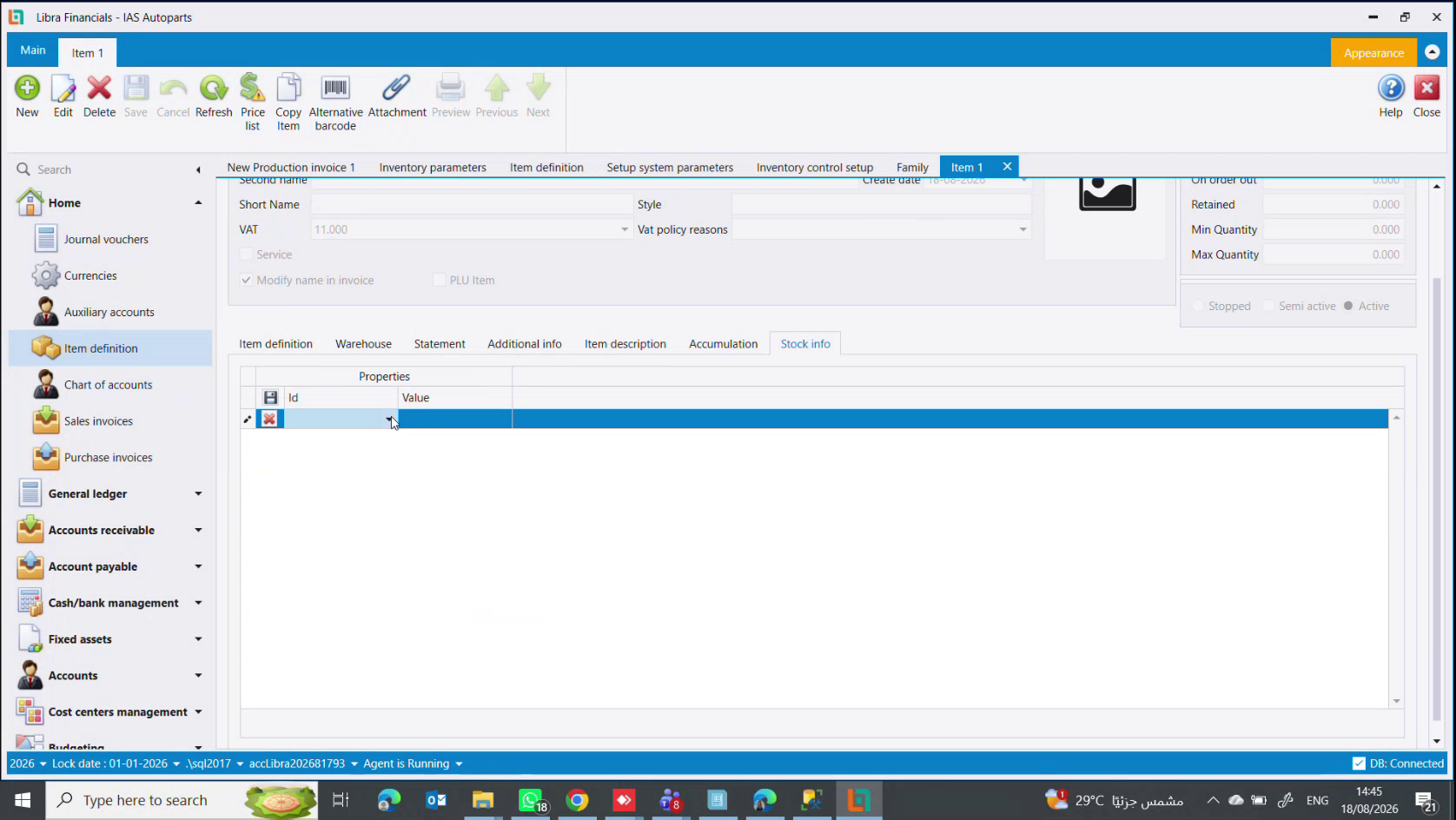
Warehouse- per-warehouse quantities and the item's default warehouse.Statement- every movement of this item.Accumulation- the components of a bundle. Only meaningful for a bundle item, and only present whenEnter accumulated itemsis switched on - see Items, kits & dismantling.Stock info- your own properties (brand, year, model, origin), asId/Valuepairs. It only appears whenShow stock infois switched on. See Item categories & stock info.
Item information and financial info
Country of origin · Related to (a sibling item) · Default warehouse · Custom (a customs percentage for an imported item) · Fixed cost · Notes · Link with a Browse button, for a document or an image.
Financial info is read-only history, shown per currency: Average cost, Last Price Cost, Last purchase price, Purch. price before disc. and Last discount %. This is where you look when a margin does not agree with what you expected.
Where the optional features come from
If a field or tab described here is missing, it is switched off rather than absent. The switches live in Inventory parameters → Items - Item categories & stock info shows that screen.
كل صنف تشتريه أو تبيعه أو تصنّعه هو سجل على شاشة واحدة: تعريف الأصناف (Item definition) (Inventory management ← Item definition). إنها أكثر شاشات البرنامج ازدحامًا، لذا يمشي هذا الدليل فيها لوحةً لوحة. النسخة خطوة بخطوة في كيفية إنشاء صنف.
العثور على صنف: اللائحة
تفتح Item definition على لائحة بكل الأصناف، ومنها تفتح السجل.
والأعمدة ملخّص نافع بذاته - Id وSerial وName وSecond name وStatus وPurchase account وعملته وMin Qty وBasic unit وBasic unit Symbol - فتراجع حسابات ووحدات كتالوج كامل دون أن تفتح شيئًا.
ولاحظ أن Serial من أربعة مقاطع (01-1-1-1): مسار العائلة بمستوياته الثلاثة، ثم رقم الصنف داخل تلك العائلة. راجع عائلات الأصناف.
ويحمل الشريط New وView وSearch وRefresh وPreview وReports وExpand all nodes و Pair RFID وShow all items - وهذا الأخير يُظهر الأصناف الموقوفة (Stopped) التي تخفيها اللائحة افتراضيًا. فإن غاب صنف تعرف أنه موجود فجرّبه قبل أن تنشئ نسخة مكرّرة.
واكتب في سطر الترشيح تحت العناوين لتضييق اللائحة.
الترويسة
| الحقل | ما هو |
|---|---|
Id | يعطيه ليبرا عند الحفظ. لا تكتبه بنفسك |
Serial | العائلة التي ينتمي إليها الصنف، معروضة كمسار (01-1-2 - : First level-Second level-Spare Parts). اختيارها هو ما يجعل الصنف يرث الحسابات - راجع عائلات الأصناف |
Name / Second name | الاسم الوصفي الكامل بلغتين. كلاهما يظهر على الفاتورة |
Short Name | اسم مختصر لإيصال نقاط البيع الضيّق حيث لا يتّسع الاسم الكامل |
Style | تسمية حرّة خاصة بك |
VAT | نسبة الضريبة - انظر أدناه |
Vat policy reasons | سبب خروج الصنف عن النسبة المعتادة، يُختار من لائحة تعرّفها أنت |
Create date | يملؤه ليبرا |
وتحتها ثلاث خانات:
Service(خدمة) - الصنف بلا مخزون. يتوقف ليبرا عن فحص الكمية عند بيعه، فلا تصبح الخدمة بالسالب ولا تعطّل الفاتورة. يبقى بإمكانك شراؤها وبيعها ولها سعر وحسابات؛ لكن لا كمية لها. التركيب واليد العاملة والتصليح تنتمي إلى هنا.Modify name in invoice- يسمح للبائع بإعادة كتابة اسم الصنف على فاتورة البيع. مفيد حين يكون الاسم المخزَّن وصفًا تقنيًا دقيقًا (Bonnet BMW 535 2020 white) والأفضل أن تقرأ نسخة الزبون شيئًا أبسط.PLU Item- الصنف يُوزن. ميزان المحل يطبع باركود يحمل بداخله الوزن أو السعر، وهذه الخانة تخبر ليبرا أن يقرأه هكذا. الأجبان والفواكه والخضار وكل ما يُباع بالوزن. بدونها يُقرأ الباركود كرمز عادي وتضيع الكمية.
الضريبة: ثلاث نسب لا اثنتان
تعرض قائمة VAT ثلاث قيم، لا ثنائية "خاضع/معفى":
| القيمة | الوصف على الشاشة |
|---|---|
0.000 | أصناف غير خاضعة |
10.000 | أصناف خاضعة 10% |
11.000 | أصناف خاضعة 11% |
11 هي النسبة اللبنانية الحالية وهي ما تحمله معظم البضائع وكل الخدمات. 0 للأصناف التي أعفتها الدولة - الخبز والقمح والشعير والطحين، أي المواد الأساسية. و10 محفوظة لأصناف على النسبة الأقدم.
تُحدَّد الضريبة في ثلاثة مواضع معًا - على الصنف وعلى الزبون وعلى المورد - ولا تخلو الفاتورة من الضريبة إلا إذا سمحت القاعدة على كل مستوى. الزبون الذي يحمل شهادة إعفاء من الدولة تُصدر له فاتورة بلا ضريبة حتى لصنف خاضع. راجع القواعد الأساسية.
الكميات والحالة
اللوحة اليمنى للقراءة فقط ما عدا الحقلين الأخيرين:
Quantity (ما تملكه الآن) · On order in (مشترى لم يُستلم بعد) · On order out (مباع لم يُسلَّم بعد) · Retained (محجوز) · Min Quantity / Max Quantity اللذان تحدّدهما أنت ويقودان تقارير إعادة الطلب.
وتحتها عمر الصنف: Stopped (موقوف) · Semi active (بِع المخزون الموجود ولا تشترِ المزيد) · Active. إخراج صنف من الخدمة تغييرُ حالة لا حذف - فالحذف يأخذ معه تاريخه.
الحسابات والوحدات
Sales account وPurchase account، ولكلٍّ عملته. يأتيان معبّأين من العائلة ويمكن تجاوزهما لكل صنف. العملة هي التي تسعّر بها - اضبطها على USD ويصبح "9" على هذا الصنف تسعة دولارات.
في الصورة الزوج هو 7011 - Sales of Vat Items و60111 - Purchases of Goods /Vat Deductible - الاقتران المعتاد لبضاعة خاضعة للضريبة.
جدول Units تحتهما من أنفع ما في الشاشة، وله دليله الخاص: كيفية إعداد وحدات القياس. باختصار: سطر لكل وحدة، وواحدة فقط معلّمة Basic unit، وFormula يقول كم وحدة أساسية في كل وحدة أخرى.
الألسنة، وما الذي يفتحها
Item definition · Warehouse · Statement · Additional info · Item description · Accumulation · Stock info
أربعة منها مطفأة حتى يُحفظ الصنف، وكذلك أزرار Price list وCopy Item وAlternative barcode في الشريط. وهذا ليس عطلًا: جميعها تحتاج رقم صنف ترتبط به. احفظ أولًا ثم عُد إليها.
Warehouse- الكميات لكل مستودع والمستودع الافتراضي للصنف.Statement- كل حركة على هذا الصنف.Accumulation- مكوّنات الطقم. لا معنى له إلا لصنف طقم، ولا يظهر إلا إذا كانEnter accumulated itemsمفعّلًا - راجع الأصناف والأطقم والتفكيك.Stock info- خصائصك أنت (ماركة، سنة، موديل، منشأ) كأزواجId/Value. لا يظهر إلا إذا كانShow stock infoمفعّلًا. راجع خصائص الأصناف.
معلومات الصنف والمعلومات المالية
Country بلد المنشأ · Related to (صنف شقيق) · Default warehouse · Custom (نسبة جمرك لصنف مستورد) · Fixed cost · Notes · Link مع زر Browse لمستند أو صورة.
Financial info تاريخ للقراءة فقط، معروض لكل عملة: Average cost وLast Price Cost و Last purchase price وPurch. price before disc. وLast discount %. إليها تنظر حين لا يتطابق هامش الربح مع ما توقّعته.
من أين تأتي الميزات الاختيارية
إذا غاب حقل أو لسان مما ورد هنا فهو مُطفأ لا مفقود. المفاتيح في Inventory parameters ← Items، وتعرضها شاشةُ خصائص الأصناف.