
Item properties & categoriesخصائص الأصناف وفئاتها
Beyond its name and accounts, an item can carry properties of your own - brand, model year, origin, size, colour. Libra calls them stock information, and they exist so you can search and report on them: "how many BMW parts do I hold", "what did 2021 models sell".
They are optional and they affect no accounting. Nothing posts differently because of them.
It takes three screens
The names are similar, so here is the whole chain before the detail:
| Screen | What you do there |
|---|---|
Stock information | name the property and choose its type |
Stock info lookups | fill in the allowed values, for a List property |
the item's Stock info tab | pick a value for this item |
The first two are tiles on General setup → Inventory control setup.
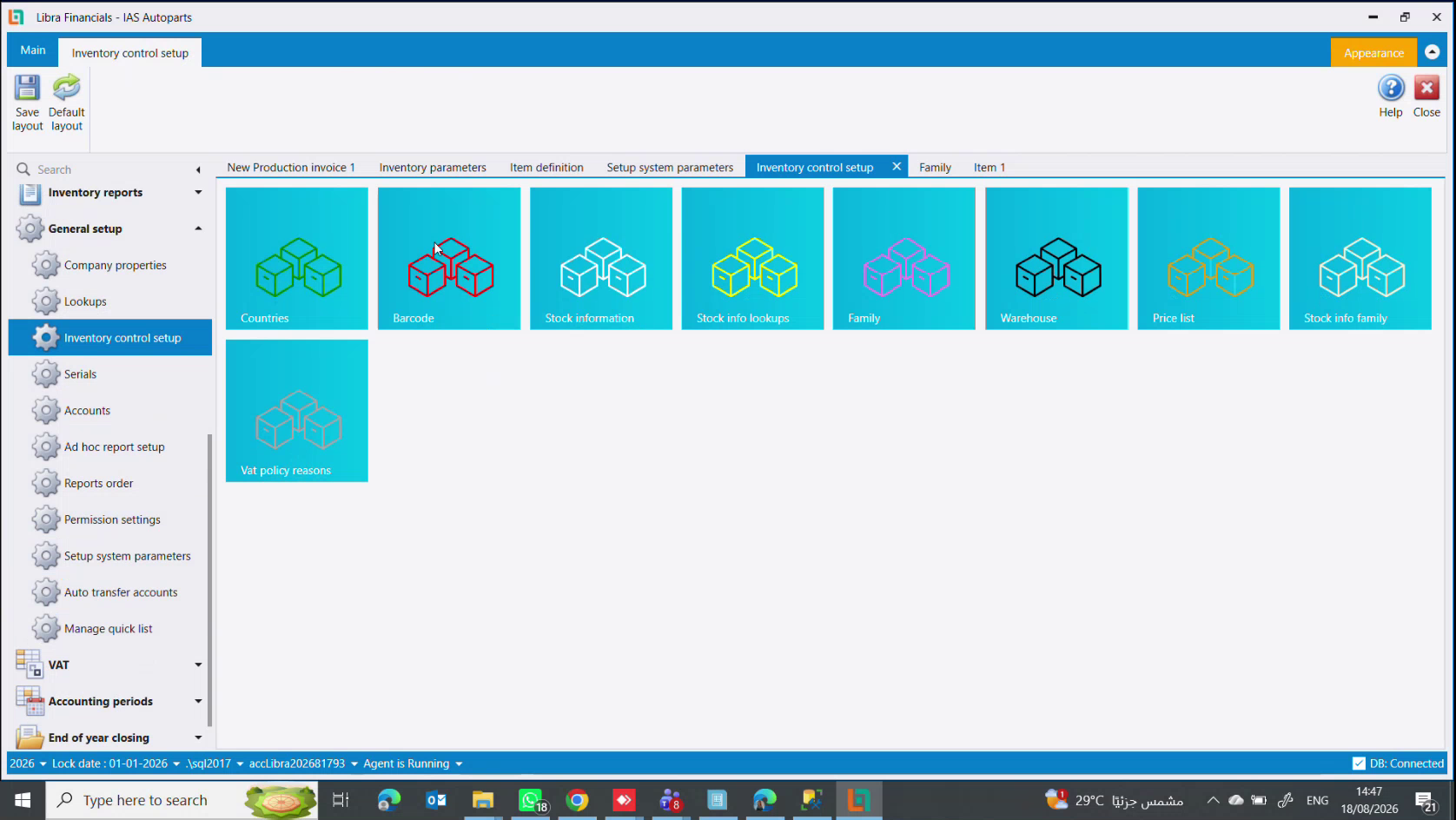
1. Define the property
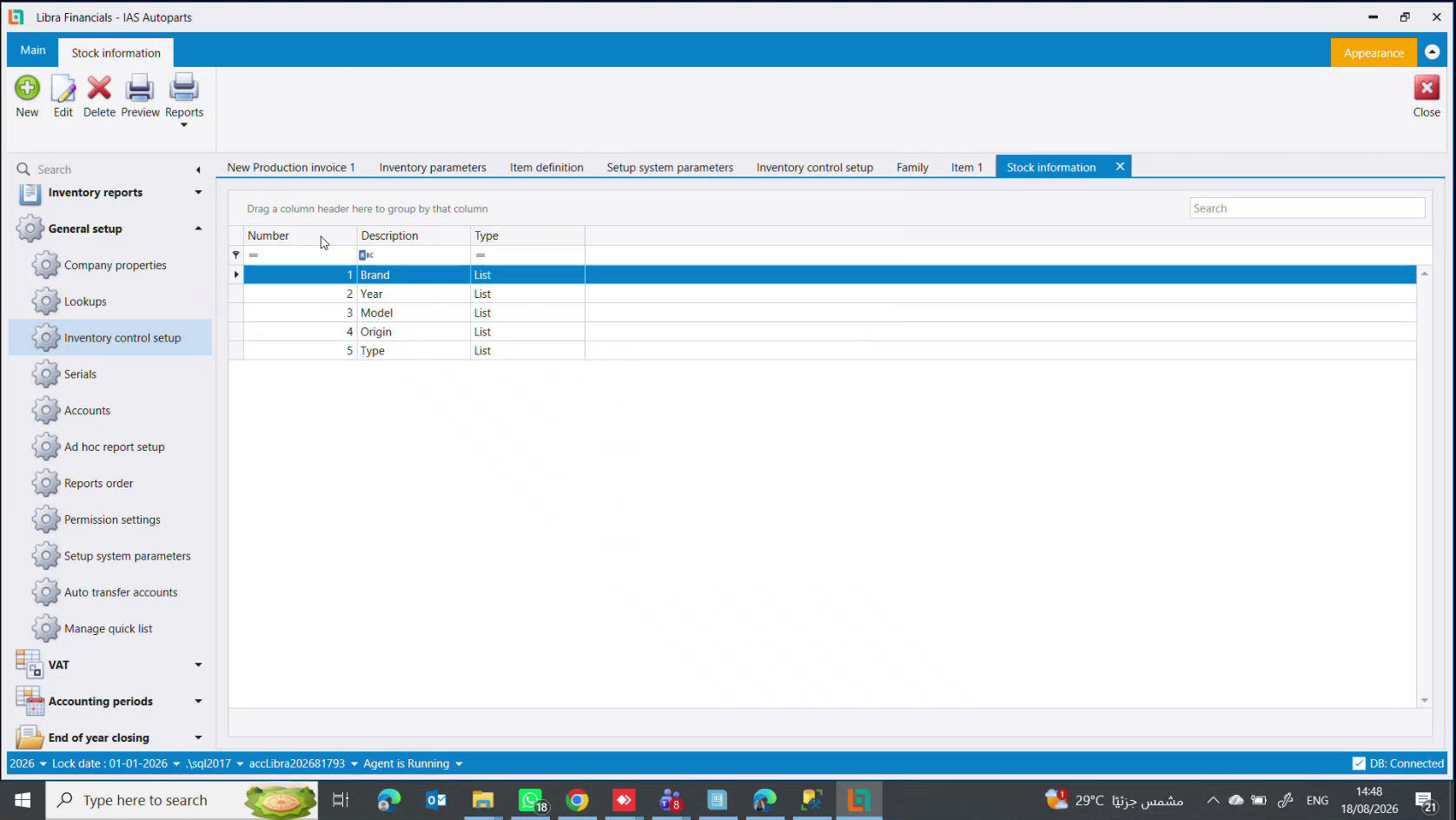
A numbered list of Description and Type. In the picture an auto-parts business has defined five, all of type List: Brand, Year, Model, Origin, Type.
The Type decides how the value gets entered on an item:
- a
List- the user picks from values you control - free text - the user types anything
- a date
- a number
Prefer List. Free text means one person writes BMW, the next writes bmw and a third writes B.M.W., and the property stops being reportable - which is the only reason it exists. Use text only where the value really is unique per item.
2. Fill in its values
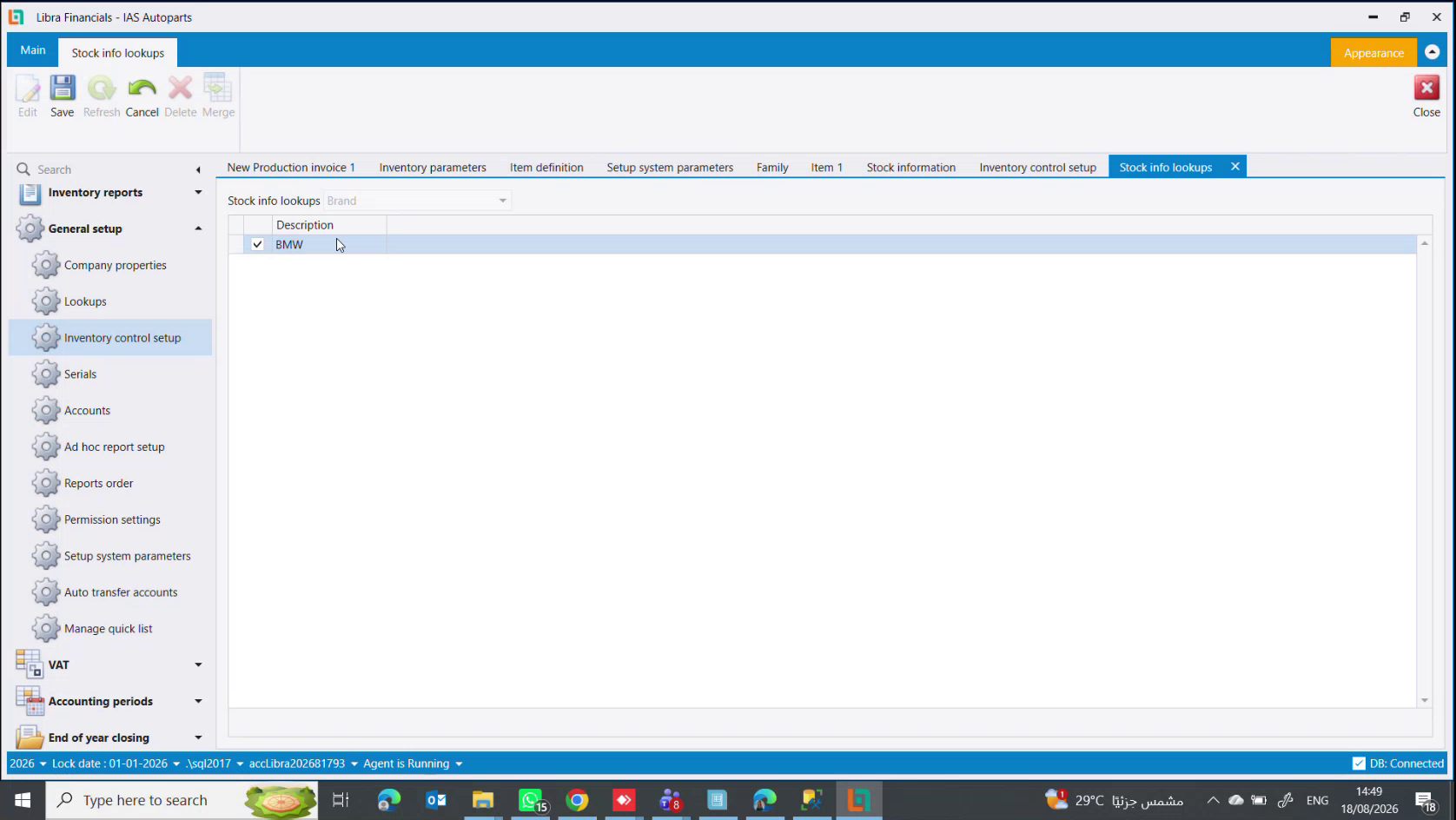
Choose the property at the top - here Brand - and enter the permitted Description values: BMW, Mercedes, Toyota, Nissan. The ribbon has Edit, Save, Refresh, Cancel, Delete and Merge, which folds two values into one when duplicates have crept in.
Only List properties need this step.
3. Set the value on an item
Open the item, go to its Stock info tab, and add Id / Value rows. The tab is only available after the item has been saved.
If the tab is not there
The Stock info tab is switched on in Inventory parameters → Items, in the Show stock info box.
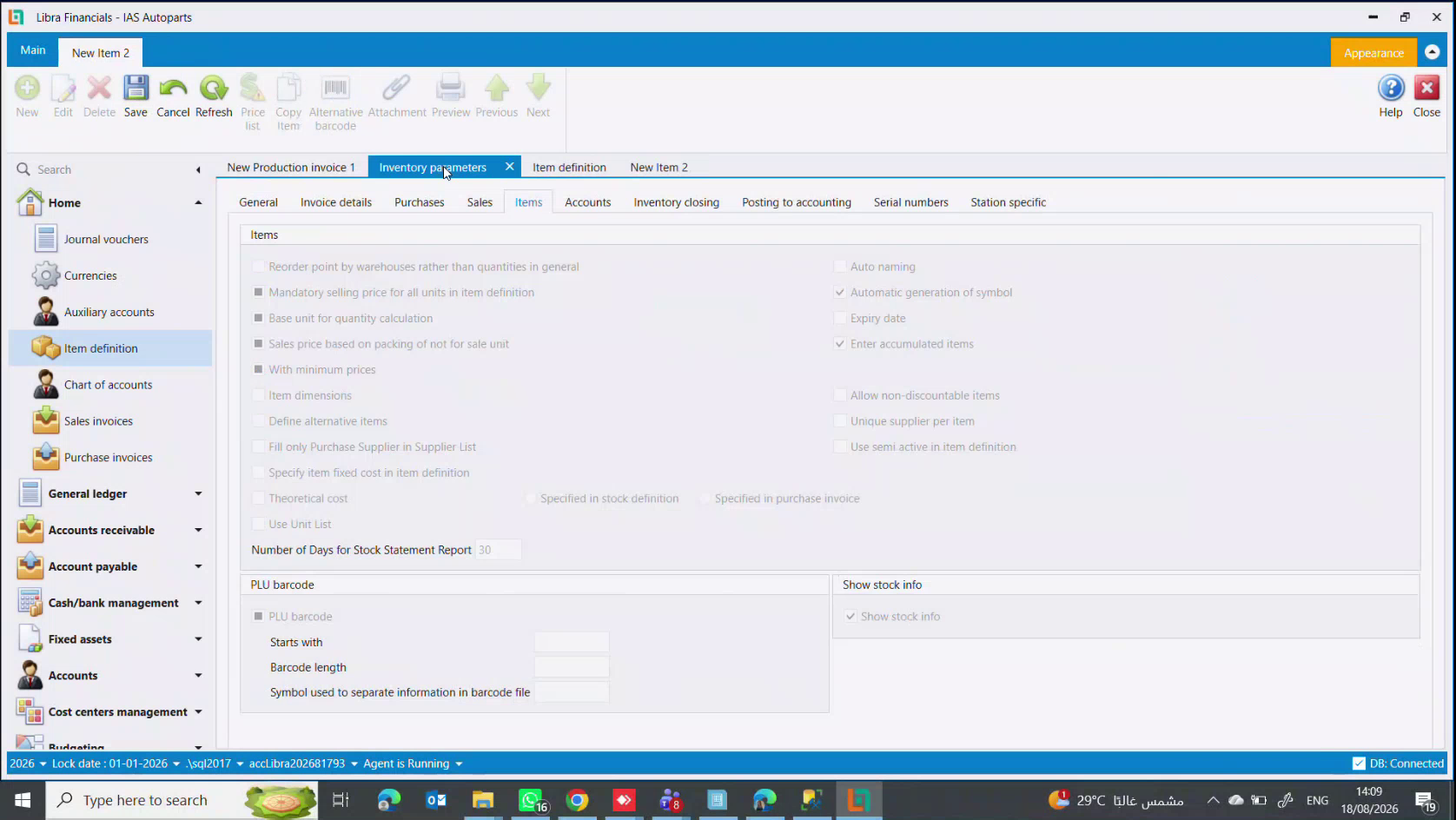
That screen is worth knowing generally, because it is where the item file's optional behaviour is decided:
| Setting | What it turns on |
|---|---|
Show stock info | the Stock info tab described here |
Enter accumulated items | the Accumulation tab - bundles, see Items, kits & dismantling |
Automatic generation of symbol | Libra numbers an item whose Symbol you left blank |
Expiry date | expiry tracking on items |
Define alternative items | substitute items |
Unique supplier per item | one supplier only, per item |
Use semi active in item definition | the Semi active status |
PLU barcode panel | Starts with, Barcode length and Symbol used to separate information in barcode file - how a scale's barcode is decoded for a PLU Item |
How far to take it
Model the properties the business actually asks questions about. For car parts, Brand, Model, Year and Origin earn their place. Colour and weight usually do not, unless someone genuinely searches by them - each property is another field to fill on every item, forever.
Next steps
إلى جانب اسمه وحساباته، يستطيع الصنف أن يحمل خصائص من عندك - ماركة، سنة الموديل، منشأ، حجم، لون. يسمّيها ليبرا معلومات البضاعة، ووُجدت لتبحث بها وتخرج تقاريرك عليها: "كم قطعة BMW عندي"، "كم باعت موديلات 2021".
وهي اختيارية ولا تؤثر على المحاسبة. لا شيء يُرحَّل بشكل مختلف بسببها.
تحتاج ثلاث شاشات
الأسماء متشابهة، فإليك السلسلة كاملة قبل التفصيل:
| الشاشة | ماذا تفعل فيها |
|---|---|
Stock information | تسمّي الخاصية وتختار نوعها |
Stock info lookups | تملأ القيم المسموحة، لخاصية من نوع List |
لسان Stock info في الصنف | تختار قيمة لهذا الصنف |
والأوليان مربّعان في General setup ← Inventory control setup.
1. عرّف الخاصية
لائحة مرقّمة من Description وType. في الصورة عرّف محل قطع غيار خمسًا، كلها من نوع List: Brand وYear وModel وOrigin وType.
ويقرّر Type كيف تُدخَل القيمة على الصنف:
List- يختار المستخدم من قيم تتحكم بها أنت- نص حر - يكتب المستخدم ما يشاء
- تاريخ
- رقم
فضّل List. فالنص الحر يعني أن يكتب أحدهم BMW والثاني bmw والثالث B.M.W.، فتتوقف الخاصية عن كونها قابلة للتقرير - وهو سبب وجودها الوحيد. ولا تستعمل النص إلا حيث تكون القيمة فريدة فعلًا لكل صنف.
2. املأ قيمها
اختر الخاصية في الأعلى - هنا Brand - وأدخل قيم Description المسموحة: BMW وMercedes و Toyota وNissan. وفي الشريط Edit وSave وRefresh وCancel وDelete وMerge الذي يدمج قيمتين في واحدة حين تتسرّب التكرارات.
ولا تحتاج هذه الخطوة إلا خصائص List.
3. ضع القيمة على الصنف
افتح الصنف واذهب إلى لسان Stock info وأضف أسطر Id / Value. ولا يتاح اللسان إلا بعد حفظ الصنف.
إذا لم يكن اللسان موجودًا
يُفعَّل لسان Stock info من Inventory parameters ← Items، في خانة Show stock info.
وتستحق تلك الشاشة أن تعرفها عمومًا، لأنها حيث يُقرَّر السلوك الاختياري لملف الصنف:
| الإعداد | ما يشغّله |
|---|---|
Show stock info | لسان Stock info الموصوف هنا |
Enter accumulated items | لسان Accumulation - الأطقم، راجع الأصناف والأطقم والتفكيك |
Automatic generation of symbol | يرقّم ليبرا الصنف الذي تركت Symbol فيه فارغًا |
Expiry date | تتبّع تواريخ الصلاحية |
Define alternative items | الأصناف البديلة |
Unique supplier per item | مورد واحد فقط لكل صنف |
Use semi active in item definition | حالة Semi active |
لوحة PLU barcode | Starts with وBarcode length وSymbol used to separate information in barcode file - كيف يُفكّ باركود الميزان لصنف PLU Item |
إلى أي حدّ تذهب
عرّف الخصائص التي يسأل عنها العمل فعلًا. فلقطع السيارات تستحق Brand وModel وYear وOrigin مكانها. أما اللون والوزن فغالبًا لا، إلا إذا كان أحدهم يبحث بهما حقًا - فكل خاصية حقلٌ إضافي يُملأ على كل صنف، إلى الأبد.