
Ledger and cost-centre statements: eight reports, eight questionsكشوف الأستاذ ومراكز التكلفة: ثمانية تقارير وثمانية أسئلة
This guide covers the account statement and the seven reports that look at your figures through cost centres or across periods. They share the ribbon described in Reports: one screen, twenty-two answers and From screen to paper: how a Libra report runs: set the panels, pick a layout in Report selection, then press Preview. Changing the printed page is covered in Changing how a printed page looks: the Report designer, and arranging the panels in Libra remembers your screen: columns, layouts and saved filters. Here we only say what each screen asks and what it answers.
Cost-centre levels are named by each company, so the level boxes on your screen carry your own names. This guide calls them your company's cost-centre levels. See Cost centers for how the levels are set up.
1. General ledger statement: every movement on an account
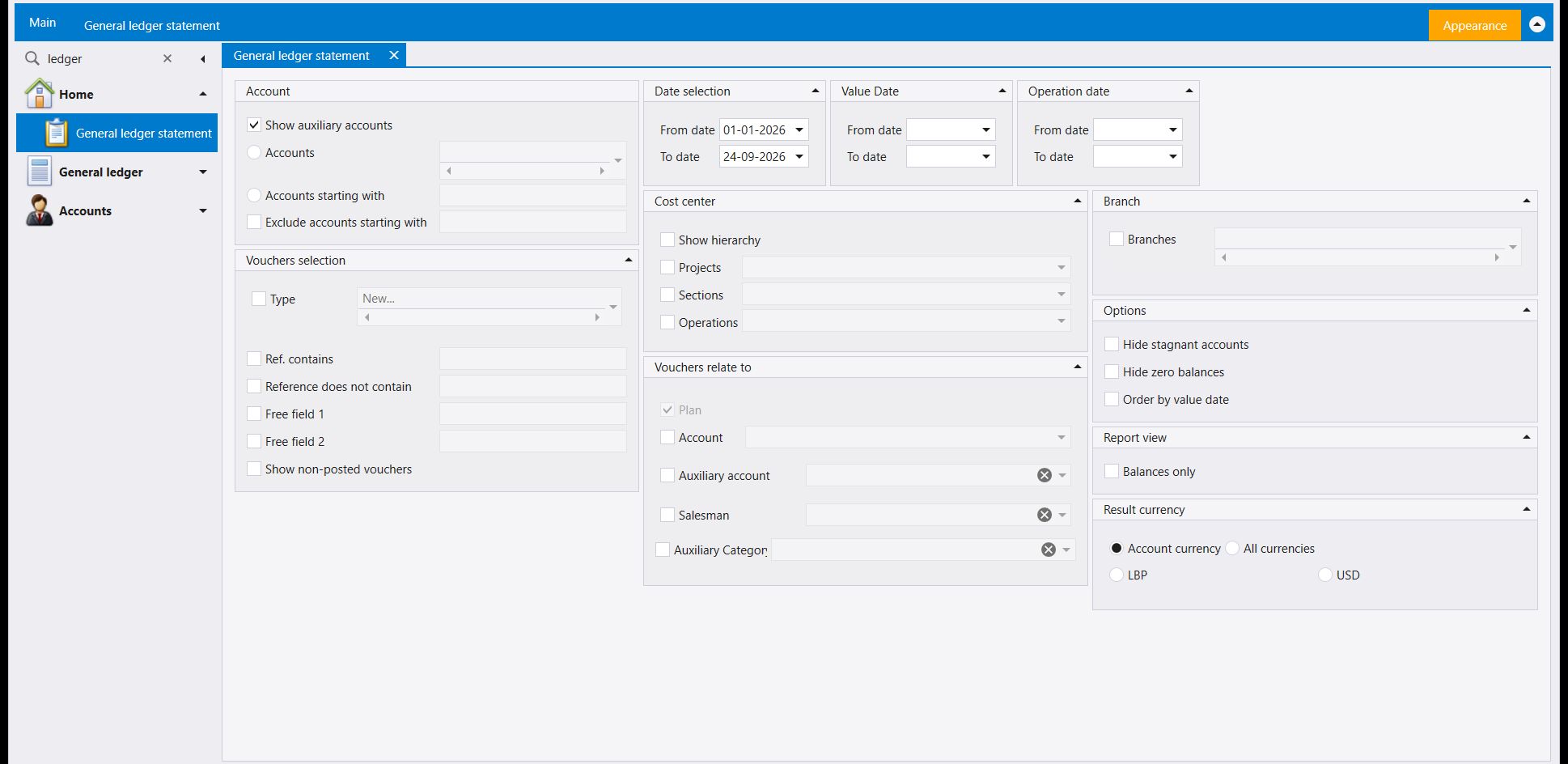
The statement answers what went through this account, line by line, and what is its balance. In some companies it sits on the Home list rather than under Reports, as in the picture.
- Account: tick Show auxiliary accounts to include customer and supplier accounts, then choose Accounts, Accounts starting with or Exclude accounts starting with.
- Vouchers selection narrows by voucher Type, Ref. contains, Reference does not contain, Free field 1 and Free field 2. Show non-posted vouchers adds entries that are not posted yet.
- Three date panels: Date selection, Value Date and Operation date. Fill in only the one you mean.
- Vouchers relate to narrows by Account, Auxiliary account, Salesman or Auxiliary Category; Cost center and Branch narrow by those.
- Options: Hide stagnant accounts, Hide zero balances, Order by value date. Balances only under Report view gives one figure per account instead of the lines.
- Result currency: Account currency, All currencies, or one of your currencies.
Report selection offers three layouts: _StatementLedgerOne, _StatementLedgerOne_1 and StatementLedgerGroupOne. This ribbon also carries a Help button.
2. Cost center trial balance: the trial balance, split by cost centre
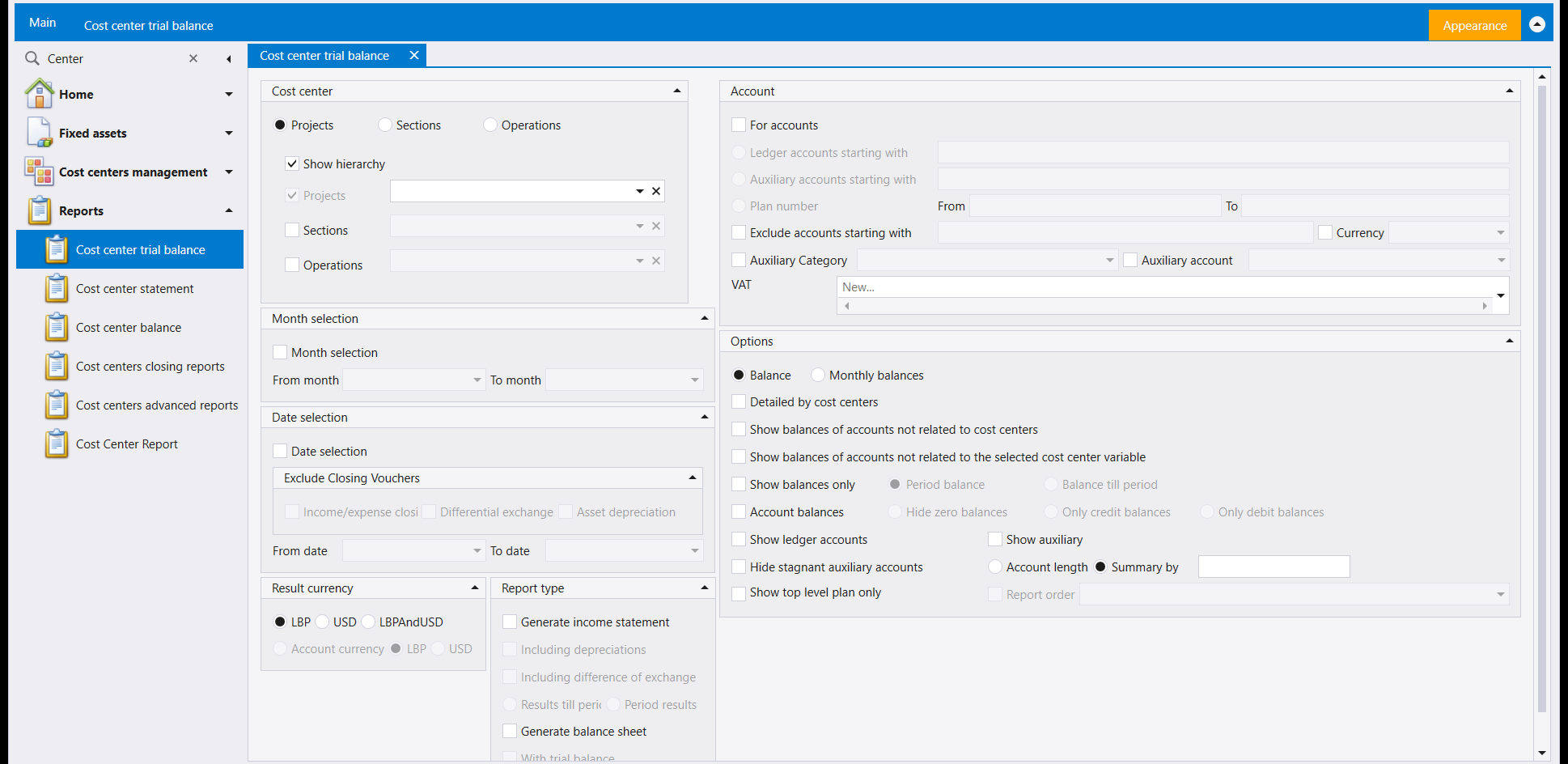
This answers what is the balance of each account inside each cost centre. Choose which level to report on at the top of Cost center, and pick particular cost centres in the boxes below it.
- Month selection or Date selection sets the period. Under Exclude Closing Vouchers you can leave out the income and expense closing, Differential exchange and Asset depreciation entries.
- Account limits the accounts: For accounts opens Ledger accounts starting with, Auxiliary accounts starting with and a Plan number range. VAT filters by VAT type.
- Options chooses Balance or Monthly balances, Detailed by cost centers, and whether to Show balances of accounts not related to cost centers. Account balances unlocks Hide zero balances, Only credit balances and Only debit balances.
- Report type turns the same figures into an income statement or a balance sheet per cost centre: Generate income statement or Generate balance sheet.
Report selection has one layout: DynamicBalance2.
3. Cost center statement: the movements behind a cost-centre figure
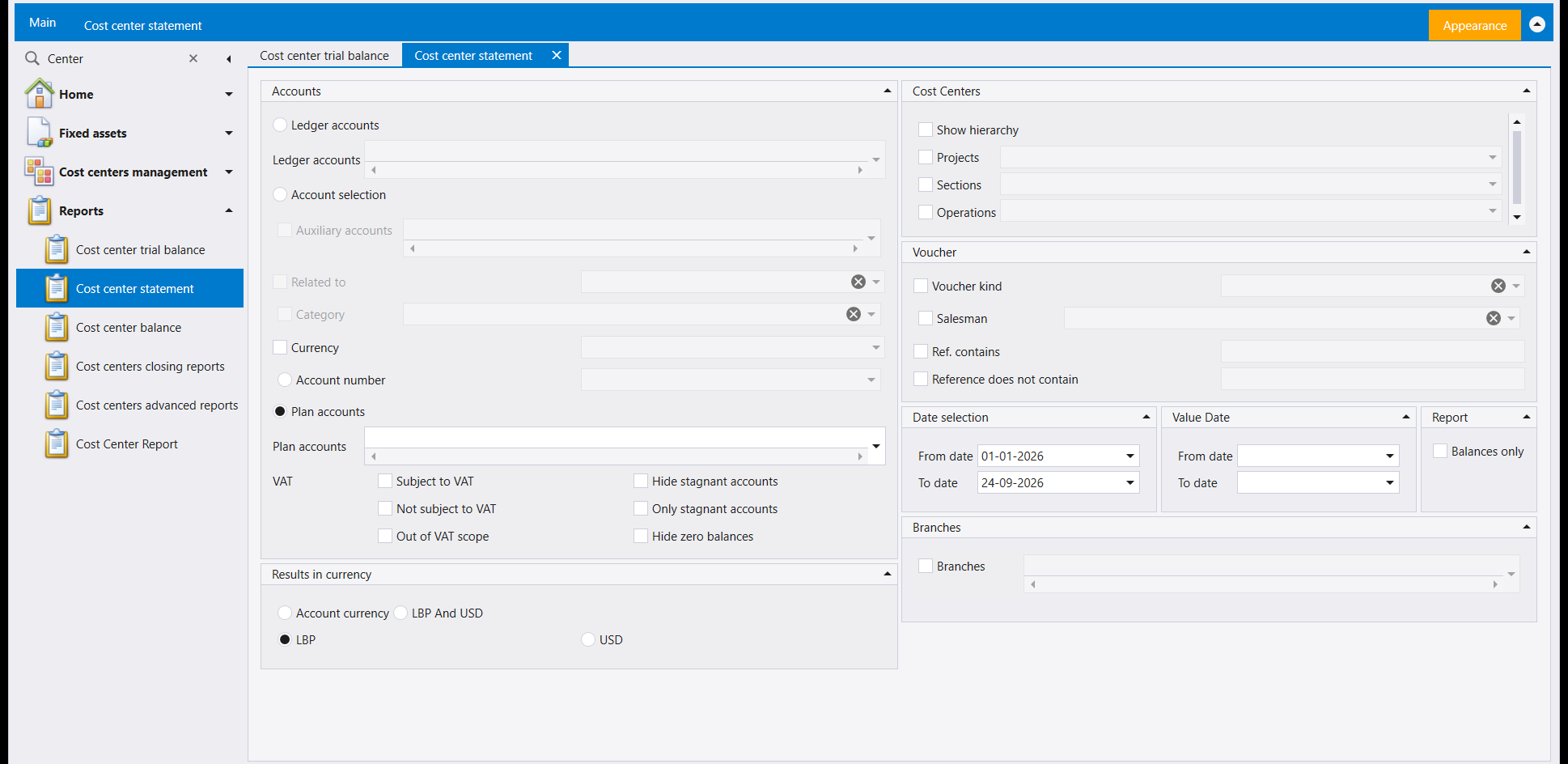
The trial balance gives you a figure; this statement lists the entries that make it up. It answers which entries were booked to this cost centre, on these accounts.
- Accounts chooses by Ledger accounts, Account selection, Account number or Plan accounts, and can filter by Currency and by Subject to VAT, Not subject to VAT or Out of VAT scope. Hide stagnant accounts, Only stagnant accounts and Hide zero balances sit beside them.
- Voucher narrows by Voucher kind, Salesman, Ref. contains and Reference does not contain.
- Balances only under Report shows totals instead of lines. Results in currency offers Account currency, LBP And USD, or a single currency.
Report selection has one layout: StatementDynamicDetail1.
4. Cost center balance: one figure per cost centre
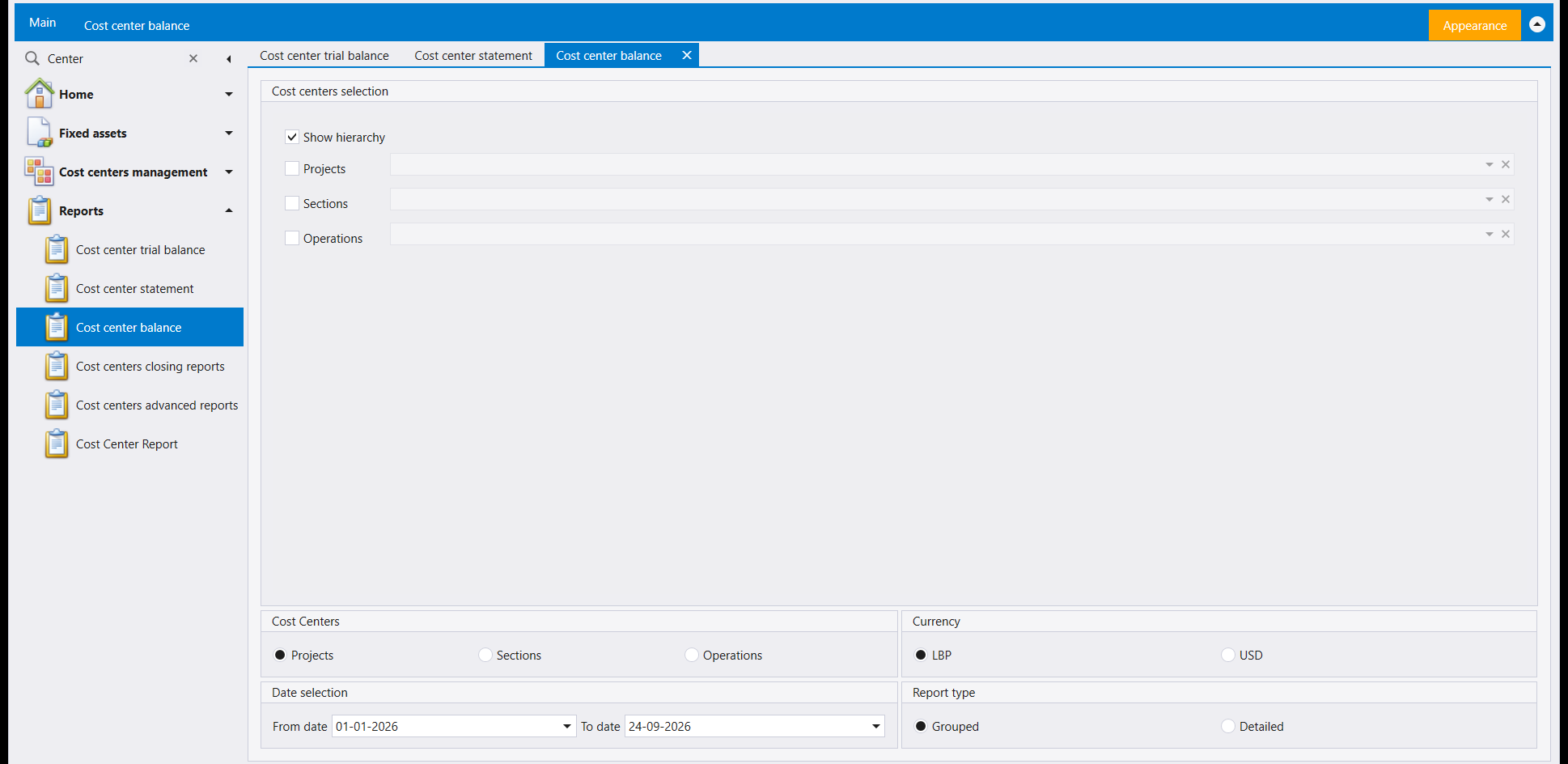
The shortest screen of the set. It answers what does each cost centre stand at for this period. Pick the cost centres, choose the level to total on under Cost Centers, then a Currency and a Date selection. Report type chooses Grouped or Detailed.
Report selection has one layout: CostCenterStatement.
5. Balance comparison: the same accounts over several periods
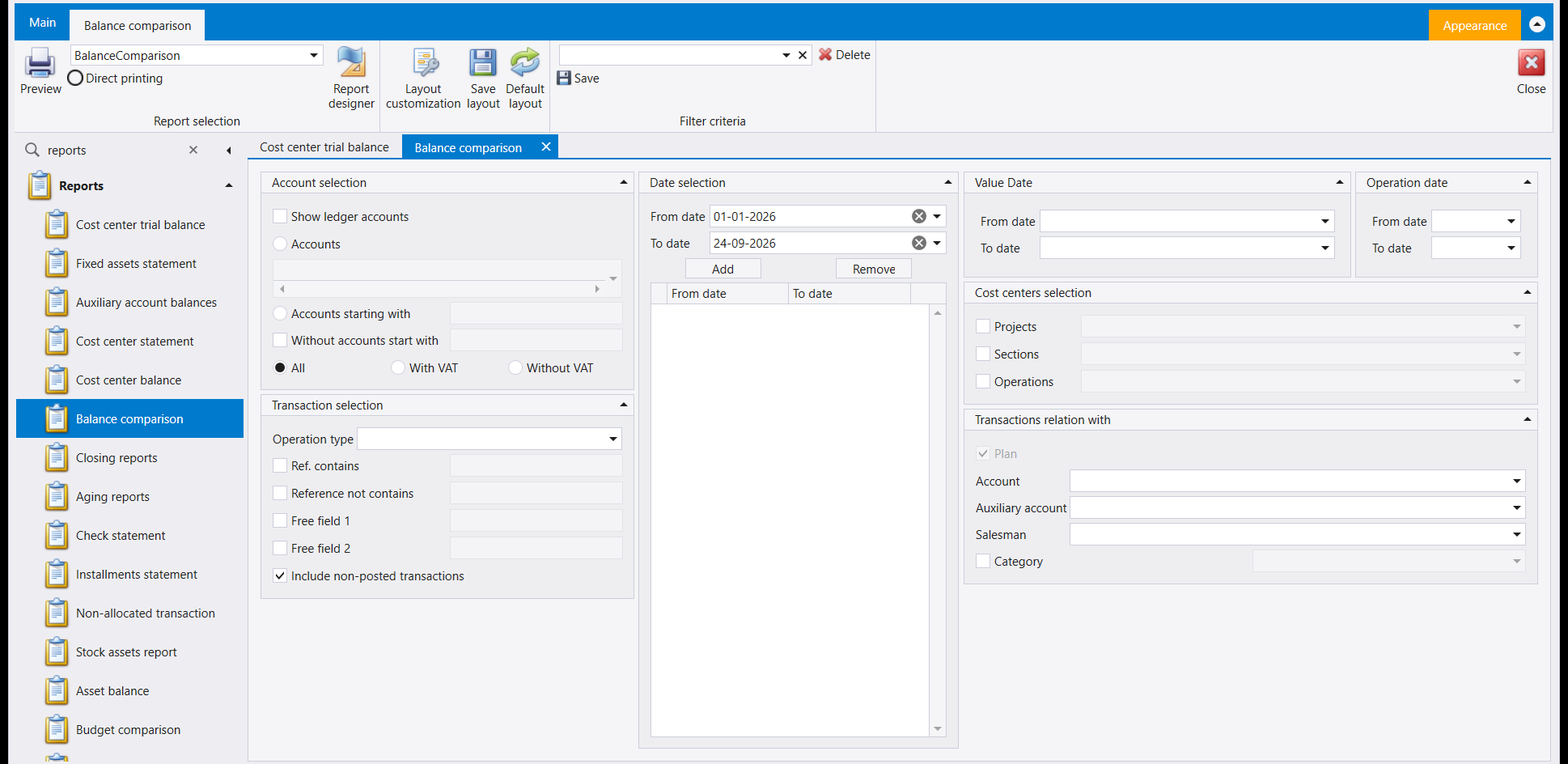
This answers how did these balances change from one period to the next. In Date selection, set a From date and To date and press Add to put that range in the list below. Add as many ranges as you want to compare. Remove takes the selected range out.
- Account selection: Show ledger accounts, Accounts, Accounts starting with, Without accounts start with, and All, With VAT or Without VAT.
- Transaction selection: Operation type, Ref. contains, Reference not contains, Free field 1, Free field 2. Include non-posted transactions is ticked in the picture; untick it to compare posted figures only.
- Transactions relation with narrows by Account, Auxiliary account, Salesman or Category, and Cost centers selection by cost centre.
Report selection has one layout: BalanceComparison.
6. Closing reports: the three end-of-period statements
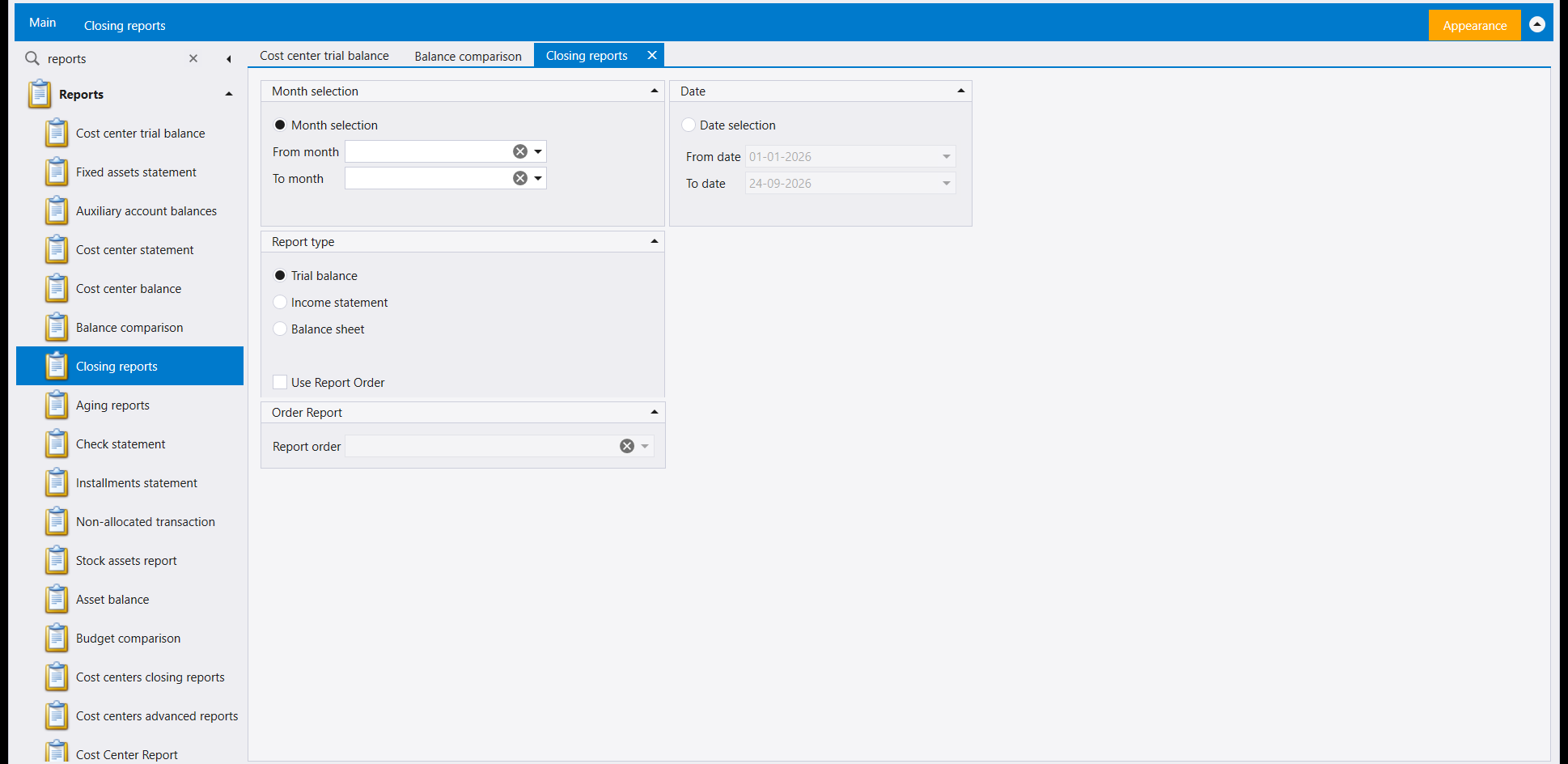
This answers what are the trial balance, the income statement and the balance sheet for these months. Choose Month selection with a From month and To month, or Date selection with two dates. Then choose the Report type: Trial balance, Income statement or Balance sheet. Tick Use Report Order and choose a Report order to print the accounts in a saved order rather than by account number.
Report selection offers three layouts: CustomTrialBalance, CustomTrialBalance2 and CustomTrialBalance3. For closing the year itself, see Locking a period and closing the year.
7. Cost centers closing reports: the income statement and balance sheet per cost centre
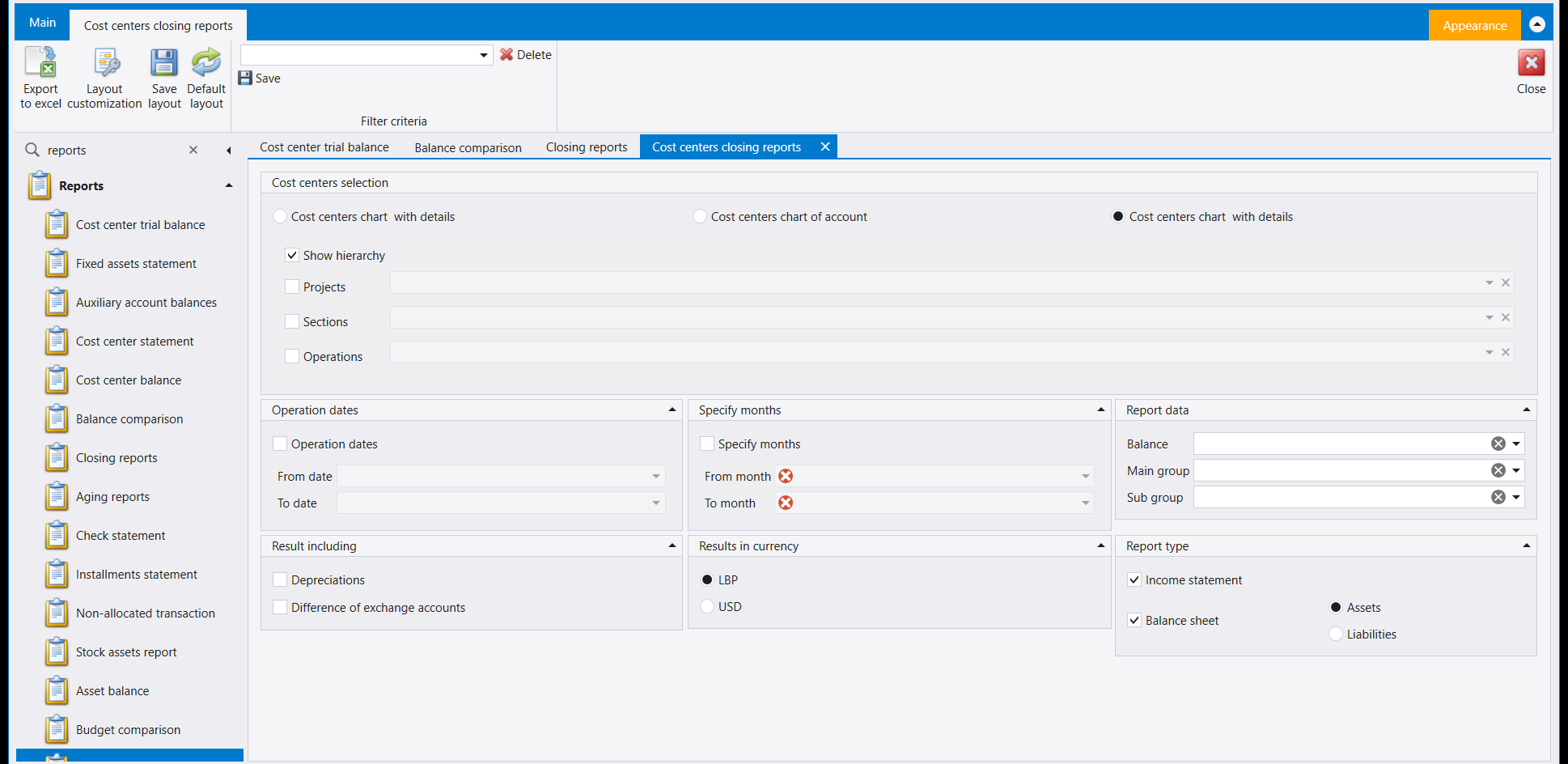
This answers what does each cost centre's income statement and balance sheet look like. Look at the ribbon first: in place of Preview and Report selection, the first button is Export to excel. The result goes out as a spreadsheet.
- Cost centers selection chooses a chart (the screen shows Cost centers chart with details and Cost centers chart of account), then the cost centres, with Show hierarchy.
- Operation dates or Specify months sets the period.
- Report data picks a Balance, Main group and Sub group. Result including adds Depreciations and Difference of exchange accounts.
- Report type: tick Income statement, Balance sheet (with Assets or Liabilities), or both.
8. Cost centers advanced reports: balances, comparison and budget by cost centre
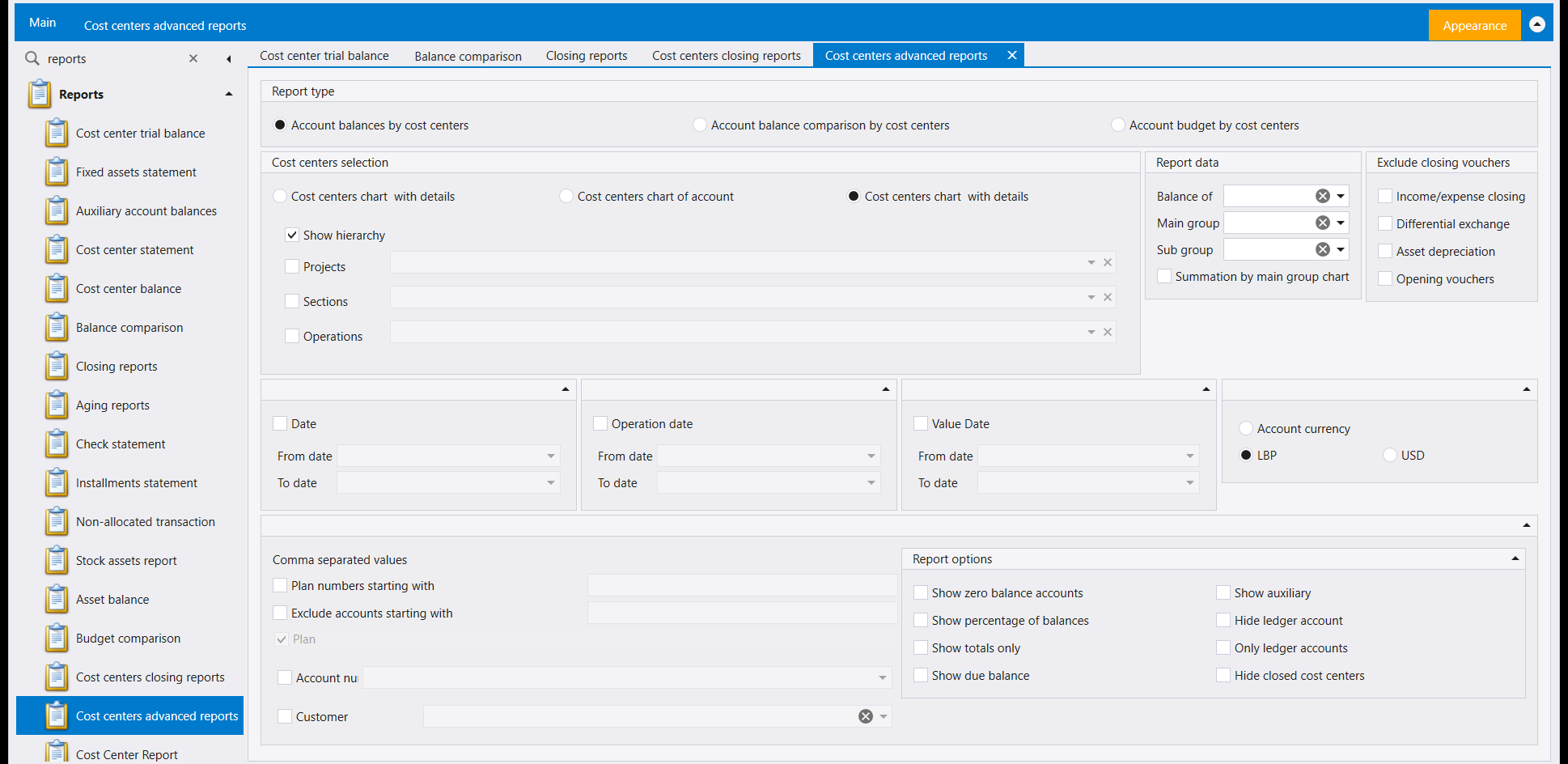
Three questions on one screen, chosen under Report type: Account balances by cost centers, Account balance comparison by cost centers and Account budget by cost centers. Like the previous screen, it has Export to excel instead of Preview.
- Exclude closing vouchers leaves out Income/expense closing, Differential exchange, Asset depreciation and Opening vouchers. This is useful when you want the trading figures alone.
- Comma separated values heads Plan numbers starting with and Exclude accounts starting with, so you can type several beginnings at once, separated by commas.
- Report options: Show zero balance accounts, Show percentage of balances, Show totals only, Show due balance, Show auxiliary, Hide ledger account, Only ledger accounts and Hide closed cost centers.
9. Which one to open
- One account, line by line: General ledger statement.
- Every account inside every cost centre: Cost center trial balance; the entries behind one figure: Cost center statement; one total per cost centre: Cost center balance.
- Several periods side by side: Balance comparison.
- End-of-period statements: Closing reports, or Cost centers closing reports per cost centre.
- Comparisons and budget by cost centre, in a spreadsheet: Cost centers advanced reports.
يغطّي هذا الدليل كشف الحساب والتقارير السبعة التي تنظر إلى أرقامك من خلال مراكز التكلفة أو عبر عدّة فترات. وهي تتشارك الشريط الموصوف في التقارير: شاشة واحدة واثنتان وعشرون إجابة ومن الشاشة إلى الورق: كيف يعمل التقرير في ليبرا: اضبط اللوحات، واختر تصميمًا في Report selection، ثم اضغط Preview. وتغيير الصفحة المطبوعة مشروح في تغيير شكل الصفحة المطبوعة: مصمّم التقارير، وترتيب اللوحات في ليبرا يتذكّر شاشتك: الأعمدة والتصاميم والفلاتر المحفوظة. وهنا نذكر فقط ما تسأله كل شاشة وما تجيب عنه.
مستويات مراكز التكلفة تسمّيها كل شركة بنفسها، فتحمل صناديق المستويات على شاشتك أسماءك أنت. ويسمّيها هذا الدليل مستويات مراكز التكلفة في شركتك. راجع مراكز التكلفة لمعرفة كيف تُعدّ هذه المستويات.
١. General ledger statement: كل حركة على حساب
يجيب الكشف عن ما الذي مرّ على هذا الحساب، سطرًا سطرًا، وما رصيده. وفي بعض الشركات يقع في لائحة Home لا تحت Reports، كما في الصورة.
- Account: أشِّر Show auxiliary accounts لإدخال حسابات الزبائن والموردين، ثم اختر Accounts أو Accounts starting with أو Exclude accounts starting with.
- Vouchers selection يضيّق بحسب Type القيد وRef. contains وReference does not contain وFree field 1 وFree field 2. وShow non-posted vouchers يضيف القيود غير المُرحَّلة بعد.
- ثلاث لوحات تواريخ: Date selection وValue Date وOperation date. املأ ما تقصده فقط.
- Vouchers relate to يضيّق بحسب Account أو Auxiliary account أو Salesman أو Auxiliary Category؛ وCost center وBranch يضيّقان بحسبهما.
- Options: Hide stagnant accounts وHide zero balances وOrder by value date. وBalances only تحت Report view يعطي رقمًا واحدًا لكل حساب بدل السطور.
- Result currency: Account currency أو All currencies أو إحدى عملاتك.
يعرض Report selection ثلاثة تصاميم: _StatementLedgerOne و_StatementLedgerOne_1 وStatementLedgerGroupOne. ويحمل هذا الشريط أيضًا زر Help.
٢. Cost center trial balance: ميزان المراجعة موزّعًا على مراكز التكلفة
يجيب هذا عن ما رصيد كل حساب داخل كل مركز تكلفة. اختر المستوى الذي تريد التقرير عليه في أعلى Cost center، واختر مراكز تكلفة بعينها في الصناديق تحته.
- Month selection أو Date selection يحدّد الفترة. وتحت Exclude Closing Vouchers يمكنك استبعاد قيود إقفال الإيرادات والمصاريف وDifferential exchange وAsset depreciation.
- Account يحصر الحسابات: For accounts يفتح Ledger accounts starting with وAuxiliary accounts starting with ومدى Plan number. وVAT يرشّح بحسب نوع الضريبة.
- Options يختار Balance أو Monthly balances، وDetailed by cost centers، وهل تُظهر Show balances of accounts not related to cost centers. وAccount balances يفتح Hide zero balances وOnly credit balances وOnly debit balances.
- Report type يحوّل الأرقام نفسها إلى بيان دخل أو ميزانية لكل مركز تكلفة: Generate income statement أو Generate balance sheet.
لـReport selection تصميم واحد: DynamicBalance2.
٣. Cost center statement: الحركات خلف رقم مركز التكلفة
يعطيك ميزان المراجعة رقمًا؛ وهذا الكشف يسرد القيود التي تكوّنه. فهو يجيب عن أي القيود سُجّلت على مركز التكلفة هذا، على هذه الحسابات.
- Accounts يختار بحسب Ledger accounts أو Account selection أو Account number أو Plan accounts، ويمكنه الترشيح بحسب Currency وبحسب Subject to VAT أو Not subject to VAT أو Out of VAT scope. وبجانبها Hide stagnant accounts وOnly stagnant accounts وHide zero balances.
- Voucher يضيّق بحسب Voucher kind وSalesman وRef. contains وReference does not contain.
- Balances only تحت Report يُظهر المجاميع بدل السطور. وResults in currency يعرض Account currency أو LBP And USD أو عملة واحدة.
لـReport selection تصميم واحد: StatementDynamicDetail1.
٤. Cost center balance: رقم واحد لكل مركز تكلفة
أقصر شاشات المجموعة. وتجيب عن أين يقف كل مركز تكلفة في هذه الفترة. اختر مراكز التكلفة، واختر المستوى الذي تجمع عليه تحت Cost Centers، ثم Currency وDate selection. وReport type يختار Grouped أو Detailed.
لـReport selection تصميم واحد: CostCenterStatement.
٥. Balance comparison: الحسابات نفسها عبر عدّة فترات
يجيب هذا عن كيف تغيّرت هذه الأرصدة من فترة إلى أخرى. في Date selection ضع From date وTo date واضغط Add لإدخال ذلك المدى في اللائحة تحته. وأضف ما تشاء من المديات للمقارنة. وRemove يُخرج المدى المحدّد.
- Account selection: Show ledger accounts وAccounts وAccounts starting with وWithout accounts start with، وAll أو With VAT أو Without VAT.
- Transaction selection: Operation type وRef. contains وReference not contains وFree field 1 وFree field 2. وInclude non-posted transactions مؤشَّر في الصورة؛ أزل تأشيره لتقارن الأرقام المُرحَّلة وحدها.
- Transactions relation with يضيّق بحسب Account أو Auxiliary account أو Salesman أو Category، وCost centers selection بحسب مركز التكلفة.
لـReport selection تصميم واحد: BalanceComparison.
٦. Closing reports: كشوف نهاية الفترة الثلاثة
يجيب هذا عن ما ميزان المراجعة وبيان الدخل والميزانية لهذه الأشهر. اختر Month selection مع From month وTo month، أو Date selection بتاريخين. ثم اختر Report type: Trial balance أو Income statement أو Balance sheet. وأشِّر Use Report Order واختر Report order لطباعة الحسابات بترتيب محفوظ بدل ترتيب أرقامها.
يعرض Report selection ثلاثة تصاميم: CustomTrialBalance وCustomTrialBalance2 وCustomTrialBalance3. ولإقفال السنة نفسها، راجع قفل الفترة وإقفال السنة.
٧. Cost centers closing reports: بيان الدخل والميزانية لكل مركز تكلفة
يجيب هذا عن كيف يبدو بيان الدخل والميزانية لكل مركز تكلفة. انظر إلى الشريط أولًا: بدل Preview وReport selection يكون الزر الأول Export to excel. فالنتيجة تخرج جدولًا إلكترونيًا.
- Cost centers selection يختار دليلًا (تُظهر الشاشة Cost centers chart with details وCost centers chart of account)، ثم مراكز التكلفة، مع Show hierarchy.
- Operation dates أو Specify months يحدّد الفترة.
- Report data يختار Balance وMain group وSub group. وResult including يضيف Depreciations وDifference of exchange accounts.
- Report type: أشِّر Income statement، أو Balance sheet (مع Assets أو Liabilities)، أو كليهما.
٨. Cost centers advanced reports: الأرصدة والمقارنة والموازنة بحسب مركز التكلفة
ثلاثة أسئلة على شاشة واحدة، تُختار تحت Report type: Account balances by cost centers وAccount balance comparison by cost centers وAccount budget by cost centers. ومثل الشاشة السابقة، فيها Export to excel بدل Preview.
- Exclude closing vouchers يستبعد Income/expense closing وDifferential exchange وAsset depreciation وOpening vouchers. وهذا مفيد حين تريد أرقام النشاط وحدها.
- Comma separated values يتصدّر Plan numbers starting with وExclude accounts starting with، فيمكنك كتابة عدّة بدايات دفعة واحدة، تفصل بينها فواصل.
- Report options: Show zero balance accounts وShow percentage of balances وShow totals only وShow due balance وShow auxiliary وHide ledger account وOnly ledger accounts وHide closed cost centers.
٩. أيّها تفتح
- حساب واحد، سطرًا سطرًا: General ledger statement.
- كل حساب داخل كل مركز تكلفة: Cost center trial balance؛ والقيود خلف رقم واحد: Cost center statement؛ ومجموع واحد لكل مركز تكلفة: Cost center balance.
- عدّة فترات جنبًا إلى جنب: Balance comparison.
- كشوف نهاية الفترة: Closing reports، أو Cost centers closing reports لكل مركز تكلفة.
- المقارنات والموازنة بحسب مركز التكلفة، في جدول إلكتروني: Cost centers advanced reports.