
How to create a fixed asset and its opening balanceكيفية إنشاء أصل ثابت ورصيده الافتتاحي
Fixed assets: the register, and the three things you do to an asset covers the register, the depreciation run, disposal and sale - everything that happens once an asset already exists. This guide is the step before all of that: opening the asset's own card, and giving it a starting balance if the business already owned it before it started using Libra.
1. Pair the account with its depreciation account, first
An asset account does not stand alone. Before you open the asset itself, its chart account needs a partner account to carry the depreciation, tied to it through Mapped to (see §8 of How to open an account). On a Lebanese chart the two are numbered to mirror each other: an asset account under class 22 and its accumulated-depreciation account under the matching branch of class 28 - a car account 2251 is mapped to 28251, the next car account 2252 to 28252, and so on down the branch.
Open the asset account and fill its Mapped to with the matching class-28 account before you go any further. Skip this and Libra will not stop you here - it stops you when you try to save the asset itself, in §4 below.
2. Open a new asset and fill in what identifies it
From the left menu, open Fixed assets › Fixed assets, then click New.
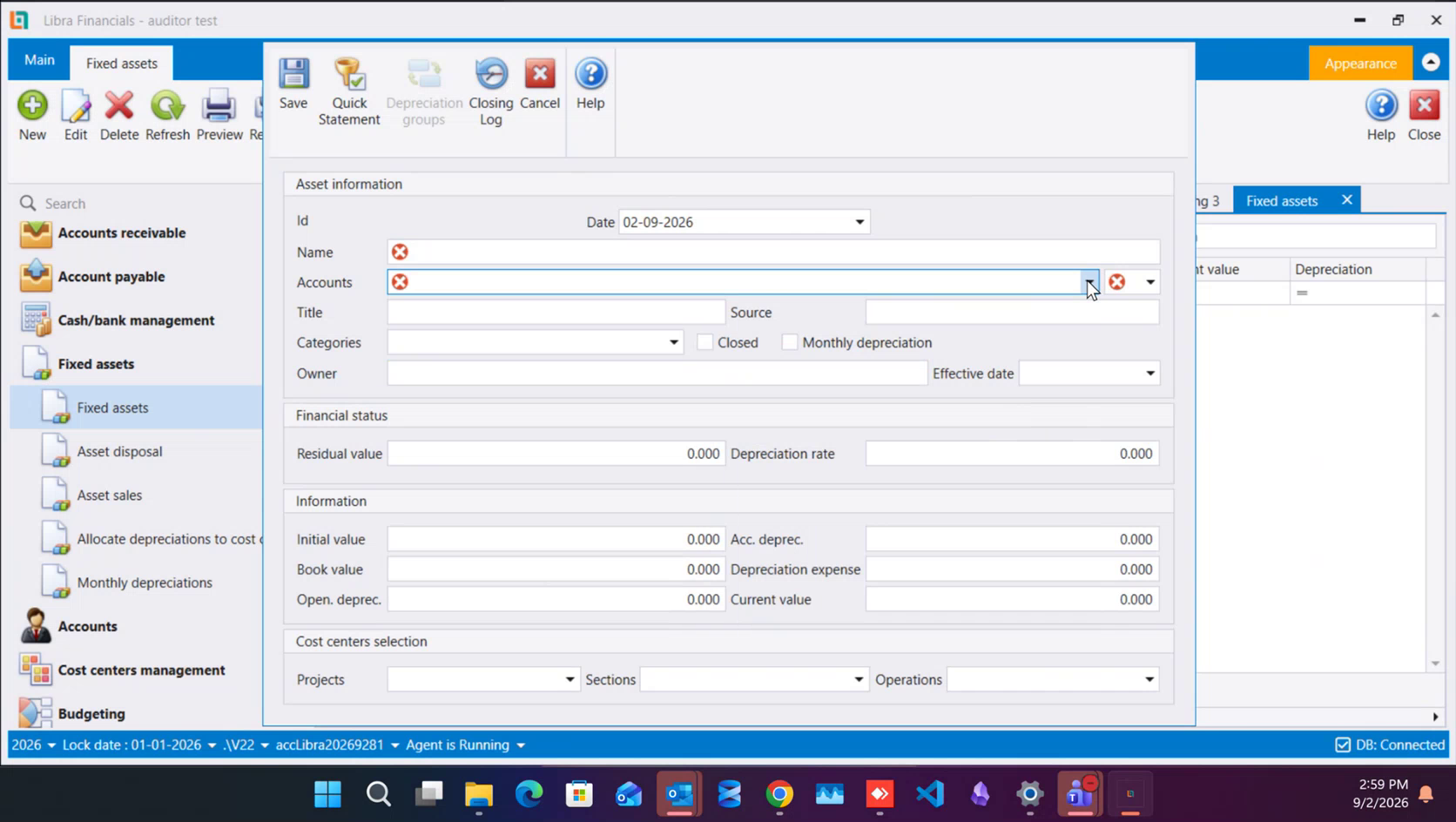
- Id is not yours to fill in - Libra assigns it on save, and §4 explains what that number turns out to be.
- Date defaults to today.
- Name is what you will recognise the asset by afterwards.
- Accounts is the class-
22account from §1 - type into it to search, the same way you search the chart of accounts elsewhere. The moment you pick one, the unlabelled box beside it fills with that account's own currency. This is the one thing on the card you cannot change once it is saved - pick the right account, in the right currency, now. - Title, Source and Categories are extra identifying fields, free for you to fill in however your own records need them.
- Closed and Monthly depreciation are checkboxes - leave Monthly depreciation clear if your own routine is to depreciate once, at year-end, rather than every month (see §7 below).
- Owner is a free text field for whoever is responsible for the asset.
3. Effective date, residual value and depreciation rate
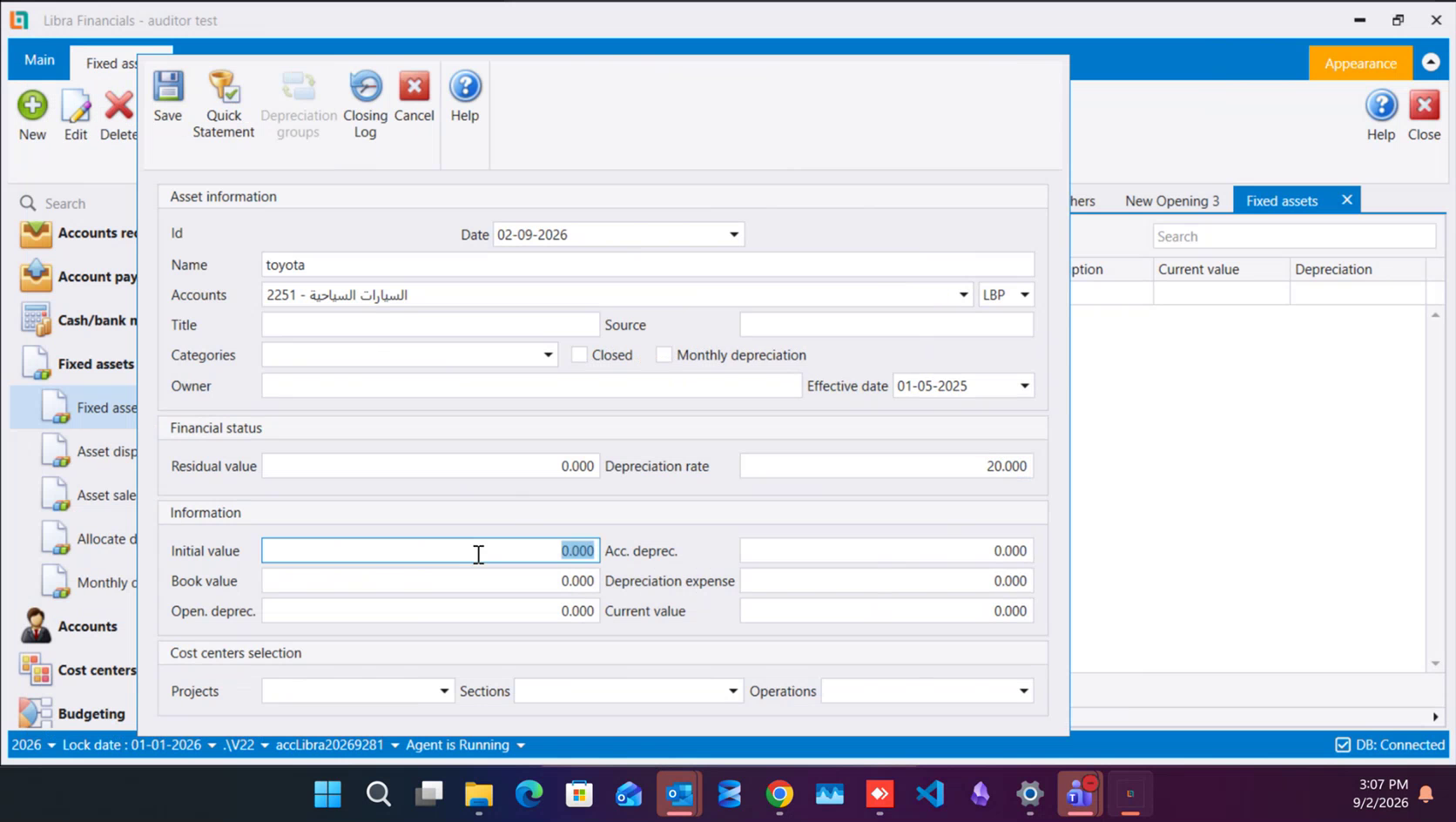
- Effective date is when depreciation starts counting - it is not the purchase date. Two conventions are both fine: from the day you bought it, or from the day it actually went into service (furniture bought and warehoused for a year before use is the case where the two dates genuinely differ). It can sit in an earlier year than the one you are working in - the card in the picture is dated
01-05-2025in a company working in 2026, which is the normal case for an asset the business already owned. - Residual value is the floor value where depreciation stops for this asset. Leave it at zero if your practice is to depreciate all the way down.
- Depreciation rate is the annual percentage. Libra does not supply or check this figure - it comes from the published rate table for that class of asset, and you type in whatever the table says (cars in the frame above are rated at
20.000).
4. Save - and what a missing pairing looks like
Click Save. If the account you chose in §2 already has its Mapped to partner filled in, the card saves and is given its own Id - 220001 in the frame below. That Id is simultaneously an auxiliary account Libra creates for the asset automatically, in the same family the auxiliary screen uses for clients, suppliers and banks (see §7 of The Auxiliary Accounts screen) - assets start their own family at 220001. Keep that number in mind; it is what you pick under PID in the next step.
If the account has no Mapped to partner yet, Save answers with this instead:
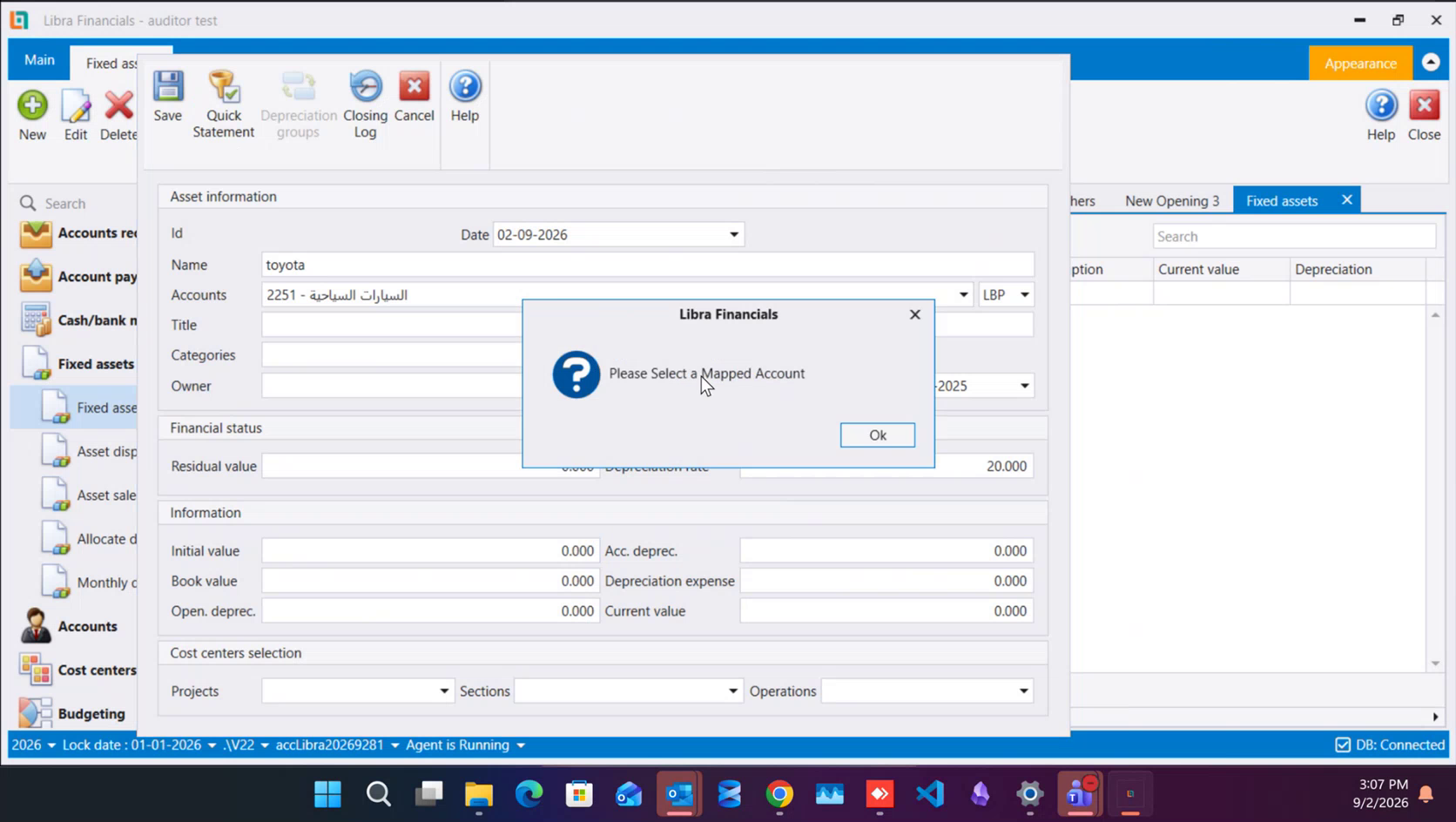
Go back to §1, open the account itself and fill Mapped to - then return and save the asset again.
5. The opening entry, for an asset you already own
If the business already owned this asset before it started using Libra, its starting figures go in through an Opening Voucher, not an ordinary journal voucher - read Opening vouchers first for what makes that screen different. Open Opening Vouchers › New and enter:
- one line on the asset's own account (
2251here), PID set to the auxiliary record the asset created for itself in §4, Debit = the asset's initial value; - one line on its mapped depreciation account (
28251), the same PID, Credit = the depreciation already taken as of the day you are opening the books; - a third line balancing the two, on whichever opening or equity account the lookup offers - the same balancing role §3 of Opening vouchers describes as capital and accumulated profit.
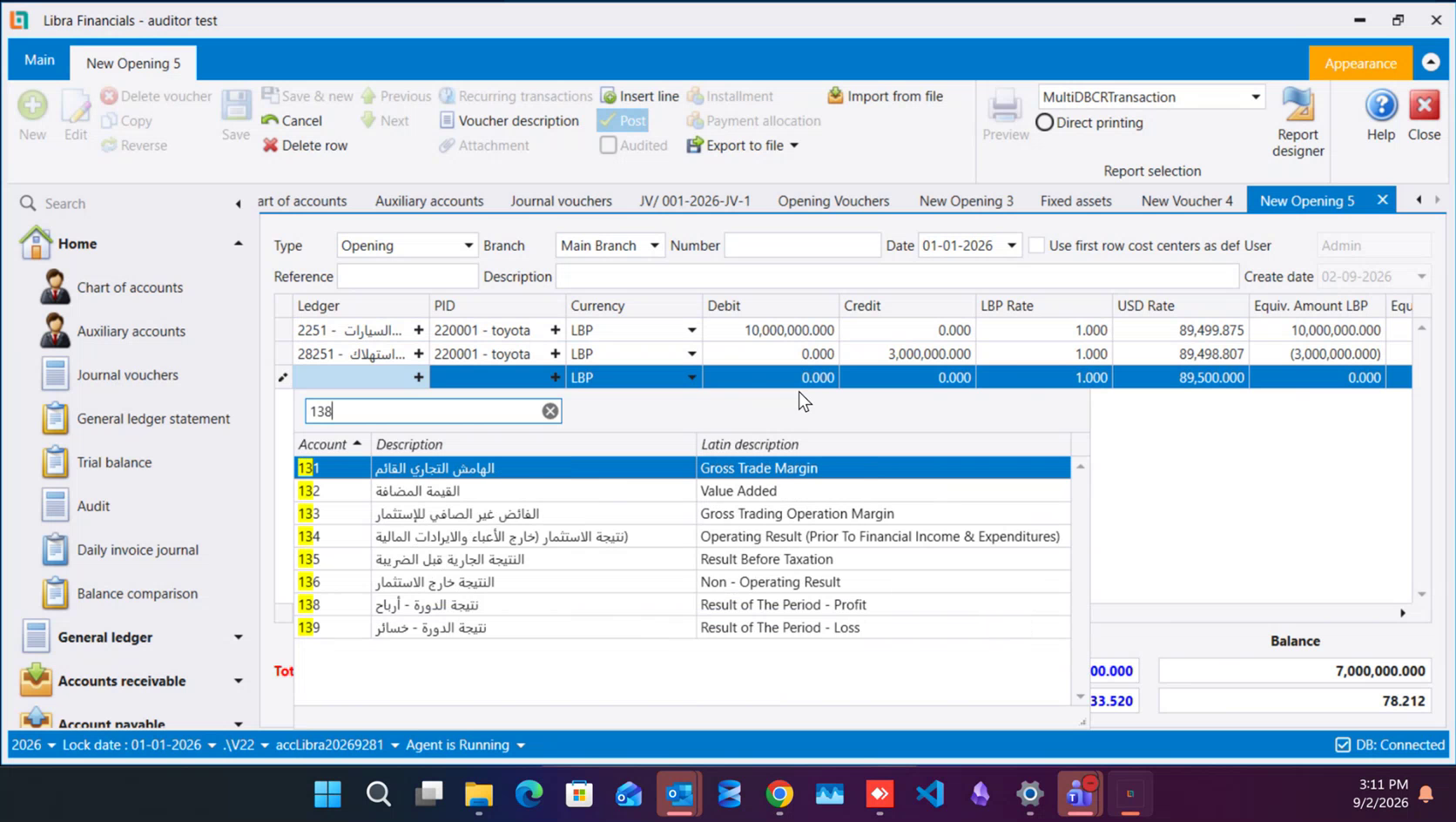
In the frame above the difference between the two - 7,000,000 - is what the third line carries, and it is exactly the figure §6 shows coming back as the asset's own Book value.
An asset bought after go-live is different and simpler: it arrives on an ordinary purchase invoice that debits the class-22 account alone, carrying the supplier's own PID rather than the asset's - the class-28 side is only ever touched by an opening voucher or a depreciation run, never by a purchase.
6. What the card shows afterwards
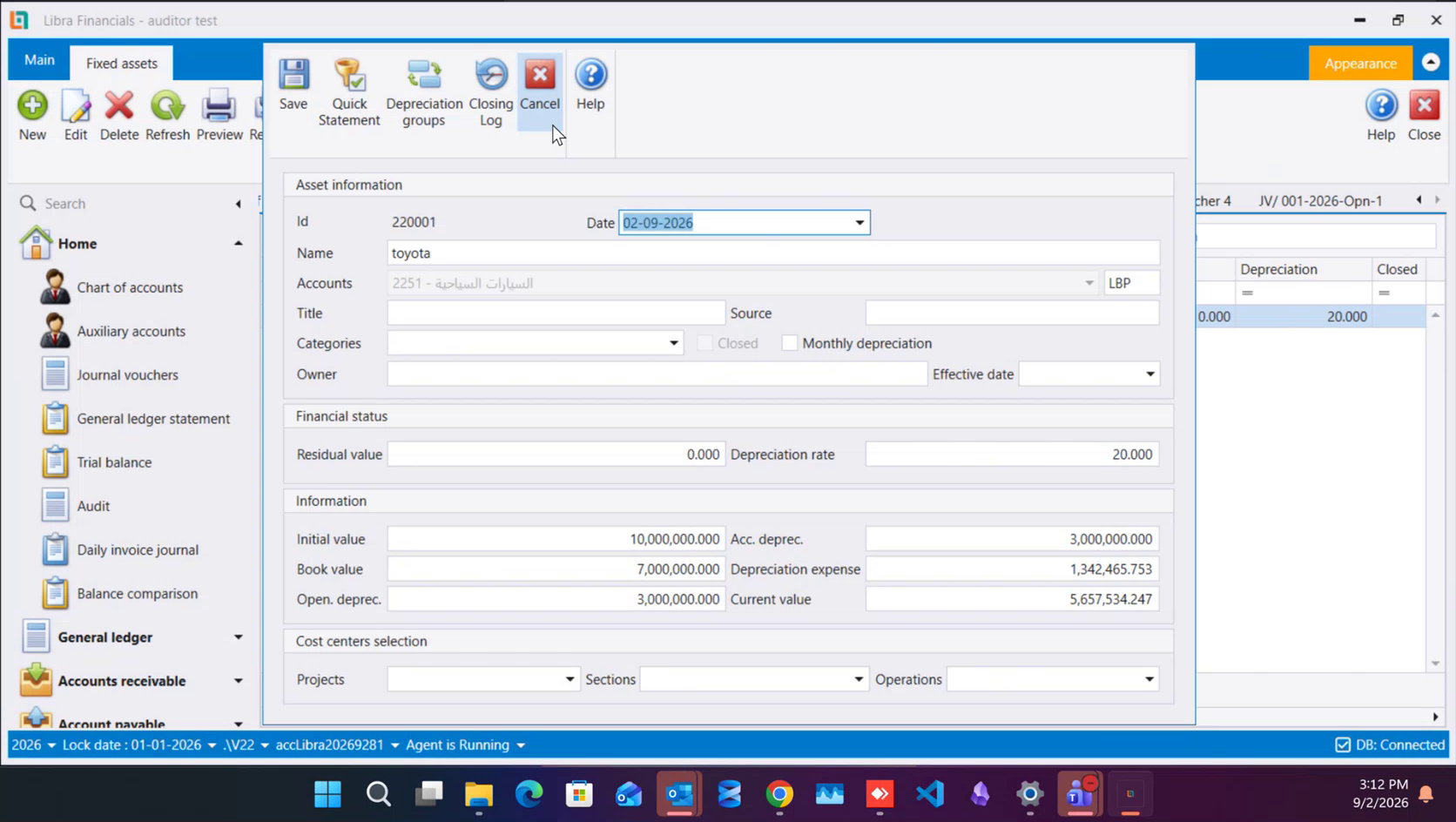
Reopen the asset once the opening voucher above is saved, and the Information panel that read all zeros in §2 now carries what you posted: Initial value, Acc. deprec., Book value, Depreciation expense and Current value all fill in from the two lines you entered. That is your confirmation the opening entry landed on the right asset.
If several parts of the business share one asset - a delivery van, a building - split the monthly charge between them on Allocate depreciations to cost centers, rather than trying to fill Projects, Sections and Operations on the card itself.
7. At year-end
The Fixed asset depreciation and Closing fixed assets steps in end-of-year closing each carry their own Manual option, for booking the figures yourself instead of letting Libra calculate them - see Locking a period and closing the year for the rest of that screen.
يشرح الأصول الثابتة: السجل، والأمور الثلاثة التي تفعلها بالأصل السجل وتشغيل الاستهلاك والاستغناء والبيع - كل ما يحدث بعد أن يصير الأصل موجودًا. وهذا الدليل هو الخطوة التي تسبق ذلك كله: فتح بطاقة الأصل نفسها، وإعطاؤه رصيدًا افتتاحيًا إن كانت الشركة تملكه أصلًا قبل أن تبدأ استعمال ليبرا.
١. اقرن الحساب بحساب استهلاكه أولًا
لا يقف حساب الأصل وحده. فقبل أن تفتح الأصل نفسه، يحتاج حسابه في الشجرة إلى حساب شريك يحمل الاستهلاك، مربوطًا به عبر Mapped to (انظر القسم ٨ من كيفية فتح حساب). وفي المخطط اللبناني يُرقَّم الاثنان ليعكس أحدهما الآخر: حساب أصل تحت الصنف 22 وحساب استهلاكه المتراكم تحت الغصن المقابل من الصنف 28 - فحساب سيارة 2251 مقترن بـ28251، وحساب السيارة التالية 2252 بـ28252، وهكذا على طول الغصن.
افتح حساب الأصل واملأ Mapped to فيه بالحساب المقابل من الصنف 28 قبل أن تتابع. وإن أغفلت هذا لن يوقفك ليبرا هنا - بل يوقفك حين تحاول حفظ الأصل نفسه، في القسم ٤ أدناه.
٢. افتح أصلًا جديدًا واملأ ما يعرّفه
من القائمة اليسرى افتح Fixed assets ‹ Fixed assets، ثم اضغط New.
- Id ليس لك أن تملأه - يخصّصه ليبرا عند الحفظ، ويشرح القسم ٤ ما يؤول إليه ذلك الرقم.
- Date يكون افتراضيًا تاريخ اليوم.
- Name هو ما ستعرف به الأصل لاحقًا.
- Accounts هو حساب الصنف
22من القسم ١ - اكتب فيه لتبحث، بالطريقة نفسها التي تبحث بها في شجرة الحسابات في أي مكان آخر. ولحظة اختيارك حسابًا، يمتلئ الصندوق غير المسمّى بجانبه بعملة ذلك الحساب. وهذا هو الشيء الوحيد في البطاقة الذي لا يمكنك تغييره بعد حفظها - فاختر الحساب الصحيح، بالعملة الصحيحة، الآن. - Title وSource وCategories حقول تعريف إضافية، حرّة لتملأها كما تحتاج سجلاتك.
- Closed وMonthly depreciation مربعا اختيار - اترك Monthly depreciation فارغًا إن كانت عادتك أن تستهلك مرة واحدة، عند نهاية السنة، بدل كل شهر (انظر القسم ٧ أدناه).
- Owner حقل نصي حر لمن هو مسؤول عن الأصل.
٣. Effective date وResidual value وDepreciation rate
- Effective date هو من متى يبدأ احتساب الاستهلاك - وليس تاريخ الشراء. وكلا التقليدين مقبول: من يوم الشراء، أو من يوم دخول الأصل الخدمة فعلًا (أثاث اشتُري وخُزّن سنة قبل استعماله هو الحالة التي يختلف فيها التاريخان فعلًا). وقد يقع في سنة أسبق من السنة التي تعمل عليها - فالبطاقة في الصورة مؤرَّخة
01-05-2025في شركة تعمل في 2026، وهي الحالة المعتادة لأصل كانت المنشأة تملكه من قبل. - Residual value هو القيمة الدنيا التي يتوقف عندها استهلاك هذا الأصل. اتركه صفرًا إن كانت عادتك الاستهلاك حتى النهاية.
- Depreciation rate هو النسبة السنوية. ولا يقدّم ليبرا هذا الرقم ولا يتحقق منه - فهو يأتي من جدول النسب المنشور لصنف ذلك الأصل، وتكتب أنت ما يقوله الجدول (السيارات في الصورة أعلاه مقدَّرة بـ
20.000).
٤. احفظ - وكيف يبدو الاقتران الناقص
اضغط Save. فإن كان الحساب الذي اخترته في القسم ٢ يحمل شريكه في Mapped to أصلًا، تُحفظ البطاقة وتُعطى معرّفها الخاص - 220001 في الصورة أدناه. وهذا المعرّف هو في الوقت نفسه حساب مساعد ينشئه ليبرا للأصل تلقائيًا، في العائلة نفسها التي تستعملها شاشة الحسابات المساعدة للزبائن والموردين والمصارف (انظر القسم ٧ من شاشة الحسابات المساعدة) - وتبدأ عائلة الأصول من 220001. احتفظ بهذا الرقم؛ فهو ما تختاره في PID في الخطوة التالية.
وإن كان الحساب بلا شريك في Mapped to بعد، يجيب Save بهذا بدلًا منه:
عد إلى القسم ١، وافتح الحساب نفسه واملأ Mapped to - ثم عد واحفظ الأصل مجددًا.
٥. القيد الافتتاحي، لأصل تملكه أصلًا
إن كانت الشركة تملك هذا الأصل أصلًا قبل أن تبدأ استعمال ليبرا، فأرقامه الافتتاحية تدخل عبر Opening Voucher، لا عبر قيد محاسبي عادي - اقرأ أولًا القيود الافتتاحية لمعرفة ما يميّز تلك الشاشة. افتح Opening Vouchers ‹ New وأدخل:
- سطرًا على حساب الأصل نفسه (
2251هنا)، وPID مضبوطًا على السجل المساعد الذي أنشأه الأصل لنفسه في القسم ٤، وDebit = القيمة الابتدائية للأصل؛ - سطرًا على حساب استهلاكه المقترن (
28251)، بالـPID نفسه، وCredit = الاستهلاك المأخوذ أصلًا حتى يوم افتتاح الدفاتر؛ - سطرًا ثالثًا يوازن بينهما، على أي حساب افتتاحي أو حساب حقوق ملكية تعرضه القائمة - الدور الموازن نفسه الذي يصفه القسم ٣ من القيود الافتتاحية بأنه رأس المال والأرباح المتراكمة.
والفرق بين الاثنين في الصورة أعلاه - 7,000,000 - هو ما يحمله السطر الثالث، وهو بالضبط الرقم الذي يظهر في القسم ٦ عائدًا بوصفه Book value الأصل نفسه.
أما الأصل المشترى بعد بدء العمل فحاله مختلفة وأبسط: يصل عبر فاتورة شراء عادية تُقيّد حساب الصنف 22 وحده مدينًا، وتحمل PID المورّد لا PID الأصل - ولا يُلمَس جانب الصنف 28 إلا بقيد افتتاحي أو بتشغيل استهلاك، لا بفاتورة شراء أبدًا.
٦. ما تُظهره البطاقة بعد ذلك
أعد فتح الأصل بعد حفظ القيد الافتتاحي أعلاه، ولوحة Information التي كانت تقرأ صفرًا كاملًا في القسم ٢ تحمل الآن ما رحّلته: تمتلئ Initial value وAcc. deprec. وBook value وDepreciation expense وCurrent value كلها من السطرين اللذين أدخلتهما. وهذا تأكيدك أن القيد الافتتاحي وقع على الأصل الصحيح.
وإن شارك أكثر من جزء من الشركة أصلًا واحدًا - شاحنة توزيع، مبنى - فقسِّم العبء الشهري بينها من شاشة Allocate depreciations to cost centers، بدل محاولة ملء Projects و Sections وOperations على البطاقة نفسها.
٧. عند نهاية السنة
يحمل خطوتا Fixed asset depreciation وClosing fixed assets في إقفال نهاية السنة كل منهما خيار Manual الخاص به، لتقييد الأرقام بنفسك بدل أن يحسبها ليبرا - انظر قفل الفترة وإقفال السنة لبقية تلك الشاشة.