
Auditor edition: a company that opens ready to workنسخة المدقّق: شركة تفتح جاهزة للعمل
An audit or accounting office spends its day inside journals: it receives a client's paperwork, enters it, reviews it, and reports on it. Auditor edition is a tick on the company-creation wizard that shapes a new company around exactly that day, so the first voucher can be entered minutes after the company exists.
1. An ordinary company, created from a preset
Tick Auditor edition in the Characteristics panel on step 2 of the wizard, and Libra builds the company with a ready-made set of defaults already applied. Everything else about it is ordinary: the same chart of accounts, the same ledger, the same reports as any other company. The tick decides what the company starts out configured for, not what it is capable of - a module the office wants later can be switched on at any time, and switching it back off returns the company to these defaults.
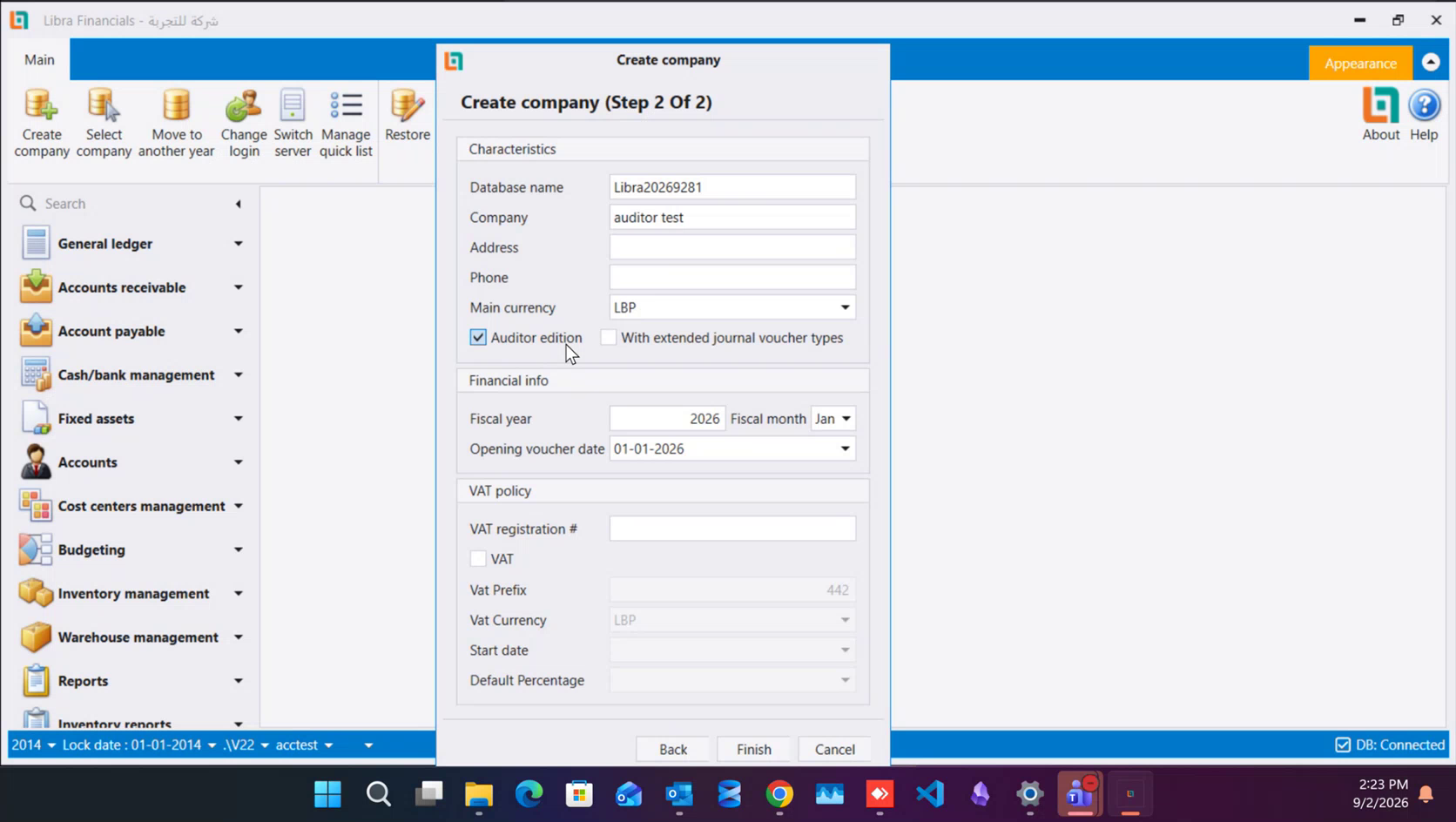
How to set up a company walks the whole wizard through field by field. This guide covers only what the tick changes.
2. The quick list is filled in for you
Log into a new auditor company and Home already carries the eight screens the work runs on, in this order: Chart of accounts, Auxiliary accounts, Journal vouchers, General ledger statement, Trial balance, Audit, Daily invoice journal, Balance comparison.
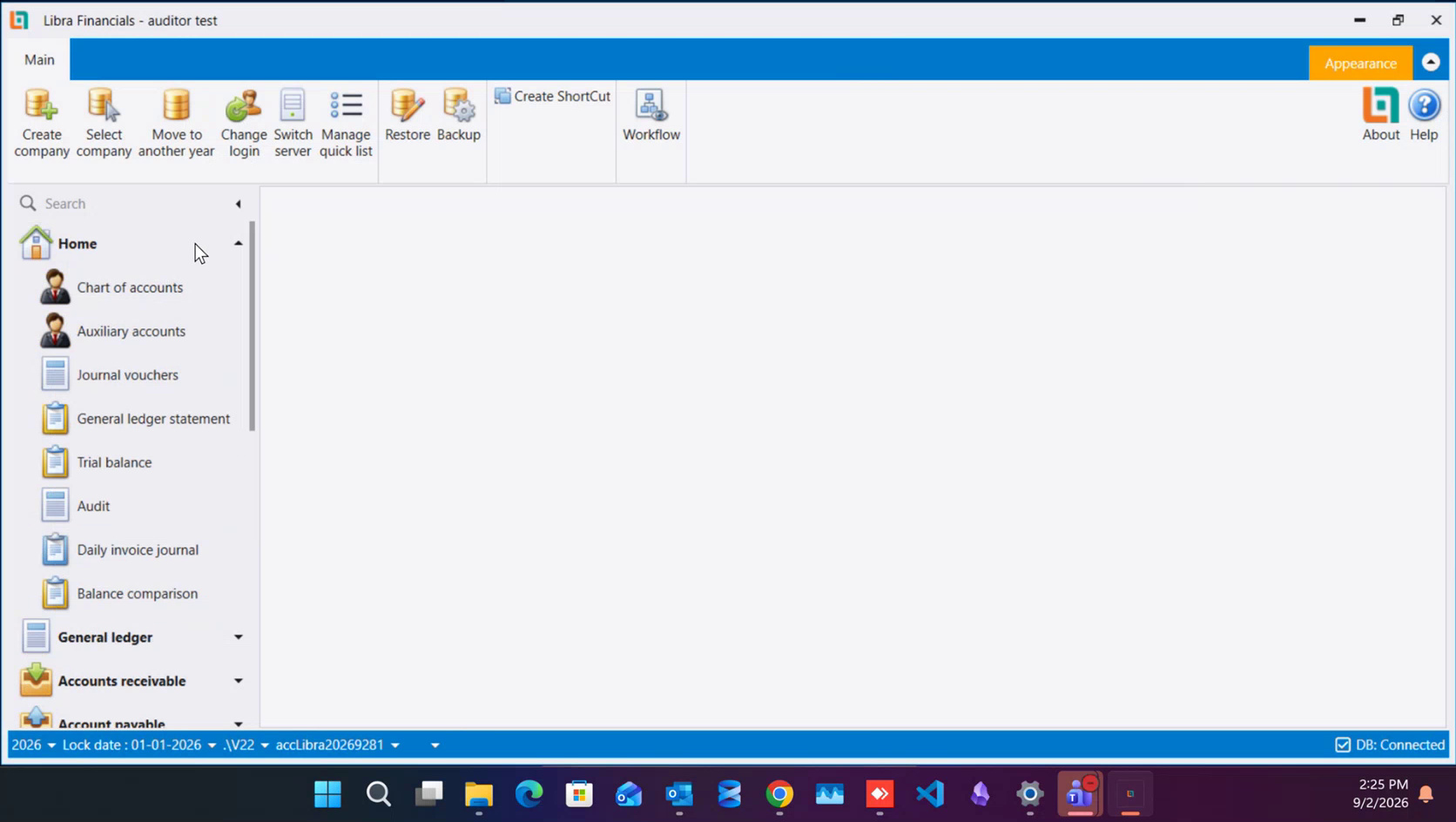
That is the whole loop in one panel: open the chart, enter the vouchers, read the ledger, check the balances, review what you entered. Every other menu group - General ledger, Accounts receivable, Account payable and the rest - is still on the navigation panel underneath, and the eight rows are yours to change. How to set up the Quick List shows how to add a screen to the list or reorder what is on it.
3. Receipts and payments are types of voucher
Money received and money paid are entered on the Journal vouchers screen, under their own entries in the Type list: Receipts Voucher, Payments Voucher, Receipt Note and Payment Note sit in the list alongside Vouchers itself. Picking one of them keeps the entry a journal voucher - it reaches the ledger through the journal and prints as a journal document - while still recording which kind of movement it was, so the reports that read those types stay correct.
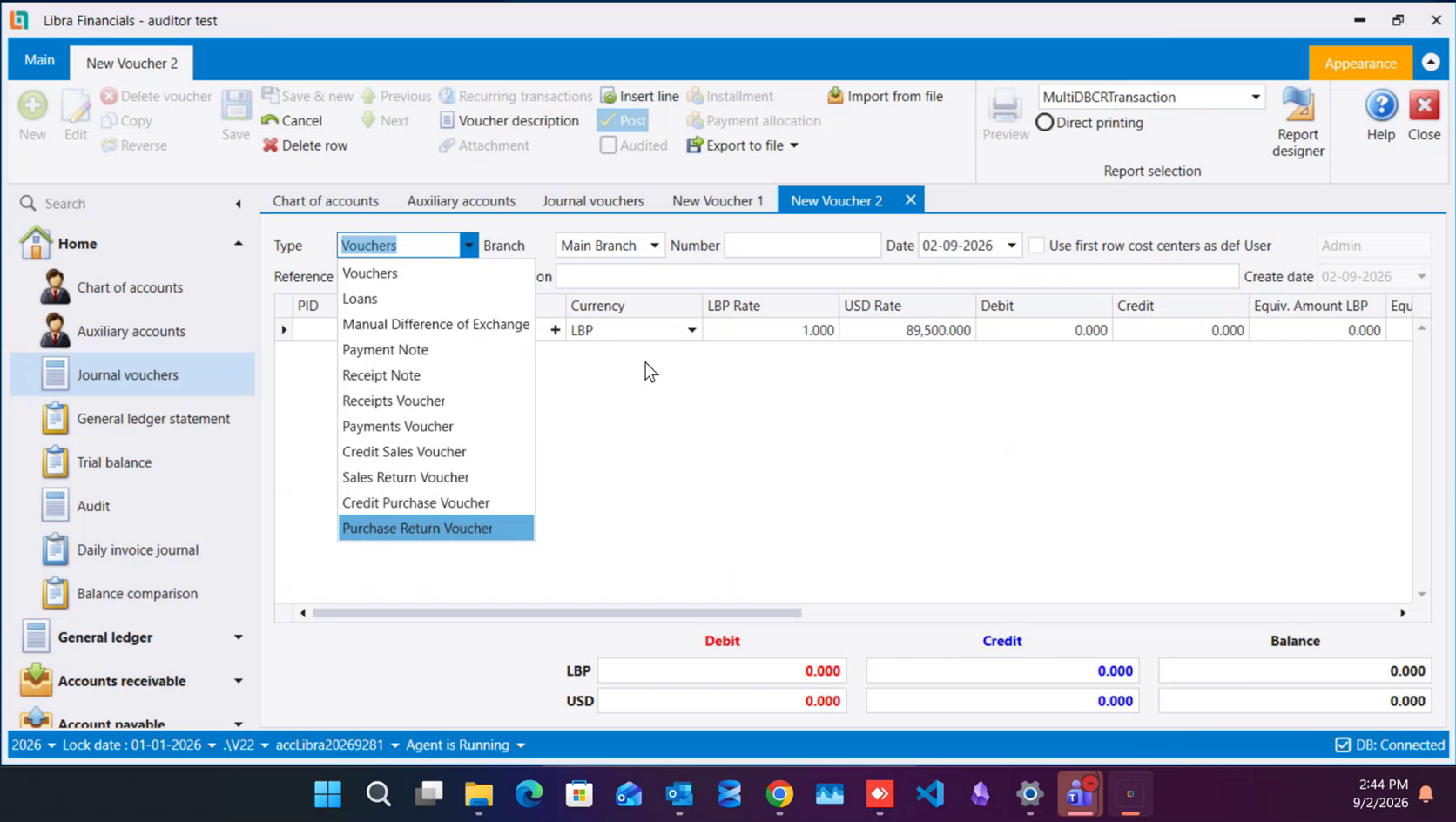
That fits the work an audit office actually does: it records what its client received and paid from the paperwork in front of it, rather than issuing receipts and payment slips to the client's own counterparties. Journal vouchers explains the screen itself, and Journal vouchers the audit-firm way goes through the full type list and which document belongs on which type.
4. Switch VAT on while the company is being created
Fill in the VAT policy panel on the same step of the wizard, and tick VAT, even when the client's registration is still unsettled. Most offices meet a client some way into their trading life, and a company that has already collected a year of postings is far more work to fit VAT onto afterwards than one that carried the setting from its first day: accounts have to be revisited, and entries already made have to be read back against a rate they were never split by. Set the start date to the client's opening date whenever the work begins from there, and put the registration number in as soon as it reaches you.
5. Where to go next
- Working across many client companies - building one template company and creating every client company from it, with the same chart, the same users and the same saved report filters.
- Structuring a client's chart for audit work - how deep to split a client's chart, and when an auxiliary record is the better answer than another account.
- Journal vouchers the audit-firm way - the voucher type list, numbering, the description convention that makes an audit trail readable, correcting an entry, and the Audited mark.
يقضي مكتب التدقيق أو المحاسبة يومه داخل القيود: يستلم أوراق العميل، ويُدخلها، ويراجعها، ويصدر عنها التقارير. وAuditor edition علامة في معالج إنشاء الشركة تُهيّئ الشركة الجديدة حول هذا اليوم بالذات، حتى يمكن إدخال أول قيد بعد دقائق من وجود الشركة.
١. شركة عادية، أُنشئت من إعداد جاهز
ضع علامة Auditor edition في لوحة Characteristics في الخطوة الثانية من المعالج، فيبني ليبرا الشركة وقد طُبّقت عليها مجموعة افتراضات جاهزة. وكل ما عدا ذلك فيها عادي: شجرة الحسابات نفسها، والأستاذ نفسه، والتقارير نفسها التي في أي شركة أخرى. فالعلامة تحدّد ما تبدأ الشركة مهيّأة له، لا ما تقدر عليه - إذ يمكن تشغيل أي وحدة يريدها المكتب لاحقًا في أي وقت، وإعادة إطفائها تُرجع الشركة إلى هذه الافتراضات.
ويشرح كيفية إنشاء شركة المعالج كله حقلًا حقلًا. أما هذا الدليل فلا يتناول سوى ما تغيّره تلك العلامة.
٢. القائمة السريعة معبّأة سلفًا
ادخل إلى شركة مدقّق جديدة تجد Home وقد حملت أصلًا الشاشات الثماني التي يدور عليها العمل، بهذا الترتيب: Chart of accounts وAuxiliary accounts وJournal vouchers وGeneral ledger statement وTrial balance وAudit وDaily invoice journal وBalance comparison.
وهذه هي الدورة كاملة في لوحة واحدة: افتح الشجرة، وأدخل القيود، واقرأ الأستاذ، وافحص الأرصدة، وراجع ما أدخلته. وتبقى كل مجموعات القوائم الأخرى - General ledger وAccounts receivable وAccount payable وسواها - موجودة في لوحة التنقّل تحتها، والصفوف الثمانية لك أن تغيّرها. ويبيّن كيفية إعداد القائمة السريعة كيف تضيف شاشة إليها أو تعيد ترتيب ما فيها.
٣. المقبوضات والمدفوعات أنواع من القيد
يُدخَل المال المقبوض والمال المدفوع في شاشة Journal vouchers، تحت بنود خاصة بها في قائمة Type: فـReceipts Voucher وPayments Voucher وReceipt Note وPayment Note كلها في القائمة إلى جانب Vouchers نفسه. واختيار أحدها يُبقي الحركة قيدًا محاسبيًا - يصل إلى الأستاذ عبر اليومية ويُطبع كمستند قيد - مع تسجيل نوع الحركة في الوقت نفسه، فتبقى التقارير التي تقرأ هذه الأنواع صحيحة.
وهذا يناسب العمل الذي يؤديه مكتب التدقيق فعلًا: فهو يسجّل ما قبضه عميله وما دفعه انطلاقًا من الأوراق التي أمامه، بدل أن يُصدر إيصالات وسندات دفع إلى الأطراف المقابلة لعميله. ويشرح القيود المحاسبية الشاشة نفسها، ويمرّ القيود المحاسبية بأسلوب مكتب التدقيق على قائمة الأنواع كاملة وعلى أي مستند يوضع تحت أي نوع.
٤. شغّل VAT أثناء إنشاء الشركة
املأ لوحة VAT policy في الخطوة نفسها من المعالج، وضع علامة VAT، حتى حين لا يكون تسجيل العميل قد استقرّ بعد. فأغلب المكاتب تلتقي عميلها بعد شوط من حياته التجارية، والشركة التي جمعت سنة من القيود يكون تركيب الضريبة عليها لاحقًا أكثر عملًا بكثير من شركة حملت الإعداد من يومها الأول: إذ يجب العودة إلى الحسابات، وقراءة القيود المُدخلة سلفًا على نسبة لم تُفصل بها قط. واضبط تاريخ البدء على تاريخ افتتاح العميل متى بدأ العمل من هناك، وأدخل رقم التسجيل حال وصوله إليك.
٥. إلى أين تتّجه بعد ذلك
- العمل مع شركات عملاء كثيرة - بناء شركة قالب واحدة وإنشاء كل شركة عميل منها، بالشجرة نفسها والمستخدمين أنفسهم وفلاتر التقارير المحفوظة نفسها.
- تنظيم شجرة حسابات العميل لعمل التدقيق - إلى أي عمق تُقسَّم شجرة العميل، ومتى يكون السجل المساعد جوابًا أفضل من فتح حساب آخر.
- القيود المحاسبية بأسلوب مكتب التدقيق - قائمة أنواع القيود، والترقيم، وعُرف الوصف الذي يجعل أثر التدقيق مقروءًا، وتصحيح القيد، وعلامة Audited.