
Journal vouchers the audit-firm wayالقيود المحاسبية بأسلوب مكتب التدقيق
Almost everything an audit office enters arrives as a journal voucher. The screen is the same one Journal vouchers describes and How to create a journal voucher walks through step by step; what follows is the handful of habits that turn a pile of correct vouchers into books somebody else can read six months later.
1. Pick the type that matches the document
Type, at the top left of the voucher, decides what kind of movement you are recording. The list holds Vouchers, Loans, Manual Difference of Exchange, Payment Note, Receipt Note, Receipts Voucher, Payments Voucher, Credit Sales Voucher, Sales Return Voucher, Credit Purchase Voucher and Purchase Return Voucher.
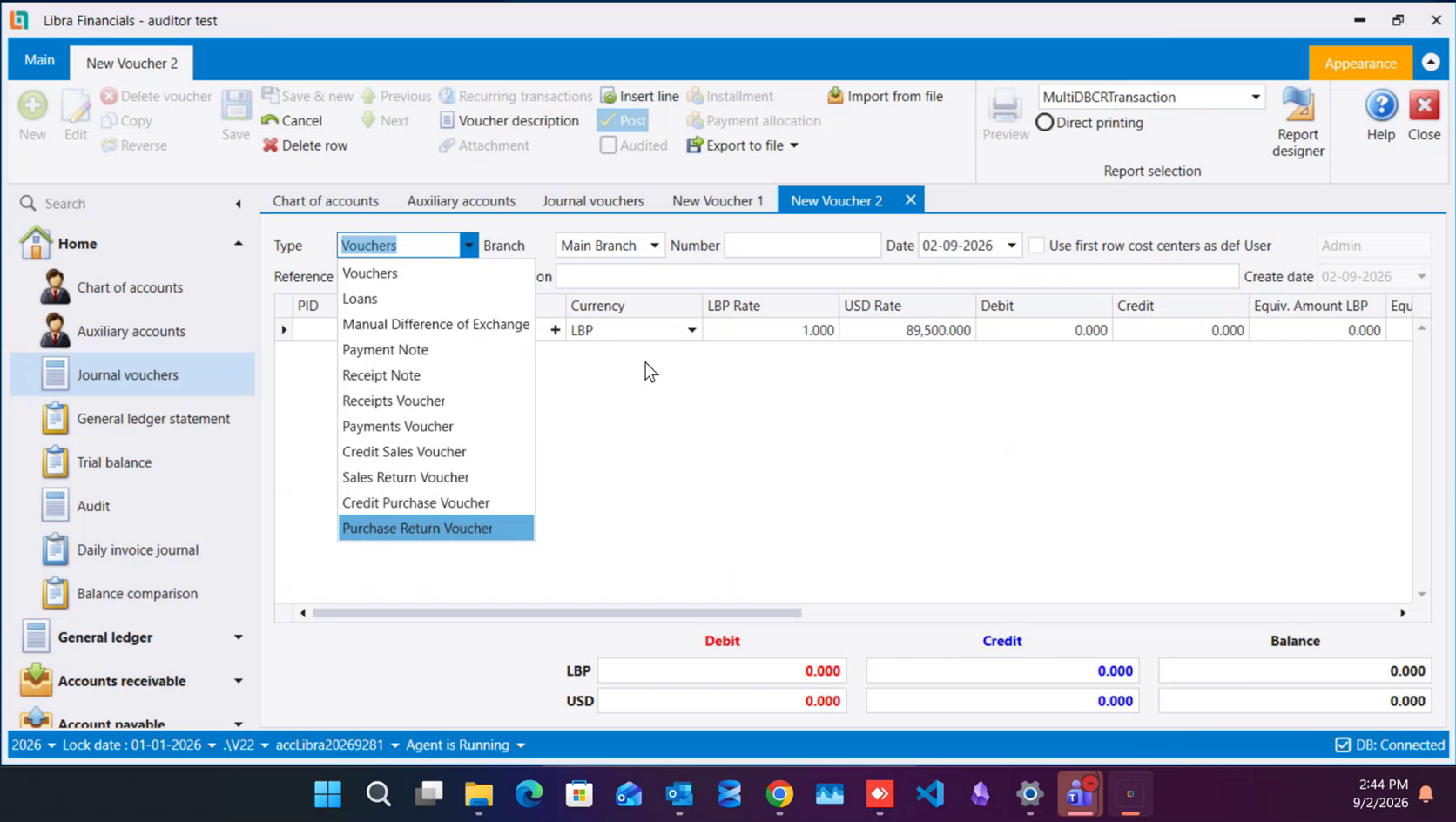
Vouchers is the plain, everyday entry. The rest are there so that a document with a character of its own keeps it: a credit sale on Credit Sales Voucher, the goods that came back on Sales Return Voucher, a purchase return on Purchase Return Voucher, a debit or credit note on Payment Note or Receipt Note, money in and out on Receipts Voucher and Payments Voucher. Put a return, a discount or a note in under its own type rather than netting it off against the original entry: the tax and analysis reports read those types, and the totals they print are only right when each document went in as what it was.
2. The number, and the gaps in it
A saved voucher takes a number made of four parts - branch, year, type and sequence - so 001-2026-JV-1 is the first journal voucher of 2026 in branch 001. The same shape carries through every type, which is why a number identifies a document on its own, with no need to say which screen it came from.
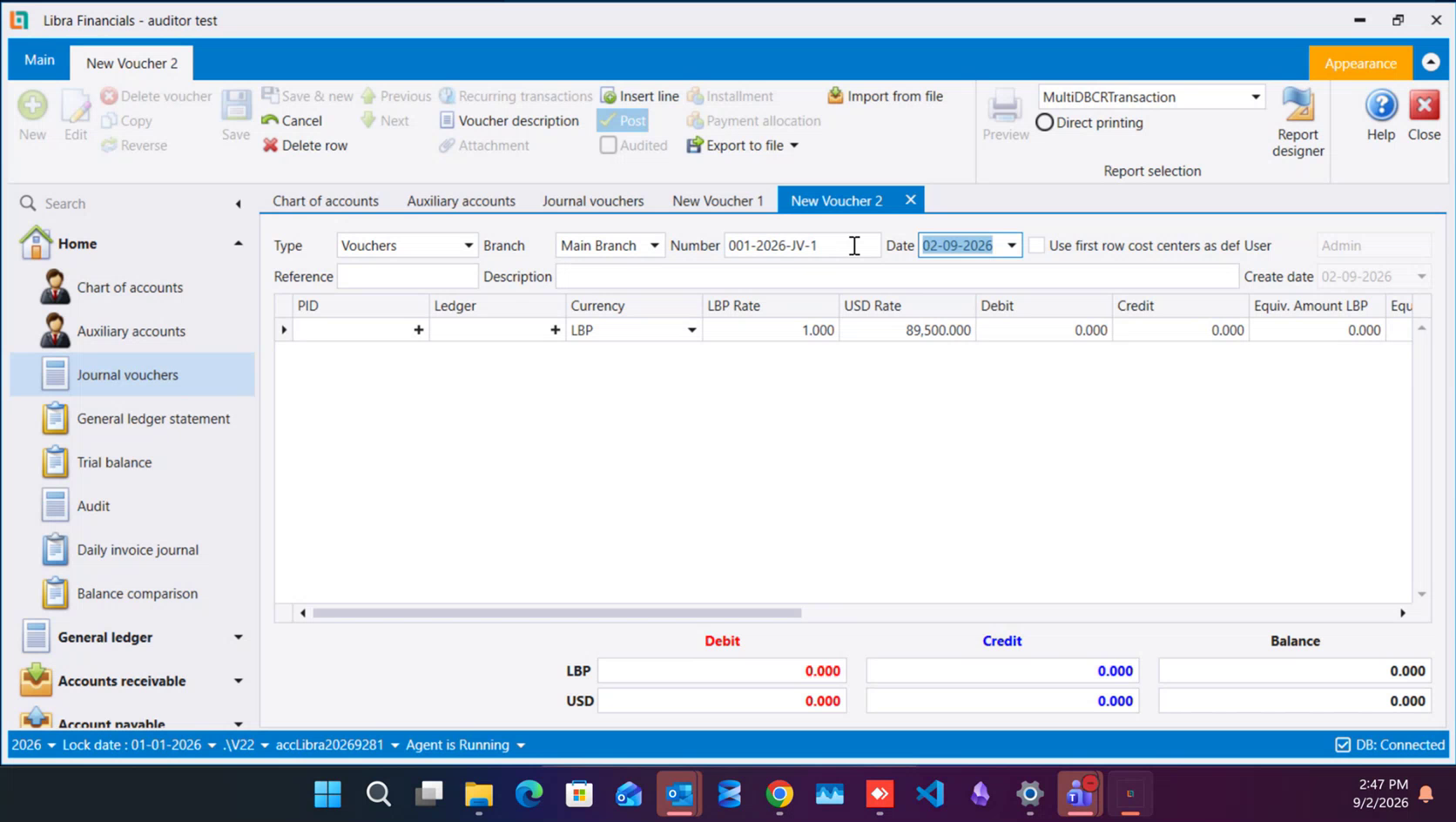
Delete a voucher and its number stays out of the sequence: the numbers after it keep the values they already had, and the deleted one waits as a gap that can be filled later by a new voucher. That is deliberate. Numbers get written on paperwork that has already gone out to a client, so re-running the sequence to close a hole would quietly rename documents somebody else is holding. Fill the gap when you have something to put in it, or leave it open and explain it in your notes.
Date opens on today. You can enter a voucher dated ahead of today; you cannot enter one dated before the company's lock date.
3. Write the description so the entry reads itself
Description is where the audit trail is won or lost. Fill it in the same order every time: invoice number, counter-party, amount, payment method - for example «inv #123 telecom 100$ paid cash». An accountant reading the ledger a year from now can picture the source document from that line alone, without pulling the file.
Keep it to one transaction per voucher. Lumping a morning's unrelated postings into a single voucher saves a few keystrokes and costs you the ability to trace one of them later; every line then has to be told apart by amount, which is exactly the work the description was supposed to save. Reference is a second, shorter field for your own cross-reference - a file number, a batch, a client's own document number - and it can be left for later while you get the description right.
4. Correct by reversing once the period has been declared
While the period is still open and nothing has been filed, correct a voucher by opening it and editing it. Once the period has been declared to the tax authority, use Reverse on the voucher's own ribbon instead. Reverse writes a mirror entry, in the period you are standing in, that cancels the original; you then enter the corrected voucher beside it. The declared period keeps the totals that were declared, the correction lands where it can still be explained, and both documents stay visible to whoever reviews the file.
Posted: when an entry actually reaches the ledger explains what posting does to a voucher and why a corrected entry has to reach the ledger the same way the original did.
5. Mark what you have reviewed with Audited
Audited is a tick, carried on the voucher's own ribbon, that says a reviewer has been through this entry. It is a review mark and nothing else: an unticked voucher is still a perfectly normal voucher and still in the ledger. What the tick buys you is a filter - reports can be limited to audited entries, so the reviewer sees what is left to do rather than the whole year again - and, where an administrator has set it up that way, a lock on further edits to entries already signed off.
The same mark is reachable one line at a time from the Audit screen. Expand an account row there and its individual entries appear underneath, with an Audit... column on the left carrying a checkbox per line - so a reviewer working down an account's movements can tick them off in place, without opening each voucher.
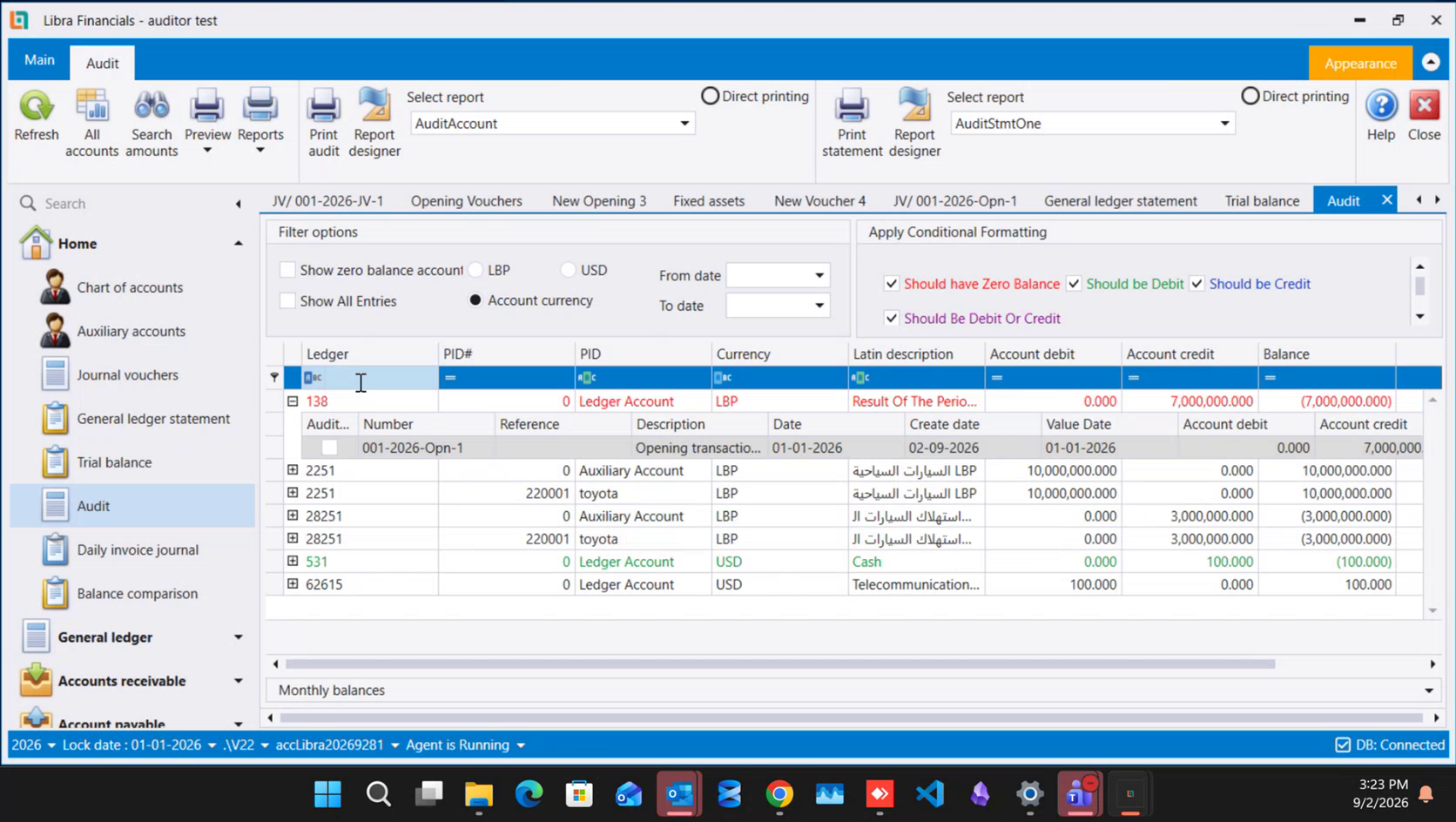
Checking your books: Audit and Advanced search covers the rest of that screen - the colour rules, the filters and the drill-down back to the source voucher.
6. Two ready print layouts
The voucher prints from its own ribbon, and Report selection beside the print button chooses the layout. Two are ready to use: a wide, landscape one that carries the full set of columns across the page, and a tall, portrait one with a shorter column set. Pick whichever suits the file the client keeps; it is one choice in a list, with nothing to design.
كل ما يُدخله مكتب التدقيق تقريبًا يصل في صورة قيد محاسبي. والشاشة هي نفسها التي تصفها القيود المحاسبية ويمرّ عليها كيفية إنشاء قيد محاسبي خطوة خطوة؛ وما يلي هو تلك العادات القليلة التي تحوّل كومة من القيود الصحيحة إلى دفاتر يستطيع غيرك قراءتها بعد ستة أشهر.
١. اختر النوع الذي يطابق المستند
يحدّد Type، أعلى يسار القيد، نوع الحركة التي تسجّلها. وتضمّ القائمة Vouchers وLoans وManual Difference of Exchange وPayment Note وReceipt Note وReceipts Voucher وPayments Voucher وCredit Sales Voucher وSales Return Voucher وCredit Purchase Voucher وPurchase Return Voucher.
وVouchers هو القيد العادي اليومي. أما البقية فموجودة ليحتفظ المستند ذو الطابع الخاص بطابعه: البيع الآجل على Credit Sales Voucher، والبضاعة المرتجعة على Sales Return Voucher، ومرتجع الشراء على Purchase Return Voucher، وإشعار المدين أو الدائن على Payment Note أو Receipt Note، والمال الداخل والخارج على Receipts Voucher وPayments Voucher. أدخل المرتجع أو الحسم أو الإشعار تحت نوعه الخاص بدل طرحه من القيد الأصلي: فتقارير الضريبة والتحليل تقرأ هذه الأنواع، والمجاميع التي تطبعها لا تصحّ إلا إذا دخل كل مستند بصفته الحقيقية.
٢. الرقم، والفجوات التي فيه
يأخذ القيد المحفوظ رقمًا من أربعة أجزاء - الفرع والسنة والنوع والتسلسل - فـ001-2026-JV-1 هو أول قيد محاسبي لعام 2026 في الفرع 001. والشكل نفسه يسري على كل الأنواع، ولذلك يدلّ الرقم على المستند وحده، بلا حاجة لذكر الشاشة التي جاء منها.
واحذف قيدًا يبقَ رقمه خارج التسلسل: فالأرقام التي بعده تحتفظ بقيمها كما هي، وينتظر الرقم المحذوف فجوةً يمكن ملؤها لاحقًا بقيد جديد. وهذا مقصود. فالأرقام تُكتب على أوراق خرجت أصلًا إلى العميل، وإعادة تشغيل التسلسل لسدّ ثغرة تعني إعادة تسمية مستندات في يد غيرك بصمت. املأ الفجوة حين يصير لديك ما تضعه فيها، أو اتركها مفتوحة واشرحها في ملاحظاتك.
ويفتح Date على تاريخ اليوم. ويمكنك إدخال قيد بتاريخ لاحق لليوم؛ أما ما قبل تاريخ إقفال الشركة فيبقى مغلقًا أمام الإدخال.
٣. اكتب الوصف بحيث يقرأ القيد نفسه
في Description يُربح أثر التدقيق أو يُخسر. املأه بالترتيب نفسه في كل مرة: رقم الفاتورة، ثم الطرف المقابل، ثم المبلغ، ثم وسيلة الدفع - مثلًا «inv #123 telecom 100$ paid cash». فالمحاسب الذي يقرأ الأستاذ بعد سنة يستطيع أن يتصوّر المستند الأصلي من هذا السطر وحده، دون سحب الملف.
واجعل كل قيد لحركة واحدة. فجمع قيود صباح كامل غير مترابطة في قيد واحد يوفّر بضع ضغطات ويكلّفك القدرة على تتبّع واحدة منها لاحقًا؛ إذ يصير تمييز كل سطر بالمبلغ، وهو بالضبط العمل الذي كان الوصف ليوفّره. وReference حقل ثانٍ أقصر لإحالتك الخاصة - رقم ملف أو دفعة أو رقم مستند العميل نفسه - ويمكن تركه إلى وقت لاحق ريثما تُتقن الوصف.
٤. صحّح بالعكس متى أُعلنت الفترة
ما دامت الفترة مفتوحة ولم يُقدَّم عنها شيء، صحّح القيد بفتحه وتعديله. أما بعد إعلان الفترة للإدارة الضريبية فاستعمل Reverse في شريط القيد نفسه. فـReverse يكتب قيدًا معاكسًا، في الفترة التي تقف فيها، يلغي الأصل؛ ثم تُدخل القيد المصحَّح إلى جانبه. فتحتفظ الفترة المعلنة بالمجاميع التي أُعلنت، ويقع التصحيح حيث يمكن شرحه بعد، ويبقى المستندان ظاهرين لمن يراجع الملف.
ويشرح الترحيل: متى يصل القيد إلى الأستاذ فعلًا ما يفعله الترحيل بالقيد، ولماذا يجب أن يصل القيد المصحَّح إلى الأستاذ بالطريقة التي وصل بها الأصل.
٥. علّم ما راجعته بـ Audited
Audited علامة يحملها شريط القيد نفسه، تقول إن مراجعًا مرّ على هذا القيد. وهي علامة مراجعة لا أكثر: فالقيد غير المعلَّم قيدٌ عادي تمامًا وموجود في الأستاذ. وما تكسبه العلامة هو الفلترة - إذ يمكن حصر التقارير في القيود المدقَّقة، فيرى المراجع ما بقي عليه بدل السنة كلها من جديد - إضافةً، حيث يضبطها المسؤول على هذا النحو، إلى قفل التعديل على القيود التي اعتُمدت.
والعلامة نفسها متاحة سطرًا سطرًا من شاشة Audit. وسّع صف حساب هناك تظهر حركاته المفردة تحته، وفي أقصى اليسار عمود Audit... يحمل مربّع اختيار لكل سطر - فيستطيع المراجع النازل في حركات حساب أن يعلّمها في مكانها، دون فتح كل قيد.
ويغطّي مراجعة دفاترك: التدقيق والبحث المتطوّر بقية تلك الشاشة - قواعد الألوان والفلاتر والنزول من السطر إلى القيد المصدر.
٦. تخطيطان جاهزان للطباعة
يُطبع القيد من شريطه الخاص، ويختار Report selection المجاور لزر الطباعة التخطيط. واثنان منهما جاهزان للاستعمال: واحد عريض بالعرض يحمل مجموعة الأعمدة كاملة على الصفحة، وآخر طولي بمجموعة أعمدة أقصر. اختر ما يناسب الملف الذي يحتفظ به العميل؛ فهو اختيار واحد من قائمة، بلا تصميم.